
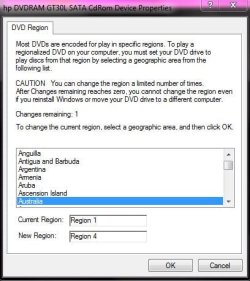
Hi. Bought my daughter's Windows 7 Compaq Presario CQ57 laptop with 2 GB memory in USA in late 2011. Everything is fine, except with playing one particular DVD. We live in Australia, and play DVDs bought in Australia regularly. An Alf (the alien) entire series one DVD however prompts a message window requiring the changing of the DVD region setting from 1 (USA) to 4 (Australia) , and warns that this will be the last time we will be able to change DVD region even if operating system is re-installed as limited number of changes possible.
Upon attempting to change to region 4 (which Im sure I did long ago anyway, and Aus. bought discs all work fine thus far too) Im told:
Unable to update region setting. The drive reports that it requires media of the destination region (region 4) so please insert appropriate media and try again.
Ive inserted several Australian bought DVDs at this prompt but made no headway. Im presuming computer is currently set at region 1 for some reason and that most DVDs we have played have not been stamped with a regional location setting until I encountered ALF. How can I get the damn setting to change to Australia so the damn DVD will play? lol
Not the end of the world, but any help appreciated, cheers
Upon attempting to change to region 4 (which Im sure I did long ago anyway, and Aus. bought discs all work fine thus far too) Im told:
Unable to update region setting. The drive reports that it requires media of the destination region (region 4) so please insert appropriate media and try again.
Ive inserted several Australian bought DVDs at this prompt but made no headway. Im presuming computer is currently set at region 1 for some reason and that most DVDs we have played have not been stamped with a regional location setting until I encountered ALF. How can I get the damn setting to change to Australia so the damn DVD will play? lol
Not the end of the world, but any help appreciated, cheers
Attachments

My Computer
- Computer Manufacturer/Model Number
- COMPAQ Presario CQ57
- OS
- Windows 7 Home Premium x64
- CPU
- AMD C-50 Processor 1.00 GHz
- Memory
- 2.00 GB

