
You are using an out of date browser. It may not display this or other websites correctly.
You should upgrade or use an alternative browser.
You should upgrade or use an alternative browser.
Media Player Libraries
- Thread starter wiz1
- Start date

- Local time
- 7:22 AM
- Messages
- 35,002
Welcome to the forums, wiz1.is it possible to add librarys to WMP?
Do you want to add all your videos , musics and pictures to WMP, or in other words do you want WMP to arrange all your videos, musics and pictures ? Yes it is possible.
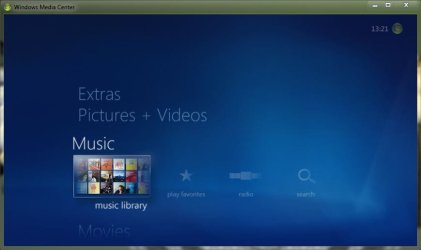
Take the example of music. Open Media Center, and click on Music library .
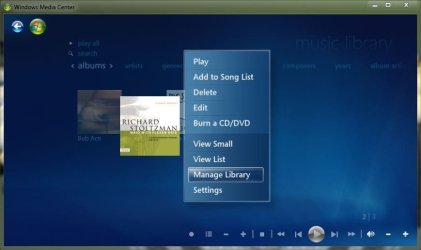
Now right click on an empty space, in the context menu click on manage library.
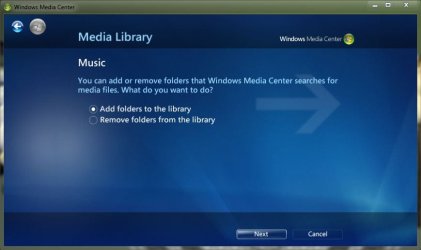
Click on add folders to the library, and then click next
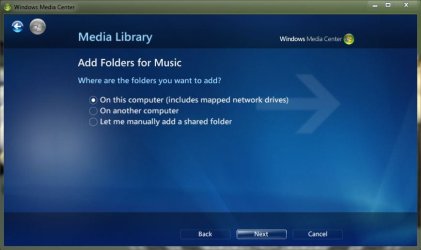
Click on on this computer , and then next
Browse andselect your music folders, and then next
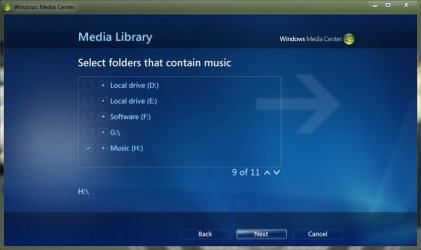
Finally , cilck on yes, and then finish.
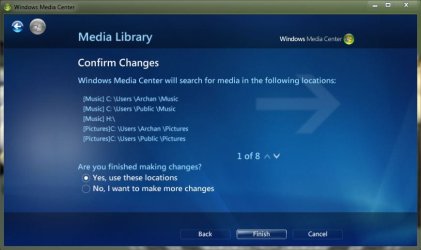
Wait some times to get those files added, and then open WMP, and see the change in music tab.
Do the same procedure for pictures and videos in their respective libraries in Media center.
Doing it in media center will add everything to not only media center, but also to WMP.
My Computer
- Computer type
- PC/Desktop
- Computer Manufacturer/Model Number
- Self Assembled
- OS
- Microsoft Windows 10 Pro Insider Preview 64-bit
- CPU
- Intel(R) Core(TM) i3-4130 CPU @ 3.40GHz
- Motherboard
- Gigabyte Technology Co., Ltd. B85M-D3H
- Memory
- Corsair Vengence 4GB x2 (8.00GB Dual-Channel DDR3 @ 798MHz)
- Graphics Card(s)
- 2047MB GeForce GTS 450 (ZOTAC International)
- Sound Card
- Onboard (Realtek High Definition Audio)
- Monitor(s) Displays
- LG Flatron E2040T
- Screen Resolution
- 1600x900
- Hard Drives
- Western Digital 1 TB
Seagate 500 GB
- PSU
- Corsair VS550
- Case
- Cooler Master K380
- Cooling
- Cooler Master Seidon 120V Plus
- Keyboard
- Logitech MK260r
- Mouse
- Logitech MK260r
- Internet Speed
- PMPL Broadband
- Antivirus
- Windows Defender + MBAM
- Browser
- Firefox
- Other Info
- Dell Studio 15" Laptop


My Computer
- OS
- Windows 7 RC
- Local time
- 7:22 AM
- Messages
- 35,002
Not exactly, bot somehow similar may be done. To add a desired video folder to WMP, right click on video, and click on manage video library.no, I mean as in add the library to WMP.
Like, I made a new library in Windows, and I want to acess the content seperatly from the video library.
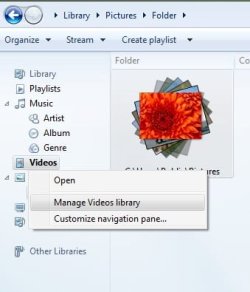
A videos library location window will appear. Click on the add button, browse to desired folder, and click ok.
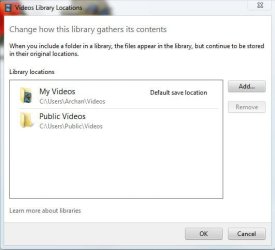
Now if you click the videos tab, it will appear like this

Time to arrange it in folders. So right click on manage video folders, and click customize navigation pane
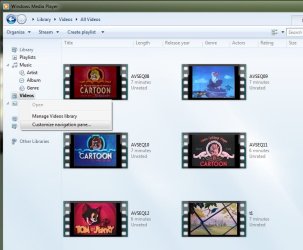
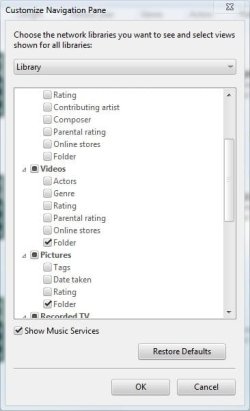
In the upcoming customize navigation pane window, check folder under video
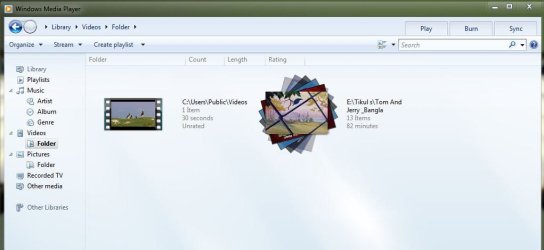
Now expand vioeos tab and click on folder. you will get such a look. Not bad at all.
My Computer
- Computer type
- PC/Desktop
- Computer Manufacturer/Model Number
- Self Assembled
- OS
- Microsoft Windows 10 Pro Insider Preview 64-bit
- CPU
- Intel(R) Core(TM) i3-4130 CPU @ 3.40GHz
- Motherboard
- Gigabyte Technology Co., Ltd. B85M-D3H
- Memory
- Corsair Vengence 4GB x2 (8.00GB Dual-Channel DDR3 @ 798MHz)
- Graphics Card(s)
- 2047MB GeForce GTS 450 (ZOTAC International)
- Sound Card
- Onboard (Realtek High Definition Audio)
- Monitor(s) Displays
- LG Flatron E2040T
- Screen Resolution
- 1600x900
- Hard Drives
- Western Digital 1 TB
Seagate 500 GB
- PSU
- Corsair VS550
- Case
- Cooler Master K380
- Cooling
- Cooler Master Seidon 120V Plus
- Keyboard
- Logitech MK260r
- Mouse
- Logitech MK260r
- Internet Speed
- PMPL Broadband
- Antivirus
- Windows Defender + MBAM
- Browser
- Firefox
- Other Info
- Dell Studio 15" Laptop
- Local time
- 7:22 AM
- Messages
- 35,002
The exactly same thing is not possible, but the alternatibe is not just bad at all . It iooks better , tooI guess its not possible.

My Computer
- Computer type
- PC/Desktop
- Computer Manufacturer/Model Number
- Self Assembled
- OS
- Microsoft Windows 10 Pro Insider Preview 64-bit
- CPU
- Intel(R) Core(TM) i3-4130 CPU @ 3.40GHz
- Motherboard
- Gigabyte Technology Co., Ltd. B85M-D3H
- Memory
- Corsair Vengence 4GB x2 (8.00GB Dual-Channel DDR3 @ 798MHz)
- Graphics Card(s)
- 2047MB GeForce GTS 450 (ZOTAC International)
- Sound Card
- Onboard (Realtek High Definition Audio)
- Monitor(s) Displays
- LG Flatron E2040T
- Screen Resolution
- 1600x900
- Hard Drives
- Western Digital 1 TB
Seagate 500 GB
- PSU
- Corsair VS550
- Case
- Cooler Master K380
- Cooling
- Cooler Master Seidon 120V Plus
- Keyboard
- Logitech MK260r
- Mouse
- Logitech MK260r
- Internet Speed
- PMPL Broadband
- Antivirus
- Windows Defender + MBAM
- Browser
- Firefox
- Other Info
- Dell Studio 15" Laptop