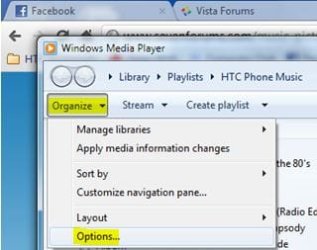
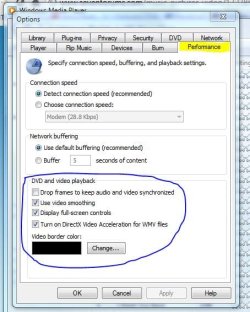
I am running a newly built win 7 64 machine dual core pentium E5800 with GMA X4500 graphics. I Need some advice on players on what I am seeing now.
When playing a DVD (both optical drive and ripped file structure) video quality is poor. Specifically, I am getting whats called clay face and blotchy type artifacts.
So far all of the players I have tried; WMP, WMP-HC,TMT5,VLC, do this except for one..KM-Player. What is KM player doing different in terms of processing the video?
Is this a codec problem or something else? Why is the quality the way it should be when using KM-Player?
Unfortunately I do not like the KM-Player interface and user controls don’t appear to support WMC remote functions.
I would like to use TMT5 or WMP-HC in my final build but the video quality needs to be excellent.
If you choose to install the Shark007 Win7codecs + the x64Components addon, you will have High Quality playback of all filetypes in Media Center. If you're seeking assistance with these codecs, search the Shark007 forum for answers.
My Computer
Computer Manufacturer/Model Number
Selfbuilt
OS
Windows 7 Ultimate 64bit
CPU
i7 2600k
Motherboard
asus P8Z68-V LE
Memory
16GB (4x4) corsair vengeance
Graphics Card(s)
Intel HD3000 iGPU / AMD HD6870 1024MB
Sound Card
bitstreamed to an Onkyo 609
Monitor(s) Displays
Asus VE278 27" LED / Bravia EX7 60" LED
Screen Resolution
native 1080p x2
Hard Drives
4x 2TB int. + 2x 2TB external and a SSD for the boot drive.
It removes nothing except conflicting codecs like Klite. It uses the Microsoft decoders by default.
Uninstall is clean and ensures that the Microsft decoders are in place and functional.
My Computer
Computer Manufacturer/Model Number
Selfbuilt
OS
Windows 7 Ultimate 64bit
CPU
i7 2600k
Motherboard
asus P8Z68-V LE
Memory
16GB (4x4) corsair vengeance
Graphics Card(s)
Intel HD3000 iGPU / AMD HD6870 1024MB
Sound Card
bitstreamed to an Onkyo 609
Monitor(s) Displays
Asus VE278 27" LED / Bravia EX7 60" LED
Screen Resolution
native 1080p x2
Hard Drives
4x 2TB int. + 2x 2TB external and a SSD for the boot drive.
To enable Media Center playback functionality, use the button on the Help TAB of the installed 'Settings Application' to associate filetypes to the Windows players.
You will not need an external player.
My Computer
Computer Manufacturer/Model Number
Selfbuilt
OS
Windows 7 Ultimate 64bit
CPU
i7 2600k
Motherboard
asus P8Z68-V LE
Memory
16GB (4x4) corsair vengeance
Graphics Card(s)
Intel HD3000 iGPU / AMD HD6870 1024MB
Sound Card
bitstreamed to an Onkyo 609
Monitor(s) Displays
Asus VE278 27" LED / Bravia EX7 60" LED
Screen Resolution
native 1080p x2
Hard Drives
4x 2TB int. + 2x 2TB external and a SSD for the boot drive.
Installed both shark packs and WMP When playing a DVD (both optical drive and ripped file structure) video quality is poor. same clay face and blotchy type artifacts. Kinda looks looks the actors are in an oil painting. Are there any other filters or setting that will fix this?