
You are using an out of date browser. It may not display this or other websites correctly.
You should upgrade or use an alternative browser.
You should upgrade or use an alternative browser.
Media Player Windows 7
- Thread starter JBBLCC
- Start date

What are you tying to do? Reset the media Library?
My Computer
- Computer Manufacturer/Model Number
- Custom (Self Build)
- OS
- Windows 7 Home Premium 64bit
- CPU
- Intel Core i7 2700k
- Motherboard
- eVGA P67 SLI
- Memory
- 8GB Mushkin Redline Ridgebacks @1866
- Graphics Card(s)
- EVGA GTX570 SC
- Sound Card
- XiFi Titanium HD
- Monitor(s) Displays
- LG W2453V
- Screen Resolution
- 1920x1080
- Hard Drives
- Intel 320 80GB -- Intel X25-V 40GB --WD Black 1TB x2 -- WD Blue 640GB
- PSU
- Seasonic x750
- Case
- Corsair 600T SE White
- Cooling
- eVGA Superclocked CPU Cooler
- Keyboard
- Saitek Cyborg
- Antivirus
- Kaspersky
- Browser
- IE
- Other Info
- LG BD/DVD
Windows Media player 12
I have Videos that do not work. I can not gelete the old videos or anything in my library. I would like to keep music files, but clean out video and start over.
THanks
I have Videos that do not work. I can not gelete the old videos or anything in my library. I would like to keep music files, but clean out video and start over.
THanks
My Computer
- Computer Manufacturer/Model Number
- Dell Inspiron
- OS
- Windows 7
The best way will be to Restore the entire Library.
There are 2 ways to do it.
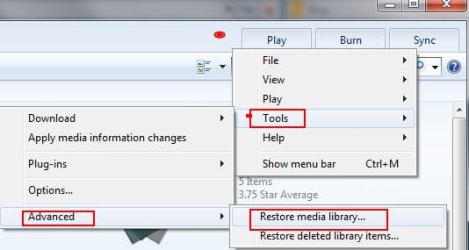
1) Open WMP and Right Click in the Empty space to the left of the Play Tab.
Choose Tools--> Advanced --> Restore Media Library
(As seen in the snip below) WMp will automatically close.
Re-Open Media Player and wait for it to rebuild the Library.
2) If the first method does not work for you, then try this method.
Close WMP & Make sure 'Show Hidden Files" is enabled.
Browse to the hidden Folder @
C \ Users \ your user name \ AppData \ Local \ Microsoft
Delete the folder "Media Player"
Open Media Player and wait for it to rebuild the Library.
Either way will completely remove everything in the library itself.
However, it does NOT delete the actual files. Only the reference to them.
Once you re-open WMP it will re-build it all.
Hope this helps.
There are 2 ways to do it.
1) Open WMP and Right Click in the Empty space to the left of the Play Tab.
Choose Tools--> Advanced --> Restore Media Library
(As seen in the snip below) WMp will automatically close.
Re-Open Media Player and wait for it to rebuild the Library.
2) If the first method does not work for you, then try this method.
Close WMP & Make sure 'Show Hidden Files" is enabled.
Browse to the hidden Folder @
C \ Users \ your user name \ AppData \ Local \ Microsoft
Delete the folder "Media Player"
Open Media Player and wait for it to rebuild the Library.
Either way will completely remove everything in the library itself.
However, it does NOT delete the actual files. Only the reference to them.
Once you re-open WMP it will re-build it all.
Hope this helps.
Attachments
My Computer
- Computer Manufacturer/Model Number
- Custom (Self Build)
- OS
- Windows 7 Home Premium 64bit
- CPU
- Intel Core i7 2700k
- Motherboard
- eVGA P67 SLI
- Memory
- 8GB Mushkin Redline Ridgebacks @1866
- Graphics Card(s)
- EVGA GTX570 SC
- Sound Card
- XiFi Titanium HD
- Monitor(s) Displays
- LG W2453V
- Screen Resolution
- 1920x1080
- Hard Drives
- Intel 320 80GB -- Intel X25-V 40GB --WD Black 1TB x2 -- WD Blue 640GB
- PSU
- Seasonic x750
- Case
- Corsair 600T SE White
- Cooling
- eVGA Superclocked CPU Cooler
- Keyboard
- Saitek Cyborg
- Antivirus
- Kaspersky
- Browser
- IE
- Other Info
- LG BD/DVD
If you open up explorer, click 'Organize' then 'Folder and search options'. Under the 'View' tab, click 'Show hidden files or folders'

OS
OS
My Computer
- Computer Manufacturer/Model Number
- Compaq Desktop
- OS
- Windows 7 Ultimate x64
- CPU
- AMD Sempron Dual Core
- Memory
- 3GB
- Graphics Card(s)
- NVIDIA GeForce 6150SE nForce 430
- Screen Resolution
- 1024x768
- Hard Drives
- 150GB Sata
I tried step one again and it worked. My Windows Media Player works fine now. Thanks, I spent around six hours and visited many sites to try and resolve. Your recomendation was perfect.
Thanks again JBBLCC
Thanks again JBBLCC
My Computer
- Computer Manufacturer/Model Number
- Dell Inspiron
- OS
- Windows 7
Glad you fixed the issue 
My Computer
- Computer Manufacturer/Model Number
- Custom (Self Build)
- OS
- Windows 7 Home Premium 64bit
- CPU
- Intel Core i7 2700k
- Motherboard
- eVGA P67 SLI
- Memory
- 8GB Mushkin Redline Ridgebacks @1866
- Graphics Card(s)
- EVGA GTX570 SC
- Sound Card
- XiFi Titanium HD
- Monitor(s) Displays
- LG W2453V
- Screen Resolution
- 1920x1080
- Hard Drives
- Intel 320 80GB -- Intel X25-V 40GB --WD Black 1TB x2 -- WD Blue 640GB
- PSU
- Seasonic x750
- Case
- Corsair 600T SE White
- Cooling
- eVGA Superclocked CPU Cooler
- Keyboard
- Saitek Cyborg
- Antivirus
- Kaspersky
- Browser
- IE
- Other Info
- LG BD/DVD
I tried step one again and it worked. My Windows Media Player works fine now. Thanks, I spent around six hours and visited many sites to try and resolve. Your recomendation was perfect.
Thanks again JBBLCC
That's good news
My Computer
- Computer Manufacturer/Model Number
- Compaq Desktop
- OS
- Windows 7 Ultimate x64
- CPU
- AMD Sempron Dual Core
- Memory
- 3GB
- Graphics Card(s)
- NVIDIA GeForce 6150SE nForce 430
- Screen Resolution
- 1024x768
- Hard Drives
- 150GB Sata