Solved Media Player won't stream

bertie11

New member
Member
VIP
Local time
3:25 PM
Messages
254
I'm using Win 7 HP 64 bit, Media Player 12.

I just connected a Panasonic Viera smart TV and I wanted to stream video, pictures and music to it from my laptop. When I go into Media Player there is no Stream button, and if I go to Control Panel /Choose Homegroup and Sharing Options, the Share Media with Devices box is greyed out so I cannot select it.

Media Player sees the Viera TV but not the other way round.

Any ideas please< I've spent all day on this!. Done sfc /scannow OK, enabled some services that were disabled but I cannot pin it down.

Thanks.
 

My Computer

Computer type
Laptop
Computer Manufacturer/Model Number
HP Envy 15
OS
Windows 8.1.1
CPU
AMD A10-5750M APU with Radeon(tm) HD Graphics
Memory
8gb
Hard Drives
1TB Serial ATA 16mb buffer
Not knowing your Panasonic TV, here's how I am doing it on both Phillips and Samsung Smart-TVs:
  • Set up network connection on TV
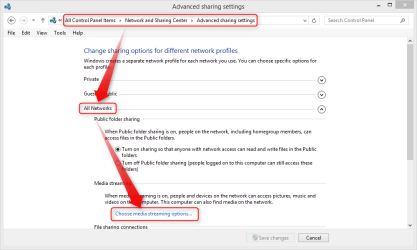
  • Set up media streaming options on Windows:
    • Step 1.
      2014-02-15_00h33_05.png
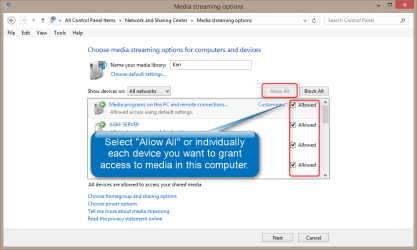
    • Step 2.
      2014-02-15_00h34_41.png
      (Your TV might appear as Unknown Device.)​
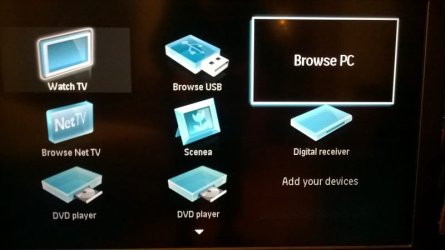
  • Using TV menu, find Browse PC or similar action:
    WP_20140214_003.jpg
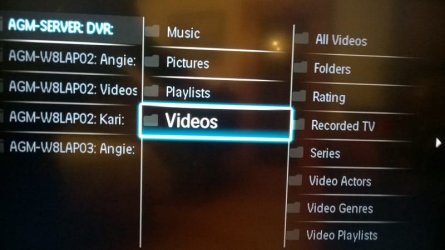
  • You should now see a list of those computers and Windows users which have turned media streaming on:
    WP_20140215_005.jpg
  • Browse to your media and play on TV
Everything on user Public's media folders will be shared by default, if you want to share media on your personal user account you need to share the respective folders first.

Kari
 
Last edited:

My Computer

Computer type
Laptop
Computer Manufacturer/Model Number
HP ENVY 17-1150eg
OS
Windows 10 Pro x64 EN-GB
CPU
1.6 GHz Intel Core i7-720QM Processor
Memory
6 GB
Graphics Card(s)
ATI Mobility Radeon HD 5850 Graphics
Sound Card
Beats sound system with integrated subwoofer
Monitor(s) Displays
17" laptop display, 22" LED and 32" Full HD TV through HDMI
Screen Resolution
1600*900 (1), 1920*1080 (2&3)
Hard Drives
Internal: 2 x 500 GB SATA Hard Disk Drive 7200 rpm
External: 2TB for backups, 3TB USB3 network drive for media
Cooling
As Envy runs a bit warm, I have it on a Cooler Master pad
Keyboard
Logitech diNovo Media Desktop Laser (bluetooth)
Mouse
Logitech Performance Mouse MX
Internet Speed
50/10 Mbps VDSL
Antivirus
Windows Defender 4.3.9431.0
Browser
Maxthon 3.5.2., IE11
Many thanks for the prompt response Kari. Sadly, I wasn't able to get very far at all.

I don't get the page with Advanced Sharing options so I don't get Media Streamimg options. But if I go to Choose Homegroup and Sharing options the Share media with devices is greyed out and nothing I do will make it available.

If I go to Advanced Sharing Settings Media Streaming, I'm told that media streaming is off and when I choose Media and streaming options I'm told Media Streaming is not turned on and that Media Streaming is disabled by Group Policy defined by your administrator. It then tells me to contact my administrator for policy details. I am the sole user of this system and am the administrator! I cannot even leave the Homegroup and rejoin to see if that would cure the problem.

I also have another spare laptop which I hardly ever use but I turned it on and Media Player has the Stream button showing and Media Streaming is already selected, not greyed out.

Does the Stream button in Media Player 'come to life' as a result of another setting elsewhere?

I appreciate your help. thanks.
 

My Computer

Computer type
Laptop
Computer Manufacturer/Model Number
HP Envy 15
OS
Windows 8.1.1
CPU
AMD A10-5750M APU with Radeon(tm) HD Graphics
Memory
8gb
Hard Drives
1TB Serial ATA 16mb buffer

My Computer

Computer type
Laptop
Computer Manufacturer/Model Number
HP ENVY 17-1150eg
OS
Windows 10 Pro x64 EN-GB
CPU
1.6 GHz Intel Core i7-720QM Processor
Memory
6 GB
Graphics Card(s)
ATI Mobility Radeon HD 5850 Graphics
Sound Card
Beats sound system with integrated subwoofer
Monitor(s) Displays
17" laptop display, 22" LED and 32" Full HD TV through HDMI
Screen Resolution
1600*900 (1), 1920*1080 (2&3)
Hard Drives
Internal: 2 x 500 GB SATA Hard Disk Drive 7200 rpm
External: 2TB for backups, 3TB USB3 network drive for media
Cooling
As Envy runs a bit warm, I have it on a Cooler Master pad
Keyboard
Logitech diNovo Media Desktop Laser (bluetooth)
Mouse
Logitech Performance Mouse MX
Internet Speed
50/10 Mbps VDSL
Antivirus
Windows Defender 4.3.9431.0
Browser
Maxthon 3.5.2., IE11
Fantastic!!

I couldn't use the Through the Local Group Policy Editor as I have Home Premium but the reg file did the trick beautifully.

Thank you so much Kari, much appreciated!
 

My Computer

Computer type
Laptop
Computer Manufacturer/Model Number
HP Envy 15
OS
Windows 8.1.1
CPU
AMD A10-5750M APU with Radeon(tm) HD Graphics
Memory
8gb
Hard Drives
1TB Serial ATA 16mb buffer
You are welcome!
 

My Computer

Computer type
Laptop
Computer Manufacturer/Model Number
HP ENVY 17-1150eg
OS
Windows 10 Pro x64 EN-GB
CPU
1.6 GHz Intel Core i7-720QM Processor
Memory
6 GB
Graphics Card(s)
ATI Mobility Radeon HD 5850 Graphics
Sound Card
Beats sound system with integrated subwoofer
Monitor(s) Displays
17" laptop display, 22" LED and 32" Full HD TV through HDMI
Screen Resolution
1600*900 (1), 1920*1080 (2&3)
Hard Drives
Internal: 2 x 500 GB SATA Hard Disk Drive 7200 rpm
External: 2TB for backups, 3TB USB3 network drive for media
Cooling
As Envy runs a bit warm, I have it on a Cooler Master pad
Keyboard
Logitech diNovo Media Desktop Laser (bluetooth)
Mouse
Logitech Performance Mouse MX
Internet Speed
50/10 Mbps VDSL
Antivirus
Windows Defender 4.3.9431.0
Browser
Maxthon 3.5.2., IE11
Back
Top