Medium Icons Appear Corrupt

Amtrak288

New member
Local time
11:27 AM
Messages
3
I have some folders with photos for a web site that I run that were created about 9-10 years ago. When you look at the folder's contents and see icons that are Medium Sized, several of the images in the icons are multi-colored images that look as if they are corrupted however when you change to view Extra Large Icons or sometimes just Large Icons, they appear correct as if there is no problem. The images preview normal and open without a problem. What could possibly be causing this? I've included a photo of what I'm talking about, the icons that appear corrupt are Medium but when switched to Large or Extra Large, they look normal. Any thoughts?
 

Attachments
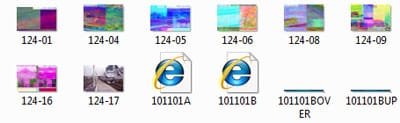
  • badicon.jpg
    badicon.jpg
    26.2 KB · Views: 6
  • goodicon.jpg
    goodicon.jpg
    28.9 KB · Views: 6

My Computer

OS
Windows 7 Professional 64 Bit
1. Clean the thumbnails using Windows disk clean up utility.

2. Try to resize the thumbnails by: hold CTRL and rotate the mouse wheel to resize them. You may get an acceptable size with no such "corrupted look".
 

My Computer

Computer Manufacturer/Model Number
COMPAQ Presario Laptop
OS
Windows 7 Ultimate 64 bit, Mac OS X 10.6
CPU
Intel Pentium Dual Core @2.0GHz
Motherboard
Compaq Generic
Memory
12GB
Graphics Card(s)
NVIDIA Graphics For Mobile 512MB VRAM
Sound Card
IDT High definition Audio
Monitor(s) Displays
Laptop LCD Display
Screen Resolution
1280*800 Bright View Widescreen
Hard Drives
500 GB Primary Master@7200rpm + 1 TB External HDD
Cooling
Direct ; generic fan
Keyboard
Generic Laptop Keyboard
Mouse
Touch Pad
Internet Speed
3.1 Mbps wireless Broadband
Other Info
Generic Dock
Back
Top