
Hi guys!
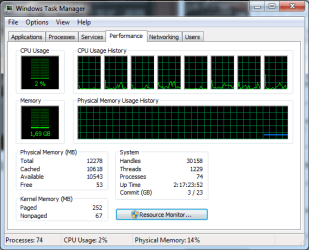
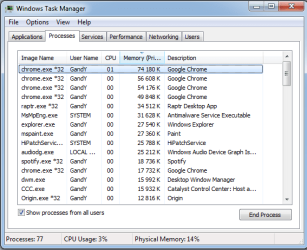
I am pretty new to this forum and i have a problem, when my pc has been on for a few days all my ram is being used. Isnt the ram supposed to "free itself" after i exit an application?
My specs are as follows :
Motherboard - Asus p6t
Memory - Corsair XMS3 Vengeance 12GB DDR3 PC3-12800 1600MHz
PCU - Intel i7 920 2.67ghz
GPU - Asus AMD 5990 2GB
Operating system - Windows 7 Ultimate X64 SP1
After a few days online my tackmanager looks like this, see attached files.
Any1 got any ideas what is wrong? if something is wrong
Thx in advance
/Gandy
I am pretty new to this forum and i have a problem, when my pc has been on for a few days all my ram is being used. Isnt the ram supposed to "free itself" after i exit an application?
My specs are as follows :
Motherboard - Asus p6t
Memory - Corsair XMS3 Vengeance 12GB DDR3 PC3-12800 1600MHz
PCU - Intel i7 920 2.67ghz
GPU - Asus AMD 5990 2GB
Operating system - Windows 7 Ultimate X64 SP1
After a few days online my tackmanager looks like this, see attached files.
Any1 got any ideas what is wrong? if something is wrong
Thx in advance
/Gandy
Attachments
My Computer
- OS
- Windows 7
- Memory
- Corsair XMS3 Vengeance 12GB DDR3
- Graphics Card(s)
- Ati Radeon 5800
- Sound Card
- Sound Blaster Extreme Audio
- Screen Resolution
- 1920x1080
- Hard Drives
- WD 500GB & WD 2TB


