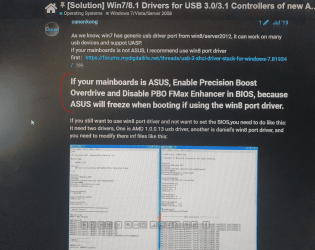
Windows 7 installation stuck on "starting windows" with X570 mobo

sadfsa

New member
Local time
3:56 AM
Messages
8
Windows 7 installation stuck on "starting windows" with X570 mobo

Hi, I really want to install Win7 x64. I made multiple attempts but no success. I really don't know what I am doing wrong and where to find solution.

My setup:
- AMD Ryzen 5 5600x
- Asus Prime X570-P
- 32GB DDR4
- GTX 1080TI
- Storage:
-- HDD 80GB (for Win7)
-- SSD M.2 with already installed Win10 Pro x64 (UEFI)
-- SSD 500GB with Linux (UEFI)
-- 4TB HDD (GPT NTFS partition for data only)

First attempt:
I took latest official Win7 SP1 ISO (2011 year), saved to pendrive using Rufus and ran. There were no any disks.

Second attempt:
I took this ISO Windows 7 Updated v4 : Free Download, Borrow, and Streaming : Internet Archive from Windows 7 Updated v4 - Eclipse Community . The author integrated usb 3.0 and nvme drivers and this time it showed up disks.
I installed Win7 to BIOS. It stuck on "Starting Windows" screen after first restart. I tried with safe mode but "setup can't be run in safe mode". I plugged that HDD to older PC and it ran, configured it to desktop and took again to my PC. In my PC i got stuck "Starting Windows". I ran safe mode but got stuck. I thought it could be related to my modern software. I turned off NIC in BIOS and then it booted up in safe mode. I installed every driver except NIC (because it was off in bios) and GPU (it probably shouldn't be done in safe mode). Still can't boot (even with NIC disabled).
Reinstalled WIndows 7 with NIC disabled and it got stuck after second restart (some progress) but still CAN'T BOOT TO DESKTOP!

Third attempt:
I took this ISO Google Drive - Virus scan warning from video How to Install Windows 7 on Modern Hardware! [USB KEYBOARD AND MOUSE WORKING] (10th 11th 12th gen) - YouTube . Installed it to UEFI and it got stuck "starting windows". Installed it to BIOS, the same problem.

Note:
I don't care about USB support in setup because I am using PS/2 keyboard. Mouse is not necessary during setup anyway.
I had CSM enabled in BIOS. Can provide photos of BIOS setup if necessary.

I really don't understand what's going on. Please help me. I appreciate every advice.
 

My Computers My Computers

  • At a glance

    Windows 10 Pro x64
    Computer type
    PC/Desktop
    OS
    Windows 10 Pro x64
    Motherboard
    Asus X570 Prime P
  • Computer type
    PC/Desktop
My Computers My Computers

  • At a glance

    7 X64i5 84002x8gb 3200mhz
    Computer type
    PC/Desktop
    OS
    7 X64
    CPU
    i5 8400
    Motherboard
    gigabyte b365m ds3h
    Memory
    2x8gb 3200mhz
    Hard Drives
    various
    PSU
    pure power 11 400w cm
    Case
    Coolermaster
    Cooling
    cryorig m9i
  • At a glance

    7x64g54008gb ddr4 2400
    Computer type
    PC/Desktop
    OS
    7x64
    CPU
    g5400
    Motherboard
    ga b365m ds3h
    Memory
    8gb ddr4 2400
    PSU
    xfx pro 450w
To make a Win 7 USB boot able drive:

Open a CMD window as administrator and type:

diskpart
list disk (it will list all drives. Identify the USB drive number)
select disk n (replace n by the USB drive number obtained with list disk)
clean
convert mbr
create part primary
select part 1
format fs=fat32 quick
assign
active
exit (to exit diskpart)

If you have a Win 7 installation iso file
On Win 7 use 7Zip to extract all files and folders from the Win 7 iso file to the USB drive.
On Win 10, mount the iso file and copy all files and folders to the USB drive.

If you have a Win 7 installation DVD
On another computer that has ODD, copy all files and folders from the DVD to the USB drive

To make it UEFI boot able you must add the \efi\boot folder
419872-windows-7-laptop-users-why-my-laptop-slow-efi-boot.jpg


To make it universal (all Win 7 versions), go to \sources on the USB drive and delete \sources\ei.cfg

Reset BIOS or load defaults.
Set Disk mode to AHCI, not RAID
Select OS mode = UEFI or Select OS mode = other + UEFI (depends on BIOS).
Disable fast boot and secure boot (you can turn it on after installation)

Windows can be installed in two ways: Legacy-MBR or UEFI-GPT
To install as Legacy-MBR you must boot the installation drive as Legacy
To install as UEFI-GPT you must boot the installation drive as UEFI.

If you have a UEFI BIOS, you should install as UEFI-GPT
Detach any other drives (SATA or Power cable) from the MB. You must remove the M.2 drive or disable it on BIOS or you will have Win 7 in one drive and the boot loader on the M.2

During POST, press F12(?) to launch the boot menu. You will see two options for the USB drive. USB UEFI (Name) and USB (Name). Select USB UEFI (Name) if you want to install as UEFI-GPT or select USB (name) if you want to install as Legacy-MBR.
Go to install and delete ALL partitions on the main drive till you have one and only one unallocated space and then proceed.
 

My Computers My Computers

  • At a glance

    Windows 7 HP 64i5 6600K - 800MHz to 4200MHz4+4G GSkill DDR4 3000IG - Intel 530
    Computer type
    PC/Desktop
    Computer Manufacturer/Model Number
    custom build
    OS
    Windows 7 HP 64
    CPU
    i5 6600K - 800MHz to 4200MHz
    Motherboard
    GA-Z170-HD3P
    Memory
    4+4G GSkill DDR4 3000
    Graphics Card(s)
    IG - Intel 530
    Monitor(s) Displays
    Samsung 226BW
    Screen Resolution
    1680x1050
    Hard Drives
    (1) -1 SM951 – 128GB M.2 AHCI PCIe SSD drive for Windows 7 and Lubuntu
    (2) -1 WD SATA 3 - 1T for Data
    (3) -1 WD SATA 3 - 1T for backup
    PSU
    Thermaltake 450W TR2 gold
    Keyboard
    Old and good Chicony mechanical keyboard
    Mouse
    Logitech mX performance - 9 buttons (had to disable some)
    Internet Speed
    500Mb/s
    Browser
    Firefox 64
    Other Info
    TinyWall firewall
  • At a glance

    Windows 7 Proi7-4500U 800MHz to 3.0GHz(4+4)G DDR3 1600IG intel 4400 + NVIDIA GeForce GT 745M
    Computer type
    Laptop
    System Manufacturer/Model Number
    Asus Q550LF
    OS
    Windows 7 Pro
    CPU
    i7-4500U 800MHz to 3.0GHz
    Motherboard
    Asus Q550LF
    Memory
    (4+4)G DDR3 1600
    Graphics Card(s)
    IG intel 4400 + NVIDIA GeForce GT 745M
    Sound Card
    Realtek
    Monitor(s) Displays
    LG Display LP156WF4-SPH1
    Screen Resolution
    1920 x 1080
    Hard Drives
    BX500 120G SSD for Windows and programs +
    1T HDD for data
    Internet Speed
    500 Mb/s
    Browser
    Firefox
    Other Info
    TinyWall firewall
Last edited:

My Computers My Computers

  • At a glance

    7 X64i5 84002x8gb 3200mhz
    Computer type
    PC/Desktop
    OS
    7 X64
    CPU
    i5 8400
    Motherboard
    gigabyte b365m ds3h
    Memory
    2x8gb 3200mhz
    Hard Drives
    various
    PSU
    pure power 11 400w cm
    Case
    Coolermaster
    Cooling
    cryorig m9i
  • At a glance

    7x64g54008gb ddr4 2400
    Computer type
    PC/Desktop
    OS
    7x64
    CPU
    g5400
    Motherboard
    ga b365m ds3h
    Memory
    8gb ddr4 2400
    PSU
    xfx pro 450w
Th Op is using amd ryzen cpu ( not intel ).


He needs to integrate the sha2 update https://catalog.s.download.windowsu..._b5614c6cea5cb4e198717789633dca16308ef79c.msu


and then the ryzen mainboard drivers AMD_AM4_X399_TRX40_Drivers_win7_81.7z — Яндекс Диск


into his selected install.wim image.


It is all at the link I posted earlier.


It is easy to do using dism++ .
1. Do I really need USB drivers? I have PS/2 keyboard so I really don't care about not having mouse. Can I install these drivers later in installed system?
2. I did like you said, but used NTlite (is it good? im newbie in this program). used offical sp1 iso from MS
- integrated driver of NVMe to install.wim from the ZIP you provided, but there were no any hdd/ssd detected (only select driver prompt).
- I did it again but put all of ZIP to install.wim and boot.wim , but installer don't work. Black screen is displayed after "windows is loading files", "starting windows" loaders.
Which driver files from ZIP exactly i need to put in installer? I assume that only storage controller, nvme is required.

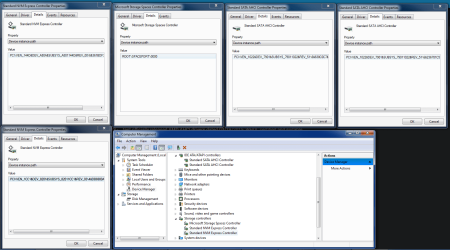
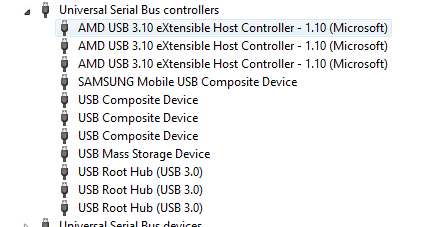
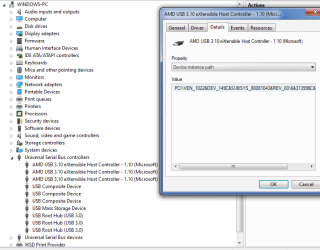
This is my controllers in Win10 (don't be confused by Win7 skin):
ids.PNG

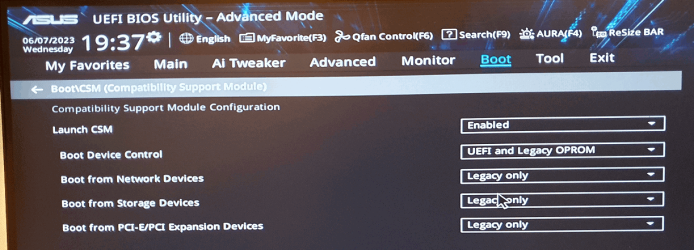
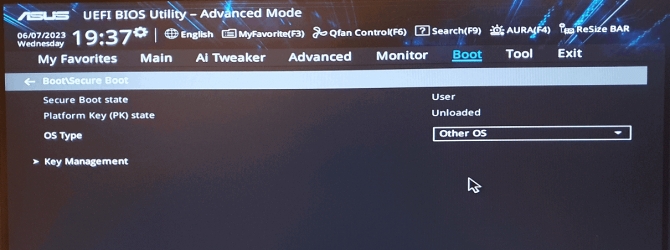
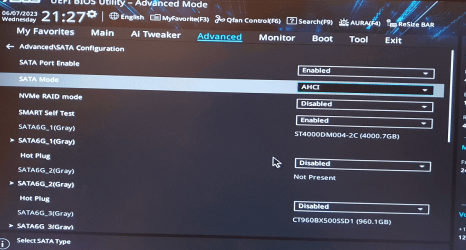
3. I'm installing it as mbr/BIOS, these are my BIOS settings:

1.PNG
2.PNG
ahci.PNG
My main OS (win 10) is gpt/uefi installed on m2 nvme so i can boot it with F8 key if not win7 will try to boot as mbr/bios. I think these settings are ok.

I am using RUFUS to put ISO on pendrive.

- - - Updated - - -

Ok, I will try once again. Step by step:

I am using this ISO:
Code:
Name: en_windows_7_professional_n_with_sp1_x64_dvd_u_677207.iso
Size: 2974552064 bytes (2836 MiB)
SHA256: 7c9573f127e01c877d6d3f22bd3ba4bbfe8dbc421755697b679557c0850bd09b

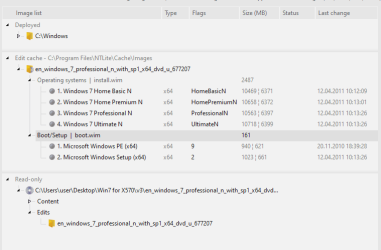
Unpacked ISO with NTlite
ntlite_1.PNG

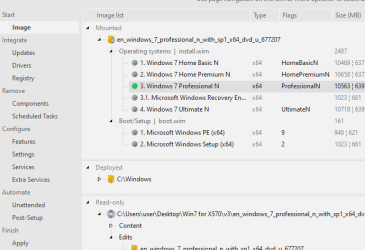
Loaded desired edition
ntlite_2.PNG

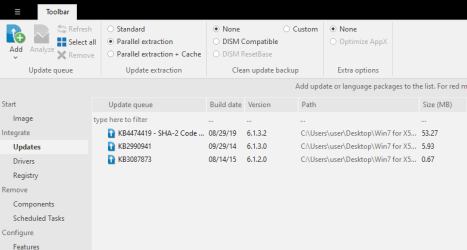
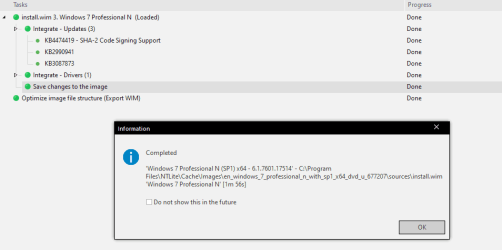
To updates I added:
- SHA-2 update
- both v2 and v3 NVMe updates from SIW2 signature
ntlite_3.PNG

To drivers:
- DEV/7901 drivers for Win7 x64 from Recommended AHCI/RAID and NVMe Drivers - General: Storage Drivers (AHCI/RAID, NVMe and USB) - Win-Raid Forum
ntlite_4.PNG

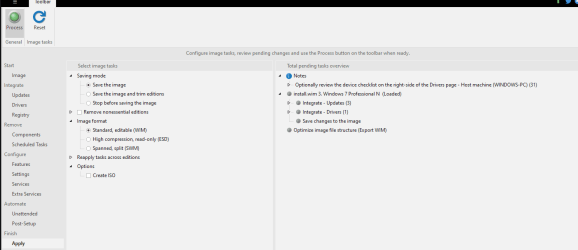
Apply the changes:
ntlite_5.PNG

- - - Updated - - -

Success!
ntlite_6.PNG

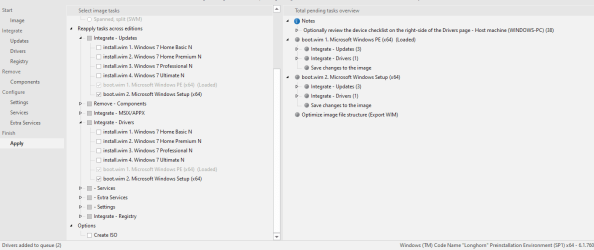
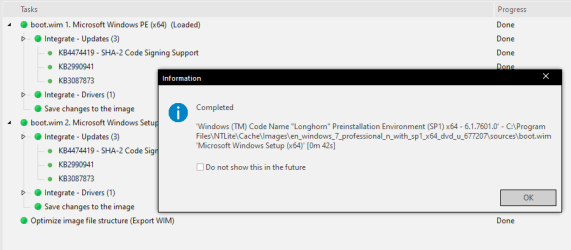
I did it again for boot.wim and I found that it can be done once time for multiple editions or files.
ntlite_7.PNG

- - - Updated - - -

Completed successfully
ntlite_8.PNG

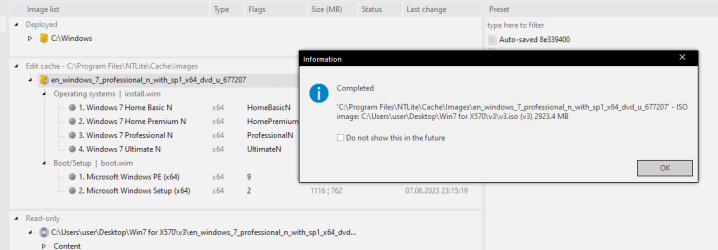
Made an ISO
ntlite_9.PNG

- - - Updated - - -

ISO to USB with rufus tool
rufus.PNG

But the problem resists :/

sad1.PNG
sad2.PNG

I am not giving up! Please help me with this issue.
 
Last edited:

My Computers My Computers

  • At a glance

    Windows 10 Pro x64
    Computer type
    PC/Desktop
    OS
    Windows 10 Pro x64
    Motherboard
    Asus X570 Prime P
  • Computer type
    PC/Desktop
check if it can see the installation usb stick and any other disks.

at cmd prompt
type:
notepad
in notepad click file >save
and browse ( set it all files instead of .txt in the dropdown )
 

My Computers My Computers

  • At a glance

    7 X64i5 84002x8gb 3200mhz
    Computer type
    PC/Desktop
    OS
    7 X64
    CPU
    i5 8400
    Motherboard
    gigabyte b365m ds3h
    Memory
    2x8gb 3200mhz
    Hard Drives
    various
    PSU
    pure power 11 400w cm
    Case
    Coolermaster
    Cooling
    cryorig m9i
  • At a glance

    7x64g54008gb ddr4 2400
    Computer type
    PC/Desktop
    OS
    7x64
    CPU
    g5400
    Motherboard
    ga b365m ds3h
    Memory
    8gb ddr4 2400
    PSU
    xfx pro 450w
SIW2:
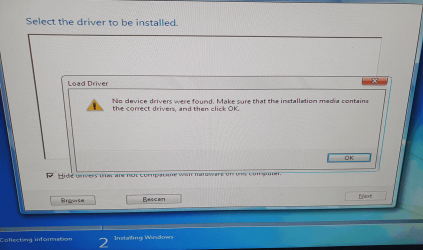
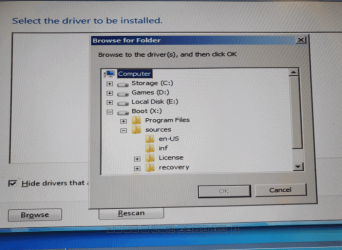
There's something wrong I couldn't enter recovery mode to show you the files:
recovery.PNG


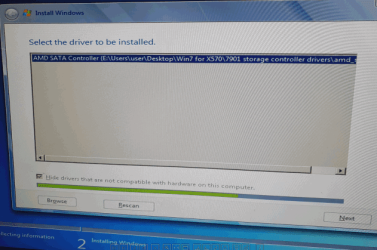
However, I tried to load drivers with "browse". The first 3 drives are mine HDDs/SSDs. The last one is pendrive I think.
browse.PNG

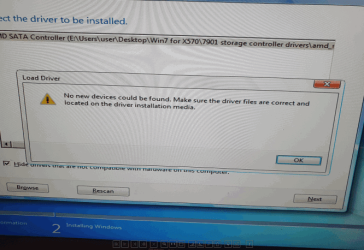
The drivers were loaded but failed after
driver_loda.PNG
fail.PNG
 

My Computers My Computers

  • At a glance

    Windows 10 Pro x64
    Computer type
    PC/Desktop
    OS
    Windows 10 Pro x64
    Motherboard
    Asus X570 Prime P
  • Computer type
    PC/Desktop
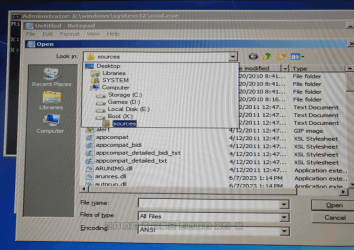
X: is the ramdisk.

Looks like it cant see the usb stick.

are you sure you are booting the installation media in the correct mode ?

you dont need to enter recovery options.

shift+f10 brings up cmd prompt
 

My Computers My Computers

  • At a glance

    7 X64i5 84002x8gb 3200mhz
    Computer type
    PC/Desktop
    OS
    7 X64
    CPU
    i5 8400
    Motherboard
    gigabyte b365m ds3h
    Memory
    2x8gb 3200mhz
    Hard Drives
    various
    PSU
    pure power 11 400w cm
    Case
    Coolermaster
    Cooling
    cryorig m9i
  • At a glance

    7x64g54008gb ddr4 2400
    Computer type
    PC/Desktop
    OS
    7x64
    CPU
    g5400
    Motherboard
    ga b365m ds3h
    Memory
    8gb ddr4 2400
    PSU
    xfx pro 450w
Looks like it cant see the usb stick.
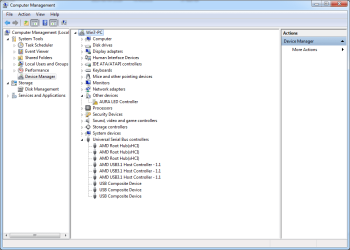
Can this occur because i didn't integrated USB drivers?
usb_controllers.PNG

Which driver I should integrate? Is this "AMD_Chips_Drivers_For_ASUS_Win7_8.1_SHA256_RE_D" from AMD_Chips_Drivers_For_ASUS_Win7_8.1_SHA256_RE_D.7z — Яндекс Диск OK?
usb.PNG

are you sure you are booting the installation media in the correct mode ?
Yes, I am booting in mbr/bios mode. I checked twice, and run F8 -> Kingstone... (not [UEFI] Kingstone ...)

shift+f10 brings up cmd prompt
notepad.PNG
Still no USB drive.

- - - Updated - - -

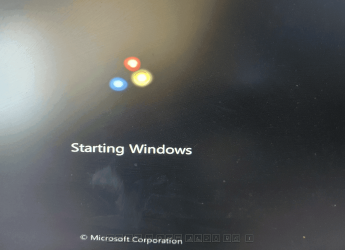
Ok I integrated the drivers "AMD_Chips_Drivers_For_ASUS_Win7_8.1_SHA256_RE_D" but it does not boot installer. It got stuck at starting windows
Capture.PNG

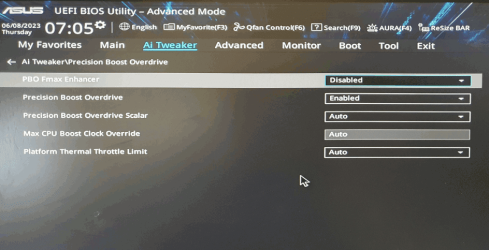
I read that i should change some options in bios
Capture2.PNG
Capture3.PNG

but it did not help:
Capture.PNG

- - - Updated - - -

I put pendrive with my modded Win 7 to old Asus P5Q Pro motherboard and installer run fine so it must be something with the drivers for my X570 mobo.

- - - Updated - - -

Another attempt, I integrated only USB drivers from X570_149C_Drivers_B2.zip from Installing Windows 7 On AMD Ryzen 9 5900x 5950x & X570 Board Chipset - YouTube but the same problem as above occured. Now I'm sure that there is something wrong with USB drivers.

- - - Updated - - -

OMG after days of work I made partial success.

So as @SIW2: said my pendrive is not recognized during Win installation so I burn ISO (only with few updates and nvme driver) to a DVD and... it recognized all hard drives (it did not when i tried the same ISO on pendrive) and installed without problem. I was very happy but of course mouse just like all other USB devices does not work.

I installed latest LAN drivers for Win7 which i found on Realtek website and it works! I can browse internet.

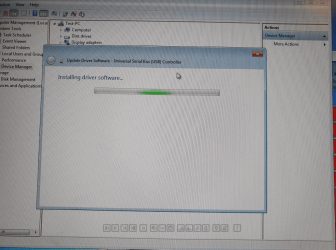
I also tried to install these USB things X570_149C_Drivers_B2.zip from Installing Windows 7 On AMD Ryzen 9 5900x 5950x & X570 Board Chipset - YouTube and mouse started to work but only one USB controller were installed. There were 2 more so I tried to to the same on them and Windows freezed. I restarted but Windows did not want to boot anymore. I probably can fix it in safe mode but that is not the case now.
freezed.PNG

Where to find proper and working USB drivers for Asus PRIME X570-P motherboard?

- - - Updated - - -

Long Boot Time - Event 110 SMSSInit - Windows 7 - MSFN

- - - Updated - - -

I give it another try and installed once again from DVD. Installed lan drivers, these USB faulty drivers but only for one controller. Mouse started to work. After restart it started to installing faulty driver for rest of of controllers and system halted. Restarted again and it worked!

I had much trouble with gpu drivers becuse latest drivers are not signed by microsoft. You can enable "Test mode" or install older one.

It took me some time to find updates manually because windows update didn't work.

Still testing if everything works.

- - - Updated - - -

Tested carefully and USB was not working properly. I am using speakers and headset on USB. When I connect it to running PC music stop playing on speakers and start on headset but only for few seonds and then nothing. The volume mixer and every app with playing sound is not responding until I plug off headset. The mouse work without problem on every port.
The driver X570_149C_Drivers_B2 are not good.

- - - Updated - - -

Full success! I tried USB driver from AMD_Chips_Drivers_For_ASUS_Win7_8.1_SHA256_RE_D and it started to work without any issues. I can plug in headset and it works!
Capture.PNG
 

My Computers My Computers

  • At a glance

    Windows 10 Pro x64
    Computer type
    PC/Desktop
    OS
    Windows 10 Pro x64
    Motherboard
    Asus X570 Prime P
  • Computer type
    PC/Desktop
AMD_Chips_Drivers_For_ASUS_Win7_8.1_SHA256_RE_D

what is that

and where is it from
 

My Computers My Computers

  • At a glance

    7 X64i5 84002x8gb 3200mhz
    Computer type
    PC/Desktop
    OS
    7 X64
    CPU
    i5 8400
    Motherboard
    gigabyte b365m ds3h
    Memory
    2x8gb 3200mhz
    Hard Drives
    various
    PSU
    pure power 11 400w cm
    Case
    Coolermaster
    Cooling
    cryorig m9i
  • At a glance

    7x64g54008gb ddr4 2400
    Computer type
    PC/Desktop
    OS
    7x64
    CPU
    g5400
    Motherboard
    ga b365m ds3h
    Memory
    8gb ddr4 2400
    PSU
    xfx pro 450w
Well done for persevering. :-)
 

My Computers My Computers

  • At a glance

    7 X64i5 84002x8gb 3200mhz
    Computer type
    PC/Desktop
    OS
    7 X64
    CPU
    i5 8400
    Motherboard
    gigabyte b365m ds3h
    Memory
    2x8gb 3200mhz
    Hard Drives
    various
    PSU
    pure power 11 400w cm
    Case
    Coolermaster
    Cooling
    cryorig m9i
  • At a glance

    7x64g54008gb ddr4 2400
    Computer type
    PC/Desktop
    OS
    7x64
    CPU
    g5400
    Motherboard
    ga b365m ds3h
    Memory
    8gb ddr4 2400
    PSU
    xfx pro 450w
I have dual boot (Win7 + Win10) now and there is an issue with check disk. Both Windows 7 and Windows 10 are "fixing" drives very often.
 

My Computers My Computers

  • At a glance

    Windows 10 Pro x64
    Computer type
    PC/Desktop
    OS
    Windows 10 Pro x64
    Motherboard
    Asus X570 Prime P
  • Computer type
    PC/Desktop
I have dual boot (Win7 + Win10) now and there is an issue with check disk. Both Windows 7 and Windows 10 are "fixing" drives very often.

Win 7 and Win 10 use different NTFS. Don't run Win 7 chkdsk as it will say there is some to correct but in fact it doesn't. Win 10 chkdsk is compatible with Win 7 NTFS so you should run it on Win 7 and win 10 partitions.

From another thread

HOWEVER, the biggest issue I am having is that when going between the two OS's, each Windows version attempts to do a CHKDSK, finds inconsistencies, repairs them, and then the system loads with no issues. BUT when this happens I end up losing data on my DATA drives and most recently lost about a whole months work.
The main problem is that Win 7 and Win 10 uses a different version of NTFS.
The problem can be dealt by disabling Hybrid Boot. (disable fast start on win 10)

Check disk on Win 10 SSD Solved - Page 2 - Windows 10 Forums
 
Last edited:

My Computers My Computers

  • At a glance

    Windows 7 HP 64i5 6600K - 800MHz to 4200MHz4+4G GSkill DDR4 3000IG - Intel 530
    Computer type
    PC/Desktop
    Computer Manufacturer/Model Number
    custom build
    OS
    Windows 7 HP 64
    CPU
    i5 6600K - 800MHz to 4200MHz
    Motherboard
    GA-Z170-HD3P
    Memory
    4+4G GSkill DDR4 3000
    Graphics Card(s)
    IG - Intel 530
    Monitor(s) Displays
    Samsung 226BW
    Screen Resolution
    1680x1050
    Hard Drives
    (1) -1 SM951 – 128GB M.2 AHCI PCIe SSD drive for Windows 7 and Lubuntu
    (2) -1 WD SATA 3 - 1T for Data
    (3) -1 WD SATA 3 - 1T for backup
    PSU
    Thermaltake 450W TR2 gold
    Keyboard
    Old and good Chicony mechanical keyboard
    Mouse
    Logitech mX performance - 9 buttons (had to disable some)
    Internet Speed
    500Mb/s
    Browser
    Firefox 64
    Other Info
    TinyWall firewall
  • At a glance

    Windows 7 Proi7-4500U 800MHz to 3.0GHz(4+4)G DDR3 1600IG intel 4400 + NVIDIA GeForce GT 745M
    Computer type
    Laptop
    System Manufacturer/Model Number
    Asus Q550LF
    OS
    Windows 7 Pro
    CPU
    i7-4500U 800MHz to 3.0GHz
    Motherboard
    Asus Q550LF
    Memory
    (4+4)G DDR3 1600
    Graphics Card(s)
    IG intel 4400 + NVIDIA GeForce GT 745M
    Sound Card
    Realtek
    Monitor(s) Displays
    LG Display LP156WF4-SPH1
    Screen Resolution
    1920 x 1080
    Hard Drives
    BX500 120G SSD for Windows and programs +
    1T HDD for data
    Internet Speed
    500 Mb/s
    Browser
    Firefox
    Other Info
    TinyWall firewall
Thanks for answer Megahertz07: but It looks that I have hybrid boot disabled. Should I disable checkdisk on Win 7?
 

My Computers My Computers

  • At a glance

    Windows 10 Pro x64
    Computer type
    PC/Desktop
    OS
    Windows 10 Pro x64
    Motherboard
    Asus X570 Prime P
  • Computer type
    PC/Desktop
Thanks for answer Megahertz07: but It looks that I have hybrid boot disabled. Should I disable checkdisk on Win 7?


Yes, Win 7 chkdsk shouldn't be used, only Win 10 chkdsk.
 

My Computers My Computers

  • At a glance

    Windows 7 HP 64i5 6600K - 800MHz to 4200MHz4+4G GSkill DDR4 3000IG - Intel 530
    Computer type
    PC/Desktop
    Computer Manufacturer/Model Number
    custom build
    OS
    Windows 7 HP 64
    CPU
    i5 6600K - 800MHz to 4200MHz
    Motherboard
    GA-Z170-HD3P
    Memory
    4+4G GSkill DDR4 3000
    Graphics Card(s)
    IG - Intel 530
    Monitor(s) Displays
    Samsung 226BW
    Screen Resolution
    1680x1050
    Hard Drives
    (1) -1 SM951 – 128GB M.2 AHCI PCIe SSD drive for Windows 7 and Lubuntu
    (2) -1 WD SATA 3 - 1T for Data
    (3) -1 WD SATA 3 - 1T for backup
    PSU
    Thermaltake 450W TR2 gold
    Keyboard
    Old and good Chicony mechanical keyboard
    Mouse
    Logitech mX performance - 9 buttons (had to disable some)
    Internet Speed
    500Mb/s
    Browser
    Firefox 64
    Other Info
    TinyWall firewall
  • At a glance

    Windows 7 Proi7-4500U 800MHz to 3.0GHz(4+4)G DDR3 1600IG intel 4400 + NVIDIA GeForce GT 745M
    Computer type
    Laptop
    System Manufacturer/Model Number
    Asus Q550LF
    OS
    Windows 7 Pro
    CPU
    i7-4500U 800MHz to 3.0GHz
    Motherboard
    Asus Q550LF
    Memory
    (4+4)G DDR3 1600
    Graphics Card(s)
    IG intel 4400 + NVIDIA GeForce GT 745M
    Sound Card
    Realtek
    Monitor(s) Displays
    LG Display LP156WF4-SPH1
    Screen Resolution
    1920 x 1080
    Hard Drives
    BX500 120G SSD for Windows and programs +
    1T HDD for data
    Internet Speed
    500 Mb/s
    Browser
    Firefox
    Other Info
    TinyWall firewall
If I put computer to hibernate or sleep I can wake it up, I can login in and then after few seconds on dekstop USB mouse breaks. It does not work at all, I can use my USB keyboard but mouse is dead however laser light is on. If I plug out, plugin in, it does not light laser like there is no power. I tried changing "USB selective suspend settings" in power options but did not helped.
 

My Computers My Computers

  • At a glance

    Windows 10 Pro x64
    Computer type
    PC/Desktop
    OS
    Windows 10 Pro x64
    Motherboard
    Asus X570 Prime P
  • Computer type
    PC/Desktop
Back
Top