
Memory Diagnostics Tool

How to Run the Memory Diagnostics Tool in Windows 7

   Information
This will show you how to run the Windows Memory Diagnostic Tool to test the Random Access Memory (RAM) on your computer for errors in Windows 7. The diagnostic includes a comprehensive set of memory tests. If you are experiencing problems while running Windows, you can use the diagnostic to determine whether the problems are caused by failing hardware, such as RAM or the memory system of your motherboard.

For more information, see: Microsoft Online Crash Analysis: Windows Memory Diagnostic Users Guide

   Tip
If you suspect memory issues, then you may also want to consider using and running Memtest86+ at boot. Memtest86+ is a comprehensive stand-alone memory diagnostic program that you boot from at startup to test your RAM. You can download a ISO file to burn to DVD to boot with, or a floppy disk package installable from Windows to a USB flash drive or floppy disk to boot with.

   Warning
It could take a long time (several hours) for the Memory Diagnostics Tool to finish running depending on how many passes you set, and if there are any issues found.


Here's How:
NOTE: Start with either step 1, 2, or 3 for how you want to start the Memory Diagnostics Tool. 1. To Start from within Windows 7 A) Open the Control Panel (icons view).

B) Click on the Administrative Tools icon, and click on Memory Diagnostics Tool.

C) Go to step 1F below.

OR

D) Open the Start menu.

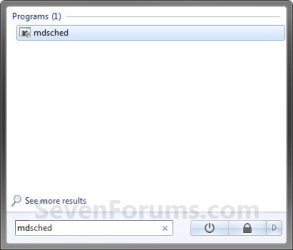
E) In the Start Menu search box, type mdsched and press Enter. (See screenshot below) Start-Menu.jpg
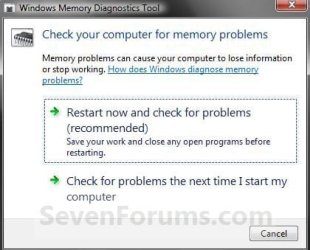
F) Select the Restart now and check for problems option. (See screenshot below) Memory.jpg
G) Go to step 4.
2. To Start from Windows Boot Manager A) Boot into the Advanced Boot Options screen.

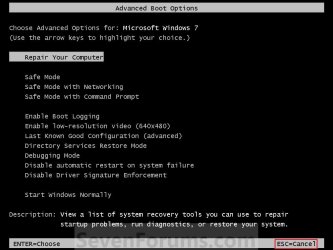
B) While in the Advanced Boot Options screen, press the Escape (Esc) key. (See screenshot below) Advanced-1.jpg
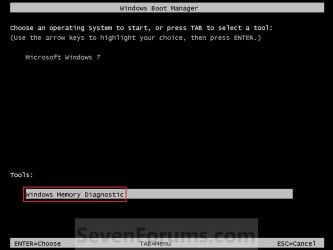
C) While in the Windows Boot Manager screen, press the Tab key. (See screenshot below) Advanced-2.jpg
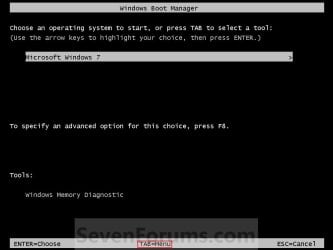
D) With Windows Memory Diagnostics selected, press Enter. (See screenshot below) Advanced-3.jpg
E) Go to step 4.
3. To Start from System Recovery Options A) Boot into the System Recovery Options screen.

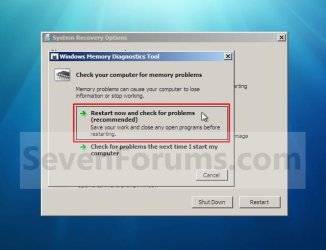
B) Select the Windows Memory Diagnostic Tool option. (See screenshot below) System_Recovery_Options.jpg
C) Select the Restart now and check for problems option. (See screenshot below) Select_When.jpg
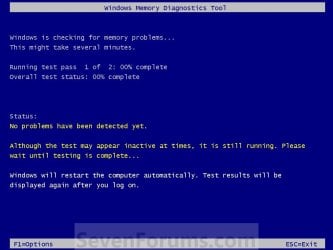
4. The computer will now restart, and you will see this screen next. (See screenshot below.
NOTE: Windows Memory Diagnostic Tool will run the Standard test by default. 1.jpg
A) Go to step 6.
5. To Change the Memory Diagnostic Tool Options A) Press F1. (See screenshot above)
NOTE: If you have a multimedia keyboard, then you may need to press the Function (F-Lock) key for F1 to work.

B) Press the TAB key to switch between the option categories, and use the arrow keys to select the option. (See screenshot below) Options.jpg
C) When finished, press F10 to apply any changes you made to the options. (See screenshot above)
NOTE: Press the Escape (Esc) key if you do not wish to make any changes to the options and return to the screen below step 4.
6. When the test is finished running, it will automatically restart the computer. (See screenshot below step 4)
NOTE: If errors are found, the Windows Memory Diagnostics Tool will attempt to determine which particular memory module in your computer is causing these errors. If that information is available, it will be stated in the results after you log on from the restart. If bad memory is found then you will need to remove and replace the bad RAM module.

7. You can also read the Memory Diagnostic Tool system log in Event Viewer.
That's it,
Shawn


Last edited:
I am going to answer my own Q: After I did some reading, downloaded MemTest-86 as an ISO file which I burn on dvd. Test came out OK. Btw, the WinRar was interfering with the PowerIso and had no choice but to uninstall WinRar.
 

My Computer

Computer Manufacturer/Model Number
Asus N53v-DH 72
OS
windows 7 home premium 64bit
CPU
Intel(R) Core(TM) i7-2670QM CPU @ 2.20GHz
Motherboard
ASUSTeK Computer Inc
Memory
6049 MB
Graphics Card(s)
NVIDIA GeForce GT 540M (1024 MB)
Monitor(s) Displays
15.6
Screen Resolution
1920-1080
Hard Drives
ST9750420AS (698 GB, IDE)

C: (NTFS) 293.0 GB (229.9 GB free)
D: (NTFS) 380.6 GB (380.5 GB free)
Total Size 673.6 GB (610.4 GB free)
Keyboard
Standard
Mouse
Optical
Internet Speed
D-12877kbps U-370kbps
Barbarossa,

Thank you for posting back with your results. :)
 

My Computer

Computer type
PC/Desktop
Computer Manufacturer/Model Number
Self built custom
OS
64-bit Windows 11 Pro for Workstations
CPU
Intel i7-8700K OC'd to 5 GHz
Motherboard
ASUS ROG Maximus XI Formula Z390
Memory
64 GB (4x16GB) G.SKILL TridentZ RGB DDR4 3600 MHz
Graphics Card(s)
ASUS ROG-STRIX-GTX1080TI-O11G-GAMING
Sound Card
Integrated
Monitor(s) Displays
2 x Samsung Odyssey G7 27"
Screen Resolution
2560x1440
Hard Drives
1TB Samsung 990 PRO M.2,
4TB Samsung 990 PRO PRO M.2,
TerraMaster F8 SSD Plus NAS
PSU
Seasonic Prime Titanium 850W
Case
Thermaltake Core P3
Cooling
Corsair Hydro H115i
Keyboard
Logitech wireless K800
Mouse
Logitech MX Master 4
Internet Speed
2 Gb/s Download and 100 Mb/s Upload
Antivirus
Malwarebyte Anti-Malware Premium
Browser
Google Chrome
Other Info
Logitech Z625 speaker system,
Logitech BRIO 4K Pro webcam,
HP Color LaserJet Pro MFP M477fdn,
APC SMART-UPS RT 1000 XL - SURT1000XLI,
Galaxy S23 Plus phone

My Computer

Computer Manufacturer/Model Number
Asus N53v-DH 72
OS
windows 7 home premium 64bit
CPU
Intel(R) Core(TM) i7-2670QM CPU @ 2.20GHz
Motherboard
ASUSTeK Computer Inc
Memory
6049 MB
Graphics Card(s)
NVIDIA GeForce GT 540M (1024 MB)
Monitor(s) Displays
15.6
Screen Resolution
1920-1080
Hard Drives
ST9750420AS (698 GB, IDE)

C: (NTFS) 293.0 GB (229.9 GB free)
D: (NTFS) 380.6 GB (380.5 GB free)
Total Size 673.6 GB (610.4 GB free)
Keyboard
Standard
Mouse
Optical
Internet Speed
D-12877kbps U-370kbps
Hi,

I followed all the instruction but, can't seem to get the Memory Diagnostics Tool to work. All I get is a blank black screen. It's weird b/c on my wife's PC ( windows 7 also) the tool is working just fine. If anyone knows how to fix this please let me know.:confused:
 

My Computer

Computer Manufacturer/Model Number
Asus N53v-DH 72
OS
windows 7 home premium 64bit
CPU
Intel(R) Core(TM) i7-2670QM CPU @ 2.20GHz
Motherboard
ASUSTeK Computer Inc
Memory
6049 MB
Graphics Card(s)
NVIDIA GeForce GT 540M (1024 MB)
Monitor(s) Displays
15.6
Screen Resolution
1920-1080
Hard Drives
ST9750420AS (698 GB, IDE)

C: (NTFS) 293.0 GB (229.9 GB free)
D: (NTFS) 380.6 GB (380.5 GB free)
Total Size 673.6 GB (610.4 GB free)
Keyboard
Standard
Mouse
Optical
Internet Speed
D-12877kbps U-370kbps
I figured it out. Thanks anyway.
 

My Computer

Computer Manufacturer/Model Number
Asus N53v-DH 72
OS
windows 7 home premium 64bit
CPU
Intel(R) Core(TM) i7-2670QM CPU @ 2.20GHz
Motherboard
ASUSTeK Computer Inc
Memory
6049 MB
Graphics Card(s)
NVIDIA GeForce GT 540M (1024 MB)
Monitor(s) Displays
15.6
Screen Resolution
1920-1080
Hard Drives
ST9750420AS (698 GB, IDE)

C: (NTFS) 293.0 GB (229.9 GB free)
D: (NTFS) 380.6 GB (380.5 GB free)
Total Size 673.6 GB (610.4 GB free)
Keyboard
Standard
Mouse
Optical
Internet Speed
D-12877kbps U-370kbps
Sorry, I was wrong. The windows 7 memory diag tool is not working. I did not figure it out and still need advice.
 

My Computer

Computer Manufacturer/Model Number
Asus N53v-DH 72
OS
windows 7 home premium 64bit
CPU
Intel(R) Core(TM) i7-2670QM CPU @ 2.20GHz
Motherboard
ASUSTeK Computer Inc
Memory
6049 MB
Graphics Card(s)
NVIDIA GeForce GT 540M (1024 MB)
Monitor(s) Displays
15.6
Screen Resolution
1920-1080
Hard Drives
ST9750420AS (698 GB, IDE)

C: (NTFS) 293.0 GB (229.9 GB free)
D: (NTFS) 380.6 GB (380.5 GB free)
Total Size 673.6 GB (610.4 GB free)
Keyboard
Standard
Mouse
Optical
Internet Speed
D-12877kbps U-370kbps
Cosu,

You might see if running a sfc /scannow command may help and allow the Memory Diagnostics Tool to run properly afterwards.
 

My Computer

Computer type
PC/Desktop
Computer Manufacturer/Model Number
Self built custom
OS
64-bit Windows 11 Pro for Workstations
CPU
Intel i7-8700K OC'd to 5 GHz
Motherboard
ASUS ROG Maximus XI Formula Z390
Memory
64 GB (4x16GB) G.SKILL TridentZ RGB DDR4 3600 MHz
Graphics Card(s)
ASUS ROG-STRIX-GTX1080TI-O11G-GAMING
Sound Card
Integrated
Monitor(s) Displays
2 x Samsung Odyssey G7 27"
Screen Resolution
2560x1440
Hard Drives
1TB Samsung 990 PRO M.2,
4TB Samsung 990 PRO PRO M.2,
TerraMaster F8 SSD Plus NAS
PSU
Seasonic Prime Titanium 850W
Case
Thermaltake Core P3
Cooling
Corsair Hydro H115i
Keyboard
Logitech wireless K800
Mouse
Logitech MX Master 4
Internet Speed
2 Gb/s Download and 100 Mb/s Upload
Antivirus
Malwarebyte Anti-Malware Premium
Browser
Google Chrome
Other Info
Logitech Z625 speaker system,
Logitech BRIO 4K Pro webcam,
HP Color LaserJet Pro MFP M477fdn,
APC SMART-UPS RT 1000 XL - SURT1000XLI,
Galaxy S23 Plus phone
OK. I'll do it now. Btw, I have memtest-86 on cd and it works just fine.

Did the scan and nothing changed . This is weird..........the other windows 7 pc is working fine.
 
Last edited by a moderator:

My Computer

Computer Manufacturer/Model Number
Asus N53v-DH 72
OS
windows 7 home premium 64bit
CPU
Intel(R) Core(TM) i7-2670QM CPU @ 2.20GHz
Motherboard
ASUSTeK Computer Inc
Memory
6049 MB
Graphics Card(s)
NVIDIA GeForce GT 540M (1024 MB)
Monitor(s) Displays
15.6
Screen Resolution
1920-1080
Hard Drives
ST9750420AS (698 GB, IDE)

C: (NTFS) 293.0 GB (229.9 GB free)
D: (NTFS) 380.6 GB (380.5 GB free)
Total Size 673.6 GB (610.4 GB free)
Keyboard
Standard
Mouse
Optical
Internet Speed
D-12877kbps U-370kbps
I'm not sure what may be the cause of it not running properly, but as long as you are not having any other issues and still getting a clean bill of heath with Memtest86+, then I wouldn't worry about it and wait until you may need a clean install to fix it. :)
 

My Computer

Computer type
PC/Desktop
Computer Manufacturer/Model Number
Self built custom
OS
64-bit Windows 11 Pro for Workstations
CPU
Intel i7-8700K OC'd to 5 GHz
Motherboard
ASUS ROG Maximus XI Formula Z390
Memory
64 GB (4x16GB) G.SKILL TridentZ RGB DDR4 3600 MHz
Graphics Card(s)
ASUS ROG-STRIX-GTX1080TI-O11G-GAMING
Sound Card
Integrated
Monitor(s) Displays
2 x Samsung Odyssey G7 27"
Screen Resolution
2560x1440
Hard Drives
1TB Samsung 990 PRO M.2,
4TB Samsung 990 PRO PRO M.2,
TerraMaster F8 SSD Plus NAS
PSU
Seasonic Prime Titanium 850W
Case
Thermaltake Core P3
Cooling
Corsair Hydro H115i
Keyboard
Logitech wireless K800
Mouse
Logitech MX Master 4
Internet Speed
2 Gb/s Download and 100 Mb/s Upload
Antivirus
Malwarebyte Anti-Malware Premium
Browser
Google Chrome
Other Info
Logitech Z625 speaker system,
Logitech BRIO 4K Pro webcam,
HP Color LaserJet Pro MFP M477fdn,
APC SMART-UPS RT 1000 XL - SURT1000XLI,
Galaxy S23 Plus phone
I'm not sure what may be the cause of it not running properly, but as long as you are not having any other issues and still getting a clean bill of heath with Memtest86+, then I wouldn't worry about it and wait until you may need a clean install to fix it. :)

OK. Thanks Brink.
 

My Computer

Computer Manufacturer/Model Number
Asus N53v-DH 72
OS
windows 7 home premium 64bit
CPU
Intel(R) Core(TM) i7-2670QM CPU @ 2.20GHz
Motherboard
ASUSTeK Computer Inc
Memory
6049 MB
Graphics Card(s)
NVIDIA GeForce GT 540M (1024 MB)
Monitor(s) Displays
15.6
Screen Resolution
1920-1080
Hard Drives
ST9750420AS (698 GB, IDE)

C: (NTFS) 293.0 GB (229.9 GB free)
D: (NTFS) 380.6 GB (380.5 GB free)
Total Size 673.6 GB (610.4 GB free)
Keyboard
Standard
Mouse
Optical
Internet Speed
D-12877kbps U-370kbps
You're welcome. :)
 

My Computer

Computer type
PC/Desktop
Computer Manufacturer/Model Number
Self built custom
OS
64-bit Windows 11 Pro for Workstations
CPU
Intel i7-8700K OC'd to 5 GHz
Motherboard
ASUS ROG Maximus XI Formula Z390
Memory
64 GB (4x16GB) G.SKILL TridentZ RGB DDR4 3600 MHz
Graphics Card(s)
ASUS ROG-STRIX-GTX1080TI-O11G-GAMING
Sound Card
Integrated
Monitor(s) Displays
2 x Samsung Odyssey G7 27"
Screen Resolution
2560x1440
Hard Drives
1TB Samsung 990 PRO M.2,
4TB Samsung 990 PRO PRO M.2,
TerraMaster F8 SSD Plus NAS
PSU
Seasonic Prime Titanium 850W
Case
Thermaltake Core P3
Cooling
Corsair Hydro H115i
Keyboard
Logitech wireless K800
Mouse
Logitech MX Master 4
Internet Speed
2 Gb/s Download and 100 Mb/s Upload
Antivirus
Malwarebyte Anti-Malware Premium
Browser
Google Chrome
Other Info
Logitech Z625 speaker system,
Logitech BRIO 4K Pro webcam,
HP Color LaserJet Pro MFP M477fdn,
APC SMART-UPS RT 1000 XL - SURT1000XLI,
Galaxy S23 Plus phone
memory diagnostic tool looping

I did an internet search to get here and have the same problem that thumper started this thread with. I've tried all the things he tried as well except when you pull memory, bios won't let the system start hardware 101. I haven't tried this yet from another poster from somewhere else because I only have a restore disk that's not pulling up a repair page. From command prompt, he says "bcdedit /bootsequence {memdiag} /remove" Now is there a way to get to repair with f8 f7 not working due to memory test starting before f8 can be initiated?

Update: I downloaded a repair disk from Microsoft, and through a dozen attempts at booting to it, due to the memory test starting so quickly, I finally got the repair disk to boot and was able to repair boot, and system, as boot didn't seem to have any affect. It was VERY difficult to boot to repair disk though. It took many tries to hit it just right. Hitting F8 over and over and over.
 
Last edited:

My Computer

Computer Manufacturer/Model Number
Home build
OS
win7 home premium 64bit
CPU
i5 intel
Motherboard
asus p755
Memory
3 gig
Graphics Card(s)
intel through i5
Sound Card
onbourd
Hard Drives
seagate 1t

My Computer

Computer type
PC/Desktop
Computer Manufacturer/Model Number
Self built custom
OS
64-bit Windows 11 Pro for Workstations
CPU
Intel i7-8700K OC'd to 5 GHz
Motherboard
ASUS ROG Maximus XI Formula Z390
Memory
64 GB (4x16GB) G.SKILL TridentZ RGB DDR4 3600 MHz
Graphics Card(s)
ASUS ROG-STRIX-GTX1080TI-O11G-GAMING
Sound Card
Integrated
Monitor(s) Displays
2 x Samsung Odyssey G7 27"
Screen Resolution
2560x1440
Hard Drives
1TB Samsung 990 PRO M.2,
4TB Samsung 990 PRO PRO M.2,
TerraMaster F8 SSD Plus NAS
PSU
Seasonic Prime Titanium 850W
Case
Thermaltake Core P3
Cooling
Corsair Hydro H115i
Keyboard
Logitech wireless K800
Mouse
Logitech MX Master 4
Internet Speed
2 Gb/s Download and 100 Mb/s Upload
Antivirus
Malwarebyte Anti-Malware Premium
Browser
Google Chrome
Other Info
Logitech Z625 speaker system,
Logitech BRIO 4K Pro webcam,
HP Color LaserJet Pro MFP M477fdn,
APC SMART-UPS RT 1000 XL - SURT1000XLI,
Galaxy S23 Plus phone
Well, I did step 1, arrived at step 4, after a few minutes my monitor went into standby mode. After 15 minutes there was quite some disc activity but actually nothing showed up on my monitor, after another 15-20 minutes (with hardly any activity) I restarted the pc. Assume that it won't take more than half an hour, else Microsoft should warn users that it may take a long time.
 

My Computer

OS
Windows 7 Ultimate x64
Wow, this test takes forever. Just added another 32GB to my PC and wanted to check it, but this test is kind of ridiculously long. They should have said "This might take several hours."

It's been about 3½ hours now on the first and only pass, and holding at 21% complete for maybe a couple hours or so. No problems detected yet. I am having it do the extended version of the test though.

Is this typical?
 

My Computer

Computer type
PC/Desktop
OS
Windows 7 Professional SP1 64bit, Manjaro Xfce, Debian 10 64bit Xfce
CPU
Intel i7-3930K @ 4.2GHz
Motherboard
ASUS P9X79 WS
Memory
Corsair Dominator 64GB Quad Channel DDR3 @ 1600MHz
Graphics Card(s)
EVGA GeForce GTX Titan Black Superclocked (×2, SLI)
Monitor(s) Displays
Sony Bravia 46"
Screen Resolution
1920×1080 (Full Screen), 1366×768 (Windows)
Hard Drives
Samsung 860 PRO 4TB SSD, Samsung 850 EVO 1TB SSD, Western Digital WD Gold 16TB 7200 RPM 512MB Cache HDD
PSU
Corsair AX1200 (1200W, 100.4A @ 12V)
Case
Corsair Obsidian 750D
Cooling
Corsair H110, 5 NOCTUA NF-A14 industrialPPC-3000 PWM Fans
Keyboard
Logitech K360
Mouse
Logitech M220
Browser
Firefox Developer Edition, Pale Moon, Tor
Hello Wrend,

Yes, this is normal. The more passes you set to run, the longer it is takes as well. :(
 

My Computer

Computer type
PC/Desktop
Computer Manufacturer/Model Number
Self built custom
OS
64-bit Windows 11 Pro for Workstations
CPU
Intel i7-8700K OC'd to 5 GHz
Motherboard
ASUS ROG Maximus XI Formula Z390
Memory
64 GB (4x16GB) G.SKILL TridentZ RGB DDR4 3600 MHz
Graphics Card(s)
ASUS ROG-STRIX-GTX1080TI-O11G-GAMING
Sound Card
Integrated
Monitor(s) Displays
2 x Samsung Odyssey G7 27"
Screen Resolution
2560x1440
Hard Drives
1TB Samsung 990 PRO M.2,
4TB Samsung 990 PRO PRO M.2,
TerraMaster F8 SSD Plus NAS
PSU
Seasonic Prime Titanium 850W
Case
Thermaltake Core P3
Cooling
Corsair Hydro H115i
Keyboard
Logitech wireless K800
Mouse
Logitech MX Master 4
Internet Speed
2 Gb/s Download and 100 Mb/s Upload
Antivirus
Malwarebyte Anti-Malware Premium
Browser
Google Chrome
Other Info
Logitech Z625 speaker system,
Logitech BRIO 4K Pro webcam,
HP Color LaserJet Pro MFP M477fdn,
APC SMART-UPS RT 1000 XL - SURT1000XLI,
Galaxy S23 Plus phone
Thanks.

It's still at 21%, and has now been there for almost 20 hours. I did have it run the extended test, and I have 64GB of RAM, so maybe that is making it take so long.

I want it to finish almost on principle at this point, but if it doesn't finish today, I'll have to stop it to get back to crunching and hosting a Minecraft server. Some of my players wanted to play yesterday and last night.
 

My Computer

Computer type
PC/Desktop
OS
Windows 7 Professional SP1 64bit, Manjaro Xfce, Debian 10 64bit Xfce
CPU
Intel i7-3930K @ 4.2GHz
Motherboard
ASUS P9X79 WS
Memory
Corsair Dominator 64GB Quad Channel DDR3 @ 1600MHz
Graphics Card(s)
EVGA GeForce GTX Titan Black Superclocked (×2, SLI)
Monitor(s) Displays
Sony Bravia 46"
Screen Resolution
1920×1080 (Full Screen), 1366×768 (Windows)
Hard Drives
Samsung 860 PRO 4TB SSD, Samsung 850 EVO 1TB SSD, Western Digital WD Gold 16TB 7200 RPM 512MB Cache HDD
PSU
Corsair AX1200 (1200W, 100.4A @ 12V)
Case
Corsair Obsidian 750D
Cooling
Corsair H110, 5 NOCTUA NF-A14 industrialPPC-3000 PWM Fans
Keyboard
Logitech K360
Mouse
Logitech M220
Browser
Firefox Developer Edition, Pale Moon, Tor
Oh my. Yeah, that could take a long time.
 

My Computer

Computer type
PC/Desktop
Computer Manufacturer/Model Number
Self built custom
OS
64-bit Windows 11 Pro for Workstations
CPU
Intel i7-8700K OC'd to 5 GHz
Motherboard
ASUS ROG Maximus XI Formula Z390
Memory
64 GB (4x16GB) G.SKILL TridentZ RGB DDR4 3600 MHz
Graphics Card(s)
ASUS ROG-STRIX-GTX1080TI-O11G-GAMING
Sound Card
Integrated
Monitor(s) Displays
2 x Samsung Odyssey G7 27"
Screen Resolution
2560x1440
Hard Drives
1TB Samsung 990 PRO M.2,
4TB Samsung 990 PRO PRO M.2,
TerraMaster F8 SSD Plus NAS
PSU
Seasonic Prime Titanium 850W
Case
Thermaltake Core P3
Cooling
Corsair Hydro H115i
Keyboard
Logitech wireless K800
Mouse
Logitech MX Master 4
Internet Speed
2 Gb/s Download and 100 Mb/s Upload
Antivirus
Malwarebyte Anti-Malware Premium
Browser
Google Chrome
Other Info
Logitech Z625 speaker system,
Logitech BRIO 4K Pro webcam,
HP Color LaserJet Pro MFP M477fdn,
APC SMART-UPS RT 1000 XL - SURT1000XLI,
Galaxy S23 Plus phone
Greetings Brink. Thanks for the years of super-detailed information. Your time is appreciated.

Another way to access the memory diagnostic tool, was to keep tapping the "F1" key just before booting to a Windows 7 DVD. That would bring up the following display...
th


At that point, you could press "Tab" key and then hit "Enter" after the Windows Memory Diagnostic option is highlighted. (note: the GUI option to reboot into the diagnostic is designed to work with on-drive recovery and won't work with boot-dvd recovery)

Bad memory often will not allow you to load into a full-blown operating system, whether via optical disk, flash drive, hard drive or otherwise. I've had systems where Windows PE would not load from DVD, (both DVD & optical drive good,) but would load and run the memory diagnostic tool; and it would flag a fault.

What's curious, the "F1" key doesn't seem to work with the Windows 8.1 (and assume Windows 8) DVDs.

Question, did Microsoft change or eliminate this option with the Windows 8 or 8.1 boot DVDs ?

Haven't been able to get a search engine hit on this.

Thanks Brink.
 

My Computer

OS
X32, V64, S64, E64
Hello Intuit,

That would be about the same as step 2, but with F1 at boot instead. I'm not sure if F1 is the same on all PCs though.

You're supposed to be able to press Shift+F8 instead in Windows 8/8.1, but there's so little time available to do so, it's just about impossible to do. You could also disable the new GUI in Windows 8/8.1 to have the old menu again if you like. :)

Startup Options - Enable or Disable in Windows 8
 

My Computer

Computer type
PC/Desktop
Computer Manufacturer/Model Number
Self built custom
OS
64-bit Windows 11 Pro for Workstations
CPU
Intel i7-8700K OC'd to 5 GHz
Motherboard
ASUS ROG Maximus XI Formula Z390
Memory
64 GB (4x16GB) G.SKILL TridentZ RGB DDR4 3600 MHz
Graphics Card(s)
ASUS ROG-STRIX-GTX1080TI-O11G-GAMING
Sound Card
Integrated
Monitor(s) Displays
2 x Samsung Odyssey G7 27"
Screen Resolution
2560x1440
Hard Drives
1TB Samsung 990 PRO M.2,
4TB Samsung 990 PRO PRO M.2,
TerraMaster F8 SSD Plus NAS
PSU
Seasonic Prime Titanium 850W
Case
Thermaltake Core P3
Cooling
Corsair Hydro H115i
Keyboard
Logitech wireless K800
Mouse
Logitech MX Master 4
Internet Speed
2 Gb/s Download and 100 Mb/s Upload
Antivirus
Malwarebyte Anti-Malware Premium
Browser
Google Chrome
Other Info
Logitech Z625 speaker system,
Logitech BRIO 4K Pro webcam,
HP Color LaserJet Pro MFP M477fdn,
APC SMART-UPS RT 1000 XL - SURT1000XLI,
Galaxy S23 Plus phone
Back
Top