
Memory Diagnostics Tool

How to Run the Memory Diagnostics Tool in Windows 7

   Information
This will show you how to run the Windows Memory Diagnostic Tool to test the Random Access Memory (RAM) on your computer for errors in Windows 7. The diagnostic includes a comprehensive set of memory tests. If you are experiencing problems while running Windows, you can use the diagnostic to determine whether the problems are caused by failing hardware, such as RAM or the memory system of your motherboard.

For more information, see: Microsoft Online Crash Analysis: Windows Memory Diagnostic Users Guide

   Tip
If you suspect memory issues, then you may also want to consider using and running Memtest86+ at boot. Memtest86+ is a comprehensive stand-alone memory diagnostic program that you boot from at startup to test your RAM. You can download a ISO file to burn to DVD to boot with, or a floppy disk package installable from Windows to a USB flash drive or floppy disk to boot with.

   Warning
It could take a long time (several hours) for the Memory Diagnostics Tool to finish running depending on how many passes you set, and if there are any issues found.


Here's How:
NOTE: Start with either step 1, 2, or 3 for how you want to start the Memory Diagnostics Tool. 1. To Start from within Windows 7 A) Open the Control Panel (icons view).

B) Click on the Administrative Tools icon, and click on Memory Diagnostics Tool.

C) Go to step 1F below.

OR

D) Open the Start menu.

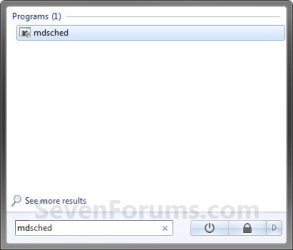
E) In the Start Menu search box, type mdsched and press Enter. (See screenshot below) Start-Menu.jpg
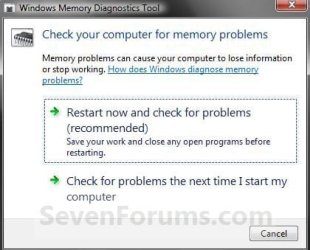
F) Select the Restart now and check for problems option. (See screenshot below) Memory.jpg
G) Go to step 4.
2. To Start from Windows Boot Manager A) Boot into the Advanced Boot Options screen.

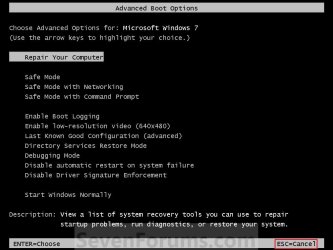
B) While in the Advanced Boot Options screen, press the Escape (Esc) key. (See screenshot below) Advanced-1.jpg
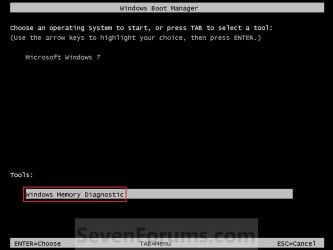
C) While in the Windows Boot Manager screen, press the Tab key. (See screenshot below) Advanced-2.jpg
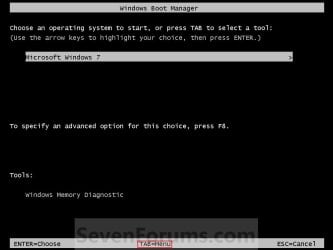
D) With Windows Memory Diagnostics selected, press Enter. (See screenshot below) Advanced-3.jpg
E) Go to step 4.
3. To Start from System Recovery Options A) Boot into the System Recovery Options screen.

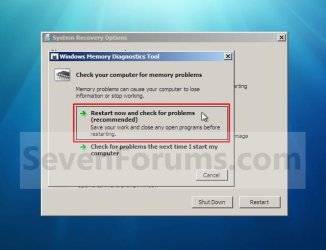
B) Select the Windows Memory Diagnostic Tool option. (See screenshot below) System_Recovery_Options.jpg
C) Select the Restart now and check for problems option. (See screenshot below) Select_When.jpg
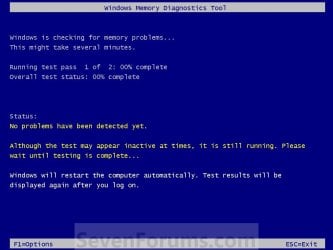
4. The computer will now restart, and you will see this screen next. (See screenshot below.
NOTE: Windows Memory Diagnostic Tool will run the Standard test by default. 1.jpg
A) Go to step 6.
5. To Change the Memory Diagnostic Tool Options A) Press F1. (See screenshot above)
NOTE: If you have a multimedia keyboard, then you may need to press the Function (F-Lock) key for F1 to work.

B) Press the TAB key to switch between the option categories, and use the arrow keys to select the option. (See screenshot below) Options.jpg
C) When finished, press F10 to apply any changes you made to the options. (See screenshot above)
NOTE: Press the Escape (Esc) key if you do not wish to make any changes to the options and return to the screen below step 4.
6. When the test is finished running, it will automatically restart the computer. (See screenshot below step 4)
NOTE: If errors are found, the Windows Memory Diagnostics Tool will attempt to determine which particular memory module in your computer is causing these errors. If that information is available, it will be stated in the results after you log on from the restart. If bad memory is found then you will need to remove and replace the bad RAM module.

7. You can also read the Memory Diagnostic Tool system log in Event Viewer.
That's it,
Shawn


Last edited:
Windows Memory Diagnostics Tool

Windows Memory Diagnostics Tool will not stop running been running all night and this morning still running how can i stop it.:cry:
 

My Computer

Computer Manufacturer/Model Number
Self built
OS
windows 7 RC
CPU
Intel dual core 2.53
Motherboard
ASUS
Memory
4GB
Graphics Card(s)
HIS
Sound Card
Builtin
Monitor(s) Displays
ACER CTR 21inch
Hard Drives
T1
Windows Memory Diagnostics Tool will not stop running been running all night and this morning still running how can i stop it.:cry:
Lower Right (on white Status bar)

Early, Am...
1086d1229784390t-memory-diagnostics-tool-1.jpg
 

My Computer

Computer Manufacturer/Model Number
Gateway GT5056
OS
XP_Pro, W7_7201, W7RC.vhd, SciLinux5.3, Fedora12, Fedora9_2x, OpenSolaris_09-06
CPU
AMD 64x2
Motherboard
Yes
Memory
1 gig
Graphics Card(s)
Dunno
Sound Card
Realtek something
Monitor(s) Displays
Samsung SyncMaster 940MW w/TV
Screen Resolution
1280x1024
Hard Drives
250 GB WD, USB Seagate Freedesk 1.5 T
Internet Speed
Cable modem
Other Info
1 + 1 = 10b,
7 + 7 = 16o,
a + b = 15h.
wish it worked but all that dose is stop the scan from starting for next phase
wont shut off by any of the controls
 

My Computer

Computer Manufacturer/Model Number
Self built
OS
windows 7 RC
CPU
Intel dual core 2.53
Motherboard
ASUS
Memory
4GB
Graphics Card(s)
HIS
Sound Card
Builtin
Monitor(s) Displays
ACER CTR 21inch
Hard Drives
T1
Hello Thumper, and welcome to Seven Forums.

You can just manually restart the computer by pressing the reset button on your computer's case to stop it. :)
 

My Computer

Computer type
PC/Desktop
Computer Manufacturer/Model Number
Self built custom
OS
64-bit Windows 11 Pro for Workstations
CPU
Intel i7-8700K OC'd to 5 GHz
Motherboard
ASUS ROG Maximus XI Formula Z390
Memory
64 GB (4x16GB) G.SKILL TridentZ RGB DDR4 3600 MHz
Graphics Card(s)
ASUS ROG-STRIX-GTX1080TI-O11G-GAMING
Sound Card
Integrated
Monitor(s) Displays
2 x Samsung Odyssey G7 27"
Screen Resolution
2560x1440
Hard Drives
1TB Samsung 990 PRO M.2,
4TB Samsung 990 PRO PRO M.2,
TerraMaster F8 SSD Plus NAS
PSU
Seasonic Prime Titanium 850W
Case
Thermaltake Core P3
Cooling
Corsair Hydro H115i
Keyboard
Logitech wireless K800
Mouse
Logitech MX Master 4
Internet Speed
2 Gb/s Download and 100 Mb/s Upload
Antivirus
Malwarebyte Anti-Malware Premium
Browser
Google Chrome
Other Info
Logitech Z625 speaker system,
Logitech BRIO 4K Pro webcam,
HP Color LaserJet Pro MFP M477fdn,
APC SMART-UPS RT 1000 XL - SURT1000XLI,
Galaxy S23 Plus phone
Hello Thumper, and welcome to Seven Forums.

You can just manually restart the computer by pressing the reset button on your computer's case to stop it. :)

How about Task Manager. Pull's me out sometimes.
 

My Computer

Computer Manufacturer/Model Number
BGC (Bob's Garage Crew)
OS
win 7 X64 Ultimate SP1
CPU
I3770K
Motherboard
Asus P8Z77-V Deluxe
Memory
G Skill F3-14900CL9-4GBXL x 4
Graphics Card(s)
NVIDIA GeForce GTX670 + Intel 4000
Sound Card
Realtek HD 5.1 (MOB)
Monitor(s) Displays
Asus VW224T (1)
Screen Resolution
1920 x 1080
Hard Drives
SATA Corsair Force GT 2.5" 180GB (System) Sata 3
OCZ Vertex3 120GB
OCZ Vertex 2 120GB 2.5" SATA II
ST31000524AS 1000.2GB
WD15EARS (External)
PSU
CoolerMaster 1000 Watt
Case
CoolerMaster HAF X
Cooling
CPU -- CoolerMaster 520N
Keyboard
MS Wireless 3000 V2
Mouse
MS Wireless 3000 V2
Internet Speed
Cable
Antivirus
Norton Internet Security
Browser
IE9
Other Info
AMI Bios 1805
OC'd 3%
Hello Thumper, and welcome to Seven Forums.

You can just manually restart the computer by pressing the reset button on your computer's case to stop it. :)

How about Task Manager. Pull's me out sometimes.

Sorry HammerHead, but this is running at boot before Windows 7 starts. You would not have the Task Manager as an option. Only after Windows 7 starts up you would. :)
 

My Computer

Computer type
PC/Desktop
Computer Manufacturer/Model Number
Self built custom
OS
64-bit Windows 11 Pro for Workstations
CPU
Intel i7-8700K OC'd to 5 GHz
Motherboard
ASUS ROG Maximus XI Formula Z390
Memory
64 GB (4x16GB) G.SKILL TridentZ RGB DDR4 3600 MHz
Graphics Card(s)
ASUS ROG-STRIX-GTX1080TI-O11G-GAMING
Sound Card
Integrated
Monitor(s) Displays
2 x Samsung Odyssey G7 27"
Screen Resolution
2560x1440
Hard Drives
1TB Samsung 990 PRO M.2,
4TB Samsung 990 PRO PRO M.2,
TerraMaster F8 SSD Plus NAS
PSU
Seasonic Prime Titanium 850W
Case
Thermaltake Core P3
Cooling
Corsair Hydro H115i
Keyboard
Logitech wireless K800
Mouse
Logitech MX Master 4
Internet Speed
2 Gb/s Download and 100 Mb/s Upload
Antivirus
Malwarebyte Anti-Malware Premium
Browser
Google Chrome
Other Info
Logitech Z625 speaker system,
Logitech BRIO 4K Pro webcam,
HP Color LaserJet Pro MFP M477fdn,
APC SMART-UPS RT 1000 XL - SURT1000XLI,
Galaxy S23 Plus phone
And i thank you all for your help but none of the above answers helped i had to remove the ram from both slot's to get it to reboot nothing else worked.some how it locked in that Memory Diagnostics Tool .so maybe this answer will help someone else in the further
 

My Computer

Computer Manufacturer/Model Number
Self built
OS
windows 7 RC
CPU
Intel dual core 2.53
Motherboard
ASUS
Memory
4GB
Graphics Card(s)
HIS
Sound Card
Builtin
Monitor(s) Displays
ACER CTR 21inch
Hard Drives
T1
Thumper, I'm happy to hear that you got it sorted. Thank you for posting back with your found solution. :)
 

My Computer

Computer type
PC/Desktop
Computer Manufacturer/Model Number
Self built custom
OS
64-bit Windows 11 Pro for Workstations
CPU
Intel i7-8700K OC'd to 5 GHz
Motherboard
ASUS ROG Maximus XI Formula Z390
Memory
64 GB (4x16GB) G.SKILL TridentZ RGB DDR4 3600 MHz
Graphics Card(s)
ASUS ROG-STRIX-GTX1080TI-O11G-GAMING
Sound Card
Integrated
Monitor(s) Displays
2 x Samsung Odyssey G7 27"
Screen Resolution
2560x1440
Hard Drives
1TB Samsung 990 PRO M.2,
4TB Samsung 990 PRO PRO M.2,
TerraMaster F8 SSD Plus NAS
PSU
Seasonic Prime Titanium 850W
Case
Thermaltake Core P3
Cooling
Corsair Hydro H115i
Keyboard
Logitech wireless K800
Mouse
Logitech MX Master 4
Internet Speed
2 Gb/s Download and 100 Mb/s Upload
Antivirus
Malwarebyte Anti-Malware Premium
Browser
Google Chrome
Other Info
Logitech Z625 speaker system,
Logitech BRIO 4K Pro webcam,
HP Color LaserJet Pro MFP M477fdn,
APC SMART-UPS RT 1000 XL - SURT1000XLI,
Galaxy S23 Plus phone
And i thank you all for your help but none of the above answers helped i had to remove the ram from both slot's to get it to reboot nothing else worked.some how it locked in that Memory Diagnostics Tool .so maybe this answer will help someone else in the further

Did you hit it a second time,

after the first 'Esc' stopped the 'scan-in-progress'?

Did you have computer power 'on' when you yanked the memory boards?

Certainly, with mainframe power off, the box is ready to boot from anywhere,
when power is reapplied...
 

My Computer

Computer Manufacturer/Model Number
Gateway GT5056
OS
XP_Pro, W7_7201, W7RC.vhd, SciLinux5.3, Fedora12, Fedora9_2x, OpenSolaris_09-06
CPU
AMD 64x2
Motherboard
Yes
Memory
1 gig
Graphics Card(s)
Dunno
Sound Card
Realtek something
Monitor(s) Displays
Samsung SyncMaster 940MW w/TV
Screen Resolution
1280x1024
Hard Drives
250 GB WD, USB Seagate Freedesk 1.5 T
Internet Speed
Cable modem
Other Info
1 + 1 = 10b,
7 + 7 = 16o,
a + b = 15h.
And i thank you all for your help but none of the above answers helped i had to remove the ram from both slot's to get it to reboot nothing else worked.some how it locked in that Memory Diagnostics Tool .so maybe this answer will help someone else in the further

Did you hit it a second time,

after the first 'Esc' stopped the 'scan-in-progress'?

Did you have computer power 'on' when you yanked the memory boards?

Certainly, with mainframe power off, the box is ready to boot from anywhere,
when power is reapplied...

No the system was powered off and power switch on the back was off also.
Hitting the esc button only paused the scan it did not stop it . i rebooted several times and memory tool still started every time. when i powered off and power switch on the back was off. I removed the ram and restarted my system it still went to memory tool but esc worked this time and rebooted and system came up. Also before running this tool due to a system crash action center told me to run this action and it did fix a problem i had with ATA channel 0 and channel 1the both had a yellow
warningicon.png
beside them and now gone after this happened.
 
Last edited:

My Computer

Computer Manufacturer/Model Number
Self built
OS
windows 7 RC
CPU
Intel dual core 2.53
Motherboard
ASUS
Memory
4GB
Graphics Card(s)
HIS
Sound Card
Builtin
Monitor(s) Displays
ACER CTR 21inch
Hard Drives
T1
And i thank you all for your help but none of the above answers helped i had to remove the ram from both slot's to get it to reboot nothing else worked.some how it locked in that Memory Diagnostics Tool .so maybe this answer will help someone else in the further

Did you hit it a second time,

after the first 'Esc' stopped the 'scan-in-progress'?

Did you have computer power 'on' when you yanked the memory boards?

Certainly, with mainframe power off, the box is ready to boot from anywhere,
when power is reapplied...

No the system was powered off and power switch on the back was off also.
Hitting the esc button only paused the scan it did not stop it .

i rebooted several times and memory tool still started every time.
when i powered off and power switch on the back was off.

I removed the ram
and restarted my system it still went to memory tool
but esc worked this time and rebooted and system came up.
What I have observed with my trial, is that a single Esc paused the testing.
It took a second keystroke to actually Exit.
I read your post as:

1. No, I did not hit 'Esc' a second time during initial memory test.

2. Memory testing started immediately, after every subsequent reboot.
(Did you ever hit 'Esc' key twice during these Memtests? Or just once?)

3. Finally, after several reboots, the ram was removed.

4. After ram removal, a single 'Esc' key exited the Memory Test utility and booted the w7 operating system.

5. You are currently running w7 with some ram still removed. 2 modules or 1?

The implication is that the removed ram is 'suspected bad' ram.
i.e. the single 1, or one of the 2, or both of the 2.

The next step would be to temporarily swap the installed ram with the suspect ram (but only 1 module at a time),
and run Memory tests again, restarting at square 1.
Keep the 'good ram' separate from the 'suspect bad' module.

(What happened prior to 'Memory testing' is of no concern here.)
(We're only 'looking at' the Memory test utility and the hw ram modules.)
 

My Computer

Computer Manufacturer/Model Number
Gateway GT5056
OS
XP_Pro, W7_7201, W7RC.vhd, SciLinux5.3, Fedora12, Fedora9_2x, OpenSolaris_09-06
CPU
AMD 64x2
Motherboard
Yes
Memory
1 gig
Graphics Card(s)
Dunno
Sound Card
Realtek something
Monitor(s) Displays
Samsung SyncMaster 940MW w/TV
Screen Resolution
1280x1024
Hard Drives
250 GB WD, USB Seagate Freedesk 1.5 T
Internet Speed
Cable modem
Other Info
1 + 1 = 10b,
7 + 7 = 16o,
a + b = 15h.
1. Yes, I did hit 'Esc' five or more time during initial memory test.

2. Memory testing started immediately, after every subsequent reboot.
(Did you ever hit 'Esc' key twice during these Memtests? Or just once?)
More then twice

3. Finally, after several reboots, the ram was removed.

4. After ram removal, a Double 'Esc' key exited the Memory Test utility and booted the Windows 7 operating system.

5. You are currently running Windows 7 with some ram still removed
No reinstalled both sticks 2gb each 1066mhz OCZ.
 

My Computer

Computer Manufacturer/Model Number
Self built
OS
windows 7 RC
CPU
Intel dual core 2.53
Motherboard
ASUS
Memory
4GB
Graphics Card(s)
HIS
Sound Card
Builtin
Monitor(s) Displays
ACER CTR 21inch
Hard Drives
T1
Guys, i ran the test & completed 100% but after re-start i didn get any pop-up or wat so ever :(
how do i check my results ? my pal told me to check in some ID under windows log, but how do i check it ? Please guide me :)

thanks :D
 

My Computer

Computer type
PC/Desktop
Computer Manufacturer/Model Number
Custom Build
OS
WINDOWS 7 ULTIMATE X64
CPU
Intel Core i5 2500k
Motherboard
AsusP8Z68-V
Memory
8GB Gskill DDR3 1600mhz
Graphics Card(s)
Zotac GTX 460
Sound Card
Asus Xonar DX
Monitor(s) Displays
View sonic VA1926w
Screen Resolution
1400*900
Hard Drives
SEGATE - SATA II 1TB
PSU
CORSAIR -VX 450w
Case
NZXT LEXA S
Cooling
Cooler master Hyper 212+
Keyboard
razer lycosa
Mouse
razer Death adder Dragon Age edition
Internet Speed
2mbps
Antivirus
Avast
Browser
Firefox
Hello Hector, and welcome to Seven Forums.

Normally if you did not have a pop-up, it did not find a problem. You might consider running Memtest86+ to help test and verify your memory further.

Hope this helps,
Shawn
 
Last edited:

My Computer

Computer type
PC/Desktop
Computer Manufacturer/Model Number
Self built custom
OS
64-bit Windows 11 Pro for Workstations
CPU
Intel i7-8700K OC'd to 5 GHz
Motherboard
ASUS ROG Maximus XI Formula Z390
Memory
64 GB (4x16GB) G.SKILL TridentZ RGB DDR4 3600 MHz
Graphics Card(s)
ASUS ROG-STRIX-GTX1080TI-O11G-GAMING
Sound Card
Integrated
Monitor(s) Displays
2 x Samsung Odyssey G7 27"
Screen Resolution
2560x1440
Hard Drives
1TB Samsung 990 PRO M.2,
4TB Samsung 990 PRO PRO M.2,
TerraMaster F8 SSD Plus NAS
PSU
Seasonic Prime Titanium 850W
Case
Thermaltake Core P3
Cooling
Corsair Hydro H115i
Keyboard
Logitech wireless K800
Mouse
Logitech MX Master 4
Internet Speed
2 Gb/s Download and 100 Mb/s Upload
Antivirus
Malwarebyte Anti-Malware Premium
Browser
Google Chrome
Other Info
Logitech Z625 speaker system,
Logitech BRIO 4K Pro webcam,
HP Color LaserJet Pro MFP M477fdn,
APC SMART-UPS RT 1000 XL - SURT1000XLI,
Galaxy S23 Plus phone
Thanks for the Reply Mate :)
how long should i run the memtest ?
 

My Computer

Computer type
PC/Desktop
Computer Manufacturer/Model Number
Custom Build
OS
WINDOWS 7 ULTIMATE X64
CPU
Intel Core i5 2500k
Motherboard
AsusP8Z68-V
Memory
8GB Gskill DDR3 1600mhz
Graphics Card(s)
Zotac GTX 460
Sound Card
Asus Xonar DX
Monitor(s) Displays
View sonic VA1926w
Screen Resolution
1400*900
Hard Drives
SEGATE - SATA II 1TB
PSU
CORSAIR -VX 450w
Case
NZXT LEXA S
Cooling
Cooler master Hyper 212+
Keyboard
razer lycosa
Mouse
razer Death adder Dragon Age edition
Internet Speed
2mbps
Antivirus
Avast
Browser
Firefox
Until whenever it finishes. It may be best to start it before you head off to bed and let it run overnight though.
 

My Computer

Computer type
PC/Desktop
Computer Manufacturer/Model Number
Self built custom
OS
64-bit Windows 11 Pro for Workstations
CPU
Intel i7-8700K OC'd to 5 GHz
Motherboard
ASUS ROG Maximus XI Formula Z390
Memory
64 GB (4x16GB) G.SKILL TridentZ RGB DDR4 3600 MHz
Graphics Card(s)
ASUS ROG-STRIX-GTX1080TI-O11G-GAMING
Sound Card
Integrated
Monitor(s) Displays
2 x Samsung Odyssey G7 27"
Screen Resolution
2560x1440
Hard Drives
1TB Samsung 990 PRO M.2,
4TB Samsung 990 PRO PRO M.2,
TerraMaster F8 SSD Plus NAS
PSU
Seasonic Prime Titanium 850W
Case
Thermaltake Core P3
Cooling
Corsair Hydro H115i
Keyboard
Logitech wireless K800
Mouse
Logitech MX Master 4
Internet Speed
2 Gb/s Download and 100 Mb/s Upload
Antivirus
Malwarebyte Anti-Malware Premium
Browser
Google Chrome
Other Info
Logitech Z625 speaker system,
Logitech BRIO 4K Pro webcam,
HP Color LaserJet Pro MFP M477fdn,
APC SMART-UPS RT 1000 XL - SURT1000XLI,
Galaxy S23 Plus phone
Where is the log file

Hi,

Do you know where the log file is located? I'd like to review it. (I mistrust the "usually means no problems". What about "unusually"...)

Thanks

Eric
 

My Computer

OS
Windows 7 64 bit

My Computer

Computer type
PC/Desktop
Computer Manufacturer/Model Number
Self built custom
OS
64-bit Windows 11 Pro for Workstations
CPU
Intel i7-8700K OC'd to 5 GHz
Motherboard
ASUS ROG Maximus XI Formula Z390
Memory
64 GB (4x16GB) G.SKILL TridentZ RGB DDR4 3600 MHz
Graphics Card(s)
ASUS ROG-STRIX-GTX1080TI-O11G-GAMING
Sound Card
Integrated
Monitor(s) Displays
2 x Samsung Odyssey G7 27"
Screen Resolution
2560x1440
Hard Drives
1TB Samsung 990 PRO M.2,
4TB Samsung 990 PRO PRO M.2,
TerraMaster F8 SSD Plus NAS
PSU
Seasonic Prime Titanium 850W
Case
Thermaltake Core P3
Cooling
Corsair Hydro H115i
Keyboard
Logitech wireless K800
Mouse
Logitech MX Master 4
Internet Speed
2 Gb/s Download and 100 Mb/s Upload
Antivirus
Malwarebyte Anti-Malware Premium
Browser
Google Chrome
Other Info
Logitech Z625 speaker system,
Logitech BRIO 4K Pro webcam,
HP Color LaserJet Pro MFP M477fdn,
APC SMART-UPS RT 1000 XL - SURT1000XLI,
Galaxy S23 Plus phone
I tried 3 times to do it and all I get is a blank screen. What am I doing wrong ?
 

My Computer

Computer Manufacturer/Model Number
Asus N53v-DH 72
OS
windows 7 home premium 64bit
CPU
Intel(R) Core(TM) i7-2670QM CPU @ 2.20GHz
Motherboard
ASUSTeK Computer Inc
Memory
6049 MB
Graphics Card(s)
NVIDIA GeForce GT 540M (1024 MB)
Monitor(s) Displays
15.6
Screen Resolution
1920-1080
Hard Drives
ST9750420AS (698 GB, IDE)

C: (NTFS) 293.0 GB (229.9 GB free)
D: (NTFS) 380.6 GB (380.5 GB free)
Total Size 673.6 GB (610.4 GB free)
Keyboard
Standard
Mouse
Optical
Internet Speed
D-12877kbps U-370kbps
Back
Top