Memory Distribution

DirtRider

Just Looking
Guru
VIP
Local time
11:37 PM
Messages
603
I have just installed my new Sapphire HD 5770 1 Gig card. Now I am ruining Win7 Pro 32 bit and have 4 Gig on board memory. Now with the new card I would in affect have a total of 5 Gig. So as we know 32 bit only looks at 4 Gig so when playing games how is the memory now distributed or what effect does the additional 1 Gig on the ATI card have?
 

My Computer

Computer Manufacturer/Model Number
Proline
OS
Windows 7 Pro 64 bit
CPU
Intel(R) Core(TM) i7 CPU 870 @ 2.93GHz
Motherboard
H55-G43(MS-7638)
Memory
4GB
Graphics Card(s)
NVIDIA GeForce GTX 470
Sound Card
Onboard
Monitor(s) Displays
Proline LCD 19 inch
Screen Resolution
1280 x 1024
Hard Drives
2 x SATA 250 Gig 1 x External 2TB
PSU
RX 730 SS
Case
Proline
Cooling
Standard
Keyboard
PS2
Mouse
PS2
Internet Speed
To embarrassed to tell lol
32bit is only read max 4GB of the memory. and you have VGA card 1Gb. what game that's u mean??

you can open the task manager when you run a game. and that's will show you how much memory used.
 

My Computer

Computer Manufacturer/Model Number
built up
OS
windows 7
CPU
Phenom II AMD Dragon 3.5Ghz
Memory
DDR3 4GB
Graphics Card(s)
ATI Radeon 512Mb
Monitor(s) Displays
HP L1506
Screen Resolution
1152 x 864
Hard Drives
WDC 1 TB SATA-II Green Power
Keyboard
HP wireless keyboard
Mouse
HP Optic
Internet Speed
1GB
What I am saying is how does the extra 1 Gig get used above the on board 4 Gig
 

My Computer

Computer Manufacturer/Model Number
Proline
OS
Windows 7 Pro 64 bit
CPU
Intel(R) Core(TM) i7 CPU 870 @ 2.93GHz
Motherboard
H55-G43(MS-7638)
Memory
4GB
Graphics Card(s)
NVIDIA GeForce GTX 470
Sound Card
Onboard
Monitor(s) Displays
Proline LCD 19 inch
Screen Resolution
1280 x 1024
Hard Drives
2 x SATA 250 Gig 1 x External 2TB
PSU
RX 730 SS
Case
Proline
Cooling
Standard
Keyboard
PS2
Mouse
PS2
Internet Speed
To embarrassed to tell lol
if you want you can change to the 64bit.
 

My Computer

Computer Manufacturer/Model Number
built up
OS
windows 7
CPU
Phenom II AMD Dragon 3.5Ghz
Memory
DDR3 4GB
Graphics Card(s)
ATI Radeon 512Mb
Monitor(s) Displays
HP L1506
Screen Resolution
1152 x 864
Hard Drives
WDC 1 TB SATA-II Green Power
Keyboard
HP wireless keyboard
Mouse
HP Optic
Internet Speed
1GB
Now with the new card I would in affect have a total of 5 Gig.

Actually no you don't. You still only have 4 GB of ram and now have a video card with 1 GB of ram on it, the two do not get added together.

So as we know 32 bit only looks at 4 Gig so when playing games how is the memory now distributed or what effect does the additional 1 Gig on the ATI card have?

With being on 32 bit Windows it means you now have less than 3 GB of ram available due to addressing limitations; 1 GB for the video card and whatever is required by the rest of the hardware. Pretty sure there is something in the tutorials about this but not finding it at the moment so,

Coding Horror: Dude, Where's My 4 Gigabytes of RAM?
 

My Computer

Computer type
PC/Desktop
Computer Manufacturer/Model Number
Me
OS
Win 7 Ultimate x64
CPU
FX-8350 @ 4.6 GHz so far
Motherboard
Asus M5A97 EVO
Memory
ADATA XPG V1 Series Black 8GB DDR3 1600
Graphics Card(s)
Sapphire R9 270x Dual-X
Sound Card
Xonar DGX w/ Corsair Vengence 1300
Monitor(s) Displays
Acer S232HL Abid
Screen Resolution
1920x1080
Hard Drives
120 GB OCZ Vertex 3
500 GB Seagate 7200.12
PSU
Antec Earthwatts 650W Green
Case
Antec Three Hundred
Cooling
Cooler Master 212 EVO
Keyboard
Logitech G510
Mouse
Logitech G500s
Internet Speed
35000/3000
So then what is the point of getting a Video card with memory on it
 

My Computer

Computer Manufacturer/Model Number
Proline
OS
Windows 7 Pro 64 bit
CPU
Intel(R) Core(TM) i7 CPU 870 @ 2.93GHz
Motherboard
H55-G43(MS-7638)
Memory
4GB
Graphics Card(s)
NVIDIA GeForce GTX 470
Sound Card
Onboard
Monitor(s) Displays
Proline LCD 19 inch
Screen Resolution
1280 x 1024
Hard Drives
2 x SATA 250 Gig 1 x External 2TB
PSU
RX 730 SS
Case
Proline
Cooling
Standard
Keyboard
PS2
Mouse
PS2
Internet Speed
To embarrassed to tell lol
So then what is the point of getting a Video card with memory on it

To stop it from stealing your RAM? Think about it, If the graphics card doesn't have to ask Windows for RAM but uses its own, then your memory and your OS isn' being bogged down by it.

For example: I have 3GB of Ram. I used to have an integrated Graphics card with 256MB dedictaed memory. As it was integrated, the graphics card was actually "stealing" 256MB from my Ram so I actually had 2.75GB Ram.

Now I have a Graphics card with 512MB but it is its own memory, so I have double the video memory, but I also have all my 3GB available. Graphics cards always need memory after all, but at least this memory now isn't being stolen away from my "proper" ram, freeing the memory for other stuff I need.

Least thats how I see it from my laymans point of view. (I know very little about graphics cards if I'm honest)

To answer your original question: the 1GB Graphics Memory will just be used for Graphics nothing else
 

My Computer

Computer type
PC/Desktop
Computer Manufacturer/Model Number
Medion Erazer (note to self: insert model number) - with custom additions
OS
Windows 10 Pro x64
CPU
Intel Core i5 7400 @ 3.00GHz
Motherboard
OEM supllied with PC
Memory
8GB 2133Mhz DDR4 (OEM supplied)
Graphics Card(s)
Gygabyte Windforce GTX 1050Ti (Factory Overclocked)
Sound Card
Realtek
Monitor(s) Displays
Acer Al1980 + HKC
Screen Resolution
1360*768(HKC) / 1280*1024(Acer)
Hard Drives
1TB Toshiba
1TB WD Caviar Green
120GB Samsung Evo 840
PSU
OEM supplied (no power rating on case)
Case
OEM Supplied
Cooling
Stock
Keyboard
Logitech Wireless
Mouse
Logitect Wireless
Internet Speed
40Mb/s Down 10Mb/s Up
Antivirus
Defender
Browser
Firefox

My Computer

Computer type
PC/Desktop
Computer Manufacturer/Model Number
Me
OS
Win 7 Ultimate x64
CPU
FX-8350 @ 4.6 GHz so far
Motherboard
Asus M5A97 EVO
Memory
ADATA XPG V1 Series Black 8GB DDR3 1600
Graphics Card(s)
Sapphire R9 270x Dual-X
Sound Card
Xonar DGX w/ Corsair Vengence 1300
Monitor(s) Displays
Acer S232HL Abid
Screen Resolution
1920x1080
Hard Drives
120 GB OCZ Vertex 3
500 GB Seagate 7200.12
PSU
Antec Earthwatts 650W Green
Case
Antec Three Hundred
Cooling
Cooler Master 212 EVO
Keyboard
Logitech G510
Mouse
Logitech G500s
Internet Speed
35000/3000
So then what is the point of getting a Video card with memory on it

To stop it from stealing your RAM? Think about it, If the graphics card doesn't have to ask Windows for RAM but uses its own, then your memory and your OS isn' being bogged down by it.

So then Windows will still use the full 4 Gig and the card will take from it's 1 Gig first if I understand correctly. So in affect even on a 32 bit you will have 5 Gig actually being used
 

My Computer

Computer Manufacturer/Model Number
Proline
OS
Windows 7 Pro 64 bit
CPU
Intel(R) Core(TM) i7 CPU 870 @ 2.93GHz
Motherboard
H55-G43(MS-7638)
Memory
4GB
Graphics Card(s)
NVIDIA GeForce GTX 470
Sound Card
Onboard
Monitor(s) Displays
Proline LCD 19 inch
Screen Resolution
1280 x 1024
Hard Drives
2 x SATA 250 Gig 1 x External 2TB
PSU
RX 730 SS
Case
Proline
Cooling
Standard
Keyboard
PS2
Mouse
PS2
Internet Speed
To embarrassed to tell lol
No, Windows can only use up to 3 gig in your case because the 1 gig on your video card is "stomping" on the upper one gig of your 4 gig of system ram which is essentially disabled.

If you install the 64 bit version of windows then you will be able to use all 4 gig of system ram and the video ram will be mapped way up high out of the way.
 

My Computer

Computer Manufacturer/Model Number
Scratch built
OS
Windows 7 x64 Ultimate
CPU
i7 960
Motherboard
Asus P6X58D
Memory
12 Gig Corsair Dominator
Graphics Card(s)
Nvidia 480
Sound Card
Maudio Delta 44 + breakout box
Monitor(s) Displays
Dell UltraSharp U2410 24in and Samsung 21 dual monitors
Screen Resolution
1920x1200 and 1280x1024
Hard Drives
Primary: Intel X-25M G2 160G SSD
Secondary: Segate baracuda 1.0 TB
HDs in AHCI mode.
PSU
Corasair TX850
Case
Cooler Master HAF
Cooling
Corsair H50
Keyboard
Logitech G15 + N52 game pad
Mouse
Logitech MX518
Internet Speed
15kbs down 4.5kbps up
Other Info
WEI 7.6
CPU & RAM 7.6
Graphics 7.9
Hard disk 7.7
So this is what I thought the first time so I could have just as well purchased a card with no memory at all as it come down to the same thing having 4 Gig on board already :huh:
 

My Computer

Computer Manufacturer/Model Number
Proline
OS
Windows 7 Pro 64 bit
CPU
Intel(R) Core(TM) i7 CPU 870 @ 2.93GHz
Motherboard
H55-G43(MS-7638)
Memory
4GB
Graphics Card(s)
NVIDIA GeForce GTX 470
Sound Card
Onboard
Monitor(s) Displays
Proline LCD 19 inch
Screen Resolution
1280 x 1024
Hard Drives
2 x SATA 250 Gig 1 x External 2TB
PSU
RX 730 SS
Case
Proline
Cooling
Standard
Keyboard
PS2
Mouse
PS2
Internet Speed
To embarrassed to tell lol
No, Windows can only use up to 3 gig in your case because the 1 gig on your video card is "stomping" on the upper one gig of your 4 gig of system ram which is essentially disabled.

If you install the 64 bit version of windows then you will be able to use all 4 gig of system ram and the video ram will be mapped way up high out of the way.

And no matter how you slice it the two do not get added together.

Graphics processing unit - Wikipedia, the free encyclopedia

Video memory - Wikipedia, the free encyclopedia

VRAM - Wikipedia, the free encyclopedia

Video memory mysteries (dated, but every little bit helps)
 

My Computer

Computer type
PC/Desktop
Computer Manufacturer/Model Number
Me
OS
Win 7 Ultimate x64
CPU
FX-8350 @ 4.6 GHz so far
Motherboard
Asus M5A97 EVO
Memory
ADATA XPG V1 Series Black 8GB DDR3 1600
Graphics Card(s)
Sapphire R9 270x Dual-X
Sound Card
Xonar DGX w/ Corsair Vengence 1300
Monitor(s) Displays
Acer S232HL Abid
Screen Resolution
1920x1080
Hard Drives
120 GB OCZ Vertex 3
500 GB Seagate 7200.12
PSU
Antec Earthwatts 650W Green
Case
Antec Three Hundred
Cooling
Cooler Master 212 EVO
Keyboard
Logitech G510
Mouse
Logitech G500s
Internet Speed
35000/3000
I agree with Stormy13. They don't get added together. Video card memory is not system memory.
 

My Computer

Computer Manufacturer/Model Number
Dell Inspiron 1520 (Laptop)/ Home (Desktop)
OS
Windows 7 x64 / Same
CPU
Intel Core 2 Duo T7250 / Intel Core i7 930
Motherboard
Intel 945 / Asus P6X58D-E
Memory
4GB / 6GB
Graphics Card(s)
NVIDIA GeForce 8400M GS / ASUS 1GB
Sound Card
Whatever Dell gave me :-( / Onboard
Monitor(s) Displays
15.4" LCD / Crappy CRT
Hard Drives
Seagate 500GB SATA; 7200 RPM / Seagate 1TB SATA; 7200 RPM
PSU
N/A / OCZ Fatal1ty 550W Modular
Case
N/A / Antec 900
Cooling
Air
Mouse
Microsoft Presenter (Bluetooth)
No, Windows can only use up to 3 gig in your case because the 1 gig on your video card is "stomping" on the upper one gig of your 4 gig of system ram which is essentially disabled.

If you install the 64 bit version of windows then you will be able to use all 4 gig of system ram and the video ram will be mapped way up high out of the way.

And no matter how you slice it the two do not get added together.

Graphics processing unit - Wikipedia, the free encyclopedia

Video memory - Wikipedia, the free encyclopedia

VRAM - Wikipedia, the free encyclopedia

Video memory mysteries (dated, but every little bit helps)

So basically then I do have a total of 5 Gig working at one time but not as one so to speak. In other words if my system (Win7) is using the full 4 Gigs the game will still have the 1 Gig on the video card to use. Then it is better to have a Video card with 1 Gig on it
 

My Computer

Computer Manufacturer/Model Number
Proline
OS
Windows 7 Pro 64 bit
CPU
Intel(R) Core(TM) i7 CPU 870 @ 2.93GHz
Motherboard
H55-G43(MS-7638)
Memory
4GB
Graphics Card(s)
NVIDIA GeForce GTX 470
Sound Card
Onboard
Monitor(s) Displays
Proline LCD 19 inch
Screen Resolution
1280 x 1024
Hard Drives
2 x SATA 250 Gig 1 x External 2TB
PSU
RX 730 SS
Case
Proline
Cooling
Standard
Keyboard
PS2
Mouse
PS2
Internet Speed
To embarrassed to tell lol
No.

In your setup, windows will have 3 gig or less to use and the video card 1 gig. You can look it up right now. How much ram usable does your windows machine report? Right click the task bar, then Start Task Manager, then click the performance tab then click the "Resource Monitor" button. On the Resource Monitor, click the "Memory" tab and look at the colored graph. It will show you your total system ram and it will also show some amount of it labelled "Hardware reserved" that part of your system ram can never be used for anything. If you use W7 x64 then there will be very little Hardware Reserved area any more and pretty much your full 4 gig of ram can be used by windows. (My hardware reserved is currently 5 MB, so small the grey part isn't even visible on the graph)

Also, you can.t buy a video card with no ram because all add-in cards use their own ram for speed reasons. Frequently built-in motherboard video chips use system ram instead of their own ram but that's not the case here at all.
 

My Computer

Computer Manufacturer/Model Number
Scratch built
OS
Windows 7 x64 Ultimate
CPU
i7 960
Motherboard
Asus P6X58D
Memory
12 Gig Corsair Dominator
Graphics Card(s)
Nvidia 480
Sound Card
Maudio Delta 44 + breakout box
Monitor(s) Displays
Dell UltraSharp U2410 24in and Samsung 21 dual monitors
Screen Resolution
1920x1200 and 1280x1024
Hard Drives
Primary: Intel X-25M G2 160G SSD
Secondary: Segate baracuda 1.0 TB
HDs in AHCI mode.
PSU
Corasair TX850
Case
Cooler Master HAF
Cooling
Corsair H50
Keyboard
Logitech G15 + N52 game pad
Mouse
Logitech MX518
Internet Speed
15kbs down 4.5kbps up
Other Info
WEI 7.6
CPU & RAM 7.6
Graphics 7.9
Hard disk 7.7
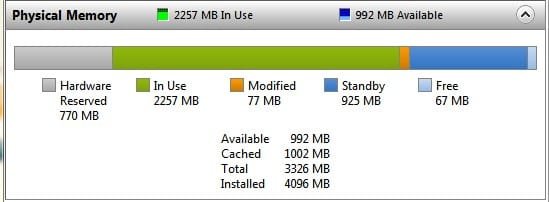
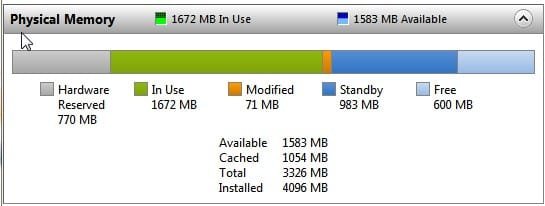
Ok I did a capture with BFBC2 running and without it running
 

Attachments

  • RAM01 Jul. 14 19.20.jpg
    RAM01 Jul. 14 19.20.jpg
    15.2 KB · Views: 12
  • RAM02 Jul. 14 19.21.jpg
    RAM02 Jul. 14 19.21.jpg
    14.7 KB · Views: 11

My Computer

Computer Manufacturer/Model Number
Proline
OS
Windows 7 Pro 64 bit
CPU
Intel(R) Core(TM) i7 CPU 870 @ 2.93GHz
Motherboard
H55-G43(MS-7638)
Memory
4GB
Graphics Card(s)
NVIDIA GeForce GTX 470
Sound Card
Onboard
Monitor(s) Displays
Proline LCD 19 inch
Screen Resolution
1280 x 1024
Hard Drives
2 x SATA 250 Gig 1 x External 2TB
PSU
RX 730 SS
Case
Proline
Cooling
Standard
Keyboard
PS2
Mouse
PS2
Internet Speed
To embarrassed to tell lol
Ok I did a capture with BFBC2 running and without it running


Regardless of what you have running, you only have 3326GB at your disposal. The remaining (770MB) is system-reserved.

Your video card is using its own 1GB of memory, not shown in that pic.
 

My Computer

Computer Manufacturer/Model Number
Dell Inspiron 1520 (Laptop)/ Home (Desktop)
OS
Windows 7 x64 / Same
CPU
Intel Core 2 Duo T7250 / Intel Core i7 930
Motherboard
Intel 945 / Asus P6X58D-E
Memory
4GB / 6GB
Graphics Card(s)
NVIDIA GeForce 8400M GS / ASUS 1GB
Sound Card
Whatever Dell gave me :-( / Onboard
Monitor(s) Displays
15.4" LCD / Crappy CRT
Hard Drives
Seagate 500GB SATA; 7200 RPM / Seagate 1TB SATA; 7200 RPM
PSU
N/A / OCZ Fatal1ty 550W Modular
Case
N/A / Antec 900
Cooling
Air
Mouse
Microsoft Presenter (Bluetooth)
Ok, that's pretty typical there. Windows gets slightly over 3 gig to use for itself. It looks like your video card is making 512 meg available at once for addressing externally and the rest of that 720 is other pieces of hardware in your computer each needing some amount of addressable ram space.

Though your video card is 1024 meg, the driver is only making 512 available for direct addressing then using the other 512 used internally (or switching it back and forth as needed) so that it is not taking up a full 1 meg of your main ram. Some cards DO that and reduce your usable memory to like 2.7 gig :(

So anyway, you have a decent mix of ram use there for the 32 bit version of windows. I wouldn;t worry about anything at this point (Though W7x64 will get you that extra 700 meg back!)
 

My Computer

Computer Manufacturer/Model Number
Scratch built
OS
Windows 7 x64 Ultimate
CPU
i7 960
Motherboard
Asus P6X58D
Memory
12 Gig Corsair Dominator
Graphics Card(s)
Nvidia 480
Sound Card
Maudio Delta 44 + breakout box
Monitor(s) Displays
Dell UltraSharp U2410 24in and Samsung 21 dual monitors
Screen Resolution
1920x1200 and 1280x1024
Hard Drives
Primary: Intel X-25M G2 160G SSD
Secondary: Segate baracuda 1.0 TB
HDs in AHCI mode.
PSU
Corasair TX850
Case
Cooler Master HAF
Cooling
Corsair H50
Keyboard
Logitech G15 + N52 game pad
Mouse
Logitech MX518
Internet Speed
15kbs down 4.5kbps up
Other Info
WEI 7.6
CPU & RAM 7.6
Graphics 7.9
Hard disk 7.7
I was not really worried about it as everything runs great, it was just something that crossed my mind when I asked in another thread what is better 64 or 32. I suppose if I wanted to go to 64 now it would be a whole new W7 OS as I believe you cannot upgrade from 32 to 64
 

My Computer

Computer Manufacturer/Model Number
Proline
OS
Windows 7 Pro 64 bit
CPU
Intel(R) Core(TM) i7 CPU 870 @ 2.93GHz
Motherboard
H55-G43(MS-7638)
Memory
4GB
Graphics Card(s)
NVIDIA GeForce GTX 470
Sound Card
Onboard
Monitor(s) Displays
Proline LCD 19 inch
Screen Resolution
1280 x 1024
Hard Drives
2 x SATA 250 Gig 1 x External 2TB
PSU
RX 730 SS
Case
Proline
Cooling
Standard
Keyboard
PS2
Mouse
PS2
Internet Speed
To embarrassed to tell lol
I was not really worried about it as everything runs great, it was just something that crossed my mind when I asked in another thread what is better 64 or 32. I suppose if I wanted to go to 64 now it would be a whole new W7 OS as I believe you cannot upgrade from 32 to 64

Correct, to go x64 requires a fresh install of the OS.
 

My Computer

Computer Manufacturer/Model Number
Dell Inspiron 1520 (Laptop)/ Home (Desktop)
OS
Windows 7 x64 / Same
CPU
Intel Core 2 Duo T7250 / Intel Core i7 930
Motherboard
Intel 945 / Asus P6X58D-E
Memory
4GB / 6GB
Graphics Card(s)
NVIDIA GeForce 8400M GS / ASUS 1GB
Sound Card
Whatever Dell gave me :-( / Onboard
Monitor(s) Displays
15.4" LCD / Crappy CRT
Hard Drives
Seagate 500GB SATA; 7200 RPM / Seagate 1TB SATA; 7200 RPM
PSU
N/A / OCZ Fatal1ty 550W Modular
Case
N/A / Antec 900
Cooling
Air
Mouse
Microsoft Presenter (Bluetooth)
Back
Top