
Solved Memory Full

After converting to logical drives, I noticed that I had lost "HP_Tools E:" drive. (compared screen shot of #4 and #34) Is it OK?
 

My Computer

Computer Manufacturer/Model Number
Hewlett-Packard / dv6 notebook PC
OS
Windows 7 Home Premium 64bit
CPU
Intel(R) Core(TM) i5 CPU M 450 @ 2.40GHz, 2 core
Motherboard
Hewlett-Packard 144A
Memory
4 GB
Graphics Card(s)
ATI
Sound Card
ATI High Definition Audio Device
Monitor(s) Displays
Name Intel(R) HD Graphics
Screen Resolution
Resolution 1366 x 768 x 60 hertz
Hard Drives
466GB TOSHIBA TOSHIBA MK5056GSY (SATA)
C: 223.09 GB
G: 220.99 GB (partition)
To convert back to Basic from Dynamic you needed to first delete the partition you added which tipped it to convert to Dynamic. There can only be four Primary or three Primary and unlimited Logical partitions on a Basic Disk.

When the extra Primary was not deleted, it dropped the last partition, HP Tools which is expendable.

When you gain the confidence to do the Clean Reinstall - Factory OEM Windows 7 you can reclaim your entire HD and all the performance Win7 is capable of. Let us know and we'll be here to help you.
 
To convert back to Basic from Dynamic you needed to first delete the partition you added which tipped it to convert to Dynamic. There can only be four Primary or three Primary and unlimited Logical partitions on a Basic Disk.

When the extra Primary was not deleted, it dropped the last partition, HP Tools which is expendable.

When you gain the confidence to do the Clean Reinstall - Factory OEM Windows 7 you can reclaim your entire HD and all the performance Win7 is capable of. Let us know and we'll be here to help you.
Thanks Greg, I'll see this and think about it
 

My Computer

Computer Manufacturer/Model Number
Hewlett-Packard / dv6 notebook PC
OS
Windows 7 Home Premium 64bit
CPU
Intel(R) Core(TM) i5 CPU M 450 @ 2.40GHz, 2 core
Motherboard
Hewlett-Packard 144A
Memory
4 GB
Graphics Card(s)
ATI
Sound Card
ATI High Definition Audio Device
Monitor(s) Displays
Name Intel(R) HD Graphics
Screen Resolution
Resolution 1366 x 768 x 60 hertz
Hard Drives
466GB TOSHIBA TOSHIBA MK5056GSY (SATA)
C: 223.09 GB
G: 220.99 GB (partition)
When you gain the confidence to do the Clean Reinstall - Factory OEM Windows 7 you can reclaim your entire HD and all the performance Win7 is capable of. Let us know and we'll be here to help you.

Hi Greg,
I think I am ready for clean re-install. I have few questions regarding steps you described. Should I ask you here or I ask in that post.
 

My Computer

Computer Manufacturer/Model Number
Hewlett-Packard / dv6 notebook PC
OS
Windows 7 Home Premium 64bit
CPU
Intel(R) Core(TM) i5 CPU M 450 @ 2.40GHz, 2 core
Motherboard
Hewlett-Packard 144A
Memory
4 GB
Graphics Card(s)
ATI
Sound Card
ATI High Definition Audio Device
Monitor(s) Displays
Name Intel(R) HD Graphics
Screen Resolution
Resolution 1366 x 768 x 60 hertz
Hard Drives
466GB TOSHIBA TOSHIBA MK5056GSY (SATA)
C: 223.09 GB
G: 220.99 GB (partition)
Thanks Greg. I have done this so far....
Steps 1 to 4 : Done.
Step 5: I run Belarc Advisor. It give me report in browser. What is next step.
Step 6 : done
Step 7 : I don't get this one.
 

My Computer

Computer Manufacturer/Model Number
Hewlett-Packard / dv6 notebook PC
OS
Windows 7 Home Premium 64bit
CPU
Intel(R) Core(TM) i5 CPU M 450 @ 2.40GHz, 2 core
Motherboard
Hewlett-Packard 144A
Memory
4 GB
Graphics Card(s)
ATI
Sound Card
ATI High Definition Audio Device
Monitor(s) Displays
Name Intel(R) HD Graphics
Screen Resolution
Resolution 1366 x 768 x 60 hertz
Hard Drives
466GB TOSHIBA TOSHIBA MK5056GSY (SATA)
C: 223.09 GB
G: 220.99 GB (partition)
Print out Belarc Advisor so you have a full audit of all your installed software with keys and hardware. Save it as a reference.

Do you have the disks or installers for the software you want to reinstall? Go through the list and All Programs to check to be sure. If you need help finding any try Google or ask back here. Only concern yourself with the software you use and want for Clean Reinstall.
 
I have done it. I checked that I have all installations I need./
Now, step 8. I want to do format / clean whole HD and clean installation. My plan is to have same like existing partitions. C: for program and other partition for data. As you suggest recovery drive will not available, isn't it?

Capture2.JPG
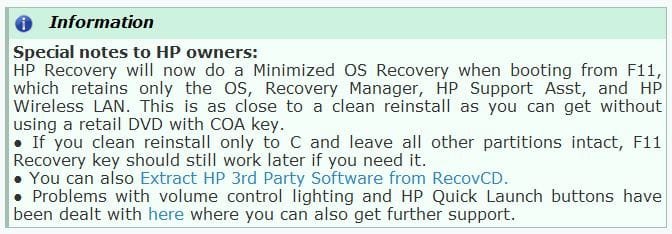
This says, HP will retains OS only when run recovery. I have never done recovery using F11, but if I have to do it, will I able to get my data as it is if I save in different partition!
 

My Computer

Computer Manufacturer/Model Number
Hewlett-Packard / dv6 notebook PC
OS
Windows 7 Home Premium 64bit
CPU
Intel(R) Core(TM) i5 CPU M 450 @ 2.40GHz, 2 core
Motherboard
Hewlett-Packard 144A
Memory
4 GB
Graphics Card(s)
ATI
Sound Card
ATI High Definition Audio Device
Monitor(s) Displays
Name Intel(R) HD Graphics
Screen Resolution
Resolution 1366 x 768 x 60 hertz
Hard Drives
466GB TOSHIBA TOSHIBA MK5056GSY (SATA)
C: 223.09 GB
G: 220.99 GB (partition)
You should back up your data externally whenever running Repairs or a reinstall.

If you're unable to do this then run the Clean Reinstall - Factory OEM Windows 7 to the C partition only while storing your data on another partition. While this is not the recommended method, as long as you only select to install to the C partition and don't touch any other during install your data should be safe and Recovery and Tools partitions should remain bootable.

To create a data partition on the HD, use Partition Wizard bootable CD to shrink C, convert it to Logical, then create a new adjacent Logical Data partition: Partition Wizard Resize Partition Video Help.
How to set partition as Primary or Logical.

If you can back your data up externally then you can run HP Factory Recovery to see if it offers Minimal Recovery option. If not I would abort it to do the Clean Reinstall.

Make your Recovery disks first either way.
 
Last edited:
I have my recovery disk. So I think I can go ahead.
Now my default boot is from HD. So when I insert boot-able disk I have to press F9 for start boot from disk. Is is OK? or I have to change anything before start clean installing..
 

My Computer

Computer Manufacturer/Model Number
Hewlett-Packard / dv6 notebook PC
OS
Windows 7 Home Premium 64bit
CPU
Intel(R) Core(TM) i5 CPU M 450 @ 2.40GHz, 2 core
Motherboard
Hewlett-Packard 144A
Memory
4 GB
Graphics Card(s)
ATI
Sound Card
ATI High Definition Audio Device
Monitor(s) Displays
Name Intel(R) HD Graphics
Screen Resolution
Resolution 1366 x 768 x 60 hertz
Hard Drives
466GB TOSHIBA TOSHIBA MK5056GSY (SATA)
C: 223.09 GB
G: 220.99 GB (partition)
With HP tap the F9 key at boot to trigger the DVD. Watch for prompt to Press any key to boot disk.

You are using the latest official Win7 installer from tutorial Step 1?
 
With HP tap the F9 key at boot to trigger the DVD. Watch for prompt to Press any key to boot disk.

You are using the latest official Win7 installer from tutorial Step 1?


Yes I have burn disk from that link.
 

My Computer

Computer Manufacturer/Model Number
Hewlett-Packard / dv6 notebook PC
OS
Windows 7 Home Premium 64bit
CPU
Intel(R) Core(TM) i5 CPU M 450 @ 2.40GHz, 2 core
Motherboard
Hewlett-Packard 144A
Memory
4 GB
Graphics Card(s)
ATI
Sound Card
ATI High Definition Audio Device
Monitor(s) Displays
Name Intel(R) HD Graphics
Screen Resolution
Resolution 1366 x 768 x 60 hertz
Hard Drives
466GB TOSHIBA TOSHIBA MK5056GSY (SATA)
C: 223.09 GB
G: 220.99 GB (partition)
I tried to boot from cd, it is booting, first it loads files > ask me to select language > after that it ask me for driver for CD/DVD drive!
IMG_20120926_111446.jpg
I click Ok, but I get this msg:
IMG_20120926_111608.jpg
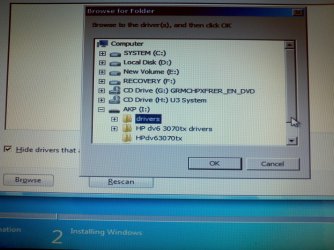
so I copy all driver of HP as well as drivers from system's folder (system32) to USB drive and re boot again. This time I select my flash drive to install driver,
IMG_20120926_111557.jpg
but got same message "No device drivers were found...."

I must doing something wrong. Please help..
 
Last edited:

My Computer

Computer Manufacturer/Model Number
Hewlett-Packard / dv6 notebook PC
OS
Windows 7 Home Premium 64bit
CPU
Intel(R) Core(TM) i5 CPU M 450 @ 2.40GHz, 2 core
Motherboard
Hewlett-Packard 144A
Memory
4 GB
Graphics Card(s)
ATI
Sound Card
ATI High Definition Audio Device
Monitor(s) Displays
Name Intel(R) HD Graphics
Screen Resolution
Resolution 1366 x 768 x 60 hertz
Hard Drives
466GB TOSHIBA TOSHIBA MK5056GSY (SATA)
C: 223.09 GB
G: 220.99 GB (partition)
The error is almost always a bad installer. How did you burn the ISO to DVD? Try ImgBurn at 4x speed on freshly downloaded ISO with new good-quality DVD's. Or write to flash stick using Universal USB Installer with Win7 in dropdown menu.

I think I used some other than imgBurn. I deleted iso file i downloaded. Let me re download win 7 iso from link u posted (Windows 7 Home Premium SP1-U IS, English x64 : X17-58997.iso) and burn to new disk using ImgBurn.
 

My Computer

Computer Manufacturer/Model Number
Hewlett-Packard / dv6 notebook PC
OS
Windows 7 Home Premium 64bit
CPU
Intel(R) Core(TM) i5 CPU M 450 @ 2.40GHz, 2 core
Motherboard
Hewlett-Packard 144A
Memory
4 GB
Graphics Card(s)
ATI
Sound Card
ATI High Definition Audio Device
Monitor(s) Displays
Name Intel(R) HD Graphics
Screen Resolution
Resolution 1366 x 768 x 60 hertz
Hard Drives
466GB TOSHIBA TOSHIBA MK5056GSY (SATA)
C: 223.09 GB
G: 220.99 GB (partition)
Are you following Clean Reinstall - Factory OEM Windows 7 to get it perfect, or just winging it?

If you're starting with the ISO in Step 1 then you can also use the tool in Step 2. Then I'd continue with the steps.

I am following that link. Right now I am downloading ISO from step 1 again (as I deleted once i burn it to disk).
I'll use tool of step 2.
 

My Computer

Computer Manufacturer/Model Number
Hewlett-Packard / dv6 notebook PC
OS
Windows 7 Home Premium 64bit
CPU
Intel(R) Core(TM) i5 CPU M 450 @ 2.40GHz, 2 core
Motherboard
Hewlett-Packard 144A
Memory
4 GB
Graphics Card(s)
ATI
Sound Card
ATI High Definition Audio Device
Monitor(s) Displays
Name Intel(R) HD Graphics
Screen Resolution
Resolution 1366 x 768 x 60 hertz
Hard Drives
466GB TOSHIBA TOSHIBA MK5056GSY (SATA)
C: 223.09 GB
G: 220.99 GB (partition)
Stick with the steps this time if you want to get it perfect, and maintain it perfectly.

Well I am following steps from that link.
> I downloaded from link in step 1.
> I did burn ISO to DVD and not to USB, so that's reason I did not use Windows 7 USB-DVD Download Tool from step 2. If I burn to DVD do I need to use USB-DVD tool?

I used Power2Go at x8 speed and I think that was causing problem.
 

My Computer

Computer Manufacturer/Model Number
Hewlett-Packard / dv6 notebook PC
OS
Windows 7 Home Premium 64bit
CPU
Intel(R) Core(TM) i5 CPU M 450 @ 2.40GHz, 2 core
Motherboard
Hewlett-Packard 144A
Memory
4 GB
Graphics Card(s)
ATI
Sound Card
ATI High Definition Audio Device
Monitor(s) Displays
Name Intel(R) HD Graphics
Screen Resolution
Resolution 1366 x 768 x 60 hertz
Hard Drives
466GB TOSHIBA TOSHIBA MK5056GSY (SATA)
C: 223.09 GB
G: 220.99 GB (partition)
Back
Top