
Memory issue continues after factory reset.

kapaxiana

New member
Local time
3:33 AM
Messages
6
I am not an expert so bare with me.

My C drive was always full even after I moved all my pictures, movies, music to the D drive. I could not find why the drive was not creating space so I decided to reset to factory settings to give it a fresh start.

I reset to factory setting using the F8 key before the start up screen as I have no disk. Windows confirmed that all my files would be deleted etc and the laptop would go back to how I bought it.

So I have turned it on, have not downloaded anything and it shows:
OS(C: )33.0GB free of 58.5GB and Local disk(D: ) 97.8GB free of 164GB. Am I correct to think that this is not right?
Please help.

TIA
 

My Computer

Computer type
Laptop
Computer Manufacturer/Model Number
Dell
OS
windows 7 Home premium 64-bit
CPU
Intel(R) Core(TM)i3
Memory
8GB
Antivirus
trend micro titanium Internet security
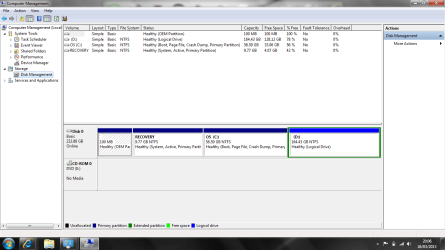
Post screenshot of disk management with all fields visible. OS 58.5-33.0=24.5GB used for win7 is quite normal. What is D.... did you create and fill it, or was it created by "restore to factory settings"? Just a look on D and check if there are files you made yourself
 

My Computer

Computer type
Laptop
Computer Manufacturer/Model Number
ACER ASPIRE 5742G
OS
Microsoft Windows 7 Home Premium 64-bits 7601 Multiprocessor Free Service Pack 1
CPU
Intel(R) Core(TM) i3 CPU M 370 @ 2.40GHz
Motherboard
Acer Aspire 5742G
Memory
4,00 GB
Graphics Card(s)
ATI Mobility Radeon HD 5400 Series
Sound Card
(1) AMD High Definition Audio Device (2) Realtek High Defi
Screen Resolution
1366 x 768 x 32 bits (4294967296 colors) @ 60 Hz
Hard Drives
WDC WD5000BEVT-22ZAT0
Post screenshot of disk management with all fields visible. OS 58.5-33.0=24.5GB used for win7 is quite normal. What is D.... did you create and fill it, or was it created by "restore to factory settings"? Just a look on D and check if there are files you made yourself


I looked into the D: drive and there were still photos and some other things that I deleted so that has freed up some space.
I 'think' the D drive was empty to start with but I am not sure, I have attached the screen shot (hope I did it right), are you able to tell if there is anything related to windows or if I can erase everything.
I want to get rid of cache and any files that are not absolutely needed for a fresh start.

Thanks for your help.
 

Attachments

  • 11.png
    11.png
    40.6 KB · Views: 6

My Computer

Computer type
Laptop
Computer Manufacturer/Model Number
Dell
OS
windows 7 Home premium 64-bit
CPU
Intel(R) Core(TM)i3
Memory
8GB
Antivirus
trend micro titanium Internet security
Did the recovery process recreate D so no old files are there anymore?

Or do you want a real fresh start... let's say install win7 out of the box.... without any bloatware?
 

My Computer

Computer type
Laptop
Computer Manufacturer/Model Number
ACER ASPIRE 5742G
OS
Microsoft Windows 7 Home Premium 64-bits 7601 Multiprocessor Free Service Pack 1
CPU
Intel(R) Core(TM) i3 CPU M 370 @ 2.40GHz
Motherboard
Acer Aspire 5742G
Memory
4,00 GB
Graphics Card(s)
ATI Mobility Radeon HD 5400 Series
Sound Card
(1) AMD High Definition Audio Device (2) Realtek High Defi
Screen Resolution
1366 x 768 x 32 bits (4294967296 colors) @ 60 Hz
Hard Drives
WDC WD5000BEVT-22ZAT0
It looks like to me that the recovery just re-created disk D with everything that was there before.
I salved on an external hardrive everything that I wanted to keep and was really hoping to start it from scratch with no old files or folders.

I haven't got a windows disc as it didnt come with the laptop when i bought it.
 

My Computer

Computer type
Laptop
Computer Manufacturer/Model Number
Dell
OS
windows 7 Home premium 64-bit
CPU
Intel(R) Core(TM)i3
Memory
8GB
Antivirus
trend micro titanium Internet security
The recovery partition is 9GB and only about 5GB filled. It can install win7 and laptop specific drivers. 5GB is very small. I can't imagine it filles D drive with lots of stuff!! I think it didn't touch D at all!
 

My Computer

Computer type
Laptop
Computer Manufacturer/Model Number
ACER ASPIRE 5742G
OS
Microsoft Windows 7 Home Premium 64-bits 7601 Multiprocessor Free Service Pack 1
CPU
Intel(R) Core(TM) i3 CPU M 370 @ 2.40GHz
Motherboard
Acer Aspire 5742G
Memory
4,00 GB
Graphics Card(s)
ATI Mobility Radeon HD 5400 Series
Sound Card
(1) AMD High Definition Audio Device (2) Realtek High Defi
Screen Resolution
1366 x 768 x 32 bits (4294967296 colors) @ 60 Hz
Hard Drives
WDC WD5000BEVT-22ZAT0
i think you are right, i don't understand how it would restore to factory settings but leave drive D as it was... any advice on what to do?
 

My Computer

Computer type
Laptop
Computer Manufacturer/Model Number
Dell
OS
windows 7 Home premium 64-bit
CPU
Intel(R) Core(TM)i3
Memory
8GB
Antivirus
trend micro titanium Internet security
It looks like to me that the recovery just re-created disk D with everything that was there before.
I salved on an external hardrive everything that I wanted to keep and was really hoping to start it from scratch with no old files or folders.

I haven't got a windows disc as it didnt come with the laptop when i bought it.
So you have backupped all you want to keep? Not in root of external I hope... easy to find?
windows 7 Home premium 64-bit -english I assume?
You have a valid product key? See COA sticker on back of laptop. Maybe under battery or battery slot.

Windows 7 Home Premium SP1 ISO
English x64: X17-58997.iso
 

My Computer

Computer type
Laptop
Computer Manufacturer/Model Number
ACER ASPIRE 5742G
OS
Microsoft Windows 7 Home Premium 64-bits 7601 Multiprocessor Free Service Pack 1
CPU
Intel(R) Core(TM) i3 CPU M 370 @ 2.40GHz
Motherboard
Acer Aspire 5742G
Memory
4,00 GB
Graphics Card(s)
ATI Mobility Radeon HD 5400 Series
Sound Card
(1) AMD High Definition Audio Device (2) Realtek High Defi
Screen Resolution
1366 x 768 x 32 bits (4294967296 colors) @ 60 Hz
Hard Drives
WDC WD5000BEVT-22ZAT0
It looks like to me that the recovery just re-created disk D with everything that was there before.
I salved on an external hardrive everything that I wanted to keep and was really hoping to start it from scratch with no old files or folders.

I haven't got a windows disc as it didnt come with the laptop when i bought it.
So you have backupped all you want to keep? Not in root of external I hope... easy to find?
windows 7 Home premium 64-bit -english I assume?
You have a valid product key? See COA sticker on back of laptop. Maybe under battery or battery slot.

Windows 7 Home Premium SP1 ISO
English x64: X17-58997.iso

Yes definitely everything I need is safe, I didnt do a windows back up just tranfered all I needed like photos and docs to an external hard drive, I don't need anything that is on the laptop except windows :-) . There is a sticker on the back of the laptop with a bar code but the numbers have faded I cannot read them. The only thing that is clear is the service tag.
 

My Computer

Computer type
Laptop
Computer Manufacturer/Model Number
Dell
OS
windows 7 Home premium 64-bit
CPU
Intel(R) Core(TM)i3
Memory
8GB
Antivirus
trend micro titanium Internet security
It looks like to me that the recovery just re-created disk D with everything that was there before.
I salved on an external hardrive everything that I wanted to keep and was really hoping to start it from scratch with no old files or folders.

I haven't got a windows disc as it didnt come with the laptop when i bought it.
So you have backupped all you want to keep? Not in root of external I hope... easy to find?
windows 7 Home premium 64-bit -english I assume?
You have a valid product key? See COA sticker on back of laptop. Maybe under battery or battery slot.

Windows 7 Home Premium SP1 ISO
English x64: X17-58997.iso

Yes definitely everything I need is safe, I didnt do a windows back up just tranfered all I needed like photos and docs to an external hard drive, I don't need anything that is on the laptop except windows :-) . There is a sticker on the back of the laptop with a bar code but the numbers have faded I cannot read them. The only thing that is clear is the service tag.
Without a valid product key reinstall is not an option! The number are faded.... really unreadable?? You should have written them down long before.
 

My Computer

Computer type
Laptop
Computer Manufacturer/Model Number
ACER ASPIRE 5742G
OS
Microsoft Windows 7 Home Premium 64-bits 7601 Multiprocessor Free Service Pack 1
CPU
Intel(R) Core(TM) i3 CPU M 370 @ 2.40GHz
Motherboard
Acer Aspire 5742G
Memory
4,00 GB
Graphics Card(s)
ATI Mobility Radeon HD 5400 Series
Sound Card
(1) AMD High Definition Audio Device (2) Realtek High Defi
Screen Resolution
1366 x 768 x 32 bits (4294967296 colors) @ 60 Hz
Hard Drives
WDC WD5000BEVT-22ZAT0
What is on D now?? Your my documents, my pictures, my music folder is still on C? Steps to do:

  1. Make a good backup of everything!
  2. Uninstall software you don't want/need
  3. Delete everything from D you don't need
Then you have almost the same as a fresh install. What's the problem?
 

My Computer

Computer type
Laptop
Computer Manufacturer/Model Number
ACER ASPIRE 5742G
OS
Microsoft Windows 7 Home Premium 64-bits 7601 Multiprocessor Free Service Pack 1
CPU
Intel(R) Core(TM) i3 CPU M 370 @ 2.40GHz
Motherboard
Acer Aspire 5742G
Memory
4,00 GB
Graphics Card(s)
ATI Mobility Radeon HD 5400 Series
Sound Card
(1) AMD High Definition Audio Device (2) Realtek High Defi
Screen Resolution
1366 x 768 x 32 bits (4294967296 colors) @ 60 Hz
Hard Drives
WDC WD5000BEVT-22ZAT0
:-( never thought of that, I have learnt my lesson and next time I buy a nre laptop will remember to do it. I guess I am just left with doing it manually! Thanks for your help anyway...
 

My Computer

Computer type
Laptop
Computer Manufacturer/Model Number
Dell
OS
windows 7 Home premium 64-bit
CPU
Intel(R) Core(TM)i3
Memory
8GB
Antivirus
trend micro titanium Internet security
Since you are using a Dell go to start all programs then Dell DataSafe. Now open Dell Data Safe and create restore disks. Use can use single or double layer disc. This will be a complete restore of your windows install as it was from Dell, including the restore partition. Now after you have created this you can then go back to the management section and delete the D partition and when done right click on C and select extend partition and just click next to choose entire amount of space. You really don't need that space as D if you have a good external drive that you can install files or copy music to your C drive. Hope this helps.
 

My Computer

Computer type
PC/Desktop
Computer Manufacturer/Model Number
1 Dell XPS8300, 1 home build
OS
W7 Prem 64 on Dell, Home Build W7 Pro 64 1drv, XP Pro 1 drv
Back
Top