Solved Memory Leak - I Think Its Java-related???

dubp34

New member
Local time
12:43 PM
Messages
5
Hey all,

Just want to make it clear that I am a total novice at computers. I can do basic stuff and can adapt, but don't really know much.

Some time ago my Norton program started to inform me that Google Chrome was using too much disc space. I did some Yahoo searching and found that the browser was known to suffer from memory leaks. I switched to Waterfox - same thing happened.

Yesterday I got yet another notification saying that Java SE Aplet was using too much disc space. According to what I've seen on the net, I have a memory leak. I am uncertain where but I think--to the best of my ability, of course--that its coming from Java.

What can I do to alleviate the problem? As a last resort, would formatting my laptop do the job? I'd like to avoid that as I have a legitimate copy of MS Word on my machine, but I am very far from home and would be unable to get the install disc from home (I'm studying abroad).

Thanks so much for all your help, I hope I've been as descriptive as possible for you.

EDIT: Just wanted to say that virus checks are clean, same with malware. I also did a complete clean-up using CCLeaner, something I do semi-regularly.
 

My Computer

OS
Windows 7 64-bit
Hey all,

Just want to make it clear that I am a total novice at computers. I can do basic stuff and can adapt, but don't really know much.

Some time ago my Norton program started to inform me that Google Chrome was using too much disc space. I did some Yahoo searching and found that the browser was known to suffer from memory leaks. I switched to Waterfox - same thing happened.

Yesterday I got yet another notification saying that Java SE Aplet was using too much disc space. According to what I've seen on the net, I have a memory leak. I am uncertain where but I think--to the best of my ability, of course--that its coming from Java.

What can I do to alleviate the problem? As a last resort, would formatting my laptop do the job? I'd like to avoid that as I have a legitimate copy of MS Word on my machine, but I am very far from home and would be unable to get the install disc from home (I'm studying abroad).

Thanks so much for all your help, I hope I've been as descriptive as possible for you.

EDIT: Just wanted to say that virus checks are clean, same with malware. I also did a complete clean-up using CCLeaner, something I do semi-regularly.

Norton is actually a huge resource hog. I would start by replacing it and using either a free version of Avira or a paid version of Avira, Nod 32 (from Eset) or Kaspersky. Any of the products listed will reduce some of the resource usage being consumed by Norton. After replacing Norton, see if the improvement is enough to cure your problem.

PS; Norton is notorious for making it difficult to do a complete uninstall, so visit their site for instructions on how to remove your version or provide the version here and I will provide a link.

HTH
 
Last edited:

My Computer

Computer type
PC/Desktop
Computer Manufacturer/Model Number
Custom Built
OS
Windows 7 Professional x64
CPU
Intel i5 quad processor
Motherboard
DP67BG
Memory
16 GB
Graphics Card(s)
Radeon HD 5770
Sound Card
Realtek High Definition Audio
Monitor(s) Displays
Samsung SyncMaster
Screen Resolution
1920X1080
Hard Drives
WD 2TB (SATA Internal)
WD 1TB (USB External)
PSU
Corsair GS800
Case
Tower (Generic)
Cooling
3 Internal Fans
Keyboard
MS Wireless
Mouse
MS Optical Wired
Internet Speed
54 mbps
Antivirus
Emsisoft
Browser
IE-Version 9, Palemoon-Version 24.2.0
I have Norton 360, it "protects" my laptop 24/7. I got it free with the laptop, otherwise I'd NEVER use it. I will try to uninstall it but feel free to post anything you find. MUCH appreciated, my friend!!! :D

EDIT: Norton removed. Will see what happens now...
 
Last edited:

My Computer

OS
Windows 7 64-bit
I have Norton 360, it "protects" my laptop 24/7. I got it free with the laptop, otherwise I'd NEVER use it. I will try to uninstall it but feel free to post anything you find. MUCH appreciated, my friend!!! :D

EDIT: Norton removed. Will see what happens now...

I will keep an eye out for updates.
 

My Computer

Computer type
PC/Desktop
Computer Manufacturer/Model Number
Custom Built
OS
Windows 7 Professional x64
CPU
Intel i5 quad processor
Motherboard
DP67BG
Memory
16 GB
Graphics Card(s)
Radeon HD 5770
Sound Card
Realtek High Definition Audio
Monitor(s) Displays
Samsung SyncMaster
Screen Resolution
1920X1080
Hard Drives
WD 2TB (SATA Internal)
WD 1TB (USB External)
PSU
Corsair GS800
Case
Tower (Generic)
Cooling
3 Internal Fans
Keyboard
MS Wireless
Mouse
MS Optical Wired
Internet Speed
54 mbps
Antivirus
Emsisoft
Browser
IE-Version 9, Palemoon-Version 24.2.0
Hey man, so I *think* everything is ok now? Removed Norton, got SpyBot and MSE instead. Venting is cooler, seem to be no issues? Internet browsers are still using 150MB+ memory - is that normal???

If anything comes up later I'll make a new topic, revive this one, or PM you. You've been very helpful and kind, I really appreciate it!!! :) Thanks so much for your effort.
 

My Computer

OS
Windows 7 64-bit
Hey man, so I *think* everything is ok now? Removed Norton, got SpyBot and MSE instead. Venting is cooler, seem to be no issues? Internet browsers are still using 150MB+ memory - is that normal???

If anything comes up later I'll make a new topic, revive this one, or PM you. You've been very helpful and kind, I really appreciate it!!! :) Thanks so much for your effort.

Good choice on MSE for an AV program, I forgot to mention it in my post. Spybot is an OK choice, but I prefer MalwareBytesAntiMalware.

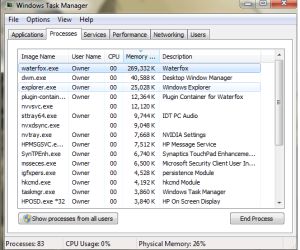
For the last part of your post, could you reply with a screenshot of your browser processes?

Glad things have improved.
 

My Computer

Computer type
PC/Desktop
Computer Manufacturer/Model Number
Custom Built
OS
Windows 7 Professional x64
CPU
Intel i5 quad processor
Motherboard
DP67BG
Memory
16 GB
Graphics Card(s)
Radeon HD 5770
Sound Card
Realtek High Definition Audio
Monitor(s) Displays
Samsung SyncMaster
Screen Resolution
1920X1080
Hard Drives
WD 2TB (SATA Internal)
WD 1TB (USB External)
PSU
Corsair GS800
Case
Tower (Generic)
Cooling
3 Internal Fans
Keyboard
MS Wireless
Mouse
MS Optical Wired
Internet Speed
54 mbps
Antivirus
Emsisoft
Browser
IE-Version 9, Palemoon-Version 24.2.0
Here it is...

Its weird because my laptop is no longer heating up like it used to, but I *think* Waterfox is still taking up too much memory??? My friend who helped me out said its normal? Thanks my friend.
 

Attachments

  • water.png
    water.png
    20.2 KB · Views: 10

My Computer

OS
Windows 7 64-bit
Here it is...

Its weird because my laptop is no longer heating up like it used to, but I *think* Waterfox is still taking up too much memory??? My friend who helped me out said its normal? Thanks my friend.

The usage is not unusual.

HTH
 

My Computer

Computer type
PC/Desktop
Computer Manufacturer/Model Number
Custom Built
OS
Windows 7 Professional x64
CPU
Intel i5 quad processor
Motherboard
DP67BG
Memory
16 GB
Graphics Card(s)
Radeon HD 5770
Sound Card
Realtek High Definition Audio
Monitor(s) Displays
Samsung SyncMaster
Screen Resolution
1920X1080
Hard Drives
WD 2TB (SATA Internal)
WD 1TB (USB External)
PSU
Corsair GS800
Case
Tower (Generic)
Cooling
3 Internal Fans
Keyboard
MS Wireless
Mouse
MS Optical Wired
Internet Speed
54 mbps
Antivirus
Emsisoft
Browser
IE-Version 9, Palemoon-Version 24.2.0
if waterfox is a firefox for 64 bit OS.... then it's normal, as it is a huge memory leak just like firefox is.

To keep the beast in check you could try firemin, which should work for waterfox as well (although I never tested it on waterfox) This blog post gives some info settings and does some tests, but it's a pretty simple program.
 

My Computer

Computer type
PC/Desktop
Computer Manufacturer/Model Number
custom built
OS
Win 7 Pro 64-bit 7601
CPU
AMD Phenom 9650 QuadCore, revision DR-B3
Motherboard
ASUS M4A78
Memory
5 GB yes I run 2x 2GB and 1x 1GB, different brand, spank me.
Graphics Card(s)
NVIDIA GeForce 9800 GT 512 Mb, unknown manufacturer.
Sound Card
Crappy Realtek Integrated Audio
Monitor(s) Displays
Fujitsu Siemens P19-3P
Screen Resolution
1280 x 1024 x 32 bits @ 60 Hz Oh yeah, 4:3 rocks!
Hard Drives
(1) MAXTOR S TM3320613AS SATA Disk Device (2) STM35004 18AS SATA Disk Device (3) TOSHIBA USB 2.5"-HDD
PSU
whatever, around 450w
Case
Scavenged from old company PC, 10+ years old
Cooling
CPU fan, GPU fan, case fan, nothing fancy
Keyboard
Microsoft, PS/2, white.
Mouse
Optical, logitec.
Internet Speed
effective max speeds: 70-ish kB/s down 30-ish kB/s up
Antivirus
Avira, free edition.
Browser
Firefox with FXChrome to make it look like Google Chrome :P
Other Info
Was discarded by previous owner due to "horrible performance".
Was running Win Xp from a IDE drive. Yeah. Was a pain.
SATA II drive and Win7 and it zips away! Yay!
Guys, thank you! I'm going to mark this thread as solved, and will check out firemin. If any issues return I will not hesitate to post again! For now, things look normal. I'd like to thank you folks for helping me, the suggestion to remove Norton worked WONDERS! :D
 

My Computer

OS
Windows 7 64-bit
Back
Top