
memory leak

chinga69

New member
Guru
Local time
5:33 AM
Messages
308
Location
australia
hi all
i am having all memory used up at intermittent times
sometimes 2 hours sometimes it takes 2 days and when it happens media portal has frozen and its used about 900 meg of my 3325 of ram

any body like to help me figure out were the memory leak is

cheers brad
 

My Computer

Computer type
PC/Desktop
Computer Manufacturer/Model Number
my own build
OS
xp/vista/win7/win8/10 tech preview
CPU
PHENOM II X4 Quad Core 965 Black Edition CPU, 3.40 GHz
Motherboard
GA-MA790FXT-UD5P
Memory
G.Skill 8GB (4x XMS3 2GB) PC-12800 (1600MHz
Graphics Card(s)
nvidia 9500 gt
Sound Card
on board
Monitor(s) Displays
T231H / X243H ACER
Screen Resolution
1980/1080
Hard Drives
Hitachi 500 samsung1terabyte wd 750
PSU
550 watt
Case
cooler master
Cooling
stock
Keyboard
microsoft
Mouse
logitech
Internet Speed
20000 dl 1020 ul exetel
Other Info
booting xp32 2x dual pci-e digital tv tuners
xp pro v 1xusb2 digital tv tuner
vista ultimate 64
win7 64 win8 64
As discussed previously, it sounds like a resource leak, but the real questions are "what's leaking?" and "can it be worked around without (re)coding the component in question?". This is all assuming you're already on the latest version of all the components involved, which tends to have a way of resolving (embarrassing) known resource leaks ;)

The best way to troubleshoot is to start a Perfmon log straight after a reboot, and to keep it running until the "freeze" symptom manifests itself. Given it can take days, the trick is to keep the log file from growing to a monstrous size. That's done by being selective about what's being monitored, and how often perfmon records a "sample".

As a suggestion, create a Perfmon counter log to record all instances of all counters under the following objects:

- MEMORY
- PROCESS
- PROCESSOR
- SYSTEM
- THREAD

Set the sample interval to say 2 minutes, and kick off the log soon after the next scheduled reboot. Stop the perfmon log only once you're confident that the machine is clearly being all weird in the particular way which you wish to analyse.

If you need more info on how to create the perfmon log, just yell. Ditto if you'd like assistance in analysing it. There's nothing particularly personal in there other than the hostname of your server and the names of the processes running on it.
 

My Computer

Computer Manufacturer/Model Number
Multiple machines in various stages of decomposition.
OS
Win7x64
As discussed previously, it sounds like a resource leak, but the real questions are "what's leaking?" and "can it be worked around without (re)coding the component in question?". This is all assuming you're already on the latest version of all the components involved, which tends to have a way of resolving (embarrassing) known resource leaks ;)

The best way to troubleshoot is to start a Perfmon log straight after a reboot, and to keep it running until the "freeze" symptom manifests itself. Given it can take days, the trick is to keep the log file from growing to a monstrous size. That's done by being selective about what's being monitored, and how often perfmon records a "sample".

As a suggestion, create a Perfmon counter log to record all instances of all counters under the following objects:


- MEMORY
- PROCESS
- PROCESSOR
- SYSTEM
- THREAD

Set the sample interval to say 2 minutes, and kick off the log soon after the next scheduled reboot. Stop the perfmon log only once you're confident that the machine is clearly being all weird in the particular way which you wish to analyse.

If you need more info on how to create the perfmon log, just yell. Ditto if you'd like assistance in analysing it. There's nothing particularly personal in there other than the hostname of your server and the names of the processes running on it.

ok lol
i will need help to start the perfmon counter log

the ram is climbing now so it shouldn't be long before it happens again

cheers brad
 

My Computer

Computer type
PC/Desktop
Computer Manufacturer/Model Number
my own build
OS
xp/vista/win7/win8/10 tech preview
CPU
PHENOM II X4 Quad Core 965 Black Edition CPU, 3.40 GHz
Motherboard
GA-MA790FXT-UD5P
Memory
G.Skill 8GB (4x XMS3 2GB) PC-12800 (1600MHz
Graphics Card(s)
nvidia 9500 gt
Sound Card
on board
Monitor(s) Displays
T231H / X243H ACER
Screen Resolution
1980/1080
Hard Drives
Hitachi 500 samsung1terabyte wd 750
PSU
550 watt
Case
cooler master
Cooling
stock
Keyboard
microsoft
Mouse
logitech
Internet Speed
20000 dl 1020 ul exetel
Other Info
booting xp32 2x dual pci-e digital tv tuners
xp pro v 1xusb2 digital tv tuner
vista ultimate 64
win7 64 win8 64
(Self-plagiarisation)

1) Create a counters.txt file somewhere on your machine with the following contents:

Code:
\process(*)\*
\processor(*)\*
\memory\*
\Thread(*)\*
\system\*

2) On an elevated (run as admin) CMD prompt (change <path> to location of counters.txt): logman create counter LeakLog -cf c:\<path>\counters.txt -si 2:00

3) On the same CMD prompt: logman start LeakLog

4) Wait for the symptom to occur...

5) On an elevated CMD prompt again: logman stop LeakLog


The resultant Binary LoG (BLG) file should be in the \Perflogs\Admin folder.

Note that it's also possible to battle the Perfmon UI to perform the same operation, but I'd rather slash my wrists. When asked "what do you really detest about post-XP Windows?", I say "the counter selection mechanism in the new Perfmon UI". Still waiting for somebody to ask me though.)
 

My Computer

Computer Manufacturer/Model Number
Multiple machines in various stages of decomposition.
OS
Win7x64
(Self-plagiarisation)

1) Create a counters.txt file somewhere on your machine with the following contents:

Code:
\process(*)\*
\processor(*)\*
\memory\*
\Thread(*)\*
\system\*
2) On an elevated (run as admin) CMD prompt (change <path> to location of counters.txt): logman create counter LeakLog -cf c:\<path>\counters.txt -si 2:00

3) On the same CMD prompt: logman start LeakLog

4) Wait for the symptom to occur...

5) On an elevated CMD prompt again: logman stop LeakLog


The resultant Binary LoG (BLG) file should be in the \Perflogs\Admin folder.

Note that it's also possible to battle the Perfmon UI to perform the same operation, but I'd rather slash my wrists. When asked "what do you really detest about post-XP Windows?", I say "the counter selection mechanism in the new Perfmon UI". Still waiting for somebody to ask me though.)

ok done all completed successfully
 

My Computer

Computer type
PC/Desktop
Computer Manufacturer/Model Number
my own build
OS
xp/vista/win7/win8/10 tech preview
CPU
PHENOM II X4 Quad Core 965 Black Edition CPU, 3.40 GHz
Motherboard
GA-MA790FXT-UD5P
Memory
G.Skill 8GB (4x XMS3 2GB) PC-12800 (1600MHz
Graphics Card(s)
nvidia 9500 gt
Sound Card
on board
Monitor(s) Displays
T231H / X243H ACER
Screen Resolution
1980/1080
Hard Drives
Hitachi 500 samsung1terabyte wd 750
PSU
550 watt
Case
cooler master
Cooling
stock
Keyboard
microsoft
Mouse
logitech
Internet Speed
20000 dl 1020 ul exetel
Other Info
booting xp32 2x dual pci-e digital tv tuners
xp pro v 1xusb2 digital tv tuner
vista ultimate 64
win7 64 win8 64
i got perfmon open and got as far as user defined data collector set but it wants an xml file

under user defined it now has a leaklog running is that what you started from the dos prompt

its up to 2300 meg of ram

cheers brad
 

My Computer

Computer type
PC/Desktop
Computer Manufacturer/Model Number
my own build
OS
xp/vista/win7/win8/10 tech preview
CPU
PHENOM II X4 Quad Core 965 Black Edition CPU, 3.40 GHz
Motherboard
GA-MA790FXT-UD5P
Memory
G.Skill 8GB (4x XMS3 2GB) PC-12800 (1600MHz
Graphics Card(s)
nvidia 9500 gt
Sound Card
on board
Monitor(s) Displays
T231H / X243H ACER
Screen Resolution
1980/1080
Hard Drives
Hitachi 500 samsung1terabyte wd 750
PSU
550 watt
Case
cooler master
Cooling
stock
Keyboard
microsoft
Mouse
logitech
Internet Speed
20000 dl 1020 ul exetel
Other Info
booting xp32 2x dual pci-e digital tv tuners
xp pro v 1xusb2 digital tv tuner
vista ultimate 64
win7 64 win8 64
i got perfmon open and got as far as user defined data collector set but it wants an xml file

under user defined it now has a leaklog running is that what you started from the dos prompt

its up to 2300 meg of ram

cheers brad

If you already punched in all the command-line stuff then you don't need to do anything in the Perfmon UI, at least until it comes time to analyse the data.

The "LOGMAN" command by itself (without switches) should now show the LeakLog status as running.

Don't worry too much about the amount of RAM. Just wait until that "freeze" symptom reproduces before stopping the log.
 

My Computer

Computer Manufacturer/Model Number
Multiple machines in various stages of decomposition.
OS
Win7x64
ok thanks
will let you know when it happens
 

My Computer

Computer type
PC/Desktop
Computer Manufacturer/Model Number
my own build
OS
xp/vista/win7/win8/10 tech preview
CPU
PHENOM II X4 Quad Core 965 Black Edition CPU, 3.40 GHz
Motherboard
GA-MA790FXT-UD5P
Memory
G.Skill 8GB (4x XMS3 2GB) PC-12800 (1600MHz
Graphics Card(s)
nvidia 9500 gt
Sound Card
on board
Monitor(s) Displays
T231H / X243H ACER
Screen Resolution
1980/1080
Hard Drives
Hitachi 500 samsung1terabyte wd 750
PSU
550 watt
Case
cooler master
Cooling
stock
Keyboard
microsoft
Mouse
logitech
Internet Speed
20000 dl 1020 ul exetel
Other Info
booting xp32 2x dual pci-e digital tv tuners
xp pro v 1xusb2 digital tv tuner
vista ultimate 64
win7 64 win8 64
ok it has frozen meadia portal over night here is the log i cant see anything in it

cheers brad


i renamed the file to get it to up load you will have to rename it
 

Attachments

My Computer

Computer type
PC/Desktop
Computer Manufacturer/Model Number
my own build
OS
xp/vista/win7/win8/10 tech preview
CPU
PHENOM II X4 Quad Core 965 Black Edition CPU, 3.40 GHz
Motherboard
GA-MA790FXT-UD5P
Memory
G.Skill 8GB (4x XMS3 2GB) PC-12800 (1600MHz
Graphics Card(s)
nvidia 9500 gt
Sound Card
on board
Monitor(s) Displays
T231H / X243H ACER
Screen Resolution
1980/1080
Hard Drives
Hitachi 500 samsung1terabyte wd 750
PSU
550 watt
Case
cooler master
Cooling
stock
Keyboard
microsoft
Mouse
logitech
Internet Speed
20000 dl 1020 ul exetel
Other Info
booting xp32 2x dual pci-e digital tv tuners
xp pro v 1xusb2 digital tv tuner
vista ultimate 64
win7 64 win8 64
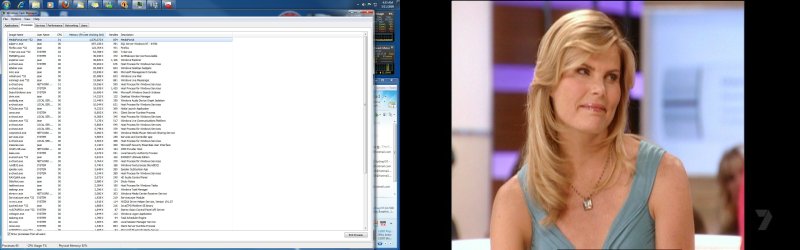
here is a pic of task manager

cheers brad
 

Attachments

  • taskman.jpg
    taskman.jpg
    704.4 KB · Views: 81

My Computer

Computer type
PC/Desktop
Computer Manufacturer/Model Number
my own build
OS
xp/vista/win7/win8/10 tech preview
CPU
PHENOM II X4 Quad Core 965 Black Edition CPU, 3.40 GHz
Motherboard
GA-MA790FXT-UD5P
Memory
G.Skill 8GB (4x XMS3 2GB) PC-12800 (1600MHz
Graphics Card(s)
nvidia 9500 gt
Sound Card
on board
Monitor(s) Displays
T231H / X243H ACER
Screen Resolution
1980/1080
Hard Drives
Hitachi 500 samsung1terabyte wd 750
PSU
550 watt
Case
cooler master
Cooling
stock
Keyboard
microsoft
Mouse
logitech
Internet Speed
20000 dl 1020 ul exetel
Other Info
booting xp32 2x dual pci-e digital tv tuners
xp pro v 1xusb2 digital tv tuner
vista ultimate 64
win7 64 win8 64
ok it has frozen meadia portal over night here is the log i cant see anything in it

cheers brad


i renamed the file to get it to up load you will have to rename it

Something's wrong with the BLG. It's tiny, and it doesn't appear to contain any actual samples - kinda like it was defined but never "started". After a couple of days of logging, I'd expect that counter set to produce a log somewhere in the (say) 50MB range, and definitely more than mere kilobytes.

Seeing as this one is LeakLog_4, what happened to LeakLog_3, 2, and 1? Perhaps one of them is the multi-megabyte log which was running all the time?

The task manager screenshot suggests a private byte leak in the MediaPortal process, though it would still be useful to see that perfmon log, if it exists. Ultimately, if the symptom comes down to a slow and steady private bytes leak in that app, then you might want to talk to the vendor/developer about how to fix it. It's possible to do further troubleshooting with tools like UMDH to identify the actual leaking code inside the process, but it's complex and in a way that's the app developer's job.

I was thinking of making a smartarse comment about the cause being linked to the desktop photo, but then I thought better of it on the off chance that it's your wife or mum. Great-looking woman sir ;)
 

My Computer

Computer Manufacturer/Model Number
Multiple machines in various stages of decomposition.
OS
Win7x64
Actually, she looks familiar. Is that your desktop or the Media Portal app playing something on TV?
 

My Computer

Computer Manufacturer/Model Number
Too many to list.
OS
XP, Seven, 2008R2
CPU
AMD, Intel, VIA
Motherboard
Various
Memory
Corsair, Kingston, etc.
Graphics Card(s)
ATI, NVIDIA
Monitor(s) Displays
Samsung
Hard Drives
Maxtor, Western Digital
Keyboard
qwerty
Internet Speed
22 Mb/s @ home, 1 Gb/s @ server
Other Info
All of my systems still run fastest on XP 32-bit for the most part. Win7 is fun to play with, but I still prefer XP for raw speed, security, and functionality.
ok it has frozen meadia portal over night here is the log i cant see anything in it

cheers brad


i renamed the file to get it to up load you will have to rename it

Something's wrong with the BLG. It's tiny, and it doesn't appear to contain any actual samples - kinda like it was defined but never "started". After a couple of days of logging, I'd expect that counter set to produce a log somewhere in the (say) 50MB range, and definitely more than mere kilobytes.


Seeing as this one is LeakLog_4, what happened to LeakLog_3, 2, and 1? Perhaps one of them is the multi-megabyte log which was running all the time?

The task manager screenshot suggests a private byte leak in the MediaPortal process, though it would still be useful to see that perfmon log, if it exists. Ultimately, if the symptom comes down to a slow and steady private bytes leak in that app, then you might want to talk to the vendor/developer about how to fix it. It's possible to do further troubleshooting with tools like UMDH to identify the actual leaking code inside the process, but it's complex and in a way that's the app developer's job.

I was thinking of making a smartarse comment about the cause being linked to the desktop photo, but then I thought better of it on the off chance that it's your wife or mum. Great-looking woman sir ;)

no its niether my wife passed away in may this year

and the pic is of what ever was on when it done its usual freeze up

the logs are all empty will start a new one now

cheers and thanks for your help much appreciated
 

My Computer

Computer type
PC/Desktop
Computer Manufacturer/Model Number
my own build
OS
xp/vista/win7/win8/10 tech preview
CPU
PHENOM II X4 Quad Core 965 Black Edition CPU, 3.40 GHz
Motherboard
GA-MA790FXT-UD5P
Memory
G.Skill 8GB (4x XMS3 2GB) PC-12800 (1600MHz
Graphics Card(s)
nvidia 9500 gt
Sound Card
on board
Monitor(s) Displays
T231H / X243H ACER
Screen Resolution
1980/1080
Hard Drives
Hitachi 500 samsung1terabyte wd 750
PSU
550 watt
Case
cooler master
Cooling
stock
Keyboard
microsoft
Mouse
logitech
Internet Speed
20000 dl 1020 ul exetel
Other Info
booting xp32 2x dual pci-e digital tv tuners
xp pro v 1xusb2 digital tv tuner
vista ultimate 64
win7 64 win8 64
no its niether my wife passed away in may this year

Sh*t, that's terrible mate - I'm sorry to hear it :(

(My apologies for sticking my nose in)
 

My Computer

Computer type
PC/Desktop
Computer Manufacturer/Model Number
Systems by SmartEyeball
OS
8 Pro x64
CPU
i7 3770K 4.6GHz
Motherboard
ASUS P8Z77 WS
Memory
16GB G.Skill Trident X 2666mhz
Graphics Card(s)
x2 EVGA 780 Ti Superclocked SLI
Sound Card
SB X-FI Surround 5.1 PRO USB / ATH-AD900 Headphones
Monitor(s) Displays
x3 Dell U2410 / 58" Samsung
Screen Resolution
5760*1200/ 1920*1200
Hard Drives
2x Intel 520 240GB (RAID 0) * 2x WD Caviar Blacks 2TB (RAID 0) * 2TB WD Caviar Black * Sony Optirac DVD
PSU
Silverstone Strider Evolution 1200W
Case
Thermaltake Level 10 GT Snow Edition
Cooling
Noctua NH-D14
Keyboard
Topre Realforce // Ducky Shine MX Black // Filco Ninja TKL
Mouse
Thermaltake Theron (Highly Recommended) + Razer Imperator
Antivirus
MSE
Browser
IE, FF, WaterFox
Other Info
GT Extreme V2 Sim Racing Cockpit + 40" LCD and K/B Mouse stand ▼
Fanatec CSR Elite Wheel + Clubsport V1 Pedals + CSR shifter/7G-H ▼Saitek X52 Pro ▼ TrackIR 5 Pro
Buttkicker v2 Seat Rumbler with Dedicated 5.1 and Sub Woofer attached to frame ▼
=
Bloody Big Grin
no its niether my wife passed away in may this year

Sh*t, that's terrible mate - I'm sorry to hear it :(

(My apologies for sticking my nose in)

Likewise, my deepest condolences, and I really feel bad about being unintentionally insensitive.

Regarding the perfmon log, please check to make sure that the size of the active log instance (almost always the one with the largest sequential number tacked onto the filename) is actually increasing over time. If not, and all of the LeakLog_x.BLG files remain constant in size even though the status when you type LOGMAN is listed as "running", there is obviously a problem with the log settings which needs to be addressed before continuing.

Thinking ahead, given that this is a server platform, the arrangements between you (your organisation) and the MediaPortal developers are presumably going to be more formal than is normal at the desktop level. I don't know anything about "MediaPortal" but a quick web search suggests that it's an open source project (?).

You may eventually need to lodge a request with whatever entity is willing to support you, because it may be impossible to diagnose and fix the problem without code-level involvement from the app developers.

The Perfmon log should reveal whether the leak is indeed "internal" to MediaPortal, or whether there are obvious other avenues to investigate.
 

My Computer

Computer Manufacturer/Model Number
Multiple machines in various stages of decomposition.
OS
Win7x64
it is not a problem and thank you
 

My Computer

Computer type
PC/Desktop
Computer Manufacturer/Model Number
my own build
OS
xp/vista/win7/win8/10 tech preview
CPU
PHENOM II X4 Quad Core 965 Black Edition CPU, 3.40 GHz
Motherboard
GA-MA790FXT-UD5P
Memory
G.Skill 8GB (4x XMS3 2GB) PC-12800 (1600MHz
Graphics Card(s)
nvidia 9500 gt
Sound Card
on board
Monitor(s) Displays
T231H / X243H ACER
Screen Resolution
1980/1080
Hard Drives
Hitachi 500 samsung1terabyte wd 750
PSU
550 watt
Case
cooler master
Cooling
stock
Keyboard
microsoft
Mouse
logitech
Internet Speed
20000 dl 1020 ul exetel
Other Info
booting xp32 2x dual pci-e digital tv tuners
xp pro v 1xusb2 digital tv tuner
vista ultimate 64
win7 64 win8 64
no its niether my wife passed away in may this year

Sh*t, that's terrible mate - I'm sorry to hear it :(

(My apologies for sticking my nose in)

Likewise, my deepest condolences, and I really feel bad about being unintentionally insensitive.

Regarding the perfmon log, please check to make sure that the size of the active log instance (almost always the one with the largest sequential number tacked onto the filename) is actually increasing over time. If not, and all of the LeakLog_x.BLG files remain constant in size even though the status when you type LOGMAN is listed as "running", there is obviously a problem with the log settings which needs to be addressed before continuing.

Thinking ahead, given that this is a server platform, the arrangements between you (your organisation) and the MediaPortal developers are presumably going to be more formal than is normal at the desktop level. I don't know anything about "MediaPortal" but a quick web search suggests that it's an open source project (?).

You may eventually need to lodge a request with whatever entity is willing to support you, because it may be impossible to diagnose and fix the problem without code-level involvement from the app developers.

The Perfmon log should reveal whether the leak is indeed "internal" to MediaPortal, or whether there are obvious other avenues to investigate.


ok will have a look around over at meadiaportal site maybe some one else is having similar issues

thanks for the help all the best
 

My Computer

Computer type
PC/Desktop
Computer Manufacturer/Model Number
my own build
OS
xp/vista/win7/win8/10 tech preview
CPU
PHENOM II X4 Quad Core 965 Black Edition CPU, 3.40 GHz
Motherboard
GA-MA790FXT-UD5P
Memory
G.Skill 8GB (4x XMS3 2GB) PC-12800 (1600MHz
Graphics Card(s)
nvidia 9500 gt
Sound Card
on board
Monitor(s) Displays
T231H / X243H ACER
Screen Resolution
1980/1080
Hard Drives
Hitachi 500 samsung1terabyte wd 750
PSU
550 watt
Case
cooler master
Cooling
stock
Keyboard
microsoft
Mouse
logitech
Internet Speed
20000 dl 1020 ul exetel
Other Info
booting xp32 2x dual pci-e digital tv tuners
xp pro v 1xusb2 digital tv tuner
vista ultimate 64
win7 64 win8 64
As discussed previously, it sounds like a resource leak, but the real questions are "what's leaking?" and "can it be worked around without (re)coding the component in question?". This is all assuming you're already on the latest version of all the components involved, which tends to have a way of resolving (embarrassing) known resource leaks ;)

The best way to troubleshoot is to start a Perfmon log straight after a reboot, and to keep it running until the "freeze" symptom manifests itself. Given it can take days, the trick is to keep the log file from growing to a monstrous size. That's done by being selective about what's being monitored, and how often perfmon records a "sample".

As a suggestion, create a Perfmon counter log to record all instances of all counters under the following objects:

- MEMORY
- PROCESS
- PROCESSOR
- SYSTEM
- THREAD

Set the sample interval to say 2 minutes, and kick off the log soon after the next scheduled reboot. Stop the perfmon log only once you're confident that the machine is clearly being all weird in the particular way which you wish to analyse.

If you need more info on how to create the perfmon log, just yell. Ditto if you'd like assistance in analysing it. There's nothing particularly personal in there other than the hostname of your server and the names of the processes running on it.

computer scan was attempted did not work,
Manufacturer: Dell
Model: Studio 17, and similar seen on Vostro 3700 (32 B with 4G RAMM)
OS: windows 7
, version 6.1 build 7600, 64 bit, updated to this very minute
CPU/Ram: 8G
Video Card: intel
Sound Card: don't know
Unit is leaking physical memory just siting idle for a few hours progressing from 30-50% to over 90%, sometimes progressing directly to a black screen. Task manager Physical memory reports 70-93% shortly before W7 alarms to shutdown a program to free memory, and machine locks to a black screen requiring hard boot sometimes a second hard boot to get control. However resource screen physical memory meter reports just 20-30% at the same time. Have run full Dell Diagnostics and have seen no issues reported. Today I captured a screen print just running task manager showing task manager meter saying 73% of 8G of RAMM is consumed!
Commit Charge graph is showing nearly or at 100% as these events develop. Orange bar on memory usage

is more than half the whole bar width. 4006 of 8192 installed. There is no explaination of Commit Charges in help or on MS website.


All operations shutdown only thing running is Task Master and Physical memory consumed still reads 73%.


Have MacAfee and Trend Micro Internet security running already. Have not run malware yet, how about a suggest malware code I can run for you.
Have run HWINFO32 what can I give you from that?

Sum of commit in Process Explorer is just under 28GB. Have since increased Vitual to 50,000 when largest automatically managed was showing 21,XXX, But have not restarted yet, not sure if W7 vitrual increase needs a restart to become active.
Largest commit only 210,760KB see list sort below by the highest commit first below. Image PID Hard Faults/sec Commit (KB) Working Set (KB) Shareable (KB) Private (KB)
iexplore.exe 4336 0 210,760 182,524 32,488 150,036
MsMpEng.exe 7388 5 193,012 107,208 10,852 96,356
iexplore.exe 3140 0 186,800 172,592 25,100 147,492
mcshield.exe 2512 0 146,968 61,960 5,096 56,864
iexplore.exe 6956 0 142,464 129,168 29,252 99,916
svchost.exe (LocalSystemNetworkRestricted) 984 0 141,624 141,012 11,988 129,024
dwm.exe 4300 0 106,440 91,788 57,332 34,456
procexp64.exe 7932 0 79,632 75,660 22,184 53,476
explorer.exe 1684 0 68,608 94,088 46,568 47,520
McSvHost.exe 1816 0 53,336 19,048 8,264 10,784
mcagent.exe 592 0 51,584 1,576 472 1,104
SearchIndexer.exe 3700 0 50,532 35,288 13,864 21,424
DellDock.exe 5184 0 48,460 8,068 4,100 3,968
WiMAXCU.exe 5240 0 46,440 27,320 15,028 12,292


Had just installed MS Security Essentials, running full scan now. Judging from the progess it will take several hours.

Had rebooted started all normal websites opened then started Task manager Phy mem is just 37% , resource manager reports 30%, Process Explorer says 19% committ, physical 14%, with 4% mem commit. Turned resource monitor log on but did not see a acknowledging response.

Normal pattern is to see Task Man. version of Physical mem either heavily loaded >=90% in the morning or have a black screen. I'm betting it is a black screen. Going to let the MS SE do the scan and get me some rest.

MS SE found no threats, Process Explorer Current Commit grew to 12 GB from 7.4 GB at start of MS SE scan, Commit Charge 42%, own commit charge 4.9%, Physical Usage 39%, Own Physical usage 17%.

Machine has now set unused, but connected to internet websites for 8 hours. Process Explorer Current Commit grew to 28.5 GB from 12 GB 8 hours after MS SE scan finished, Commit Charge 92%, own commit charge 4.8%, Physical Usage 68%, Own Physical usage 18%. Physical usage volume is 5.1 GB. Physical Memory usage has increased 75% for 8 hours of no use other than internet connection and getting websites feeds. Task Manager reports Physical Memory at 68%, Resource Monitor reports 37% Used Physical Memory. Highest individual Commit is IE at 351,210 KB, MsMpEng second at 203,220.

This is a recently sold Dell Machine, that came with Trend Micro Shield (AV and firewall), Dell also recommended and sold McAfee to be added (not displace TMS), Memory leak symptoms was present before McAfee was installed. I have seen recommendations to install MS SE and did so yesterday and ran a full clean scan. This morning's 8 hour idle period with a 75% Physical Memory leak proves MS SE is not preventing the source of the problem. I had a period with just TMS, before even McAfee was installed that exhibited similar memory leakage. From this I am inferring these AVs are not the true isssue I am chasing. I'll uninstall McAfee.


Run speed is not my issue, Normally the I5 CPU is at or below 10%. I have shutoff TMS and McAfee but not uninstalled them and left MSSE running.
 
Last edited:

My Computer

Computer Manufacturer/Model Number
Dell
OS
Windows 7 version6.1 build 7600, 64 bit, MS Office 21010
CPU
I5
Motherboard
studio 1749
Memory
8G Ramm
Graphics Card(s)
intel, unknown
Sound Card
unkown
Monitor(s) Displays
laptop
Hard Drives
520G
...
This is a recently sold Dell Machine, that came with Trend Micro Shield (AV and firewall), Dell also recommended and sold McAfee to be added (not displace TMS), Memory leak symptoms was present before McAfee was installed. I have seen recommendations to install MS SE and did so yesterday and ran a full clean scan. This morning's 8 hour idle period with a 75% Physical Memory leak proves MS SE is not preventing the source of the problem. I had a period with just TMS, before even McAfee was installed that exhibited similar memory leakage. From this I am inferring these AVs are not the true isssue I am chasing. I'll uninstall McAfee.


Run speed is not my issue, Normally the I5 CPU is at or below 10%. I have shutoff TMS and McAfee but not uninstalled them and left MSSE running.

You should probably uninstall Trend Micro and McAfee for the time being. McAfee especially, it is so full of issues its not even funny.
 

My Computer

Computer type
PC/Desktop
Computer Manufacturer/Model Number
Alienware Aurora ALX R4
OS
Windows 10 Pro (x64)
CPU
Intel Core i7-3930K (3.2GHz - 4.5GHz)
Motherboard
Alienware Aurora-R4 x79
Memory
4x Samsung 4GB PC3-12800 DDR3 (16GB 1600MHz)
Graphics Card(s)
Nvidia Geforce GTX 690
Sound Card
SteelSeries Siberia Elite
Monitor(s) Displays
Dell UltraSharp U3011
Screen Resolution
2560x1600
Hard Drives
Samsung 850 Pro 256 GB, Seagate 1TB Desktop Hybrid HDD, 2x Western Digital 4TB Green HDD
PSU
875W Some Dell PSU <.<
Case
Alienware Aurora ALX
Cooling
Custom Liquid Cooling (EK CPU & GPU blocks) dual EK 480RAD
Keyboard
Logitech G710+ Mechanical
Mouse
Logitech G700s
Internet Speed
Verizon Fios (50 mbps average)
Other Info
Server: Intel NUC D54250WYK: i5-4250U, 16GB, 256 GB mSATA, Windows Server 2012 R2
McAfee is uninstalled. Serial attempt to uninstall TMS is getting "windows operating system error has stopped the program" I must restart before trying again.

I have trying to set up H2SO4's suggested log, having problem getting elevated to admin mode, but since I am the owner I should have no issues. Been a while since I wrote DOS code. Can you advise how to elevate into admin?

By 8PM 10/17 the task manager commit (GB) hit 56 /56, this screen flicked 10-15 then the machine locked up in a black screen and required a forced reboot to gain control. Yahoo email, two adobe flash session website and one java script graph were running when it hit the commit limitation.
 
Last edited:

My Computer

Computer Manufacturer/Model Number
Dell
OS
Windows 7 version6.1 build 7600, 64 bit, MS Office 21010
CPU
I5
Motherboard
studio 1749
Memory
8G Ramm
Graphics Card(s)
intel, unknown
Sound Card
unkown
Monitor(s) Displays
laptop
Hard Drives
520G
Back
Top