memory loss

Loosenut

New member
Local time
11:49 PM
Messages
7
Location
ST. Louis Missouri USA
does anyone know the reason win7 reports I have 4 gig memory, but says only 2 gig is usable?

Loosenut
 

My Computer

Computer Manufacturer/Model Number
Custom Built By..... Hart-Attack-Computing
OS
windows 7
CPU
intel Q9550 2.83 Mhz
Motherboard
evga ftw sli
Memory
4 gig ddr3 2000 mhz
Graphics Card(s)
2 xfx nvidia Black edition 512 ram in sli mode
Monitor(s) Displays
Acer 24" flatpanel & Acer 23" Flat panel won in bf2 raffle
Screen Resolution
1920x1080
Hard Drives
Western Digital Raptor 10,000 rpm 300 gig.
PSU
1000 watt
Case
apeva
Cooling
4 case fans
Keyboard
Logitech g15
Mouse
Logitech g5
Internet Speed
20 mbps
Normally it because Windows has reserved that memory for the cards and other hardware you have installed. (SLI)

I don't see Windows taking 2GB very often, but I see you have SLI running and if you have other cards in the PCI slots or PCIEX16 slots, it could happen.
 

My Computer

Computer Manufacturer/Model Number
Keeps changing - (Custom)
OS
Windows 7 Professional x64
CPU
Intel Core i7 860
Motherboard
Gigabyte GA-P55-UD4P
Memory
4GB DDR3 Mushkin 1600Mhz @ 7-8-7-20
Graphics Card(s)
MSI GTS250 1GB DDR3 Twin Frozr
Sound Card
Onboard realtek
Monitor(s) Displays
Samsung SyncMaster 24" P2450 + Samsung 20" 2033
Screen Resolution
1920 X 1080 and 1600 X 900 (#2 system 1440 X 900)
Hard Drives
Patriot Inferno 120GB SSD + 3 WD Blue 640GB drives
PSU
Corsair 750 HX Modular
Case
Lancool PC-K62
Cooling
Cooler Master TX3 CPU cooler and 4-140mm and 1-120mm case
Keyboard
Gigabyte USB keyboard
Mouse
Microsoft wireless laser mouse 5000
Internet Speed
7 Mb down 1.5 up
Other Info
System #2: AMD Phenom II X6 1055T (Freezer 7 Pro cooler) - Gigabyte 880GMA-UD2H - WD 500GB Black - 9500GT (1GB) 500W OCZ modular PSU - Antec 200 case. System #3 (LapTop) Core 2 Duo T6670 - 320GB 7200RPM HD - 4GB DDR3 RAM.
tks nothing in other slots now though.


Loosenut
 

My Computer

Computer Manufacturer/Model Number
Custom Built By..... Hart-Attack-Computing
OS
windows 7
CPU
intel Q9550 2.83 Mhz
Motherboard
evga ftw sli
Memory
4 gig ddr3 2000 mhz
Graphics Card(s)
2 xfx nvidia Black edition 512 ram in sli mode
Monitor(s) Displays
Acer 24" flatpanel & Acer 23" Flat panel won in bf2 raffle
Screen Resolution
1920x1080
Hard Drives
Western Digital Raptor 10,000 rpm 300 gig.
PSU
1000 watt
Case
apeva
Cooling
4 case fans
Keyboard
Logitech g15
Mouse
Logitech g5
Internet Speed
20 mbps
Is this WIn 7 32-bit? If so then realize that it can only recognize a max 3.2 gig of ram. To take full advantage of 4gig mem you'll need to go to Win 64-bit...

There are literally thousands of threads addressing this issue, just do a search for more details...
 

My Computer

Computer Manufacturer/Model Number
Home Grown
OS
Windows 7 Ultimate (64)
CPU
i7-2600K
Motherboard
Asus P8P67-M Pro
Memory
G.SKILL Ripjaws X Series 8GB (2 x 4GB)
Graphics Card(s)
ATI 5750
Sound Card
On-Board
Monitor(s) Displays
LG W2486L
Screen Resolution
1920X1080
Hard Drives
Intel X-25M 80 Gig SSD | Intel X-25M 160 Gig SSD | WD Black 500MB - External eSata
PSU
Zalman ZM770-XT 770 Watts
Case
Antec 180 mini
Cooling
Cooler Master V8
Internet Speed
15MB - Cable
Other Info
Sissy OC - 4.6 @ 1.3175 24/7 | 18' Idle - 55' Load
Is this WIn 7 32-bit? If so then realize that it can only recognize a max 3.2 gig of ram.
Some will do a little more (I have one here that see 3.5G).

That said, does the full 4Gb show up in the BIOS?
 

My Computer

Computer Manufacturer/Model Number
BrightWorks Systems B4
OS
Windows 7 Profession 64-bit
CPU
Intel Core i7-860 Quad
Motherboard
Gigabyte P55-UD4P
Memory
Mushkin 4x2Gb PC12800
Graphics Card(s)
Gigabyte GTX260 896Mb
Sound Card
Integrated 7.1 HD Dolby
Monitor(s) Displays
2 Samsung 2220wm-HAS 22"
Screen Resolution
1680 x 1050 | 1680 x 1050
Hard Drives
WD HE 1Tb
PSU
Corsair TX-750W
Case
Ultra M998
Cooling
OEM
Keyboard
MS Wireless Comfort 5000
Mouse
MS Wireless 5000
Internet Speed
Cable and pretty darn fast
No I have the 64 bit windows pro ver. system shows 4 gig installed and only 2 usable!!
 

My Computer

Computer Manufacturer/Model Number
Custom Built By..... Hart-Attack-Computing
OS
windows 7
CPU
intel Q9550 2.83 Mhz
Motherboard
evga ftw sli
Memory
4 gig ddr3 2000 mhz
Graphics Card(s)
2 xfx nvidia Black edition 512 ram in sli mode
Monitor(s) Displays
Acer 24" flatpanel & Acer 23" Flat panel won in bf2 raffle
Screen Resolution
1920x1080
Hard Drives
Western Digital Raptor 10,000 rpm 300 gig.
PSU
1000 watt
Case
apeva
Cooling
4 case fans
Keyboard
Logitech g15
Mouse
Logitech g5
Internet Speed
20 mbps
yes windows pro 64 bit ver and it shows 4 gig in bios and in system stats and the next line down says only 2 gig usable

"Loosnut"
 

My Computer

Computer Manufacturer/Model Number
Custom Built By..... Hart-Attack-Computing
OS
windows 7
CPU
intel Q9550 2.83 Mhz
Motherboard
evga ftw sli
Memory
4 gig ddr3 2000 mhz
Graphics Card(s)
2 xfx nvidia Black edition 512 ram in sli mode
Monitor(s) Displays
Acer 24" flatpanel & Acer 23" Flat panel won in bf2 raffle
Screen Resolution
1920x1080
Hard Drives
Western Digital Raptor 10,000 rpm 300 gig.
PSU
1000 watt
Case
apeva
Cooling
4 case fans
Keyboard
Logitech g15
Mouse
Logitech g5
Internet Speed
20 mbps
i7 bent pins?

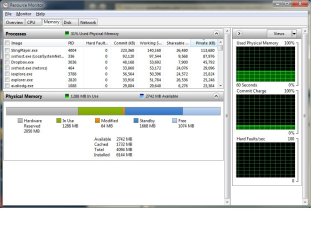
I've been pokin into this issue for a few weeks too. 6 gb physical but Hardware Reserved is holding onto over 2gb.

Resource.jpg


One suggestion I found on the interweb was bent pins on the CPU socket causing this. (i7-Intel 920 CPU) I know...doesn't make sense. Except, I KNOW I bent some pins on my CPU when I installed it. (actually, the pins are on the MB.) Yeah, dropped the damn CPU onto the socket and bent 3 pins. I was almost shocked it booted up. Haven't had the inclination to actually tear it apart and try to straighten them out.

Did the msconfig thing too. That DID make 4 more CPU cores show up that weren't there before.

Memery Remap - no apparent option for this in Gigabyte BIOS
 

My Computer

Computer Manufacturer/Model Number
Bumpus Did it!
OS
WIN7
CPU
Intel i7 920
Motherboard
Gigabyte EX58-UDR
Memory
6GB DDR3 Triple Channel
Graphics Card(s)
Nvidia 250 GTS
Sound Card
Realtek onboard
Monitor(s) Displays
Samsung 192n & 204b
Hard Drives
37gb WD Velociraptors (2) Raid 1 -
Seagate SATAII 1 tb -
WD SATAII 1tb -
WD SATAII Green 1.5tb
PSU
OCZ ModXStream Pro 600W
Case
Lian-Li V1000
Cooling
3 x 120mm
Keyboard
crap
Mouse
MS Intelimouse
Internet Speed
Uverse 12mbps
Other Info
TV (via Slingbox), Data backup & game box.

Hope it never blows up ;)
Back
Top