Memory not reporting correctly

lucasbuck

New member
Member
Local time
4:23 PM
Messages
57
My machine is less that a year old. I installed 6 GB because at the time I wasn't sure if I was going to go 64 bit or not. I ended up sticking with 32. Anyways, I read 6.00 GB (2.49 GB usable). I know I can't access all 6, but even my laptop (which is 32 bit and only 4 GB) says 3.25 GB usable.
I originally ran memtest when the system was built, so I assume everything was seated correctly. But maybe if a chip was bad, it just never checked it (but I think I remember it doing both). Just wanted to check before I started checking sticks. (And I'm not using an onboard video card)
I removed and cleaned. I even doubled checked the manual to make sure they were in the right slots. It's weird. I tested just 2 chips and system properties said 4 GB (2.49) usable. So whether it has 4 or 6, it still says only 2.49 available.
 

My Computer

Computer Manufacturer/Model Number
Custom desktop
OS
Windows 7 Professional 64bit
CPU
Intel Core i7 920 @ 2.67GHz
Motherboard
EVGA 141-BL-E757 (Socket 423)
Memory
6.00 GB Triple-Channel DDR3 @ 530MHz
Graphics Card(s)
ATI Radeon HD 5800 Series (XFX Pine Group)
Sound Card
AMD High Definition Audio Device
Hard Drives
932GB Western Digital WDC WD1001FALS-00J7B1 ATA Device (SATA)
2795GB Western Digital WDC WD30EZRX-00MMMB0 ATA Device (SATA)
1863GB Western Digital WDC WD2001FASS-00W2B0 ATA Device (SATA)
1863GB Western Digital WDC WD20EADS-00S2B0 ATA Device (SATA)
Internet Speed
Cable
I had a similar issue on my machine, in my case it turned out it had something to do with autodesk being installed, when I removed it the reported ram went back to normal.
Something else you can try is opening msconfig via the search bar in the start menu.
click the boot tab and uncheck number of processors and memory.
then okay out and reboot.

http://www.sevenforums.com/tutorials/66482-memory-set-maximum-amount-used-windows-7-a.html

I have to admit I'm rather mystified as to why you chose 32 bit in the first place when you had more than 4 gigs of ram. That's another issue entirely though.
 
Last edited by a moderator:

My Computer

Computer Manufacturer/Model Number
Insane hobo technologies. ;-)
OS
Windows 7 x64
CPU
Intel i7 2600k
Motherboard
Asrock z68 extreme 4 gen 3
Memory
G.skill Ripjaw 16gigs @ 1866
Graphics Card(s)
Nvidia gtx580 (evga)
Sound Card
Integrated HD audio + hdmi
Monitor(s) Displays
24" ASUS widescreen + 42" insignia
Screen Resolution
1080p (1920x1080)
Hard Drives
128 Samsung 830
256 Samsung 840
3 x 1tb storage drive (various)
1 western digital 1tb (eSATA)
1 Seagate 1tb (eSATA)
PSU
1 kilowatt SLI/Crossfire rated Silverstone modular
Case
NZXT Phantom + additional 220 fan
Cooling
Zalmann
Keyboard
Microsoft wireless 3000 (v2)
Mouse
MS - wireless 5000 (bluetrack)
Internet Speed
depends on if you ask me or my provider.
Other Info
The above information is provided as is, and the author assumes no responsibility for issues it may cause with your sanity or fanboyism.
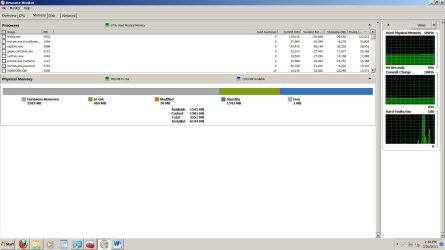
Look into Resource Monitor > Memory tab. There you see best how it is used - in the color bar. Post a snip of the color bar including the nums and we'll have a look.
 
Last edited by a moderator:

My Computer

Computer Manufacturer/Model Number
HP, Dell, Gateway, Toshiba - 4 laptops and 2 desktops
OS
Vista, Windows7, Mint Mate, Zorin, Windows 8
CPU
from 1.6GHz Duo to i7
Monitor(s) Displays
2x HP w2207
Hard Drives
5x HDD, 7x SSD, 12x Externals
Keyboard
with trackball - no mices
Mouse
Trackball mice
Internet Speed
DSL 6000
Thanks for the replies. I checked, and both of those are already unchecked. I did want to ask, you said you had Autodesk installed and that was the issue for you. Did you mean Autodesk applications? As in, I have 3dsMax 2011 and Maya 2011 installed. I wanted to check if that's what you meant before I uninstalled them to test!
Here's a screen shot of the resource monitor. Thanks for the help!
 

Attachments

  • screen.jpg
    screen.jpg
    124.1 KB · Views: 77

My Computer

Computer Manufacturer/Model Number
Custom desktop
OS
Windows 7 Professional 64bit
CPU
Intel Core i7 920 @ 2.67GHz
Motherboard
EVGA 141-BL-E757 (Socket 423)
Memory
6.00 GB Triple-Channel DDR3 @ 530MHz
Graphics Card(s)
ATI Radeon HD 5800 Series (XFX Pine Group)
Sound Card
AMD High Definition Audio Device
Hard Drives
932GB Western Digital WDC WD1001FALS-00J7B1 ATA Device (SATA)
2795GB Western Digital WDC WD30EZRX-00MMMB0 ATA Device (SATA)
1863GB Western Digital WDC WD2001FASS-00W2B0 ATA Device (SATA)
1863GB Western Digital WDC WD20EADS-00S2B0 ATA Device (SATA)
Internet Speed
Cable
What are you using for a video card(s)? If a dedicated card9s) then the memory oin it will be part of the ~1.5 GB that is unusable.
 

My Computer

Computer type
PC/Desktop
Computer Manufacturer/Model Number
Me
OS
Win 7 Ultimate x64
CPU
FX-8350 @ 4.6 GHz so far
Motherboard
Asus M5A97 EVO
Memory
ADATA XPG V1 Series Black 8GB DDR3 1600
Graphics Card(s)
Sapphire R9 270x Dual-X
Sound Card
Xonar DGX w/ Corsair Vengence 1300
Monitor(s) Displays
Acer S232HL Abid
Screen Resolution
1920x1080
Hard Drives
120 GB OCZ Vertex 3
500 GB Seagate 7200.12
PSU
Antec Earthwatts 650W Green
Case
Antec Three Hundred
Cooling
Cooler Master 212 EVO
Keyboard
Logitech G510
Mouse
Logitech G500s
Internet Speed
35000/3000
It's a Radeon 5800 series. It is running dual monitors though, but just duplicating. (I have one monitor in my computer room, one in my living room, so it just shows the same thing depending on what room I'm using the machine in.)
Could it be I didn't turn off the onboard video? Nothing's hooked to those outputs.
 

My Computer

Computer Manufacturer/Model Number
Custom desktop
OS
Windows 7 Professional 64bit
CPU
Intel Core i7 920 @ 2.67GHz
Motherboard
EVGA 141-BL-E757 (Socket 423)
Memory
6.00 GB Triple-Channel DDR3 @ 530MHz
Graphics Card(s)
ATI Radeon HD 5800 Series (XFX Pine Group)
Sound Card
AMD High Definition Audio Device
Hard Drives
932GB Western Digital WDC WD1001FALS-00J7B1 ATA Device (SATA)
2795GB Western Digital WDC WD30EZRX-00MMMB0 ATA Device (SATA)
1863GB Western Digital WDC WD2001FASS-00W2B0 ATA Device (SATA)
1863GB Western Digital WDC WD20EADS-00S2B0 ATA Device (SATA)
Internet Speed
Cable
http://www.sevenforums.com/general-discussion/86886-32-bit-vs-64-bit-comparison.html

32 bit OS
-A 32 bit OS can only address 4Gb of memory. Some of this is then allocated to hardware devices, usually dropping the available RAM to 3.25Gb or 3.5 Gb.
-The addressable space also applies to programs, giving a 2Gb limit of RAM to any one process. This means that 32 bit Photoshop can only ever access up to 2Gbs of RAM.
-Drivers are always a concern. Drivers for hardware usually have a 32 bit version, and there is usually not a problem with 32 bit drivers (finding or using).
-A 32 bit OS has a lower memory requirement to run. For Windows 7, the minimum RAM needed is 1Gb

Your video card has 1 GB on it (your total avai;able would be even less if it was the 2 GB version of the card), so there is 1 GB gone from the 4 GB without taking into consideration any other hardware (which is pretty much everything connected to the motherboard) that requires address space. In your case with 32 bit Windows installed you have ~3 GB of ram installed and doing absolutely nothing

Basically comes down to one of two things with the 6 GB you have installed,

1. Install 64 bit Windows to take advantage of it.

2. Remove 3 GB or ram, and come out ahead by approximately 512 MB over what you have available now.
 

My Computer

Computer type
PC/Desktop
Computer Manufacturer/Model Number
Me
OS
Win 7 Ultimate x64
CPU
FX-8350 @ 4.6 GHz so far
Motherboard
Asus M5A97 EVO
Memory
ADATA XPG V1 Series Black 8GB DDR3 1600
Graphics Card(s)
Sapphire R9 270x Dual-X
Sound Card
Xonar DGX w/ Corsair Vengence 1300
Monitor(s) Displays
Acer S232HL Abid
Screen Resolution
1920x1080
Hard Drives
120 GB OCZ Vertex 3
500 GB Seagate 7200.12
PSU
Antec Earthwatts 650W Green
Case
Antec Three Hundred
Cooling
Cooler Master 212 EVO
Keyboard
Logitech G510
Mouse
Logitech G500s
Internet Speed
35000/3000
A 64 bit operating system is a must for 6 gb of ram. I also noticed you have 3593 mb of ram in reserve for hardware. That seem a lot to me. I have 770 mb.
 

My Computer

Computer type
PC/Desktop
Computer Manufacturer/Model Number
Home made Desktop
OS
Windows 10 Pro. 64/ version 1709 Windows 7 Pro/64
CPU
Intel i7-6800K @ 4.3
Motherboard
ASUS X-99 Deluxe II
Memory
Corsair Platinum 16 gig @2400
Graphics Card(s)
EVGA GTX 1070 OC
Monitor(s) Displays
Asus 27" LED LCD/VE278Q
Screen Resolution
1920-1080 or 1280-720 HDMI
Hard Drives
INTEL SSD 730-240 Gb Sata 3.0/
PSU
EVGA Platium 1200W
Case
Phanteks Luxe Tempered Glass 8 fans/ one radiator
Cooling
XSPC/ Water Cooled CPU
Keyboard
Das 4 Professional
Mouse
Logitech M705/MX Anywhere 2-S
Internet Speed
100 mbits
Antivirus
Microsoft Security Essentials/ Malwarebytes Premium 3.0/ SAS
Browser
I.E. 11 default/Firefox/ ISP Time Warner Cable/Spectrum
Other Info
LG BluRay Burner/
Sound system-KLipsch-THX/
Icy Dock ssd Hot Swap bays.
Well, I can't take out 3 gb, since their 2 gb sticks. And I hate to pay for 64bit, since I already have this. Is there any way to change how much is going to hardware, or any other tweaks to make?
 

My Computer

Computer Manufacturer/Model Number
Custom desktop
OS
Windows 7 Professional 64bit
CPU
Intel Core i7 920 @ 2.67GHz
Motherboard
EVGA 141-BL-E757 (Socket 423)
Memory
6.00 GB Triple-Channel DDR3 @ 530MHz
Graphics Card(s)
ATI Radeon HD 5800 Series (XFX Pine Group)
Sound Card
AMD High Definition Audio Device
Hard Drives
932GB Western Digital WDC WD1001FALS-00J7B1 ATA Device (SATA)
2795GB Western Digital WDC WD30EZRX-00MMMB0 ATA Device (SATA)
1863GB Western Digital WDC WD2001FASS-00W2B0 ATA Device (SATA)
1863GB Western Digital WDC WD20EADS-00S2B0 ATA Device (SATA)
Internet Speed
Cable
Well, I can't take out 3 gb, since their 2 gb sticks. And I hate to pay for 64bit, since I already have this. Is there any way to change how much is going to hardware, or any other tweaks to make?

If you have Windows 7 your license is good for both 32 or 64 bit versions. You don't have to buy another license to get 64bit. But no there are to tweaks you can do. You are out 2 GBs and additional for how much memory your graphics card needs as well as the rest of your hardware. This cannot be avoided.
 

My Computer

Computer type
PC/Desktop
Computer Manufacturer/Model Number
Alienware Aurora ALX R4
OS
Windows 10 Pro (x64)
CPU
Intel Core i7-3930K (3.2GHz - 4.5GHz)
Motherboard
Alienware Aurora-R4 x79
Memory
4x Samsung 4GB PC3-12800 DDR3 (16GB 1600MHz)
Graphics Card(s)
Nvidia Geforce GTX 690
Sound Card
SteelSeries Siberia Elite
Monitor(s) Displays
Dell UltraSharp U3011
Screen Resolution
2560x1600
Hard Drives
Samsung 850 Pro 256 GB, Seagate 1TB Desktop Hybrid HDD, 2x Western Digital 4TB Green HDD
PSU
875W Some Dell PSU <.<
Case
Alienware Aurora ALX
Cooling
Custom Liquid Cooling (EK CPU & GPU blocks) dual EK 480RAD
Keyboard
Logitech G710+ Mechanical
Mouse
Logitech G700s
Internet Speed
Verizon Fios (50 mbps average)
Other Info
Server: Intel NUC D54250WYK: i5-4250U, 16GB, 256 GB mSATA, Windows Server 2012 R2
Do you have the win7 retail install DVDS ? Or was this a Mfg OEM win7 ?

If retail you could clean install the the 64 bit with your key code ;)
 

My Computer

Computer type
PC/Desktop
Computer Manufacturer/Model Number
Built them myself, Science Experiments !
OS
Win7 Enterprise, Win7 x86 (Ult 7600), Win7 x64 Ult 7600, TechNet RTM on AMD x64 (2.8Ghz)
CPU
AMD fx8350 4ghz, AMD-32 2400mhz, AMD-64 3200mhz, AMDx64 2.8G
Motherboard
SIS 755, ECS-K8M890M-M (Ult 7600), GigaByte & others
Memory
2gb, 4gb on the Ult 7600, 4gb on Technet RTM, 32gb on FX8350
Graphics Card(s)
Draw my own Graphics, several nVidia cards
Sound Card
on motherboard
Monitor(s) Displays
19" flat scr, 28" I-Inc widescr,22" Emprex Widescr, 23" Acer
Screen Resolution
1280 x 1024, 1440 x 900, 1920 x 1080
Hard Drives
6 pata Ide HD's & 2 Sata HD's
added 80gb external on Ult 7600 computer,
numerous extra 1tb, 2TB, 3Tb SATA HD's
A collection of ext HD Docks w/ HDs
PSU
430w, 550w, 600w, 700, 800, etc
Case
All Generic Full Towers
Cooling
Open Air & a few fans, some w/ colored LEDs
Keyboard
Compaq & Dell recycled from GoodWill
Mouse
Made in China Optical Wired Mouse
Internet Speed
Fast Cable InterNet
Antivirus
AVG Free on 24 different Desktops, NO Problems!
Browser
IE 8 is preferred, but use FireFox sometimes
Other Info
Linksys Routers, switches, & Hubs
Too Many USB Flash Drives to count, Biggest is 64GB !
Eight computers in my home network.
Sixteen computers at my business network.
Linked via TeamViewer !
Lots of old used spare computer parts everywhere!
Given that you have 6GB of RAM, a 1GB Radeon that takes that much address space from your 4GB (in 32bit that is all you have in address space) plus the other nits and lice that take anothe 500MBs, there is no way around installing a 64bit system - unless you want to waste all the RAM.
 

My Computer

Computer Manufacturer/Model Number
HP, Dell, Gateway, Toshiba - 4 laptops and 2 desktops
OS
Vista, Windows7, Mint Mate, Zorin, Windows 8
CPU
from 1.6GHz Duo to i7
Monitor(s) Displays
2x HP w2207
Hard Drives
5x HDD, 7x SSD, 12x Externals
Keyboard
with trackball - no mices
Mouse
Trackball mice
Internet Speed
DSL 6000
I've got it and can reinstall. The main reason I avoided 64 was because I do a lot of gaming and heard there were issues. Any comment on that?
 

My Computer

Computer Manufacturer/Model Number
Custom desktop
OS
Windows 7 Professional 64bit
CPU
Intel Core i7 920 @ 2.67GHz
Motherboard
EVGA 141-BL-E757 (Socket 423)
Memory
6.00 GB Triple-Channel DDR3 @ 530MHz
Graphics Card(s)
ATI Radeon HD 5800 Series (XFX Pine Group)
Sound Card
AMD High Definition Audio Device
Hard Drives
932GB Western Digital WDC WD1001FALS-00J7B1 ATA Device (SATA)
2795GB Western Digital WDC WD30EZRX-00MMMB0 ATA Device (SATA)
1863GB Western Digital WDC WD2001FASS-00W2B0 ATA Device (SATA)
1863GB Western Digital WDC WD20EADS-00S2B0 ATA Device (SATA)
Internet Speed
Cable
I've got it and can reinstall. The main reason I avoided 64 was because I do a lot of gaming and heard there were issues. Any comment on that?
NO, you won't get any issue unless you install old 16-bit DOS-era games
You best solution is to use the 64-bit version of windows 7

Enable 'Memory Remap' if it is listed in your BIOS :)
 

My Computer

Computer type
PC/Desktop
Computer Manufacturer/Model Number
Custom Build
OS
Windows 10 Pro x64, Arch Linux
CPU
Intel Core 2 Quad Q8200 OC'd 3.08GHz
Motherboard
Asus Rampage formula LGA775
Memory
8GB DDR2 900Mhz
Graphics Card(s)
MSI GT730 2GB GDDR5 (Kepler)
Sound Card
Supreme FX2
Monitor(s) Displays
Samsung LS22F350 LED
Screen Resolution
1080P
Hard Drives
Kingston SSDNow UV400 120GB, 500GB Hitachi, 2TB Samsung, 500GB Seagate FreeAgent, 640GB Samsung, 160GB Toshiba (Arch)
PSU
AeroCool 500W Bronze
Cooling
Cooler Master V6 + 3X fans
Keyboard
Prolink keyboard
Mouse
Logitech M705
Internet Speed
1MiB/s
Browser
Chrome Beta
I've got it and can reinstall. The main reason I avoided 64 was because I do a lot of gaming and heard there were issues. Any comment on that?


yeah that was true with xp 64 bit like early on, whoever told you that was operating on really outdated information though.
Pretty much all the 64bit compat issues were solved back with vista.
 

My Computer

Computer Manufacturer/Model Number
Insane hobo technologies. ;-)
OS
Windows 7 x64
CPU
Intel i7 2600k
Motherboard
Asrock z68 extreme 4 gen 3
Memory
G.skill Ripjaw 16gigs @ 1866
Graphics Card(s)
Nvidia gtx580 (evga)
Sound Card
Integrated HD audio + hdmi
Monitor(s) Displays
24" ASUS widescreen + 42" insignia
Screen Resolution
1080p (1920x1080)
Hard Drives
128 Samsung 830
256 Samsung 840
3 x 1tb storage drive (various)
1 western digital 1tb (eSATA)
1 Seagate 1tb (eSATA)
PSU
1 kilowatt SLI/Crossfire rated Silverstone modular
Case
NZXT Phantom + additional 220 fan
Cooling
Zalmann
Keyboard
Microsoft wireless 3000 (v2)
Mouse
MS - wireless 5000 (bluetrack)
Internet Speed
depends on if you ask me or my provider.
Other Info
The above information is provided as is, and the author assumes no responsibility for issues it may cause with your sanity or fanboyism.
Actually, looks like mine only do 32 :(
 

My Computer

Computer Manufacturer/Model Number
Custom desktop
OS
Windows 7 Professional 64bit
CPU
Intel Core i7 920 @ 2.67GHz
Motherboard
EVGA 141-BL-E757 (Socket 423)
Memory
6.00 GB Triple-Channel DDR3 @ 530MHz
Graphics Card(s)
ATI Radeon HD 5800 Series (XFX Pine Group)
Sound Card
AMD High Definition Audio Device
Hard Drives
932GB Western Digital WDC WD1001FALS-00J7B1 ATA Device (SATA)
2795GB Western Digital WDC WD30EZRX-00MMMB0 ATA Device (SATA)
1863GB Western Digital WDC WD2001FASS-00W2B0 ATA Device (SATA)
1863GB Western Digital WDC WD20EADS-00S2B0 ATA Device (SATA)
Internet Speed
Cable

My Computer

Computer type
PC/Desktop
Computer Manufacturer/Model Number
Custom Build
OS
Windows 10 Pro x64, Arch Linux
CPU
Intel Core 2 Quad Q8200 OC'd 3.08GHz
Motherboard
Asus Rampage formula LGA775
Memory
8GB DDR2 900Mhz
Graphics Card(s)
MSI GT730 2GB GDDR5 (Kepler)
Sound Card
Supreme FX2
Monitor(s) Displays
Samsung LS22F350 LED
Screen Resolution
1080P
Hard Drives
Kingston SSDNow UV400 120GB, 500GB Hitachi, 2TB Samsung, 500GB Seagate FreeAgent, 640GB Samsung, 160GB Toshiba (Arch)
PSU
AeroCool 500W Bronze
Cooling
Cooler Master V6 + 3X fans
Keyboard
Prolink keyboard
Mouse
Logitech M705
Internet Speed
1MiB/s
Browser
Chrome Beta
Think you will find he is referring to his Windows disk, which if it is OEM/system builders then you only get one disk; 32 bit or 64 bit, not both like in the retail or upgrade package.
 

My Computer

Computer type
PC/Desktop
Computer Manufacturer/Model Number
Me
OS
Win 7 Ultimate x64
CPU
FX-8350 @ 4.6 GHz so far
Motherboard
Asus M5A97 EVO
Memory
ADATA XPG V1 Series Black 8GB DDR3 1600
Graphics Card(s)
Sapphire R9 270x Dual-X
Sound Card
Xonar DGX w/ Corsair Vengence 1300
Monitor(s) Displays
Acer S232HL Abid
Screen Resolution
1920x1080
Hard Drives
120 GB OCZ Vertex 3
500 GB Seagate 7200.12
PSU
Antec Earthwatts 650W Green
Case
Antec Three Hundred
Cooling
Cooler Master 212 EVO
Keyboard
Logitech G510
Mouse
Logitech G500s
Internet Speed
35000/3000
Correct, that's what I had. I just bought a a retail and will install 64 so we will see if that helps. But thanks to everyone for the input!
 

My Computer

Computer Manufacturer/Model Number
Custom desktop
OS
Windows 7 Professional 64bit
CPU
Intel Core i7 920 @ 2.67GHz
Motherboard
EVGA 141-BL-E757 (Socket 423)
Memory
6.00 GB Triple-Channel DDR3 @ 530MHz
Graphics Card(s)
ATI Radeon HD 5800 Series (XFX Pine Group)
Sound Card
AMD High Definition Audio Device
Hard Drives
932GB Western Digital WDC WD1001FALS-00J7B1 ATA Device (SATA)
2795GB Western Digital WDC WD30EZRX-00MMMB0 ATA Device (SATA)
1863GB Western Digital WDC WD2001FASS-00W2B0 ATA Device (SATA)
1863GB Western Digital WDC WD20EADS-00S2B0 ATA Device (SATA)
Internet Speed
Cable
Back
Top