Memory Problem

SmEkSiMe

New member
Local time
2:59 PM
Messages
20
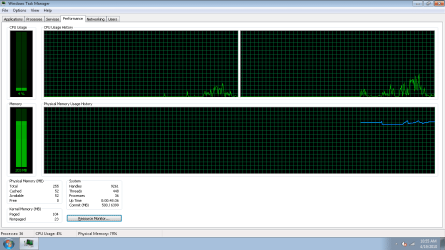
Hey guyz, I just turned on my laptop and it's running really crappy and slow. When I went to computer properties, I noticed that out of my 4.0 GB of RAM, only 256 MB is usable... Is this the reason why my laptop is acting like this and why? I've ran my Windows Memory Diagnostic tool but no problems were detected and when I redid my WEI score the only thing that changed was my Memory Operations from 5.3 to 1... Anyone have any possible solutions and why this is happening? I've also ran CCleaner, Disk Defrag, and MBAM.
 

My Computer

Computer Manufacturer/Model Number
Acer Aspire 5517-1208
OS
Windows 7 Home Premium 64-bit
CPU
AMD Athlon X2 Dual Core Processor L310
Memory
4096MB RAM DDR2
Graphics Card(s)
ATI Radeon HD 3200 Graphics
Sound Card
Realtek High Definition Audio
Hello SmEkSiMe,

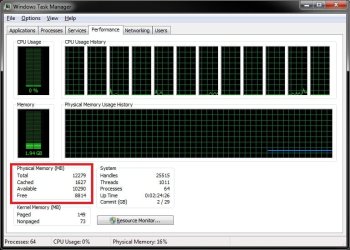
Could you post a screenshot of your Task Manager (CTRL+SHIFT+ESC) with the Performance tab selected? This will also helps how more information about you available memory.

Task_Manager.jpg
 

My Computer

Computer type
PC/Desktop
Computer Manufacturer/Model Number
Self built custom
OS
64-bit Windows 11 Pro for Workstations
CPU
Intel i7-8700K OC'd to 5 GHz
Motherboard
ASUS ROG Maximus XI Formula Z390
Memory
64 GB (4x16GB) G.SKILL TridentZ RGB DDR4 3600 MHz
Graphics Card(s)
ASUS ROG-STRIX-GTX1080TI-O11G-GAMING
Sound Card
Integrated
Monitor(s) Displays
2 x Samsung Odyssey G7 27"
Screen Resolution
2560x1440
Hard Drives
1TB Samsung 990 PRO M.2,
4TB Samsung 990 PRO PRO M.2,
TerraMaster F8 SSD Plus NAS
PSU
Seasonic Prime Titanium 850W
Case
Thermaltake Core P3
Cooling
Corsair Hydro H115i
Keyboard
Logitech wireless K800
Mouse
Logitech MX Master 4
Internet Speed
2 Gb/s Download and 100 Mb/s Upload
Antivirus
Malwarebyte Anti-Malware Premium
Browser
Google Chrome
Other Info
Logitech Z625 speaker system,
Logitech BRIO 4K Pro webcam,
HP Color LaserJet Pro MFP M477fdn,
APC SMART-UPS RT 1000 XL - SURT1000XLI,
Galaxy S23 Plus phone
Hey guyz, I just turned on my laptop and it's running really crappy and slow. When I went to computer properties, I noticed that out of my 4.0 GB of RAM, only 256 MB is usable... Is this the reason why my laptop is acting like this and why? I've ran my Windows Memory Diagnostic tool but no problems were detected and when I redid my WEI score the only thing that changed was my Memory Operations from 5.3 to 1... Anyone have any possible solutions and why this is happening? I've also ran CCleaner, Disk Defrag, and MBAM.

Sounds like a memory leak to me. Do you have ESet's Nod32 or AVG installed on your system?
 

My Computer

Computer type
PC/Desktop
Computer Manufacturer/Model Number
Home built
OS
Windows 7 Ult, Windows 8.1 Pro,
CPU
Q9650-4.275GHz, E8600 4.5GHz, E6750-3.8GHz
Motherboard
Evga 780i FTW
Memory
G.Skill PC2 9600 1200Mhz 5 5 5 15 2T
Graphics Card(s)
GTX480
Sound Card
Asus Xonar D2
Monitor(s) Displays
HannsG
Screen Resolution
1680X1050
Hard Drives
GSkill Phoenix Pro 120GB SSD
PSU
ThermalTake Toughpower 1000Watt modular
Case
ThermalTake XaserV
Cooling
Xigmatek S1283
Keyboard
Logitech G15
Mouse
Logitech G9
Internet Speed
T1

Attachments

  • TaskManager.png
    TaskManager.png
    13.8 KB · Views: 16

My Computer

Computer Manufacturer/Model Number
Acer Aspire 5517-1208
OS
Windows 7 Home Premium 64-bit
CPU
AMD Athlon X2 Dual Core Processor L310
Memory
4096MB RAM DDR2
Graphics Card(s)
ATI Radeon HD 3200 Graphics
Sound Card
Realtek High Definition Audio
Hey guyz, I just turned on my laptop and it's running really crappy and slow. When I went to computer properties, I noticed that out of my 4.0 GB of RAM, only 256 MB is usable... Is this the reason why my laptop is acting like this and why? I've ran my Windows Memory Diagnostic tool but no problems were detected and when I redid my WEI score the only thing that changed was my Memory Operations from 5.3 to 1... Anyone have any possible solutions and why this is happening? I've also ran CCleaner, Disk Defrag, and MBAM.

Sounds like a memory leak to me. Do you have ESet's Nod32 or AVG installed on your system?

No I have neither...
 

My Computer

Computer Manufacturer/Model Number
Acer Aspire 5517-1208
OS
Windows 7 Home Premium 64-bit
CPU
AMD Athlon X2 Dual Core Processor L310
Memory
4096MB RAM DDR2
Graphics Card(s)
ATI Radeon HD 3200 Graphics
Sound Card
Realtek High Definition Audio
SmEkSiMe,

Double check to make sure that you have the Maximum memory box unchecked in the tutorial below.

http://www.sevenforums.com/tutorials/66482-memory-set-maximum-amount-used-windows-7-a.html

Also, double check your BIOS settings to see how much RAM (memory) you have allocated/reserved to be used by your integrated graphics chip. It may have been set to have to much allocated leaving you with only the 255 MB.


Have you dropped or bumped your laptop pretty good recently? Maybe the RAM sticks got knocked loose if you did.
 

My Computer

Computer type
PC/Desktop
Computer Manufacturer/Model Number
Self built custom
OS
64-bit Windows 11 Pro for Workstations
CPU
Intel i7-8700K OC'd to 5 GHz
Motherboard
ASUS ROG Maximus XI Formula Z390
Memory
64 GB (4x16GB) G.SKILL TridentZ RGB DDR4 3600 MHz
Graphics Card(s)
ASUS ROG-STRIX-GTX1080TI-O11G-GAMING
Sound Card
Integrated
Monitor(s) Displays
2 x Samsung Odyssey G7 27"
Screen Resolution
2560x1440
Hard Drives
1TB Samsung 990 PRO M.2,
4TB Samsung 990 PRO PRO M.2,
TerraMaster F8 SSD Plus NAS
PSU
Seasonic Prime Titanium 850W
Case
Thermaltake Core P3
Cooling
Corsair Hydro H115i
Keyboard
Logitech wireless K800
Mouse
Logitech MX Master 4
Internet Speed
2 Gb/s Download and 100 Mb/s Upload
Antivirus
Malwarebyte Anti-Malware Premium
Browser
Google Chrome
Other Info
Logitech Z625 speaker system,
Logitech BRIO 4K Pro webcam,
HP Color LaserJet Pro MFP M477fdn,
APC SMART-UPS RT 1000 XL - SURT1000XLI,
Galaxy S23 Plus phone
SmEkSiMe,

Double check to make sure that you have the Maximum memory box unchecked in the tutorial below.

http://www.sevenforums.com/tutorials/66482-memory-set-maximum-amount-used-windows-7-a.html

Also, double check your BIOS settings to see how much RAM (memory) you have allocated/reserved to be used by your integrated graphics chip. It may have been set to have to much allocated leaving you with only the 255 MB.


Have you dropped or bumped your laptop pretty good recently? Maybe the RAM sticks got knocked loose if you did.

Lol it was the first part Brink. Thanks man. Apparently the box was checked but the number underneath it was 256. I left it checked and put the number back to 4096 and restarted. I went to check it again and it went to 0. Is that fine or no?
 

My Computer

Computer Manufacturer/Model Number
Acer Aspire 5517-1208
OS
Windows 7 Home Premium 64-bit
CPU
AMD Athlon X2 Dual Core Processor L310
Memory
4096MB RAM DDR2
Graphics Card(s)
ATI Radeon HD 3200 Graphics
Sound Card
Realtek High Definition Audio
SmEkSiMe,

Double check to make sure that you have the Maximum memory box unchecked in the tutorial below.

http://www.sevenforums.com/tutorials/66482-memory-set-maximum-amount-used-windows-7-a.html

Also, double check your BIOS settings to see how much RAM (memory) you have allocated/reserved to be used by your integrated graphics chip. It may have been set to have to much allocated leaving you with only the 255 MB.


Have you dropped or bumped your laptop pretty good recently? Maybe the RAM sticks got knocked loose if you did.

Lol it was the first part Brink. Thanks man. Apparently the box was checked but the number underneath it was 256. I left it checked and put the number back to 4096 and restarted. I went to check it again and it went to 0. Is that fine or no?

It is fine and perfectly normal.
 

My Computer

Computer Manufacturer/Model Number
HP Pavillion dv-7 1005 Tx
OS
Win 8 Release candidate 8400
CPU
[email protected]
Memory
4 gigs
Graphics Card(s)
Nvidia 9600M
Sound Card
HD built-in
Monitor(s) Displays
17" Wxga
Screen Resolution
1440x900
Cooling
none
Internet Speed
45Mb down 5Mb up
SmEkSiMe,

Double check to make sure that you have the Maximum memory box unchecked in the tutorial below.

http://www.sevenforums.com/tutorials/66482-memory-set-maximum-amount-used-windows-7-a.html

Also, double check your BIOS settings to see how much RAM (memory) you have allocated/reserved to be used by your integrated graphics chip. It may have been set to have to much allocated leaving you with only the 255 MB.


Have you dropped or bumped your laptop pretty good recently? Maybe the RAM sticks got knocked loose if you did.

Lol it was the first part Brink. Thanks man. Apparently the box was checked but the number underneath it was 256. I left it checked and put the number back to 4096 and restarted. I went to check it again and it went to 0. Is that fine or no?

Yep, that is the default setting to allow Windows 7 to use all available installed RAM. I'm happy to hear that you got it sorted. :)
 

My Computer

Computer type
PC/Desktop
Computer Manufacturer/Model Number
Self built custom
OS
64-bit Windows 11 Pro for Workstations
CPU
Intel i7-8700K OC'd to 5 GHz
Motherboard
ASUS ROG Maximus XI Formula Z390
Memory
64 GB (4x16GB) G.SKILL TridentZ RGB DDR4 3600 MHz
Graphics Card(s)
ASUS ROG-STRIX-GTX1080TI-O11G-GAMING
Sound Card
Integrated
Monitor(s) Displays
2 x Samsung Odyssey G7 27"
Screen Resolution
2560x1440
Hard Drives
1TB Samsung 990 PRO M.2,
4TB Samsung 990 PRO PRO M.2,
TerraMaster F8 SSD Plus NAS
PSU
Seasonic Prime Titanium 850W
Case
Thermaltake Core P3
Cooling
Corsair Hydro H115i
Keyboard
Logitech wireless K800
Mouse
Logitech MX Master 4
Internet Speed
2 Gb/s Download and 100 Mb/s Upload
Antivirus
Malwarebyte Anti-Malware Premium
Browser
Google Chrome
Other Info
Logitech Z625 speaker system,
Logitech BRIO 4K Pro webcam,
HP Color LaserJet Pro MFP M477fdn,
APC SMART-UPS RT 1000 XL - SURT1000XLI,
Galaxy S23 Plus phone
That is OK. When that checkbox is clear, then your system will use all the available RAM and ignore whatever value is in the box underneath. When the checkbox is checked (ticked), the system is limited to the amount of RAM in that box. The default status is for the checkbox to be clear so that your system has full access to the total amount of memory installed.

Do you have that checkbox checked or not? The only reason for having that checkbox checked is for troublershooting and certain application compatibility issues.
 

My Computer

Computer type
PC/Desktop
Computer Manufacturer/Model Number
Dwarf Dwf/11/2012 r09/2013
OS
Windows 8.1 Pro RTM x64
CPU
Intel Core-i5-3570K 4-core @ 3.4GHz (Ivy Bridge) (OC 4.4GHz)
Motherboard
ASRock Z77 Extreme4-M
Memory
4 x 4GB DDR3-1600 Corsair Vengeance CMZ8GX3M2A1600C9B (16GB)
Graphics Card(s)
MSI GeForce GTX770 Gaming OC 2GB
Sound Card
Realtek High Definition on board solution (ALC 898)
Monitor(s) Displays
ViewSonic VA1912w Widescreen (VGA)
Screen Resolution
1440x900
Hard Drives
OCZ Agility 3 SSD 120GB SATA III x2 (RAID 0)
Samsung HD501LJ 500GB SATA II x2
Hitachi HDS721010CLA332 1TB SATA II
Iomega 1.5TB Ext USB 2.0
WD 2.0TB Ext USB 3.0
PSU
XFX Pro Series 850W Semi-Modular
Case
Gigabyte IF233
Cooling
1 x 120mm Front Inlet 1 x 120mm Rear Exhaust
Keyboard
Microsoft Comfort Curve Keyboard 3000 (USB)
Mouse
Microsoft Comfort Mouse 3000 for Business (USB)
Internet Speed
NetGear DG834Gv3 ADSL Modem/Router (Ethernet) ~4.0 Mb/s (O2)
Antivirus
Avast! 8.0.1497
Browser
IE 11
Other Info
Optical Drive: HL-DT-ST BD-RE BH10LS30 SATA Bluray
Lexmark S305 Printer/Scanner/Copier (USB)
WEI Score: 8.1/8.1/8.5/8.5/8.25
Asus Eee PC 1011PX Netbook (Windows 7 x86 Starter)
Back
Top