Memory/Ram

wesley16

New member
Local time
10:49 AM
Messages
10
I have 4096 MB Ram installed at my PC,
But when i look at Task Manager it shows me: 3327 MB Ram

How can i fix this?


I already looked in the BIOS but i didn't anything, also i looked in the Mobo manual
In the Bios ram shows up as 4096 MB

Please someone help me!
 

My Computer

Computer Manufacturer/Model Number
Self Build
OS
Windows 7 Professional x64
CPU
AMD Athlon II x4 640
Motherboard
MSI 880-GM-E41
Memory
4GB
Graphics Card(s)
ATI Radeon 5670 Silent 1GB
Monitor(s) Displays
LG HD TV
Case
Antec 300
is it not ur "Onboard ATI Radeon HD 5670" eating it?

ur all 64 OS CPU and M/B so shouldnt be any reason.
 

My Computer

Computer Manufacturer/Model Number
Windows 7 Ultimate 64-bit
OS
Windows 7 Ultimate N 64-bit
CPU
AMD Black Edition - AMD Phenom X4 2.5 GHz Processor
Motherboard
Bio Star
Memory
8GB DDR2 800MHZ BRANDED
Graphics Card(s)
Palti NVIDIA GeForce GTX 460
Monitor(s) Displays
3D 23.6" & 22"
Screen Resolution
1920x1080@120Hz
Hard Drives
313GB SAMSUNG SAMSUNG HD321KJ
PSU
OCZ 600W StealthXStream PSU, PowerWhisper, Active PFC
Internet Speed
22793

My Computer

Computer type
PC/Desktop
Computer Manufacturer/Model Number
Custom Build
OS
Windows 10 Pro x64
CPU
Intel Core i5 4440 @Stock
Motherboard
Gigabyte Z97 D3H
Memory
4 x 4GB HyperX Fury DDR3
Graphics Card(s)
Gigabyte GTX 1050Ti O4G
Sound Card
Integrated
Monitor(s) Displays
Dell P2417H
Screen Resolution
1920 x 1080
Hard Drives
Samsung EVO 850 120GB / Toshiba DT01ACA050 1TB 7200prm 32MB
PSU
Riotoro Onyx 750W
Case
NZXT H500 Black-Red
Cooling
Stock CPU + NZXT 120mm + 2x120mm red fans
Keyboard
Modecom Volcano Lanparty
Mouse
Asus ROG Gladius / DeepCool E-Pad Plus
Internet Speed
DOCSIS 50/3 Mbit
Browser
Google Chrome
Other Info
Asus K55VJ(i5 3210M, GT635M / 2GB, 8GB DDR3, 500GB HDD)
is it not ur "Onboard ATI Radeon HD 5670" eating it?

ur all 64 OS CPU and M/B so shouldnt be any reason.

My video card isn't onboard its a 1Gb one bought it 4 days ago
 

My Computer

Computer Manufacturer/Model Number
Self Build
OS
Windows 7 Professional x64
CPU
AMD Athlon II x4 640
Motherboard
MSI 880-GM-E41
Memory
4GB
Graphics Card(s)
ATI Radeon 5670 Silent 1GB
Monitor(s) Displays
LG HD TV
Case
Antec 300
If the motherboard does not have a memory remap option then you are not going to see all of your RAM. That is how the address space works. Your 1 GB video card requires 1024 segments of the address space. The address space is shared between all components of the mother board including RAM. without Memory Remap, everything stays inside the 4096 address space.
 

My Computer

Computer type
PC/Desktop
Computer Manufacturer/Model Number
Alienware Aurora ALX R4
OS
Windows 10 Pro (x64)
CPU
Intel Core i7-3930K (3.2GHz - 4.5GHz)
Motherboard
Alienware Aurora-R4 x79
Memory
4x Samsung 4GB PC3-12800 DDR3 (16GB 1600MHz)
Graphics Card(s)
Nvidia Geforce GTX 690
Sound Card
SteelSeries Siberia Elite
Monitor(s) Displays
Dell UltraSharp U3011
Screen Resolution
2560x1600
Hard Drives
Samsung 850 Pro 256 GB, Seagate 1TB Desktop Hybrid HDD, 2x Western Digital 4TB Green HDD
PSU
875W Some Dell PSU <.<
Case
Alienware Aurora ALX
Cooling
Custom Liquid Cooling (EK CPU & GPU blocks) dual EK 480RAD
Keyboard
Logitech G710+ Mechanical
Mouse
Logitech G700s
Internet Speed
Verizon Fios (50 mbps average)
Other Info
Server: Intel NUC D54250WYK: i5-4250U, 16GB, 256 GB mSATA, Windows Server 2012 R2
Two things to check,

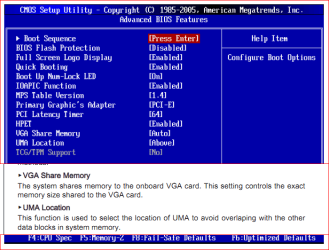
memhole.png

Make sure that the VGA Share is set to off, or as low as it will go if off isn't available. The UMA Location is the only thing I can find in the manual that looks like it might be the memory re-mapping; make sure that it is set to Above (default setting according to the manual).
 

My Computer

Computer type
PC/Desktop
Computer Manufacturer/Model Number
Me
OS
Win 7 Ultimate x64
CPU
FX-8350 @ 4.6 GHz so far
Motherboard
Asus M5A97 EVO
Memory
ADATA XPG V1 Series Black 8GB DDR3 1600
Graphics Card(s)
Sapphire R9 270x Dual-X
Sound Card
Xonar DGX w/ Corsair Vengence 1300
Monitor(s) Displays
Acer S232HL Abid
Screen Resolution
1920x1080
Hard Drives
120 GB OCZ Vertex 3
500 GB Seagate 7200.12
PSU
Antec Earthwatts 650W Green
Case
Antec Three Hundred
Cooling
Cooler Master 212 EVO
Keyboard
Logitech G510
Mouse
Logitech G500s
Internet Speed
35000/3000
My video card isn't onboard its a 1Gb one bought it 4 days ago


sorry just going off ur 'system specs'

did u have this issue before upgrade?
 

My Computer

Computer Manufacturer/Model Number
Windows 7 Ultimate 64-bit
OS
Windows 7 Ultimate N 64-bit
CPU
AMD Black Edition - AMD Phenom X4 2.5 GHz Processor
Motherboard
Bio Star
Memory
8GB DDR2 800MHZ BRANDED
Graphics Card(s)
Palti NVIDIA GeForce GTX 460
Monitor(s) Displays
3D 23.6" & 22"
Screen Resolution
1920x1080@120Hz
Hard Drives
313GB SAMSUNG SAMSUNG HD321KJ
PSU
OCZ 600W StealthXStream PSU, PowerWhisper, Active PFC
Internet Speed
22793
I'm not familar with your MB settings, but I have an MSI board too. If you are running off of the memory of the graphics card I believe you can disable UMA. My MB has sideport and UMA, I can enable them both or either one. UMA dedicates a portion of your ram to be used by the onboard graphics and therefore is not available to the system to use.
 

My Computers

System One System Two

  • Computer type
    PC/Desktop
    Computer Manufacturer/Model Number
    ALWAYS UNDER CONSTRUCTION
    OS
    Windows 11 Pro
    CPU
    Ryzen 9 5900X
    Motherboard
    Asus X570 Crosshair Viii Hero
    Memory
    32GB G Skill DDR4-3600
    Graphics Card(s)
    EVGA RTX 3080 FTW 3 Ultra
    Sound Card
    On Board/Sennheiser PC37X Headset
    Monitor(s) Displays
    3 X Asus 27"
    Screen Resolution
    2560x1440
    Hard Drives
    2 X 1 TB NVME drives
    PSU
    EVGA 850
    Case
    Phanteks Eclipse P400A
    Cooling
    EVGA 280 AIO
    Keyboard
    Logitech G510s/ Logitech G13
    Mouse
    Logitech G502
    Internet Speed
    24/1
    Antivirus
    ESET/MBAM Pro/SAS Pro
    Browser
    Chrome/ Firefox/ Edge
  • Computer type
    Laptop
    System Manufacturer/Model Number
    Dell 16 Plus
    OS
    Windows 11 Pro
    CPU
    Intel Ultra 9 288V
    Memory
    32 GB LPDDR5X 8533
    Monitor(s) Displays
    16" Mini-LED HDR600 Touch 90 Hz
    Screen Resolution
    2560X1600
    Hard Drives
    1 TB NVME
Have a look in Resource Monitor > Memory tab (the color bar). Then you know for certain whether the hardware has reserved the missing bytes (the left grey area).
 

My Computer

Computer Manufacturer/Model Number
HP, Dell, Gateway, Toshiba - 4 laptops and 2 desktops
OS
Vista, Windows7, Mint Mate, Zorin, Windows 8
CPU
from 1.6GHz Duo to i7
Monitor(s) Displays
2x HP w2207
Hard Drives
5x HDD, 7x SSD, 12x Externals
Keyboard
with trackball - no mices
Mouse
Trackball mice
Internet Speed
DSL 6000
I have 4096 MB Ram installed at my PC,
But when i look at Task Manager it shows me: 3327 MB Ram

How can i fix this?


I already looked in the BIOS but i didn't anything, also i looked in the Mobo manual
In the Bios ram shows up as 4096 MB

Please someone help me!

Have a look in Resource Monitor > Memory tab (the color bar). Then you know for certain whether the hardware has reserved the missing bytes (the left grey area).

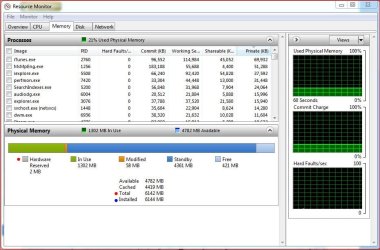
Have a look at you resource monitor like whs said. Here's mine for example.

Note the "Installed" Memory (blue dot). Now note the "Total" memory (red dot), now look over to the Gray "Reserved" memory (blue dot) and note the amount. This is subtracted from your "Installed" memory. Now take note of the "Modified" memory (should be an orange box) - this is also subtracted from your "Installed" memory.

Now with that out of the way - On the "Physical Memory" line you'll see two numbers - MB In Use and MB Available - If you add those they should add up to your total memory "Installed" - minus the "Hardware Reserved" and "Modified" memory.

Example mine - 1302+4782= 6084MB. Now, if we add the "Hardware Reserved" and "Modified" memory 60MB (2+58= 60) to the MB In Use and MB Available (1302+4782+60) that equals all your installed memory - 6144MB. Which is what the "Installed" line reads :)

The other "simpler" way is just to add all the numbers under the color bars which would also equal all your memory installed ;)

Resource Monitor.JPG

If you have less than that you are missing memroy.

Hope this helps.
 

My Computer

Computer type
PC/Desktop
Computer Manufacturer/Model Number
Custom built by me.
OS
Windows 10 Pro
CPU
Intel Core i7-4770K (3.5Ghz)
Motherboard
Gigabyte G1 Sniper 5 (F10 Bios)
Memory
32 gig Corsair Dominator Platinum (4x8Gig)
Graphics Card(s)
Sapphire Tri-X R9 Fury
Sound Card
Soundblaster ZXR
Monitor(s) Displays
NEC PA242W 24" LCD Monitor
Screen Resolution
1920 x 1200
Hard Drives
Primary - Samsung 850 Pro (512gig), Samsung 840 Pro (256gig), 2TB WD Caviar Black.
PSU
EVGA Supernova 1000 G2
Case
Cooler Master HAF X
Cooling
Corsair H100i with Corsair Air Series SP120 Quiet Fans
Keyboard
Logitech Wireless Wave
Mouse
Logitech Performance MX
Internet Speed
High Speed Cable
Antivirus
Norton Security
Browser
IE11
Other Info
Memory Timings - 1866MHz @ 9-9-9-27-1T @ 1.5 volts
I think you might be a little off Sygnus. Total and Installed do not seem to take "Modified" into consideration. Total is 6142 while Installed is 6144, the Hardware Reserved is 2 MB while Modified is 58. However Total only shows 2 MBs are missing.
 

My Computer

Computer type
PC/Desktop
Computer Manufacturer/Model Number
Alienware Aurora ALX R4
OS
Windows 10 Pro (x64)
CPU
Intel Core i7-3930K (3.2GHz - 4.5GHz)
Motherboard
Alienware Aurora-R4 x79
Memory
4x Samsung 4GB PC3-12800 DDR3 (16GB 1600MHz)
Graphics Card(s)
Nvidia Geforce GTX 690
Sound Card
SteelSeries Siberia Elite
Monitor(s) Displays
Dell UltraSharp U3011
Screen Resolution
2560x1600
Hard Drives
Samsung 850 Pro 256 GB, Seagate 1TB Desktop Hybrid HDD, 2x Western Digital 4TB Green HDD
PSU
875W Some Dell PSU <.<
Case
Alienware Aurora ALX
Cooling
Custom Liquid Cooling (EK CPU & GPU blocks) dual EK 480RAD
Keyboard
Logitech G710+ Mechanical
Mouse
Logitech G700s
Internet Speed
Verizon Fios (50 mbps average)
Other Info
Server: Intel NUC D54250WYK: i5-4250U, 16GB, 256 GB mSATA, Windows Server 2012 R2
I think you might be a little off Sygnus. Total and Installed do not seem to take "Modified" into consideration. Total is 6142 while Installed is 6144, the Hardware Reserved is 2 MB while Modified is 58. However Total only shows 2 MBs are missing.

Looking at my "installed" memory of 6144, if you minus the 2MB for "reserved" and the 58MB for "Modified" that will give you 6084 - which is what the the "Physical Memory" line adds up to. However the "Total" line only minuses the 2MB of "Reserved" memory - 6144-2=6142.

Anyways a simpler way to check if all your memory is in use is the just add all the numbers by the colored bars. Adding all of mine still comes out the 6144.
 

My Computer

Computer type
PC/Desktop
Computer Manufacturer/Model Number
Custom built by me.
OS
Windows 10 Pro
CPU
Intel Core i7-4770K (3.5Ghz)
Motherboard
Gigabyte G1 Sniper 5 (F10 Bios)
Memory
32 gig Corsair Dominator Platinum (4x8Gig)
Graphics Card(s)
Sapphire Tri-X R9 Fury
Sound Card
Soundblaster ZXR
Monitor(s) Displays
NEC PA242W 24" LCD Monitor
Screen Resolution
1920 x 1200
Hard Drives
Primary - Samsung 850 Pro (512gig), Samsung 840 Pro (256gig), 2TB WD Caviar Black.
PSU
EVGA Supernova 1000 G2
Case
Cooler Master HAF X
Cooling
Corsair H100i with Corsair Air Series SP120 Quiet Fans
Keyboard
Logitech Wireless Wave
Mouse
Logitech Performance MX
Internet Speed
High Speed Cable
Antivirus
Norton Security
Browser
IE11
Other Info
Memory Timings - 1866MHz @ 9-9-9-27-1T @ 1.5 volts
Back
Top