Memory remapping problem

TheBaron

New member
Local time
9:08 PM
Messages
7
Hello!

I bought a new motherboard recently because my old one broke down.
I'm running Windows 7 Home Premium 64-bit, and with my old motherboard I was able to use all 4 GB's of RAM. When I switched to the new motherboard I could only use 3,25 GB RAM. I went in to Bios and enabled the Memory hole remapping -setting, but then the graphic card driver won't work, and it seems like the graphic card uses both its own memory (512 mb) and shared memory. If I go back in to Bios and disable Memory hole remapping I can only use 3,25 GB again, but the graphic card driver works instead. Is there any way to use all 4 Gb's of ram and get the graphic card driver to work again?
 

My Computer

OS
Windows 7 Home Premium 64bit
CPU
AMD Phenom X4 9950 Black Edition
Motherboard
ASRock ALiveXFire-eSATA2
Memory
4.0GB Dual-Channel DDR2 @ 399MHz (6-6-6-18)
Graphics Card(s)
512MB GeForce 9500 GT (nVidia)
Sound Card
High Definition Audio Device
Monitor(s) Displays
BenQ G900W @ 1440x900 + HP L1502 @ 1024x768
Screen Resolution
1440x900 and 1024x768
Hard Drives
250GB Seagate ST3250310AS ATA Device
500GB Iomega External HDD
PSU
CoolerMaster Extreme Power Plus 400W
Case
ACE Ecco 420
Keyboard
Logitech Deluxe 250
Mouse
Logitech
Internet Speed
5/1
What does it say in your system window, (start orb, right click my computer, properties), under installed memory X.X GB?
 

My Computer

Computer Manufacturer/Model Number
Custom built
OS
Windows 7 Ultimate 64 bit
CPU
AMD Phenom II X4 965 Black Edition
Motherboard
Gigabyte GA-MA790X-DS4
Memory
GSkill 4 X 2 GB PC 8500
Graphics Card(s)
XFX Radeon HD 6790 D
Sound Card
On board RealTek HD
Monitor(s) Displays
Dual monitors:Samsung SyncMaster S20B300
Screen Resolution
1600 X 900
Hard Drives
Seagate Barracuda 1TB (primary)
Seagate Barracuda 2 X 320 GB
PSU
Ultra X4 750 watt fully modular
Case
Thermaltake Overseer RX 1 full tower
Cooling
Core-Contact 92 mm CPU Cooler
Keyboard
Logitech G510
Mouse
Razor DeathAdder
Internet Speed
50/5 Mbps UL/DL
Other Info
Optical: Super Muliti DVD burner w/lightscribe, Hauppauge WinTV HVR-1800
4,00 GB installed (3,25 GB usable)
 

My Computer

OS
Windows 7 Home Premium 64bit
CPU
AMD Phenom X4 9950 Black Edition
Motherboard
ASRock ALiveXFire-eSATA2
Memory
4.0GB Dual-Channel DDR2 @ 399MHz (6-6-6-18)
Graphics Card(s)
512MB GeForce 9500 GT (nVidia)
Sound Card
High Definition Audio Device
Monitor(s) Displays
BenQ G900W @ 1440x900 + HP L1502 @ 1024x768
Screen Resolution
1440x900 and 1024x768
Hard Drives
250GB Seagate ST3250310AS ATA Device
500GB Iomega External HDD
PSU
CoolerMaster Extreme Power Plus 400W
Case
ACE Ecco 420
Keyboard
Logitech Deluxe 250
Mouse
Logitech
Internet Speed
5/1
Some older GPU's will and can use extra RAM if it requires it, it will be automatically allocated to it which is probably why it's showing up as it is on your system. The only option that I know of is to upgrade your GPU. Unless some one on here knows something else. It's not going to hurt or hinder your system in any way. It's the same way with on-board graphics.
 

My Computer

Computer Manufacturer/Model Number
Custom built
OS
Windows 7 Ultimate 64 bit
CPU
AMD Phenom II X4 965 Black Edition
Motherboard
Gigabyte GA-MA790X-DS4
Memory
GSkill 4 X 2 GB PC 8500
Graphics Card(s)
XFX Radeon HD 6790 D
Sound Card
On board RealTek HD
Monitor(s) Displays
Dual monitors:Samsung SyncMaster S20B300
Screen Resolution
1600 X 900
Hard Drives
Seagate Barracuda 1TB (primary)
Seagate Barracuda 2 X 320 GB
PSU
Ultra X4 750 watt fully modular
Case
Thermaltake Overseer RX 1 full tower
Cooling
Core-Contact 92 mm CPU Cooler
Keyboard
Logitech G510
Mouse
Razor DeathAdder
Internet Speed
50/5 Mbps UL/DL
Other Info
Optical: Super Muliti DVD burner w/lightscribe, Hauppauge WinTV HVR-1800
Have you tried booting to safe mode and reinstalling the graphics card driver with the mapping enabled?
 

My Computer

Computer type
PC/Desktop
Computer Manufacturer/Model Number
Home built (GeneO industries)/Model 4
OS
Windows 10 Pro. EFI boot partition, full EFI boot
CPU
i7 4770k 4.4GHz (44-44-43-43 turbo) @ 1.248V
Motherboard
ASUS Maximus VI Hero
Memory
16GB (8GBx2) @2200 MHz G.skill Sniper 10-11-10-30-1, 1.6V
Graphics Card(s)
MSI GTX 970 Gaming 4G
Sound Card
Onboard SupremeFX Audio
Monitor(s) Displays
NEC Spectraview 2490WUXi-SV
Screen Resolution
1920 x 1200
Hard Drives
Samsung 850 Pro 256GB (OS), Samsung 2x 128GB 840 Pro SSD in RAID0, 3x WD Blue 6Gb/s 1TB RAID0, WD 2TB Black external USB 3.0, 2TB WD20EARS Green external USB 3.0, 2x 500GB Seagate and 1 750 GB external USB, 1x 350GB external USB3
PSU
Seasonic X-850 (2012 KM3 model)
Case
Fractal Design Define R4
Cooling
NH-D14, NF-F12, NF-A15; NF-P14, NF-P12,NF-A14, S12A PWM
Keyboard
Cooler Master Storm Quickfire Rapid - Brown
Mouse
Logitech G602
Internet Speed
126.4 Mb/s down, 24.3 Mb/s up
Other Info
USB 3.0 x8 , SATA III x8, eSATA, USB 2.0 x6. Samsung DVD R/W drive.

WEI: CPU 7.8, Memory 7.9, Graphics 7.9, Disk 7.9
Have you tried booting to safe mode and reinstalling the graphics card driver with the mapping enabled?


No I haven't, I'll give it a try :)
 

My Computer

OS
Windows 7 Home Premium 64bit
CPU
AMD Phenom X4 9950 Black Edition
Motherboard
ASRock ALiveXFire-eSATA2
Memory
4.0GB Dual-Channel DDR2 @ 399MHz (6-6-6-18)
Graphics Card(s)
512MB GeForce 9500 GT (nVidia)
Sound Card
High Definition Audio Device
Monitor(s) Displays
BenQ G900W @ 1440x900 + HP L1502 @ 1024x768
Screen Resolution
1440x900 and 1024x768
Hard Drives
250GB Seagate ST3250310AS ATA Device
500GB Iomega External HDD
PSU
CoolerMaster Extreme Power Plus 400W
Case
ACE Ecco 420
Keyboard
Logitech Deluxe 250
Mouse
Logitech
Internet Speed
5/1
Have you tried booting to safe mode and reinstalling the graphics card driver with the mapping enabled?

Nope, didn't work... :(
 

My Computer

OS
Windows 7 Home Premium 64bit
CPU
AMD Phenom X4 9950 Black Edition
Motherboard
ASRock ALiveXFire-eSATA2
Memory
4.0GB Dual-Channel DDR2 @ 399MHz (6-6-6-18)
Graphics Card(s)
512MB GeForce 9500 GT (nVidia)
Sound Card
High Definition Audio Device
Monitor(s) Displays
BenQ G900W @ 1440x900 + HP L1502 @ 1024x768
Screen Resolution
1440x900 and 1024x768
Hard Drives
250GB Seagate ST3250310AS ATA Device
500GB Iomega External HDD
PSU
CoolerMaster Extreme Power Plus 400W
Case
ACE Ecco 420
Keyboard
Logitech Deluxe 250
Mouse
Logitech
Internet Speed
5/1
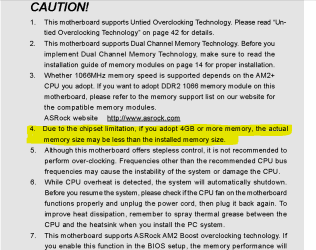
Hi Unfortunately it isn't going to get better :( here is a snippet from your mobo handbook;

Capture.PNG

This is very surprising as they claim you can use up to 16GB RAM, give me a chance to read the complete manual maybe there is more
 

My Computer

Computer Manufacturer/Model Number
Something I threw together
OS
Windows 7 Ultimate x64
CPU
Intel Core i7-2600K
Motherboard
Asus P8P67
Memory
16 GB G Skill F3-10666 CL9D-4GBRL
Graphics Card(s)
ATI Radeon HD 6870
Sound Card
ATI Radeon HDMI / Realtek ALC892
Monitor(s) Displays
2 x 22" standard monitors / LG32LC56v TV to watch films
Screen Resolution
1920 x1080
Hard Drives
2 x OCZ Vertex2 111.79GB
3 x Samsung103SJ
1 x Samsung103UJ
1 x WD3200BEVT
1 x Hitachi5K320-160
PSU
Thermaltake Toughpower Cable Management 750W
Case
Antec 300
Cooling
Noctua NH-U12P SE2 and 5 120mm Case fans
Keyboard
Microsoft Comfort Curve Keyboard 2000
Mouse
Hama M3110 / Logitech M305
Internet Speed
16000
Other Info
I have also used Fedora, Suse, Ubuntu Linux
And all other Windows from 95 to date except ME
Ok I have read through the manual and have found nothing to add to the above, if anything I have a new question and that would be what would happen if you install more ram? Answer I do not know :( but I guess that you will be able to use more but still have a chunk missing.
 

My Computer

Computer Manufacturer/Model Number
Something I threw together
OS
Windows 7 Ultimate x64
CPU
Intel Core i7-2600K
Motherboard
Asus P8P67
Memory
16 GB G Skill F3-10666 CL9D-4GBRL
Graphics Card(s)
ATI Radeon HD 6870
Sound Card
ATI Radeon HDMI / Realtek ALC892
Monitor(s) Displays
2 x 22" standard monitors / LG32LC56v TV to watch films
Screen Resolution
1920 x1080
Hard Drives
2 x OCZ Vertex2 111.79GB
3 x Samsung103SJ
1 x Samsung103UJ
1 x WD3200BEVT
1 x Hitachi5K320-160
PSU
Thermaltake Toughpower Cable Management 750W
Case
Antec 300
Cooling
Noctua NH-U12P SE2 and 5 120mm Case fans
Keyboard
Microsoft Comfort Curve Keyboard 2000
Mouse
Hama M3110 / Logitech M305
Internet Speed
16000
Other Info
I have also used Fedora, Suse, Ubuntu Linux
And all other Windows from 95 to date except ME
Back
Top