Memory Speeds Problems with CPU-Z

glennc

New member
Power User
VIP
Local time
4:31 PM
Messages
1,024
Hello to all,
With the help of the forums great members I've learned a lot about Dram and indicated speed and CPU-Z indication. I have 4 800 Mhz DDR2 chips for a total of 8GB.
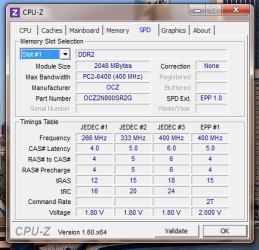
CPU-Z shows each slot/module as a 400 MHz speed. The memory page of CPU-Z show the DRAM Frequency as 334 Mhz, which should be optimally 400 Mhz. Can any assist or explain if I set up something wrong or a reasoning for this discrepancy?
Thank
Slot 1
slot1.png

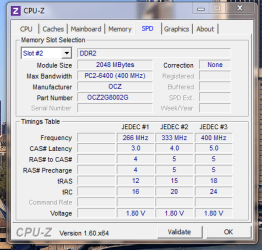
Slot 2
slot2.PNG

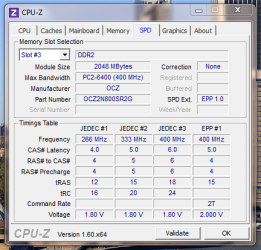
Slot 3
slot3.PNG

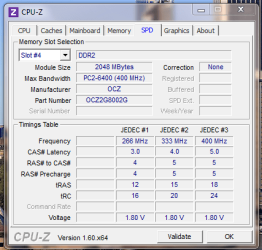
Slot 4
slot4.png

Memory Tab Description
Memory.pnd.PNG

Hope you can help. What did I do wrong?
Glenn
 

My Computer

Computer type
PC/Desktop
Computer Manufacturer/Model Number
Self-Built
OS
Windows 7 Ultimate
CPU
AMD Phenom-II X4 965
Motherboard
Gigabyte GA-MA785GM-US2H
Memory
8192 MB DDR2-SDRAM
Graphics Card(s)
ATI Radeon HD 4200
Sound Card
ATI Radeon HD 4200 High Definition Audo
Monitor(s) Displays
LG Electronics W1943
Screen Resolution
1360 X 768
Hard Drives
C: 500 GB Caviar Black SATA
E: 500 GB Caviar Black SATA
PSU
Ultra LSP 750
Case
Ultra XBlaster
Cooling
2 Fans, CPU Fan, PS Fan
Keyboard
Acer
Mouse
Logitech
Internet Speed
6 MB
I don't know if your Gigabyte board does it, but some Asus boards downclocked the memory when all four DIMMs lots were populated. That was done for stability.

The frequency, timings, and voltage for the RAM could still be set in the BIOS manually, to run it at its rated frequency. Sometimes, I've had to back off on the timing a little to get the rated frequency. It's like overclocking the RAM, even though it isn't actually being run at an elevated frequency.

If you adjust those setting, I recommend that you check the memory stability. The memory check at POST (power on self test) is inadequate; use the built-in Windows memory diagnostic, or a third-party tool like from:

Memtest86+ - Advanced Memory Diagnostic Tool

(Memtest86+ has the advantage of being OS independent.)
 

My Computer

Computer Manufacturer/Model Number
homegrown
OS
Windows 7 Pro X64 SP1
CPU
Intel Core I7-3930k
Motherboard
Asus P9X79 Pro
Memory
16 GB Gskill DDR3-2133
Graphics Card(s)
eVGA GTX680
Sound Card
Creative X-Fi Titanium
Monitor(s) Displays
As PA246Q
Screen Resolution
1920 X 1200
Hard Drives
Corsair Force GT, 120 GB
WDC 1.5TB Caviar Black
PSU
PCP&C Silencer 750 Crossfire
Case
Silverstone FT02
Cooling
Noctua NH-D14
Keyboard
cheap Logitech USB
Mouse
Microsoft Intellimouse Explorer (old optical) USB
Internet Speed
6Mb cable
Other Info
Pioneer BDR-205
Samsung SH-203B
Monsoon 5.1 speakers
I don't know if your Gigabyte board does it, but some Asus boards downclocked the memory when all four DIMMs lots were populated. That was done for stability.

The frequency, timings, and voltage for the RAM could still be set in the BIOS manually, to run it at its rated frequency. Sometimes, I've had to back off on the timing a little to get the rated frequency. It's like overclocking the RAM, even though it isn't actually being run at an elevated frequency.

If you adjust those setting, I recommend that you check the memory stability. The memory check at POST (power on self test) is inadequate; use the built-in Windows memory diagnostic, or a third-party tool like from:

Memtest86+ - Advanced Memory Diagnostic Tool

(Memtest86+ has the advantage of being OS independent.)

Howdy,
I ran the Windows memory diagnostic, it rebooted and ran and didn't indicate anything. Didn't say anything was wrong, but it didn't say anything. For the life of me I can not figure out how to get memtes86+ to run. I download the zip, extract the iso, burn the iso to a DVD, insert the DVD and let it start and I get open explorer message. I open it and it shows a lot of files on the disk, but none that appear runnable. I really would like to get a good test and maybe see why the ram is running so slow. Thanks for any help!
Glenn
 

My Computer

Computer type
PC/Desktop
Computer Manufacturer/Model Number
Self-Built
OS
Windows 7 Ultimate
CPU
AMD Phenom-II X4 965
Motherboard
Gigabyte GA-MA785GM-US2H
Memory
8192 MB DDR2-SDRAM
Graphics Card(s)
ATI Radeon HD 4200
Sound Card
ATI Radeon HD 4200 High Definition Audo
Monitor(s) Displays
LG Electronics W1943
Screen Resolution
1360 X 768
Hard Drives
C: 500 GB Caviar Black SATA
E: 500 GB Caviar Black SATA
PSU
Ultra LSP 750
Case
Ultra XBlaster
Cooling
2 Fans, CPU Fan, PS Fan
Keyboard
Acer
Mouse
Logitech
Internet Speed
6 MB
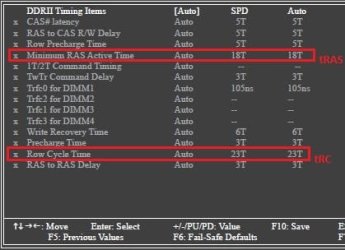
I don't know what it is on a Gigabyte board, but there is a key for a 1 time boot menu. Tap that key when you see the logo and select the CD/DVD player. You have to do it quickly and you may see a screen to 'hit any key to boot from the CD'. If that does not work, you can always change the boot order in BIOS to CD/DVD 1st then Hard drive 2nd. You may also just try to change the timings a little. Try only changing tras to 18 and trc to 24 and see if that helps the frequency. However, if it does change, you will not notice any difference. Also, in BIOS make sure the dram voltage is correct.
 

My Computers

System One System Two

  • Computer type
    PC/Desktop
    Computer Manufacturer/Model Number
    ALWAYS UNDER CONSTRUCTION
    OS
    Windows 11 Pro
    CPU
    Ryzen 9 5900X
    Motherboard
    Asus X570 Crosshair Viii Hero
    Memory
    32GB G Skill DDR4-3600
    Graphics Card(s)
    EVGA RTX 3080 FTW 3 Ultra
    Sound Card
    On Board/Sennheiser PC37X Headset
    Monitor(s) Displays
    3 X Asus 27"
    Screen Resolution
    2560x1440
    Hard Drives
    2 X 1 TB NVME drives
    PSU
    EVGA 850
    Case
    Phanteks Eclipse P400A
    Cooling
    EVGA 280 AIO
    Keyboard
    Logitech G510s/ Logitech G13
    Mouse
    Logitech G502
    Internet Speed
    24/1
    Antivirus
    ESET/MBAM Pro/SAS Pro
    Browser
    Chrome/ Firefox/ Edge
  • Computer type
    Laptop
    System Manufacturer/Model Number
    Dell 16 Plus
    OS
    Windows 11 Pro
    CPU
    Intel Ultra 9 288V
    Memory
    32 GB LPDDR5X 8533
    Monitor(s) Displays
    16" Mini-LED HDR600 Touch 90 Hz
    Screen Resolution
    2560X1600
    Hard Drives
    1 TB NVME
BTW, those first 4 screens do not tell you anything about what the RAM is running at, just the profiles for speeds it is capable of. Only the last screen shows you what it is running at. So there is no conflict. You appear to have a mix of a couple of slightly different kinds of RAM. It is capable of 400 MHz but your motherboard BIOS is running it at one of the 333 MHz profile. That may actually be optimal - the individual timings are better.
 

My Computer

Computer type
PC/Desktop
Computer Manufacturer/Model Number
Home built (GeneO industries)/Model 4
OS
Windows 10 Pro. EFI boot partition, full EFI boot
CPU
i7 4770k 4.4GHz (44-44-43-43 turbo) @ 1.248V
Motherboard
ASUS Maximus VI Hero
Memory
16GB (8GBx2) @2200 MHz G.skill Sniper 10-11-10-30-1, 1.6V
Graphics Card(s)
MSI GTX 970 Gaming 4G
Sound Card
Onboard SupremeFX Audio
Monitor(s) Displays
NEC Spectraview 2490WUXi-SV
Screen Resolution
1920 x 1200
Hard Drives
Samsung 850 Pro 256GB (OS), Samsung 2x 128GB 840 Pro SSD in RAID0, 3x WD Blue 6Gb/s 1TB RAID0, WD 2TB Black external USB 3.0, 2TB WD20EARS Green external USB 3.0, 2x 500GB Seagate and 1 750 GB external USB, 1x 350GB external USB3
PSU
Seasonic X-850 (2012 KM3 model)
Case
Fractal Design Define R4
Cooling
NH-D14, NF-F12, NF-A15; NF-P14, NF-P12,NF-A14, S12A PWM
Keyboard
Cooler Master Storm Quickfire Rapid - Brown
Mouse
Logitech G602
Internet Speed
126.4 Mb/s down, 24.3 Mb/s up
Other Info
USB 3.0 x8 , SATA III x8, eSATA, USB 2.0 x6. Samsung DVD R/W drive.

WEI: CPU 7.8, Memory 7.9, Graphics 7.9, Disk 7.9
I don't know what it is on a Gigabyte board, but there is a key for a 1 time boot menu. Tap that key when you see the logo and select the CD/DVD player. You have to do it quickly and you may see a screen to 'hit any key to boot from the CD'. If that does not work, you can always change the boot order in BIOS to CD/DVD 1st then Hard drive 2nd. You may also just try to change the timings a little. Try only changing tras to 18 and trc to 24 and see if that helps the frequency. However, if it does change, you will not notice any difference. Also, in BIOS make sure the dram voltage is correct.

Hello essenbe,
Dear sir, may I inquire as to what your initial comment about the CD will do?
I can get to the BIOS, the thing is set for auto, which is the second item on the page. The rest of the page is set up with blanked out but very important sounding stuff. I turned the auto to manual and that page of stuff suddenly became fully available. To much stuff, haven't a clue, latencies and stuff like MTF. So I don't know what to change or why or to what. So without assistance I am going to leave it at auto. Thanks
Glenn
 

My Computer

Computer type
PC/Desktop
Computer Manufacturer/Model Number
Self-Built
OS
Windows 7 Ultimate
CPU
AMD Phenom-II X4 965
Motherboard
Gigabyte GA-MA785GM-US2H
Memory
8192 MB DDR2-SDRAM
Graphics Card(s)
ATI Radeon HD 4200
Sound Card
ATI Radeon HD 4200 High Definition Audo
Monitor(s) Displays
LG Electronics W1943
Screen Resolution
1360 X 768
Hard Drives
C: 500 GB Caviar Black SATA
E: 500 GB Caviar Black SATA
PSU
Ultra LSP 750
Case
Ultra XBlaster
Cooling
2 Fans, CPU Fan, PS Fan
Keyboard
Acer
Mouse
Logitech
Internet Speed
6 MB
BTW, those first 4 screens do not tell you anything about what the RAM is running at, just the profiles for speeds it is capable of. Only the last screen shows you what it is running at. So there is no conflict. You appear to have a mix of a couple of slightly different kinds of RAM. It is capable of 400 MHz but your motherboard BIOS is running it at one of the 333 MHz profile. That may actually be optimal - the individual timings are better.

Hello Geneo,
That is what I thought, thanks for confirming. I just wanted any potential assisters to have the info that is shown. I guess I am going to have to go in and manually adjust the memory speed, whenever I figure out what all the options mean...
Appreciate your time
Glenn
 

My Computer

Computer type
PC/Desktop
Computer Manufacturer/Model Number
Self-Built
OS
Windows 7 Ultimate
CPU
AMD Phenom-II X4 965
Motherboard
Gigabyte GA-MA785GM-US2H
Memory
8192 MB DDR2-SDRAM
Graphics Card(s)
ATI Radeon HD 4200
Sound Card
ATI Radeon HD 4200 High Definition Audo
Monitor(s) Displays
LG Electronics W1943
Screen Resolution
1360 X 768
Hard Drives
C: 500 GB Caviar Black SATA
E: 500 GB Caviar Black SATA
PSU
Ultra LSP 750
Case
Ultra XBlaster
Cooling
2 Fans, CPU Fan, PS Fan
Keyboard
Acer
Mouse
Logitech
Internet Speed
6 MB
When you go into BIOS you should have a section called boot order or boot priorities. In that section you choose what drive or device to boot from first. You can set the CD/DVD drive to be the 1st boot device and your hard drive to be the second boot device. Put the CD you just created and it should boot from the CD. When it boots, you will usually see a message on the screen to push any key to boot from yhe CD. Push a ket and it will boot from the CD you just created. After you have done all the tests you want to run from the CD, you can go back and change it if you like.
 

My Computers

System One System Two

  • Computer type
    PC/Desktop
    Computer Manufacturer/Model Number
    ALWAYS UNDER CONSTRUCTION
    OS
    Windows 11 Pro
    CPU
    Ryzen 9 5900X
    Motherboard
    Asus X570 Crosshair Viii Hero
    Memory
    32GB G Skill DDR4-3600
    Graphics Card(s)
    EVGA RTX 3080 FTW 3 Ultra
    Sound Card
    On Board/Sennheiser PC37X Headset
    Monitor(s) Displays
    3 X Asus 27"
    Screen Resolution
    2560x1440
    Hard Drives
    2 X 1 TB NVME drives
    PSU
    EVGA 850
    Case
    Phanteks Eclipse P400A
    Cooling
    EVGA 280 AIO
    Keyboard
    Logitech G510s/ Logitech G13
    Mouse
    Logitech G502
    Internet Speed
    24/1
    Antivirus
    ESET/MBAM Pro/SAS Pro
    Browser
    Chrome/ Firefox/ Edge
  • Computer type
    Laptop
    System Manufacturer/Model Number
    Dell 16 Plus
    OS
    Windows 11 Pro
    CPU
    Intel Ultra 9 288V
    Memory
    32 GB LPDDR5X 8533
    Monitor(s) Displays
    16" Mini-LED HDR600 Touch 90 Hz
    Screen Resolution
    2560X1600
    Hard Drives
    1 TB NVME
When you go into BIOS you should have a section called boot order or boot priorities. In that section you choose what drive or device to boot from first. You can set the CD/DVD drive to be the 1st boot device and your hard drive to be the second boot device. Put the CD you just created and it should boot from the CD. When it boots, you will usually see a message on the screen to push any key to boot from yhe CD. Push a ket and it will boot from the CD you just created. After you have done all the tests you want to run from the CD, you can go back and change it if you like.

Oh my, can't believe I forgot that. Then it will run the memtest. Thanks you and duh!
I ran windows memory diagnostics 4 times and it indicates no problems. I believe the memory is fine. Now it is just a matter of changing the auto default setting to a higher speed and whatever else that distressing page implies. Also the BIOS has temperature warnings that are turned off, fans not running- turned off. Is this the normal state people run in. I am looking for performance. Also my old CPU was 3Ghz and the new one is 3.4 Ghz. Will changing that increase my performance?
Thank you kind sir!
Glenn
 

My Computer

Computer type
PC/Desktop
Computer Manufacturer/Model Number
Self-Built
OS
Windows 7 Ultimate
CPU
AMD Phenom-II X4 965
Motherboard
Gigabyte GA-MA785GM-US2H
Memory
8192 MB DDR2-SDRAM
Graphics Card(s)
ATI Radeon HD 4200
Sound Card
ATI Radeon HD 4200 High Definition Audo
Monitor(s) Displays
LG Electronics W1943
Screen Resolution
1360 X 768
Hard Drives
C: 500 GB Caviar Black SATA
E: 500 GB Caviar Black SATA
PSU
Ultra LSP 750
Case
Ultra XBlaster
Cooling
2 Fans, CPU Fan, PS Fan
Keyboard
Acer
Mouse
Logitech
Internet Speed
6 MB
Windows Memory Diagnostic test is not as comprehensive as Memtest86. Here is a tutorial on how to run memtest86. It will take several hours to run the test, it is best to do it overnight. In bios I always have temp warnings on and normally you set a target temp for the fans. That will make them speed up if the temp increases. And the fans should be running. Also, you should have a section in BIOS called Hardware monitor which will tell you voltages and temps. The main page is usually system information which tells you your CPU type and speed as well as your installed ram and the speed of the ram as well as other info. That page is normally for information purposes and does not allow for changes.

EDIT: Don't be concerned, many people are not familar with bios and don't go there often. It is quite common.
 

My Computers

System One System Two

  • Computer type
    PC/Desktop
    Computer Manufacturer/Model Number
    ALWAYS UNDER CONSTRUCTION
    OS
    Windows 11 Pro
    CPU
    Ryzen 9 5900X
    Motherboard
    Asus X570 Crosshair Viii Hero
    Memory
    32GB G Skill DDR4-3600
    Graphics Card(s)
    EVGA RTX 3080 FTW 3 Ultra
    Sound Card
    On Board/Sennheiser PC37X Headset
    Monitor(s) Displays
    3 X Asus 27"
    Screen Resolution
    2560x1440
    Hard Drives
    2 X 1 TB NVME drives
    PSU
    EVGA 850
    Case
    Phanteks Eclipse P400A
    Cooling
    EVGA 280 AIO
    Keyboard
    Logitech G510s/ Logitech G13
    Mouse
    Logitech G502
    Internet Speed
    24/1
    Antivirus
    ESET/MBAM Pro/SAS Pro
    Browser
    Chrome/ Firefox/ Edge
  • Computer type
    Laptop
    System Manufacturer/Model Number
    Dell 16 Plus
    OS
    Windows 11 Pro
    CPU
    Intel Ultra 9 288V
    Memory
    32 GB LPDDR5X 8533
    Monitor(s) Displays
    16" Mini-LED HDR600 Touch 90 Hz
    Screen Resolution
    2560X1600
    Hard Drives
    1 TB NVME
I've attached two screenshots, the first being what you need to change to force 800Mhz (CPU-Z 400Mhz) and the second to change the two timings essenbe suggested (post #4).

Due to the mixed RAM you may have problems. The two SR2G sticks have 3 JEDEC's and a EPP the other two only have three JEDEC's and the timings and voltages are different. I'm pretty sure this is why your RAM is running at 333Mhz because under that profile the timings and voltages are closer to the same.

Now forcing the RAM to 800Mhz may cause a problem with the auto timings so you may need to manually set the timings as well.

I think we need some overclocker's to have a look if you really want it running at 800Mhz (400Mhz). I mean if it was me I would remove the two SR2G sticks and make sure there running at 800Mhz (require save and exit) before writing down the timings in the right hand column. Next I would set the speed back to auto if it needed to be changed and then put all 4 sticks back in and then set to 800Mhz. Next set the voltage to 2V, overvoltage on two sticks, and set the timings to what you wrote down. Then most importantly test with MemTest.

The timings would be safe for the two 2G sticks and the voltage would be sufficent to run the SR2G sticks at a CAS# Latency of 5. But I wouldn't know if the 2G sticks could handle 2V for long.

You could also test at 1.8 volts as it may be the 4,4,15 that requires the extra voltage.

But this is just me, not a experienced overclocker.
 

Attachments

  • BIOS.jpg
    BIOS.jpg
    30.3 KB · Views: 3
  • Timings.jpg
    Timings.jpg
    26.4 KB · Views: 4
Last edited:

My Computer

Computer Manufacturer/Model Number
Self built
OS
Windows 7 Ultimate x64
CPU
Intel Pentium Dual Core E5200 2.5GHz (3.77GHz OC)
Motherboard
Asus P5Q-E
Memory
Corsair 4GB DDR2 (4x1GB CM2X1024-6400C4)
Graphics Card(s)
Palit GeForce GTS 250 (1024MB)
Sound Card
On Board (ADI AD2000B 8ch HD)
Monitor(s) Displays
Samsung 32in LCD TV
Screen Resolution
1360x768
Hard Drives
2 x 1TB Samsung 103SJ (Raid0)
2 x External 500GB Samsung 502IJ (NexStar 3 HD Enclosures)
PSU
550W Antec Neo HE 550
Case
Antec P180
Cooling
Xigmatex Red Scorpion CPU Cooler. 3x120mm Fans
Keyboard
Logitech MX5000 Laser (Combo)
Mouse
Logitech MX5000 Laser (Combo)
Internet Speed
ADSL2+ (avg 10 Mbps Down, 0.80 Mbps up)
Other Info
Gigabyte GN-WP01GS 54g Wireless Lan Card
I seem to recall seeing a long time ago that when you populate all 4 slots with 4 sticks of DDR2 800 ram that it will downclock to 667 speeds, something to do with IMC (memory controller) limitations. Been looking around but can't find the reference at the moment.

You should be able to set it manually to 800 as Duzzy suggests above, but if you do get it there don't be surprised if it isn't stable. All things considering if things are stable with the ram at 667, I would just leave it there. That and as nice as it would be to get it running at its rated speed, unless all you run is memory benchmarks you likely won't even see a difference (1-2% maybe) with it at 800.
 

My Computer

Computer type
PC/Desktop
Computer Manufacturer/Model Number
Me
OS
Win 7 Ultimate x64
CPU
FX-8350 @ 4.6 GHz so far
Motherboard
Asus M5A97 EVO
Memory
ADATA XPG V1 Series Black 8GB DDR3 1600
Graphics Card(s)
Sapphire R9 270x Dual-X
Sound Card
Xonar DGX w/ Corsair Vengence 1300
Monitor(s) Displays
Acer S232HL Abid
Screen Resolution
1920x1080
Hard Drives
120 GB OCZ Vertex 3
500 GB Seagate 7200.12
PSU
Antec Earthwatts 650W Green
Case
Antec Three Hundred
Cooling
Cooler Master 212 EVO
Keyboard
Logitech G510
Mouse
Logitech G500s
Internet Speed
35000/3000
Windows Memory Diagnostic test is not as comprehensive as Memtest86. Here is a tutorial on how to run memtest86. It will take several hours to run the test, it is best to do it overnight. In bios I always have temp warnings on and normally you set a target temp for the fans. That will make them speed up if the temp increases. And the fans should be running. Also, you should have a section in BIOS called Hardware monitor which will tell you voltages and temps. The main page is usually system information which tells you your CPU type and speed as well as your installed ram and the speed of the ram as well as other info. That page is normally for information purposes and does not allow for changes.

EDIT: Don't be concerned, many people are not familar with bios and don't go there often. It is quite common.

Hello,
Memtest now works!! Thanks. I also took a shot at the BIOS. Found where I could bump the ram speed to 800MHz. I now realize that on the POST screen it was showing DDR 667!!!! Well it now shows DDR 800. I ran the index assessement test and the times are exactly the same as with it set at DDR 667. So I went back and set it to auto. Unless I missed something, it seems the increase gave me no more perfomance benefit, by itself. You can comment on any obvious mistakes. CPU-Z also showed 401 as the DDR Speed when it was changed over.
Cool!
Glenn
 

My Computer

Computer type
PC/Desktop
Computer Manufacturer/Model Number
Self-Built
OS
Windows 7 Ultimate
CPU
AMD Phenom-II X4 965
Motherboard
Gigabyte GA-MA785GM-US2H
Memory
8192 MB DDR2-SDRAM
Graphics Card(s)
ATI Radeon HD 4200
Sound Card
ATI Radeon HD 4200 High Definition Audo
Monitor(s) Displays
LG Electronics W1943
Screen Resolution
1360 X 768
Hard Drives
C: 500 GB Caviar Black SATA
E: 500 GB Caviar Black SATA
PSU
Ultra LSP 750
Case
Ultra XBlaster
Cooling
2 Fans, CPU Fan, PS Fan
Keyboard
Acer
Mouse
Logitech
Internet Speed
6 MB
I've attached two screenshots, the first being what you need to change to force 800Mhz (CPU-Z 400Mhz) and the second to change the two timings essenbe suggested (post #4).

Due to the mixed RAM you may have problems. The two SR2G sticks have 3 JEDEC's and a EPP the other two only have three JEDEC's and the timings and voltages are different. I'm pretty sure this is why your RAM is running at 333Mhz because under that profile the timings and voltages are closer to the same.

Now forcing the RAM to 800Mhz may cause a problem with the auto timings so you may need to manually set the timings as well.

I think we need some overclocker's to have a look if you really want it running at 800Mhz (400Mhz). I mean if it was me I would remove the two SR2G sticks and make sure there running at 800Mhz (require save and exit) before writing down the timings in the right hand column. Next I would set the speed back to auto if it needed to be changed and then put all 4 sticks back in and then set to 800Mhz. Next set the voltage to 2V, overvoltage on two sticks, and set the timings to what you wrote down. Then most importantly test with MemTest.

The timings would be safe for the two 2G sticks and the voltage would be sufficent to run the SR2G sticks at a CAS# Latency of 5. But I wouldn't know if the 2G sticks could handle 2V for long.

You could also test at 1.8 volts as it may be the 4,4,15 that requires the extra voltage.


But this is just me, not a experienced overclocker.

Thanks for your informative assistance. As I noted in the reply to essenbe, I only changed the timing to 800 GHz and didn't notice any change in the index performance, so I reset it. Do to my limited knowledge, I don't expect to see a remarkable increase on tweaking the values closer to correct. So unless an overclocker will come on and let me know of a valid reason, I set it back to auto.
Appreciate your time
Glenn
 

My Computer

Computer type
PC/Desktop
Computer Manufacturer/Model Number
Self-Built
OS
Windows 7 Ultimate
CPU
AMD Phenom-II X4 965
Motherboard
Gigabyte GA-MA785GM-US2H
Memory
8192 MB DDR2-SDRAM
Graphics Card(s)
ATI Radeon HD 4200
Sound Card
ATI Radeon HD 4200 High Definition Audo
Monitor(s) Displays
LG Electronics W1943
Screen Resolution
1360 X 768
Hard Drives
C: 500 GB Caviar Black SATA
E: 500 GB Caviar Black SATA
PSU
Ultra LSP 750
Case
Ultra XBlaster
Cooling
2 Fans, CPU Fan, PS Fan
Keyboard
Acer
Mouse
Logitech
Internet Speed
6 MB
I seem to recall seeing a long time ago that when you populate all 4 slots with 4 sticks of DDR2 800 ram that it will downclock to 667 speeds, something to do with IMC (memory controller) limitations. Been looking around but can't find the reference at the moment.

You should be able to set it manually to 800 as Duzzy suggests above, but if you do get it there don't be surprised if it isn't stable. All things considering if things are stable with the ram at 667, I would just leave it there. That and as nice as it would be to get it running at its rated speed, unless all you run is memory benchmarks you likely won't even see a difference (1-2% maybe) with it at 800.

From my limited test, described above and the results I am in agreement. I set it back to auto. Better safe than sorry! Thanks stormy13!
Glenn
 

My Computer

Computer type
PC/Desktop
Computer Manufacturer/Model Number
Self-Built
OS
Windows 7 Ultimate
CPU
AMD Phenom-II X4 965
Motherboard
Gigabyte GA-MA785GM-US2H
Memory
8192 MB DDR2-SDRAM
Graphics Card(s)
ATI Radeon HD 4200
Sound Card
ATI Radeon HD 4200 High Definition Audo
Monitor(s) Displays
LG Electronics W1943
Screen Resolution
1360 X 768
Hard Drives
C: 500 GB Caviar Black SATA
E: 500 GB Caviar Black SATA
PSU
Ultra LSP 750
Case
Ultra XBlaster
Cooling
2 Fans, CPU Fan, PS Fan
Keyboard
Acer
Mouse
Logitech
Internet Speed
6 MB
I believe I said in a previous post that you would notice no increase in performance. But, the link I gave on memtest86 says to run I think 7 passes. 7 passes will take 8-10 hours to run. The frequency of the ram is really not noticeable except in benchmarks. I have run 1333, 1600, 1866 and 2133 MHz ram and can tell no performance difference in actual usage, only in benchmarks.
 

My Computers

System One System Two

  • Computer type
    PC/Desktop
    Computer Manufacturer/Model Number
    ALWAYS UNDER CONSTRUCTION
    OS
    Windows 11 Pro
    CPU
    Ryzen 9 5900X
    Motherboard
    Asus X570 Crosshair Viii Hero
    Memory
    32GB G Skill DDR4-3600
    Graphics Card(s)
    EVGA RTX 3080 FTW 3 Ultra
    Sound Card
    On Board/Sennheiser PC37X Headset
    Monitor(s) Displays
    3 X Asus 27"
    Screen Resolution
    2560x1440
    Hard Drives
    2 X 1 TB NVME drives
    PSU
    EVGA 850
    Case
    Phanteks Eclipse P400A
    Cooling
    EVGA 280 AIO
    Keyboard
    Logitech G510s/ Logitech G13
    Mouse
    Logitech G502
    Internet Speed
    24/1
    Antivirus
    ESET/MBAM Pro/SAS Pro
    Browser
    Chrome/ Firefox/ Edge
  • Computer type
    Laptop
    System Manufacturer/Model Number
    Dell 16 Plus
    OS
    Windows 11 Pro
    CPU
    Intel Ultra 9 288V
    Memory
    32 GB LPDDR5X 8533
    Monitor(s) Displays
    16" Mini-LED HDR600 Touch 90 Hz
    Screen Resolution
    2560X1600
    Hard Drives
    1 TB NVME
I believe I said in a previous post that you would notice no increase in performance. But, the link I gave on memtest86 says to run I think 7 passes. 7 passes will take 8-10 hours to run. The frequency of the ram is really not noticeable except in benchmarks. I have run 1333, 1600, 1866 and 2133 MHz ram and can tell no performance difference in actual usage, only in benchmarks.

Yes Sir, that is why I changed it back. I ran memtest for a couple hours, didn't notice but it had a complete on it and it was running another. So I don't know how many passes it made. It sees it as DDR 667. Not a single error. Fingers crossed. Thanks essenbe, you have helped me understand and test. I feel much more relaxed {:-))!
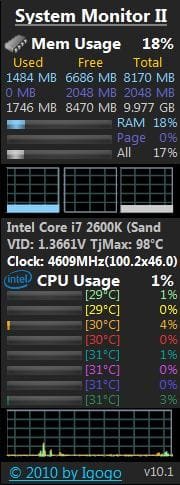
So later I'll read about the test more and set it up to run all night. Do you trust those gadgets with the core temperatures on it?
This forum is great, and many thanks!
Glenn
 

My Computer

Computer type
PC/Desktop
Computer Manufacturer/Model Number
Self-Built
OS
Windows 7 Ultimate
CPU
AMD Phenom-II X4 965
Motherboard
Gigabyte GA-MA785GM-US2H
Memory
8192 MB DDR2-SDRAM
Graphics Card(s)
ATI Radeon HD 4200
Sound Card
ATI Radeon HD 4200 High Definition Audo
Monitor(s) Displays
LG Electronics W1943
Screen Resolution
1360 X 768
Hard Drives
C: 500 GB Caviar Black SATA
E: 500 GB Caviar Black SATA
PSU
Ultra LSP 750
Case
Ultra XBlaster
Cooling
2 Fans, CPU Fan, PS Fan
Keyboard
Acer
Mouse
Logitech
Internet Speed
6 MB
Yes, I trust those gadgets, but only as a close approximation. Don't expect them to be absolutely correct. I keep this gadget with temps from core temp always open on my desktop.

X.JPG
 

My Computers

System One System Two

  • Computer type
    PC/Desktop
    Computer Manufacturer/Model Number
    ALWAYS UNDER CONSTRUCTION
    OS
    Windows 11 Pro
    CPU
    Ryzen 9 5900X
    Motherboard
    Asus X570 Crosshair Viii Hero
    Memory
    32GB G Skill DDR4-3600
    Graphics Card(s)
    EVGA RTX 3080 FTW 3 Ultra
    Sound Card
    On Board/Sennheiser PC37X Headset
    Monitor(s) Displays
    3 X Asus 27"
    Screen Resolution
    2560x1440
    Hard Drives
    2 X 1 TB NVME drives
    PSU
    EVGA 850
    Case
    Phanteks Eclipse P400A
    Cooling
    EVGA 280 AIO
    Keyboard
    Logitech G510s/ Logitech G13
    Mouse
    Logitech G502
    Internet Speed
    24/1
    Antivirus
    ESET/MBAM Pro/SAS Pro
    Browser
    Chrome/ Firefox/ Edge
  • Computer type
    Laptop
    System Manufacturer/Model Number
    Dell 16 Plus
    OS
    Windows 11 Pro
    CPU
    Intel Ultra 9 288V
    Memory
    32 GB LPDDR5X 8533
    Monitor(s) Displays
    16" Mini-LED HDR600 Touch 90 Hz
    Screen Resolution
    2560X1600
    Hard Drives
    1 TB NVME
Back
Top