
Solved Memory upgrade not all usable

Bobthebass

New member
Local time
1:12 AM
Messages
15
Location
Glasgow
Hi there,

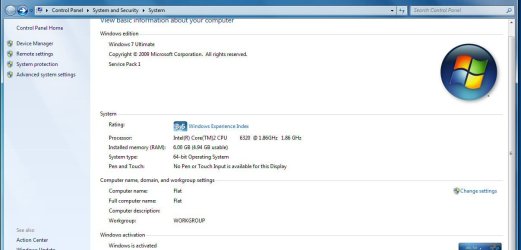
I have just added 4Gb Crucial memory (2x2Gb) to my existing 2Gb RAM (2 x 1Gb) for 6 Gb total. The system info shows 6Gb but only 4.94Gb usable.

Any suggestions as to the difference and how I might get more usable memory?

n.b. When only 2 Gb was installed it all appeared usable.

(I have looked and Max Memory is unchecked in msconfig)

Screenshots attached of System screen and the memory tab of resource center
 

Attachments
  • memory1.jpg
    memory1.jpg
    59.1 KB · Views: 90
  • memory2.jpg
    memory2.jpg
    90.3 KB · Views: 75

My Computer

OS
Win XP Home SP3 / Win7 Ultimate dual boot
CPU
INTEL CORE 2 DUO E6300
Motherboard
ASUS SKT-775 P5B-E PLUS
Memory
2GB DDR2 PC-5400
Graphics Card(s)
XpertVision 256MB GeF 7300GT
Sound Card
MOBO
Monitor(s) Displays
Benq V2220 21.5 LCD Monitor
Hard Drives
80 GB SATA HDD UDMA 300 7200 8MB
160 GB SATA HDD UDMA 300 7200 8MB
1Tb SATA HDD
500 Gb Western Digital MyBook Essential
Case
ThermalTake CASE MAMBO
Welcome
I know that crucial tells you what you should use, but the first rule is dont mix and match, nothing but trouble
Second take a memory test to see if its the slots or the sticks or neither
Guide to using Memtest86+ - Geeks to Go Forums

To the future posters, lets not get into the mix and match thing. If thats not the problem, here fine, lets just find out what is the problem.
 

My Computer

Computer type
PC/Desktop
Computer Manufacturer/Model Number
Dell XPS 420
OS
Windows 10, Home Clean Install
CPU
Intel Core2 processsor Q8200(2.33Ghz 1333FSB) Quad Core Tech
Motherboard
Dell
Memory
6 gb
Graphics Card(s)
ATI Radeon 256MB HD3650
Sound Card
Intergrated 7.1 Channel Audio
Monitor(s) Displays
Dell SP2009W 20"
Hard Drives
640 GB Serial ATA Hard drive
Cooling
Fan
Keyboard
Dell USB Keyboard
Mouse
Dell Premium Optical USB
Internet Speed
DSL 2.85
Aha, and the Crucial tool looked so helpful for picking the right kit :(

I will download and use the Memtest program.

Do you think it is worth updating the BIOS for my mobo??
 

My Computer

OS
Win XP Home SP3 / Win7 Ultimate dual boot
CPU
INTEL CORE 2 DUO E6300
Motherboard
ASUS SKT-775 P5B-E PLUS
Memory
2GB DDR2 PC-5400
Graphics Card(s)
XpertVision 256MB GeF 7300GT
Sound Card
MOBO
Monitor(s) Displays
Benq V2220 21.5 LCD Monitor
Hard Drives
80 GB SATA HDD UDMA 300 7200 8MB
160 GB SATA HDD UDMA 300 7200 8MB
1Tb SATA HDD
500 Gb Western Digital MyBook Essential
Case
ThermalTake CASE MAMBO
After we know the results of the test, we go to the next step.
Be sure to run all the sticks for 8 passes.
Then take a good stick and test each slot for 8 passes.
This will let us know something.
It might not be mix and match in your case, but it is a no no. In the future, just spend a few bucks more and get all at once.
 

My Computer

Computer type
PC/Desktop
Computer Manufacturer/Model Number
Dell XPS 420
OS
Windows 10, Home Clean Install
CPU
Intel Core2 processsor Q8200(2.33Ghz 1333FSB) Quad Core Tech
Motherboard
Dell
Memory
6 gb
Graphics Card(s)
ATI Radeon 256MB HD3650
Sound Card
Intergrated 7.1 Channel Audio
Monitor(s) Displays
Dell SP2009W 20"
Hard Drives
640 GB Serial ATA Hard drive
Cooling
Fan
Keyboard
Dell USB Keyboard
Mouse
Dell Premium Optical USB
Internet Speed
DSL 2.85
Your machine is recognizing all 6 GB, but only five are available due to one being "hardware reserved." I am not sure what is using it, but something is, and needs to be corrected, as you have no problems using 2GB, and you do not have onboard graphics that are in use from what I gather from your system specifications.
 

My Computer

Computer Manufacturer/Model Number
Pugh Technologies
OS
W7 Professional x64
CPU
AMD Athlon II X3 445 Rana 3.10 GHz
Motherboard
MSI 870A-G54
Memory
PNY XLR DDR3 1600 4x2GB
Graphics Card(s)
NVIDIA GeForce GTS 450 (fermi) 1GB GDDR5
Sound Card
Realtek ALC892 onboard
Monitor(s) Displays
ASUS VE205t, Viewsonic VX2035WM
Screen Resolution
1600x900, 1600x1050
Hard Drives
977GB Hitachi Hitachi HDS721010CLA332
244GB Western Digital WDC WD2500AAJS-65B4A0
488GB Western Digital WDC WD5000AAJS-00A8B0
488GB Western Digital WDC WD5000AAKS-00UU3A0
PSU
Antec EarthWatts EA650 650W
Case
ThermalTake Armor A90 Mid Tower
Cooling
3x 120mm in, 1x 120mm & 200mm out, self built hydro-cooler
Keyboard
Logitec 55
Mouse
Razer Deathadder
Internet Speed
20 Mbps D/L, 9 Mbps U/L
I think I solved it without checking the memory.

Based on other posts, I decided to check the BIOS options while rebooting.

Memory remapping was disabled. I enabled it, and now no memory is showing up as hardware reserved.

I have the full 6Gb!!
 

My Computer

OS
Win XP Home SP3 / Win7 Ultimate dual boot
CPU
INTEL CORE 2 DUO E6300
Motherboard
ASUS SKT-775 P5B-E PLUS
Memory
2GB DDR2 PC-5400
Graphics Card(s)
XpertVision 256MB GeF 7300GT
Sound Card
MOBO
Monitor(s) Displays
Benq V2220 21.5 LCD Monitor
Hard Drives
80 GB SATA HDD UDMA 300 7200 8MB
160 GB SATA HDD UDMA 300 7200 8MB
1Tb SATA HDD
500 Gb Western Digital MyBook Essential
Case
ThermalTake CASE MAMBO
Great glad that you got it sorted.
 

My Computer

Computer type
PC/Desktop
Computer Manufacturer/Model Number
Dell XPS 420
OS
Windows 10, Home Clean Install
CPU
Intel Core2 processsor Q8200(2.33Ghz 1333FSB) Quad Core Tech
Motherboard
Dell
Memory
6 gb
Graphics Card(s)
ATI Radeon 256MB HD3650
Sound Card
Intergrated 7.1 Channel Audio
Monitor(s) Displays
Dell SP2009W 20"
Hard Drives
640 GB Serial ATA Hard drive
Cooling
Fan
Keyboard
Dell USB Keyboard
Mouse
Dell Premium Optical USB
Internet Speed
DSL 2.85
Thank you for the advice. I am really enjoying SevenForums. It is full of kind, helpful, knowledgeable folk!

Next task - upgrade graphics card :D (And yes, I'll be back here if it goes wrong!!)
 

My Computer

OS
Win XP Home SP3 / Win7 Ultimate dual boot
CPU
INTEL CORE 2 DUO E6300
Motherboard
ASUS SKT-775 P5B-E PLUS
Memory
2GB DDR2 PC-5400
Graphics Card(s)
XpertVision 256MB GeF 7300GT
Sound Card
MOBO
Monitor(s) Displays
Benq V2220 21.5 LCD Monitor
Hard Drives
80 GB SATA HDD UDMA 300 7200 8MB
160 GB SATA HDD UDMA 300 7200 8MB
1Tb SATA HDD
500 Gb Western Digital MyBook Essential
Case
ThermalTake CASE MAMBO
Glad to hear it. It's always nice when it's not a hardware issue, but machines thinking too hard about what they should be doing lol.
 

My Computer

Computer Manufacturer/Model Number
Pugh Technologies
OS
W7 Professional x64
CPU
AMD Athlon II X3 445 Rana 3.10 GHz
Motherboard
MSI 870A-G54
Memory
PNY XLR DDR3 1600 4x2GB
Graphics Card(s)
NVIDIA GeForce GTS 450 (fermi) 1GB GDDR5
Sound Card
Realtek ALC892 onboard
Monitor(s) Displays
ASUS VE205t, Viewsonic VX2035WM
Screen Resolution
1600x900, 1600x1050
Hard Drives
977GB Hitachi Hitachi HDS721010CLA332
244GB Western Digital WDC WD2500AAJS-65B4A0
488GB Western Digital WDC WD5000AAJS-00A8B0
488GB Western Digital WDC WD5000AAKS-00UU3A0
PSU
Antec EarthWatts EA650 650W
Case
ThermalTake Armor A90 Mid Tower
Cooling
3x 120mm in, 1x 120mm & 200mm out, self built hydro-cooler
Keyboard
Logitec 55
Mouse
Razer Deathadder
Internet Speed
20 Mbps D/L, 9 Mbps U/L
Back
Top