

Hi all
Maybe should be under performance - but this is an interesting fact I've noticed.
Running a SERVER as a Workstation has a lot of advantages provided you do it properly and remove a lot of the typical server nags like shutdown event tracker, ALT-CTRL-DELETE to logon etc.
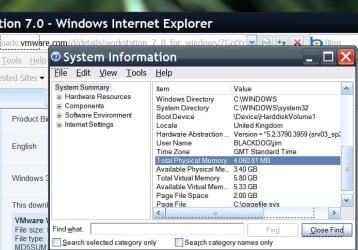
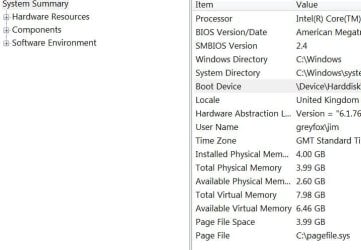
However REAL RAM usage is far far better on the server than W7 - good if you are running Virtual machines. 800MB less -- enough for a decent virtual machine itself.
Here's the available RAM on a W2K3 server and a W7-X64 machine - both with 4GB real Ram installed with graphics / audio etc on the motherboard.
W2K3 is running for or 5 IE8 sessions, W7 just booted up with no applications running
Surprising difference in the usage -- WK3 Server comes out quite a bit on top.
(Not saying W7 has poor performance --far from it but for running VM's where every byte of spare RAM is precious the server looks if it has it). In principle because a machine uses a lot of RAM doesn't mean that the OS is poor or inefficient - however the caveat here is if you are running VIRTUAL MACHINES then this IS significant.
The difference in available RAM here is the difference of being able to start another VM or not.
And of course there is NO problem running a 64 Bit guest VM on a 32 bit host - just your max RAM is only 4GB.
Since a lot of people only have 4GB RAM this could be of interest.
More than 4GB then it doesn't really matter.
enc screenshots of memory allocation
Cheers
jimbo
Maybe should be under performance - but this is an interesting fact I've noticed.
Running a SERVER as a Workstation has a lot of advantages provided you do it properly and remove a lot of the typical server nags like shutdown event tracker, ALT-CTRL-DELETE to logon etc.
However REAL RAM usage is far far better on the server than W7 - good if you are running Virtual machines. 800MB less -- enough for a decent virtual machine itself.
Here's the available RAM on a W2K3 server and a W7-X64 machine - both with 4GB real Ram installed with graphics / audio etc on the motherboard.
W2K3 is running for or 5 IE8 sessions, W7 just booted up with no applications running
Surprising difference in the usage -- WK3 Server comes out quite a bit on top.
(Not saying W7 has poor performance --far from it but for running VM's where every byte of spare RAM is precious the server looks if it has it). In principle because a machine uses a lot of RAM doesn't mean that the OS is poor or inefficient - however the caveat here is if you are running VIRTUAL MACHINES then this IS significant.
The difference in available RAM here is the difference of being able to start another VM or not.
And of course there is NO problem running a 64 Bit guest VM on a 32 bit host - just your max RAM is only 4GB.
Since a lot of people only have 4GB RAM this could be of interest.
More than 4GB then it doesn't really matter.
enc screenshots of memory allocation
Cheers
jimbo
Attachments
My Computer
- Computer type
- PC/Desktop
- Computer Manufacturer/Model Number
- Custom built, several laptops HP/ASUS
- OS
- Linux CENTOS 7 / various Windows OS'es and servers
- CPU
- Intel i7 Intel i5
- Memory
- 8GB, 16GB
- Graphics Card(s)
- On Motherboard
- Sound Card
- Realtek HD audio
- Monitor(s) Displays
- Apple Cinema display, Samsung LCD
- Screen Resolution
- 1920 X 1080
- Hard Drives
- 4 X 1TB SATA
- Mouse
- Toshiba wireless laser
- Internet Speed
- > 20MB up
