Hello,
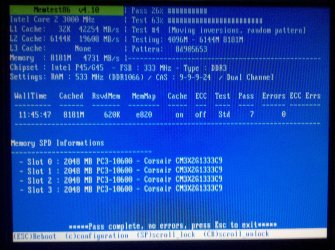
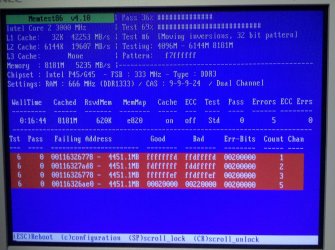
I recently upgraded my systems (Intel DP45SG) RAM capacity to 8GB from 4 GB. Once installed, I booted up to my systems BIOS and verified the RAM modules have been detected and restored all BIOS settings to default to make sure all new changes have been updated properly. All RAM has been detected and everything looks good in the BIOS. Next, I decided to run Memtest86+ v4.10 to fully test the new modules. Around Test #6 Pass 36% & Test 69% I received four errors (I've attached a screenshot of Memtest86+). After receiving the errors I turned off the system, reseated the RAM modules retested and got the same error. I went ahead and turned off the system, and removed my original 4GB modules and only left the new 4GB modules. This time Memtest86+ passed. I decided to test the other RAM slots to make sure it's not the MB. Memtest86+ passed again. At this point I thought my original RAM modules might have gone bad. I removed the new modules and reinstalled the original modules, ran Memtest86+ and the original 4GB modules passed as well. Now it seems Memtest86+ pass with only 4GB installed but once I get to 8GB it fails.
At this point, I decided to go a few steps further. I left the 8GB RAM installed in the system and booted up to Windows 7. I decided to run Prime95 for 24hrs to see if any errors occur. After 24hrs Prime95 had no errors. I decided to use my computer normally for a few days to see if any issues occurred. After 4 days of playing games for a few hours, watching and editing videos, and normal web surfing, no issues have occurred in the OS.
I am not sure where to go from here. I am not experiencing any issues with my newly installed RAM modules however I am not passing Memtest86+ with all modules installed. Also the BIOS is up to date, my system is not over clocked and is running on factory stock settings (except the Geforce GTX 470 which is over clocked by the factory). Any help will be appreciated for this issue and thank you for your time.
My System Specs:
Motherboard: Intel Desktop Board DP45SG
Processor: Intel Core 2 Quad Q9650 @ 3.00GHz
Memory: Four 2GB Corsair - tw3x4g1333c9
Video Card: Nvidia GeForce GTX 470 SC+
Hard Drive # 1: Hitachi Deskstar 7K1000.B 1 TB (HDT721010SLA360)
Hard Drive # 2: SAMSUNG Spinpoint F1 1TB (HD103UJ)
Hard Drive # 3: Western Digital Caviar SE 160GB (WD1600JS)
Optical Drive: LG Super Multi DVD Rewriter (GH22NS40)
Power Supply: Ultra X3 1000W ATX Power Supply
Case: ThermalTake Tsunami Dream (Silver)
Sound Card: Creative Sound Blaster Audigy 2 ZS
Monitor: NEC Multisync LCD1765
Operating System: Windows 7 Professional 64bit
I recently upgraded my systems (Intel DP45SG) RAM capacity to 8GB from 4 GB. Once installed, I booted up to my systems BIOS and verified the RAM modules have been detected and restored all BIOS settings to default to make sure all new changes have been updated properly. All RAM has been detected and everything looks good in the BIOS. Next, I decided to run Memtest86+ v4.10 to fully test the new modules. Around Test #6 Pass 36% & Test 69% I received four errors (I've attached a screenshot of Memtest86+). After receiving the errors I turned off the system, reseated the RAM modules retested and got the same error. I went ahead and turned off the system, and removed my original 4GB modules and only left the new 4GB modules. This time Memtest86+ passed. I decided to test the other RAM slots to make sure it's not the MB. Memtest86+ passed again. At this point I thought my original RAM modules might have gone bad. I removed the new modules and reinstalled the original modules, ran Memtest86+ and the original 4GB modules passed as well. Now it seems Memtest86+ pass with only 4GB installed but once I get to 8GB it fails.
At this point, I decided to go a few steps further. I left the 8GB RAM installed in the system and booted up to Windows 7. I decided to run Prime95 for 24hrs to see if any errors occur. After 24hrs Prime95 had no errors. I decided to use my computer normally for a few days to see if any issues occurred. After 4 days of playing games for a few hours, watching and editing videos, and normal web surfing, no issues have occurred in the OS.
I am not sure where to go from here. I am not experiencing any issues with my newly installed RAM modules however I am not passing Memtest86+ with all modules installed. Also the BIOS is up to date, my system is not over clocked and is running on factory stock settings (except the Geforce GTX 470 which is over clocked by the factory). Any help will be appreciated for this issue and thank you for your time.
My System Specs:
Motherboard: Intel Desktop Board DP45SG
Processor: Intel Core 2 Quad Q9650 @ 3.00GHz
Memory: Four 2GB Corsair - tw3x4g1333c9
Video Card: Nvidia GeForce GTX 470 SC+
Hard Drive # 1: Hitachi Deskstar 7K1000.B 1 TB (HDT721010SLA360)
Hard Drive # 2: SAMSUNG Spinpoint F1 1TB (HD103UJ)
Hard Drive # 3: Western Digital Caviar SE 160GB (WD1600JS)
Optical Drive: LG Super Multi DVD Rewriter (GH22NS40)
Power Supply: Ultra X3 1000W ATX Power Supply
Case: ThermalTake Tsunami Dream (Silver)
Sound Card: Creative Sound Blaster Audigy 2 ZS
Monitor: NEC Multisync LCD1765
Operating System: Windows 7 Professional 64bit
Attachments
My Computer
At a glance
Windows 7 Professional 64bitIntel Core 2 Quad Q9650 @ 3.00GHz8GB Corsair XMS3 DDR3 PC3-10666Nvidia Geforce GTX 470 SC+
- Computer Manufacturer/Model Number
- Custom Built System
- OS
- Windows 7 Professional 64bit
- CPU
- Intel Core 2 Quad Q9650 @ 3.00GHz
- Motherboard
- Intel Desktop Board DP45SG
- Memory
- 8GB Corsair XMS3 DDR3 PC3-10666
- Graphics Card(s)
- Nvidia Geforce GTX 470 SC+
- Sound Card
- Creative Sound Blaster Audigy 2 ZS Gamer
- Monitor(s) Displays
- NEC MultiSync LCD1765
- Screen Resolution
- 1280 X 1024
- Hard Drives
- Seagate Barracuda 7200.11RPM SATA 3Gb/s 750GB,
Western Digital Caviar 7200RPM SATA 3Gb/s 160GB, &
Hitachi 7200RPM SATA 3Gb/s 1TB.
- PSU
- Ultra X3 1000 Watt
- Case
- Thermaltake Tsunami Dream - Color: Silver
- Cooling
- Thermaltake Fans
- Keyboard
- Saitek Gamer Keyboard
- Mouse
- Logitec MX1100 Laser Cordless Mouse
- Internet Speed
- Comcast Cable - DOCSIS 3.0 - 30Mbps

 . But if you find your 1333 only works at 1066 you'd want to RMA anyway, wouldn't you?