
Merge 3 Partitions

iKeirNez

New member
Local time
4:20 PM
Messages
23
I recently bought a new computer. It had 3 partitions 2 of them both had Windows Vista installed and the 3rd one had some other files. I went and installed Windows 7 over one of the vista partitions but the other 2 partitions have data on them and I want to put it all into one partition.

I do not need the data on the other 2 partitions. So basically I want to merge 3 partitions while keeping the data from one of the partitions. Would I need to completely reinstall windows 7?

Keir
 

My Computer

Computer Manufacturer/Model Number
AMD
OS
Windows 7 Professional 32bit
Memory
4.00GB
Graphics Card(s)
ATI
Hard Drives
500GB (Primary)
250GB (Ghost Backup)
150GB (General)
Hello Keir, welcome to Seven Forums!


Before we make any specific recommendations will you please post a snip/screen-shot of the entire Windows disk management drive map with a full description as to which drive/partition is which, so we can see what you have going on.

In the Windows start menu right click computer and click manage, in the left pane of the "Computer Management" window that opens click disk management and post a maximized snip of that.


My Computer

Computer Manufacturer/Model Number
* BFK Customs *
OS
W 7 64-bit Ultimate
CPU
Intel Q9550 Yorkfield
Motherboard
ASUS P5Q Pro
Memory
8GB Dominator 8500C5D
Graphics Card(s)
ATI : XFX 5870
Sound Card
Realtek HD Audio 7-1
Monitor(s) Displays
1x 47" LCD HDMI & 3x 26" LCD HDMI
Screen Resolution
1920x1080P & 1920x1200
Hard Drives
1x 80GB Intel X25-M G2 SSD : 1x 500GB & 1x 640GB WD Caviar Black(s)
PSU
Corsair 620HX
Case
Cooler Master RC-690
Cooling
Tuniq Tower 120, 2x 140mm and 3x 120mm case fans
Keyboard
Microsoft 500
Mouse
Razer Diamondback 3G
Internet Speed
14 Mb/s
Other Info
1x Koutech 3Gb/s SATA HDD Hot Swap Rack
Hello Keir, welcome to Seven Forums!


Before we make any specific recommendations will you please post a snip/screen-shot of the entire Windows disk management drive map with a full description as to which drive/partition is which, so we can see what you have going on.

In the Windows start menu right click computer and click manage, in the left pane of the "Computer Management" window that opens click disk management and post a maximized snip of that.


Is that the Windows Install Disc?

Screenshot:

Untitled.png

1st Partition - Recovery KEEP
2nd Partition - Main Drive KEEP IN PLACE
3rd Partition - To be merged to 2nd Partition
4th Partition - To be merged to 2nd Partition

Thanks
 

My Computer

Computer Manufacturer/Model Number
AMD
OS
Windows 7 Professional 32bit
Memory
4.00GB
Graphics Card(s)
ATI
Hard Drives
500GB (Primary)
250GB (Ghost Backup)
150GB (General)
What OS's do you have on partition 2 & 4?
 

My Computer

OS
ME/XP/Vista/Win7
What OS's do you have on partition 2 & 4?

On 2 I have Windows 7 Professional this is my primary.

On 4 I have Windows Vista which I need to get rid of!
 

My Computer

Computer Manufacturer/Model Number
AMD
OS
Windows 7 Professional 32bit
Memory
4.00GB
Graphics Card(s)
ATI
Hard Drives
500GB (Primary)
250GB (Ghost Backup)
150GB (General)
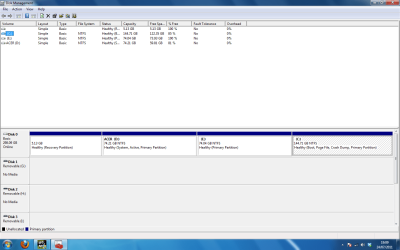
You are aware this is the Windows that you were using when this snip was made?


click to enlarge
123.jpg
 

My Computer

Computer Manufacturer/Model Number
* BFK Customs *
OS
W 7 64-bit Ultimate
CPU
Intel Q9550 Yorkfield
Motherboard
ASUS P5Q Pro
Memory
8GB Dominator 8500C5D
Graphics Card(s)
ATI : XFX 5870
Sound Card
Realtek HD Audio 7-1
Monitor(s) Displays
1x 47" LCD HDMI & 3x 26" LCD HDMI
Screen Resolution
1920x1080P & 1920x1200
Hard Drives
1x 80GB Intel X25-M G2 SSD : 1x 500GB & 1x 640GB WD Caviar Black(s)
PSU
Corsair 620HX
Case
Cooler Master RC-690
Cooling
Tuniq Tower 120, 2x 140mm and 3x 120mm case fans
Keyboard
Microsoft 500
Mouse
Razer Diamondback 3G
Internet Speed
14 Mb/s
Other Info
1x Koutech 3Gb/s SATA HDD Hot Swap Rack

My Computer

Computer Manufacturer/Model Number
AMD
OS
Windows 7 Professional 32bit
Memory
4.00GB
Graphics Card(s)
ATI
Hard Drives
500GB (Primary)
250GB (Ghost Backup)
150GB (General)

OK the first thing that needs done is to make the C: partition the Windows "System Active" partition so the System boot files can be (re)created to the C: partition, don't do anything else until you do that.


Start by having a look at thsi tutorial at the link below and be sure to post back with any further questions you may have and to keep us informed.


My Computer

Computer Manufacturer/Model Number
* BFK Customs *
OS
W 7 64-bit Ultimate
CPU
Intel Q9550 Yorkfield
Motherboard
ASUS P5Q Pro
Memory
8GB Dominator 8500C5D
Graphics Card(s)
ATI : XFX 5870
Sound Card
Realtek HD Audio 7-1
Monitor(s) Displays
1x 47" LCD HDMI & 3x 26" LCD HDMI
Screen Resolution
1920x1080P & 1920x1200
Hard Drives
1x 80GB Intel X25-M G2 SSD : 1x 500GB & 1x 640GB WD Caviar Black(s)
PSU
Corsair 620HX
Case
Cooler Master RC-690
Cooling
Tuniq Tower 120, 2x 140mm and 3x 120mm case fans
Keyboard
Microsoft 500
Mouse
Razer Diamondback 3G
Internet Speed
14 Mb/s
Other Info
1x Koutech 3Gb/s SATA HDD Hot Swap Rack
Partition 1 is the Recovery partition for ACER partition 2.
 

My Computer

OS
ME/XP/Vista/Win7
Unfortunately your D partition is the active partition (where the bootmgr resides). So the task is not that easy.

If I were you, I would backup all my user data and start from scratch. That means delete the C, D and E partitions and define a new partition in that unallocated space. Then reinstall /7 there.

There are other ways of doing it by saving your data from D and E, then image C. After deletion of C, D and E and the definition of a new partition there, you restore the image. Then you repair the bootmgr and off you go.
 

My Computer

Computer Manufacturer/Model Number
HP, Dell, Gateway, Toshiba - 4 laptops and 2 desktops
OS
Vista, Windows7, Mint Mate, Zorin, Windows 8
CPU
from 1.6GHz Duo to i7
Monitor(s) Displays
2x HP w2207
Hard Drives
5x HDD, 7x SSD, 12x Externals
Keyboard
with trackball - no mices
Mouse
Trackball mice
Internet Speed
DSL 6000
Once you delete Vista the REcovery partition will no longer run, so make your Recovery disks if you think you might ever want to restore the computer to factory condition to resell it and/or move your Win7 elsewhere.

Since your partitions are almost empty, I would just go ahead and use free Partition Wizard bootable CD to delete all but C, then rightclick C to Resize, drag it's left border all the way to left so it is in the preferred lower HD address for faster reads. Then drag the right border of C to the left to make space for a new data partition of the size desired.

Once you delete then resize as desired, click on C to Modify>Set to Active, OK. Then click on HD to highlight it, from Disk tab select Rebuild MBR, apply it to see if Win7 will start when rebooted. If not boot into the Win7 DVD Repair console or Repair CD to run the 3 Startup Repairs which BareFootKid linked above.
 
OK the first thing that needs done is to make the C: partition the Windows "System Active" partition so the System boot files can be (re)created to the C: partition, don't do anything else until you do that.


Start by having a look at thsi tutorial at the link below and be sure to post back with any further questions you may have and to keep us informed.

Okay I will try and do this soon!

Partition 1 is the Recovery partition for ACER partition 2.

I definetely know that partition 1 is the recovery partition for ACER!
 

My Computer

Computer Manufacturer/Model Number
AMD
OS
Windows 7 Professional 32bit
Memory
4.00GB
Graphics Card(s)
ATI
Hard Drives
500GB (Primary)
250GB (Ghost Backup)
150GB (General)
Unfortunately your D partition is the active partition (where the bootmgr resides). So the task is not that easy.

If I were you, I would backup all my user data and start from scratch. That means delete the C, D and E partitions and define a new partition in that unallocated space. Then reinstall /7 there.

There are other ways of doing it by saving your data from D and E, then image C. After deletion of C, D and E and the definition of a new partition there, you restore the image. Then you repair the bootmgr and off you go.

Okay! Well I could do that!

Once you delete Vista the REcovery partition will no longer run, so make your Recovery disks if you think you might ever want to restore the computer to factory condition to resell it and/or move your Win7 elsewhere.

Since your partitions are almost empty, I would just go ahead and use free Partition Wizard bootable CD to delete all but C, then rightclick C to Resize, drag it's left border all the way to left so it is in the preferred lower HD address for faster reads. Then drag the right border of C to the left to make space for a new data partition of the size desired.

Once you delete then resize as desired, click on C to Modify>Set to Active, OK. Then click on HD to highlight it, from Disk tab select Rebuild MBR, apply it to see if Win7 will start when rebooted. If not boot into the Win7 DVD Repair console or Repair CD to run the 3 Startup Repairs which BareFootKid linked above.

How can I create the recovery discs?
 

My Computer

Computer Manufacturer/Model Number
AMD
OS
Windows 7 Professional 32bit
Memory
4.00GB
Graphics Card(s)
ATI
Hard Drives
500GB (Primary)
250GB (Ghost Backup)
150GB (General)

I don't think I will need one anyway. I have the Windows 7 disc anyway!
 

My Computer

Computer Manufacturer/Model Number
AMD
OS
Windows 7 Professional 32bit
Memory
4.00GB
Graphics Card(s)
ATI
Hard Drives
500GB (Primary)
250GB (Ghost Backup)
150GB (General)

My Computer

Computer Manufacturer/Model Number
* BFK Customs *
OS
W 7 64-bit Ultimate
CPU
Intel Q9550 Yorkfield
Motherboard
ASUS P5Q Pro
Memory
8GB Dominator 8500C5D
Graphics Card(s)
ATI : XFX 5870
Sound Card
Realtek HD Audio 7-1
Monitor(s) Displays
1x 47" LCD HDMI & 3x 26" LCD HDMI
Screen Resolution
1920x1080P & 1920x1200
Hard Drives
1x 80GB Intel X25-M G2 SSD : 1x 500GB & 1x 640GB WD Caviar Black(s)
PSU
Corsair 620HX
Case
Cooler Master RC-690
Cooling
Tuniq Tower 120, 2x 140mm and 3x 120mm case fans
Keyboard
Microsoft 500
Mouse
Razer Diamondback 3G
Internet Speed
14 Mb/s
Other Info
1x Koutech 3Gb/s SATA HDD Hot Swap Rack

My Computer

Computer Manufacturer/Model Number
AMD
OS
Windows 7 Professional 32bit
Memory
4.00GB
Graphics Card(s)
ATI
Hard Drives
500GB (Primary)
250GB (Ghost Backup)
150GB (General)
OK just to be sure to post back here with updates so we know how you get on.
 

My Computer

Computer Manufacturer/Model Number
* BFK Customs *
OS
W 7 64-bit Ultimate
CPU
Intel Q9550 Yorkfield
Motherboard
ASUS P5Q Pro
Memory
8GB Dominator 8500C5D
Graphics Card(s)
ATI : XFX 5870
Sound Card
Realtek HD Audio 7-1
Monitor(s) Displays
1x 47" LCD HDMI & 3x 26" LCD HDMI
Screen Resolution
1920x1080P & 1920x1200
Hard Drives
1x 80GB Intel X25-M G2 SSD : 1x 500GB & 1x 640GB WD Caviar Black(s)
PSU
Corsair 620HX
Case
Cooler Master RC-690
Cooling
Tuniq Tower 120, 2x 140mm and 3x 120mm case fans
Keyboard
Microsoft 500
Mouse
Razer Diamondback 3G
Internet Speed
14 Mb/s
Other Info
1x Koutech 3Gb/s SATA HDD Hot Swap Rack
Back
Top