
Solved merge partitions

powerpca

New member
Local time
8:16 PM
Messages
9
I would like to merge the C Drive and the D drive partitions (same HD). when I right click on the D drive, delete is not active. Do I need to "mark partition as active" on the D drive to make "delete vloume" active before I can delete the D drive then extend the C drive?
 

My Computer

Computer Manufacturer/Model Number
Custom
OS
Win 7 utimatex64
CPU
Inte Core duo E8400
Motherboard
asus
Memory
8 gig
Monitor(s) Displays
view sonic
Hard Drives
WD 750 G
Other Info
SP1 is installed. All updates are installed.

My Computer

Computer type
PC/Desktop
Computer Manufacturer/Model Number
Dell Inspiron 530
OS
Windows 7 Professional SP1 64-bit
CPU
Intel Core 2 Duo Processor E8300 @ 2.83GHz
Motherboard
Dell Inc. 0RY007 (Socket 775)
Memory
4.00 GB Dual-Channel DDR2 @ 332MHz (5-5-5-15)
Graphics Card(s)
Intel(R) G33/G31 Express Chipset Family
Sound Card
Integrated 7.1 Channel Audio
Monitor(s) Displays
Acer G245HQL 23.6" LED(1920x1080@60Hz)
Screen Resolution
1920 x 1080
Hard Drives
Disk 0 HITACHI 1TB OS Installed - Disk 1 HITACHI 1TB For Backups
Keyboard
Dell USB Keyboard
Mouse
Dell Optical USB Mouse
Internet Speed
DSL 10 meg
Antivirus
Symantec(SEP)
Browser
Pale Moon
Welcome to Windows Seven Forums.

Do not try and make the partition Active or you may not be able to boot into Windows. There should only be one Active partition on a drive and that is the one that contains the boot files.

Please post the screenshot as suggested by Flatiron so that we can give you the best advice.
 

My Computer

Computer Manufacturer/Model Number
HP Pavilion Elite 495UK
OS
Windows 7 Ultimate SP1 64-Bit
CPU
Intel Core i7 870 @ 2.93GHz
Motherboard
MSI 2A9C (CPU1)
Memory
8Gb Dual-Channel DDR3 @ 664MHz
Graphics Card(s)
nVidia GeForce GTX 460 1024MB dedicated RAM
Sound Card
Realtek HD Audio
Monitor(s) Displays
HP2310i
Screen Resolution
1920 x 1080
Hard Drives
1x1954GB Hitachi HDS22020ALA 330 (RAID), 1x1954GB Hitachi External for backup and storage
PSU
460W
Case
HP Elite
Cooling
Air cooled
Keyboard
Logitech K750 solar-powered keyboard
Mouse
Logitech Wireless M180 mouse
Internet Speed
2Mb
Other Info
Pure Avanti Flow Internet Radio with iPod Dock, 64Gb iPod, HP USB Speakers, Sony MDR-V500 Headphones, Sony Vaio F-Series Laptop
Merge C and F drive

Actually the drvies that I want to merge are the C and the F drive. The C contains the System etc and the F is blank
 

Attachments

  • Capture.JPG
    Capture.JPG
    53.1 KB · Views: 28

My Computer

Computer Manufacturer/Model Number
Custom
OS
Win 7 utimatex64
CPU
Inte Core duo E8400
Motherboard
asus
Memory
8 gig
Monitor(s) Displays
view sonic
Hard Drives
WD 750 G
Other Info
SP1 is installed. All updates are installed.
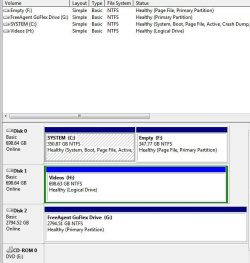
You should be able to right-click the F partition and choose Delete, then right-click the C partition and click Extend.

I'm puzzled though as to why you have a page file on your F drive, it may be this that won't let you delete the partition.
 

My Computer

Computer Manufacturer/Model Number
HP Pavilion Elite 495UK
OS
Windows 7 Ultimate SP1 64-Bit
CPU
Intel Core i7 870 @ 2.93GHz
Motherboard
MSI 2A9C (CPU1)
Memory
8Gb Dual-Channel DDR3 @ 664MHz
Graphics Card(s)
nVidia GeForce GTX 460 1024MB dedicated RAM
Sound Card
Realtek HD Audio
Monitor(s) Displays
HP2310i
Screen Resolution
1920 x 1080
Hard Drives
1x1954GB Hitachi HDS22020ALA 330 (RAID), 1x1954GB Hitachi External for backup and storage
PSU
460W
Case
HP Elite
Cooling
Air cooled
Keyboard
Logitech K750 solar-powered keyboard
Mouse
Logitech Wireless M180 mouse
Internet Speed
2Mb
Other Info
Pure Avanti Flow Internet Radio with iPod Dock, 64Gb iPod, HP USB Speakers, Sony MDR-V500 Headphones, Sony Vaio F-Series Laptop
I do not understand what is page file is and how to remove it. This partition F should be completely empty. Can you tell me how to remove the page file from this partition?
 

My Computer

Computer Manufacturer/Model Number
Custom
OS
Win 7 utimatex64
CPU
Inte Core duo E8400
Motherboard
asus
Memory
8 gig
Monitor(s) Displays
view sonic
Hard Drives
WD 750 G
Other Info
SP1 is installed. All updates are installed.
I just realized that the page file was from my vitrual memory setup. I removed the page file on the drive and can now delete the volume. Thanks!
 

My Computer

Computer Manufacturer/Model Number
Custom
OS
Win 7 utimatex64
CPU
Inte Core duo E8400
Motherboard
asus
Memory
8 gig
Monitor(s) Displays
view sonic
Hard Drives
WD 750 G
Other Info
SP1 is installed. All updates are installed.
You're very welcome.
 

My Computer

Computer Manufacturer/Model Number
HP Pavilion Elite 495UK
OS
Windows 7 Ultimate SP1 64-Bit
CPU
Intel Core i7 870 @ 2.93GHz
Motherboard
MSI 2A9C (CPU1)
Memory
8Gb Dual-Channel DDR3 @ 664MHz
Graphics Card(s)
nVidia GeForce GTX 460 1024MB dedicated RAM
Sound Card
Realtek HD Audio
Monitor(s) Displays
HP2310i
Screen Resolution
1920 x 1080
Hard Drives
1x1954GB Hitachi HDS22020ALA 330 (RAID), 1x1954GB Hitachi External for backup and storage
PSU
460W
Case
HP Elite
Cooling
Air cooled
Keyboard
Logitech K750 solar-powered keyboard
Mouse
Logitech Wireless M180 mouse
Internet Speed
2Mb
Other Info
Pure Avanti Flow Internet Radio with iPod Dock, 64Gb iPod, HP USB Speakers, Sony MDR-V500 Headphones, Sony Vaio F-Series Laptop
I merged the C and D drives successfully, everything works, BUT the C Drive shows only 350G on the properties window, while it shows 698G on the Memory Mgmt. Also as you can see, I have a page file on both the System and Video drives. Do I need this? Finally, can you see a reason why the properties window does not show the full 698G HD space? Thanks
 

Attachments

  • C Properties.JPG
    C Properties.JPG
    38.1 KB · Views: 8
  • drives.JPG
    drives.JPG
    60.6 KB · Views: 9
  • virtualMem.JPG
    virtualMem.JPG
    34 KB · Views: 9

My Computer

Computer Manufacturer/Model Number
Custom
OS
Win 7 utimatex64
CPU
Inte Core duo E8400
Motherboard
asus
Memory
8 gig
Monitor(s) Displays
view sonic
Hard Drives
WD 750 G
Other Info
SP1 is installed. All updates are installed.
I'm not sure why you have a page file on two drives.

I'd choose 'Automatically manage paging file size for all drives'.

Also, I notice the recommended paging file size is 12286MB, but the amount currently allocated is 20477 MB. I don't know how significant that is, but I'd be inclined to disable the page file on Disk 1.
 

My Computer

Computer Manufacturer/Model Number
HP Pavilion Elite 495UK
OS
Windows 7 Ultimate SP1 64-Bit
CPU
Intel Core i7 870 @ 2.93GHz
Motherboard
MSI 2A9C (CPU1)
Memory
8Gb Dual-Channel DDR3 @ 664MHz
Graphics Card(s)
nVidia GeForce GTX 460 1024MB dedicated RAM
Sound Card
Realtek HD Audio
Monitor(s) Displays
HP2310i
Screen Resolution
1920 x 1080
Hard Drives
1x1954GB Hitachi HDS22020ALA 330 (RAID), 1x1954GB Hitachi External for backup and storage
PSU
460W
Case
HP Elite
Cooling
Air cooled
Keyboard
Logitech K750 solar-powered keyboard
Mouse
Logitech Wireless M180 mouse
Internet Speed
2Mb
Other Info
Pure Avanti Flow Internet Radio with iPod Dock, 64Gb iPod, HP USB Speakers, Sony MDR-V500 Headphones, Sony Vaio F-Series Laptop
Back
Top