
Hey,
I recently did a fresh OS install (from 32bit W7 Home Premium to 64bit) and reinstalled Outlook 2010.
I took the .pst files and backed them up beforehand. I then reimported them on Outlook through the following process:
File > Open > Import > Import from another program or file > Outlook data file (.pst) > Replace duplicates with items imported
I then add my email account by going to:
File > Add Account
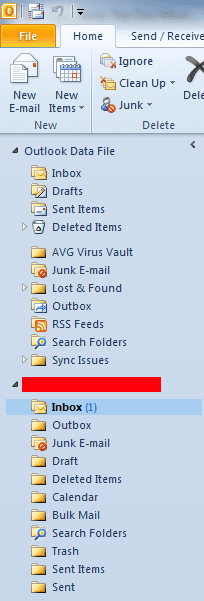
My emails get imported, but it results in the attached screenshot with two separate parts - one called Outlook Data File and another with my email address.
How do I combine these into one? I don't want them separated out.
Thanks!
I recently did a fresh OS install (from 32bit W7 Home Premium to 64bit) and reinstalled Outlook 2010.
I took the .pst files and backed them up beforehand. I then reimported them on Outlook through the following process:
File > Open > Import > Import from another program or file > Outlook data file (.pst) > Replace duplicates with items imported
I then add my email account by going to:
File > Add Account
My emails get imported, but it results in the attached screenshot with two separate parts - one called Outlook Data File and another with my email address.
How do I combine these into one? I don't want them separated out.
Thanks!
Attachments
My Computer
- Computer type
- PC/Desktop
- Computer Manufacturer/Model Number
- Dell Dimension 9200
- OS
- Windows 7 Home Premium 32-bit SP1
- CPU
- Intel Core 2 Duo E6400 @ 2.13GHz
- Motherboard
- Dell Inc. 0WG855
- Memory
- 4.00GB DDR2
- Graphics Card(s)
- 1024MB NVIDIA GeForce 210
- Hard Drives
- 931GB Western Digital WDC


