
merging partition or hard disk drives

Sundippan

New member
Local time
12:51 AM
Messages
15
hi!
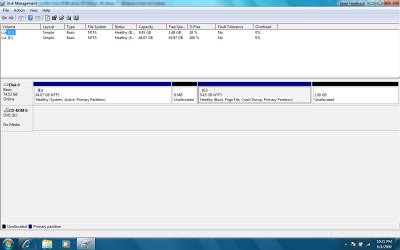
i installed windows 7 and i don't know what i did wrong, but this is what i end up with
C: 1.66 GB free of 9.44 , where as i have total of 80 GB hard drive. and then i have drive "E" which has 64 GB hard drive.

so how can i merge this two drive???
 

Attachments
  • disk space.png
    disk space.png
    33.2 KB · Views: 1,784

My Computer

OS
Windows 7 beta (7000)
Paragon has software that will allow you to do this. Although I've never tried it, Partition Manager Express is available for free at their site and should easily allow you to merge your partitions.

Remember, it's always a good idea to have backups before this kind of procedure. Good luck.
 

My Computer

Computer type
PC/Desktop
Computer Manufacturer/Model Number
Custom Build/Mod
OS
Windows 7 Home Premium x64
CPU
Intel QX9650 Extreme 4.0 GHz
Motherboard
ASUS Rampage Extreme Rev2
Memory
8GB (4x2) Corsair Dominator DDR3
Graphics Card(s)
2x Radeon R390X [8GB]
Sound Card
SupremeFX X-Fi
Monitor(s) Displays
Dell 2408WFP 26" Panel
Screen Resolution
1920x1200
Hard Drives
4x WD 2TB (8TB+ Total)
2x Crucial SSD 128GB (RAID-0)
1x LG Blu-ray read/write
1x Phillips LightScribe DVD read/write
PSU
Corsair HX1000
Case
CoolerMaster - Cosmos S
Cooling
Custom Liquid - 320mm rad w/ 3x 80mm fans, CPU/NB/SB Blocks
Keyboard
Logitech Illuminater Pro
Mouse
Logitech
Internet Speed
Fractional T1 - 125Mbps
Antivirus
ESET Security Suite / Microsoft Security Essentials
Browser
Cyberfox Intel x64
Other Info
OC'd to 5.0GHz @ 44c under full load
thats perfect...THANKZ man....this is just what i need...
 

My Computer

OS
Windows 7 beta (7000)
Just a remark on that one if I may? Perhaps it is a update, I don't know, but anyway:

Paragon's Partition Manager is quite OK, but require registration upon install, so you
1. Have to be online, and
2. Have to register to use it.

But.. ..there is an alternative, and it's only about 1/3 of the size of Paragon's ware.
EaseUS Partition Master Home.

Quick download and install, no registration or uplink necessary, and it has a really smooth and sort of "Acronis Disk Manager" old-time feel to it, only mush better graphics of course. If you appreciate a nice and userfriendly GUI.

Just my two cents. I just tried both, and I got a great partition layout in minutes using EaseUS. It was really fast.
And No, I don't get any kickback from EaseUS for saying this.. LOL..
 

My Computer

OS
Win 7 Home Premium 64bit
Are you Dual booting as I'm sure you would have told us that if so, right? The reason I ask is because you have two OS's on the HD which seem to be configured in a Dual Boot with the System boot files on E.

If you don't want that then you need to boot the Win7 DVD to clean reinstall, using Custom install Drive Options to delete all partitions first and partition as you want, or just delete all and click next and Win7 will set up your install partitioning for Win7. Illustrated steps here: Clean Install Windows 7
.
 
Back
Top