Merging Partitions Help Please

TDKMate

New member
Member
VIP
Local time
10:13 AM
Messages
335
I've already Googled merging/joining but didn't find what was looking for. I found plenty on how to join a second partition into the first one; for example, how to merge 'D' into 'C' but I want to do the opposite: merge the first partition into the second ('C' into 'D') without losing data, of course.

The reason is I just installed an SSD for my OS drive and now have a hole where the OS use to be.

I have 3 partitions on the 'old' hard drive: The now vacant 1st partition (formally 'C' but now assigned as 'J'). The remaining 2 partitions, 'D' and 'E' drives, have both programs and data on them so I need to keep their drive letters the same so the programs and my links still work.

I have a second hard drive that is not affected by this.

Is there any quick and easy way to do this??

Using Win 7 Pro 64
 

My Computer

Computer type
PC/Desktop
Computer Manufacturer/Model Number
home built
OS
Win 7 Pro 64 SP1
CPU
i7 6700K SkyLake
Motherboard
MSI Gaming M7
Memory
32 GB
Graphics Card(s)
nVidia GTX 970
Sound Card
onboard
Monitor(s) Displays
DELL U2711
Screen Resolution
2560x1440
Hard Drives
1 SSD OS, 2 WD Black Caviar data harddrives
PSU
EVGA Super Nova 850W G2 'Gold'
Case
Thermaltake Soprano Snow Edition
Cooling
Cooler Master Hyper 212 evo
Keyboard
Logitech K350
Mouse
Mad Kats RATT
Antivirus
Avast
Browser
Firefox
Should be relatively easy, but details needed.

Post a screen shot of Windows Disk Management with all drives connected.

You may be able to correct the problem with Windows alone, but more likely will need a third party tool---Partition Wizard.

Post the picture.
 

My Computer

Computer type
PC/Desktop
Computer Manufacturer/Model Number
Ignatz Special; 4 speed manual gearbox; factory air conditioning; one of one
OS
Windows 7 Home Premium SP1, 64-bit
CPU
Intel Skylake i5-6600K, not overclocked
Motherboard
AsRock Z170M Extreme 4, micro ATX
Memory
8 GB HyperX DDR4-2666 (2 x 4 GB)
Graphics Card(s)
none; graphics are integrated on CPU
Sound Card
onboard: Realtek ALC1150; external: USB Behringer UF0-202
Monitor(s) Displays
Dell S2340M 23 inch IPS
Screen Resolution
1600 x 900
Hard Drives
System: Crucial MX100 series SSD, 128 GB;
Data: Samsung Spinpoint 103SJ, 1 TB;
Backup: WD Caviar Green WD30EZRX-00D8PB0, 3 TB
PSU
Rosewill SilentNight 500 watt fanless, semi-modular
Case
Antec Solo II
Cooling
Noctua NH-U12S; Noctua F12 intake, Noctua S12A exhaust
Keyboard
Microsoft 200 6JH-00001 USB
Mouse
Dell or Microsoft optical wired; USB
Antivirus
Microsoft Security Essentials and Malwarebytes Premium
Browser
Pale Moon
Other Info
All fans PWM; speeds at idle: CPU circa 500 rpm; intake circa 600 rpm; exhaust circa 600 rpm; CPU temps 27 idle and 47 C load in a warm room (27 C/81 F) when running Intel Extreme Tuning Utility stress test.
Ah. Windows 7 Disk Management only works 'to the right'. It is a common problem that it will not easily allow you to extend a partition 'to the left'.

To do this in Windows you must create a new partition in the unallocated space and format it, then copy all your data from 'D' to 'C', then delete partition 'D', then expand 'C' into 'D'. Easy if the data on 'D' will fit into 'C'.

Or you can use a third party program like:
Free download Magic Partition Manager Software, partition magic alternative, free partition magic, partition magic Windows 7 and server partition software - Partition Wizard Online
You can use the free Home Edition, which will easily expand a partition to the left.

In either case it is always a good idea to back up the data to a separate disk anyway. Even the best programs have bad days.
 

My Computer

Computer type
PC/Desktop
Computer Manufacturer/Model Number
Home Built - Jan 2013
OS
Windows 7 64 Bit Home Premium SP1
CPU
i7-3820
Motherboard
Asus P9X79-PRO - Bios 4608
Memory
GSkill F3-14900CL9Q - 16GB
Graphics Card(s)
EVGA GeForce GTX660 - Driver 352.86
Sound Card
On board Realtek ALC898
Monitor(s) Displays
Acer S271HL
Screen Resolution
1920 x 1080
Hard Drives
#1- Samsung 840 Pro Series
#2- Western Digital WD1002FAEX Sata3 Black
#3- Western Digital WD1002FAEX Sata3 Black
PSU
Corsair CMPSU-850TX-V2 - 850 watt (by Seasonic)
Case
Corsair Obsidian 550D
Cooling
Standard 3 120mm case fans, Cooler Master Hyper 212 EVO
Keyboard
MS KC-0405
Mouse
Intellimouse 5-button
Internet Speed
56 Mbits/Sec (on a good day)
Antivirus
Avast & Malwarebytes
Browser
Firefox
Other Info
Asus DVD - DRW-24B1ST 24X
Should be relatively easy, but details needed.

Post a screen shot of Windows Disk Management with all drives connected.

You may be able to correct the problem with Windows alone, but more likely will need a third party tool---Partition Wizard.

Post the picture.
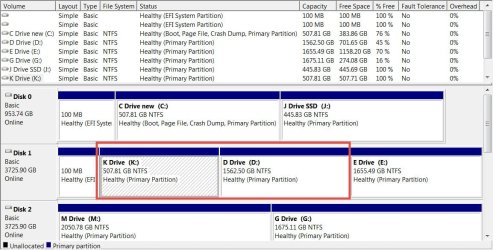
Screenshot posted. I put a red box around the two partitions I'd like to join/merge.

Note that I used the wrong drive letter in my first post: It is 'K' drive, not 'J' drive. :o

You can see that 'D' has 702GB of programs and data on it.

'K' is newly formatted and is empty.
 

Attachments

  • Disk Management for Posting.jpg
    Disk Management for Posting.jpg
    118 KB · Views: 3

My Computer

Computer type
PC/Desktop
Computer Manufacturer/Model Number
home built
OS
Win 7 Pro 64 SP1
CPU
i7 6700K SkyLake
Motherboard
MSI Gaming M7
Memory
32 GB
Graphics Card(s)
nVidia GTX 970
Sound Card
onboard
Monitor(s) Displays
DELL U2711
Screen Resolution
2560x1440
Hard Drives
1 SSD OS, 2 WD Black Caviar data harddrives
PSU
EVGA Super Nova 850W G2 'Gold'
Case
Thermaltake Soprano Snow Edition
Cooling
Cooler Master Hyper 212 evo
Keyboard
Logitech K350
Mouse
Mad Kats RATT
Antivirus
Avast
Browser
Firefox
Ah. Windows 7 Disk Management only works 'to the right'. It is a common problem that it will not easily allow you to extend a partition 'to the left'.

To do this in Windows you must create a new partition in the unallocated space and format it, then copy all your data from 'D' to 'C', then delete partition 'D', then expand 'C' into 'D'. Easy if the data on 'D' will fit into 'C'.

Or you can use a third party program like:
Free download Magic Partition Manager Software, partition magic alternative, free partition magic, partition magic Windows 7 and server partition software - Partition Wizard Online
You can use the free Home Edition, which will easily expand a partition to the left.

In either case it is always a good idea to back up the data to a separate disk anyway. Even the best programs have bad days.
A second vote for Magic Partition, so it must be good.

I don't really know the difference between 'extend' and 'merge' but I suspect that 'merge' is what I want.

However... in reading their help pages, it appears I would need to by the $40 Pro version. (And I'm not sure at this point if it's worth it for one use.)

I say that as it says under the Merge help (found here: How to Merge C Drive and D drive in Windows 7 without Data Loss? )

"... Comparing the 2 solutions above, we can find resorting to partition manager is the best way to merge partitions since users do not need to backup data in advance. Nevertheless, if users want to make partition merging realized, please download MiniTool Partition Wizard Professional Edition because home edition does not support merging partitions."

And under the Extend help (found here: How to extend partition on Windows in an easy and secure way? ):

"... In order to realize partition extension on Windows, users need to download professional partition magic and install it on computer."

Am I missing something?
 

My Computer

Computer type
PC/Desktop
Computer Manufacturer/Model Number
home built
OS
Win 7 Pro 64 SP1
CPU
i7 6700K SkyLake
Motherboard
MSI Gaming M7
Memory
32 GB
Graphics Card(s)
nVidia GTX 970
Sound Card
onboard
Monitor(s) Displays
DELL U2711
Screen Resolution
2560x1440
Hard Drives
1 SSD OS, 2 WD Black Caviar data harddrives
PSU
EVGA Super Nova 850W G2 'Gold'
Case
Thermaltake Soprano Snow Edition
Cooling
Cooler Master Hyper 212 evo
Keyboard
Logitech K350
Mouse
Mad Kats RATT
Antivirus
Avast
Browser
Firefox
Looks to me like the simplest thing to do is to move the stuff on D over to E, temporarily. It should fit easily if that pic is correct.

Then delete D. That will leave a bunch of "unallocated space".

Then extend K to the right to take up that unallocated space.

You should be able to extend K by right clicking it in Windows Disk Management and using menus.

I think you could futz around with Partition Magic and get it to extend without first moving stuff to E, but that would require you to ascend a learning curve and I doubt it would be quicker. Certainly not more intuitive.

If you have a bunch of installed programs on D, I assume you'd have to rename K to D when you finish in order for the programs to work.
 

My Computer

Computer type
PC/Desktop
Computer Manufacturer/Model Number
Ignatz Special; 4 speed manual gearbox; factory air conditioning; one of one
OS
Windows 7 Home Premium SP1, 64-bit
CPU
Intel Skylake i5-6600K, not overclocked
Motherboard
AsRock Z170M Extreme 4, micro ATX
Memory
8 GB HyperX DDR4-2666 (2 x 4 GB)
Graphics Card(s)
none; graphics are integrated on CPU
Sound Card
onboard: Realtek ALC1150; external: USB Behringer UF0-202
Monitor(s) Displays
Dell S2340M 23 inch IPS
Screen Resolution
1600 x 900
Hard Drives
System: Crucial MX100 series SSD, 128 GB;
Data: Samsung Spinpoint 103SJ, 1 TB;
Backup: WD Caviar Green WD30EZRX-00D8PB0, 3 TB
PSU
Rosewill SilentNight 500 watt fanless, semi-modular
Case
Antec Solo II
Cooling
Noctua NH-U12S; Noctua F12 intake, Noctua S12A exhaust
Keyboard
Microsoft 200 6JH-00001 USB
Mouse
Dell or Microsoft optical wired; USB
Antivirus
Microsoft Security Essentials and Malwarebytes Premium
Browser
Pale Moon
Other Info
All fans PWM; speeds at idle: CPU circa 500 rpm; intake circa 600 rpm; exhaust circa 600 rpm; CPU temps 27 idle and 47 C load in a warm room (27 C/81 F) when running Intel Extreme Tuning Utility stress test.
You extend a partition into unallocated space.
You merge when you want to combine 2 existing partitions into one, including all the data on both.
Merging is a more complicated, riskier process, which is why you only get that option in the paid version.

You don't need to merge partitions. You have the free space to move data and delete a partition, creating unallocated space that you can extend into. Much safer. And if you can do it in Disk Management it is even easier.

The procedure outlined by ignatzasonic would be the simplest for you.
 

My Computer

Computer type
PC/Desktop
Computer Manufacturer/Model Number
Home Built - Jan 2013
OS
Windows 7 64 Bit Home Premium SP1
CPU
i7-3820
Motherboard
Asus P9X79-PRO - Bios 4608
Memory
GSkill F3-14900CL9Q - 16GB
Graphics Card(s)
EVGA GeForce GTX660 - Driver 352.86
Sound Card
On board Realtek ALC898
Monitor(s) Displays
Acer S271HL
Screen Resolution
1920 x 1080
Hard Drives
#1- Samsung 840 Pro Series
#2- Western Digital WD1002FAEX Sata3 Black
#3- Western Digital WD1002FAEX Sata3 Black
PSU
Corsair CMPSU-850TX-V2 - 850 watt (by Seasonic)
Case
Corsair Obsidian 550D
Cooling
Standard 3 120mm case fans, Cooler Master Hyper 212 EVO
Keyboard
MS KC-0405
Mouse
Intellimouse 5-button
Internet Speed
56 Mbits/Sec (on a good day)
Antivirus
Avast & Malwarebytes
Browser
Firefox
Other Info
Asus DVD - DRW-24B1ST 24X
K is empty, so there's nothing to merge!

Just delete K and afterwards extend D to left side using Partition Wizard for example.

Or do I totally misunderstood the question(?)
 

My Computer

Computer type
Laptop
Computer Manufacturer/Model Number
ACER ASPIRE 5742G
OS
Microsoft Windows 7 Home Premium 64-bits 7601 Multiprocessor Free Service Pack 1
CPU
Intel(R) Core(TM) i3 CPU M 370 @ 2.40GHz
Motherboard
Acer Aspire 5742G
Memory
4,00 GB
Graphics Card(s)
ATI Mobility Radeon HD 5400 Series
Sound Card
(1) AMD High Definition Audio Device (2) Realtek High Defi
Screen Resolution
1366 x 768 x 32 bits (4294967296 colors) @ 60 Hz
Hard Drives
WDC WD5000BEVT-22ZAT0
Nope. Either way works. It just simpler for some to do it with Windows.

K is empty, but it's still a partition, so it still would need to be deleted in Partition Magic.
 

My Computer

Computer type
PC/Desktop
Computer Manufacturer/Model Number
Home Built - Jan 2013
OS
Windows 7 64 Bit Home Premium SP1
CPU
i7-3820
Motherboard
Asus P9X79-PRO - Bios 4608
Memory
GSkill F3-14900CL9Q - 16GB
Graphics Card(s)
EVGA GeForce GTX660 - Driver 352.86
Sound Card
On board Realtek ALC898
Monitor(s) Displays
Acer S271HL
Screen Resolution
1920 x 1080
Hard Drives
#1- Samsung 840 Pro Series
#2- Western Digital WD1002FAEX Sata3 Black
#3- Western Digital WD1002FAEX Sata3 Black
PSU
Corsair CMPSU-850TX-V2 - 850 watt (by Seasonic)
Case
Corsair Obsidian 550D
Cooling
Standard 3 120mm case fans, Cooler Master Hyper 212 EVO
Keyboard
MS KC-0405
Mouse
Intellimouse 5-button
Internet Speed
56 Mbits/Sec (on a good day)
Antivirus
Avast & Malwarebytes
Browser
Firefox
Other Info
Asus DVD - DRW-24B1ST 24X
GDay Mate.(whatever GDay means..:rolleyes:) EaseUS Partition Master.
www . easeus . com / partition-manager /
I use this one. This could do what you want.
 

My Computer

Computer type
Laptop
Computer Manufacturer/Model Number
Dell XPS L502x
OS
Windows 7 Home Premium 64bit
CPU
Intel Core i7 2670QM
Motherboard
Intel HM67 Mobile Express Chipset
Memory
Samsung 8GB 1333Mhz
Graphics Card(s)
nVidia Geforce 540M GT 2GB
Sound Card
Realtek High Definition Audio
Monitor(s) Displays
15.6" Dell Standard RGB-LED Backlit Display
Screen Resolution
1366x768
Hard Drives
Seagate Momentus 2.5" 750GB HDD 5400rpm
Internet Speed
3.1 Mbits/s
Antivirus
AVG Free, Kaspersky
Browser
Google chrome
Sorry but I have been around for a couple of days... Thanks for the posts :)
 

My Computer

Computer type
PC/Desktop
Computer Manufacturer/Model Number
home built
OS
Win 7 Pro 64 SP1
CPU
i7 6700K SkyLake
Motherboard
MSI Gaming M7
Memory
32 GB
Graphics Card(s)
nVidia GTX 970
Sound Card
onboard
Monitor(s) Displays
DELL U2711
Screen Resolution
2560x1440
Hard Drives
1 SSD OS, 2 WD Black Caviar data harddrives
PSU
EVGA Super Nova 850W G2 'Gold'
Case
Thermaltake Soprano Snow Edition
Cooling
Cooler Master Hyper 212 evo
Keyboard
Logitech K350
Mouse
Mad Kats RATT
Antivirus
Avast
Browser
Firefox
Looks to me like the simplest thing to do is to move the stuff on D over to E, temporarily. It should fit easily if that pic is correct.

Then delete D. That will leave a bunch of "unallocated space".

Then extend K to the right to take up that unallocated space.

You should be able to extend K by right clicking it in Windows Disk Management and using menus.

I think you could futz around with Partition Magic and get it to extend without first moving stuff to E, but that would require you to ascend a learning curve and I doubt it would be quicker. Certainly not more intuitive.

If you have a bunch of installed programs on D, I assume you'd have to rename K to D when you finish in order for the programs to work.
I don't think it will all fit into 'E' as I add 'D' and 'E' up to be 1859.85 GB and 'E' is only about a 1.61 GB partition. I can save 'E' to an external drive, however.

Thanks for the reminder to rename 'K' to 'D'.
 

My Computer

Computer type
PC/Desktop
Computer Manufacturer/Model Number
home built
OS
Win 7 Pro 64 SP1
CPU
i7 6700K SkyLake
Motherboard
MSI Gaming M7
Memory
32 GB
Graphics Card(s)
nVidia GTX 970
Sound Card
onboard
Monitor(s) Displays
DELL U2711
Screen Resolution
2560x1440
Hard Drives
1 SSD OS, 2 WD Black Caviar data harddrives
PSU
EVGA Super Nova 850W G2 'Gold'
Case
Thermaltake Soprano Snow Edition
Cooling
Cooler Master Hyper 212 evo
Keyboard
Logitech K350
Mouse
Mad Kats RATT
Antivirus
Avast
Browser
Firefox
You extend a partition into unallocated space.
You merge when you want to combine 2 existing partitions into one, including all the data on both.
Merging is a more complicated, riskier process, which is why you only get that option in the paid version.

You don't need to merge partitions. You have the free space to move data and delete a partition, creating unallocated space that you can extend into. Much safer. And if you can do it in Disk Management it is even easier.

The procedure outlined by ignatzasonic would be the simplest for you.
Thanks for the clarification between 'extend' and 'merge.' Using Disk Management will be a lot cheaper, too.
 

My Computer

Computer type
PC/Desktop
Computer Manufacturer/Model Number
home built
OS
Win 7 Pro 64 SP1
CPU
i7 6700K SkyLake
Motherboard
MSI Gaming M7
Memory
32 GB
Graphics Card(s)
nVidia GTX 970
Sound Card
onboard
Monitor(s) Displays
DELL U2711
Screen Resolution
2560x1440
Hard Drives
1 SSD OS, 2 WD Black Caviar data harddrives
PSU
EVGA Super Nova 850W G2 'Gold'
Case
Thermaltake Soprano Snow Edition
Cooling
Cooler Master Hyper 212 evo
Keyboard
Logitech K350
Mouse
Mad Kats RATT
Antivirus
Avast
Browser
Firefox
K is empty, so there's nothing to merge!

Just delete K and afterwards extend D to left side using Partition Wizard for example.

Or do I totally misunderstood the question(?)
You understand correctly. But to my understanding, Partition Wizard Free won't do that, I'd need the $40 Pro version, which I'd like to avoid.
 

My Computer

Computer type
PC/Desktop
Computer Manufacturer/Model Number
home built
OS
Win 7 Pro 64 SP1
CPU
i7 6700K SkyLake
Motherboard
MSI Gaming M7
Memory
32 GB
Graphics Card(s)
nVidia GTX 970
Sound Card
onboard
Monitor(s) Displays
DELL U2711
Screen Resolution
2560x1440
Hard Drives
1 SSD OS, 2 WD Black Caviar data harddrives
PSU
EVGA Super Nova 850W G2 'Gold'
Case
Thermaltake Soprano Snow Edition
Cooling
Cooler Master Hyper 212 evo
Keyboard
Logitech K350
Mouse
Mad Kats RATT
Antivirus
Avast
Browser
Firefox
GDay Mate.(whatever GDay means..:rolleyes:) EaseUS Partition Master.
www . easeus . com / partition-manager /
I use this one. This could do what you want.
Thanks, I'll check it out.
 

My Computer

Computer type
PC/Desktop
Computer Manufacturer/Model Number
home built
OS
Win 7 Pro 64 SP1
CPU
i7 6700K SkyLake
Motherboard
MSI Gaming M7
Memory
32 GB
Graphics Card(s)
nVidia GTX 970
Sound Card
onboard
Monitor(s) Displays
DELL U2711
Screen Resolution
2560x1440
Hard Drives
1 SSD OS, 2 WD Black Caviar data harddrives
PSU
EVGA Super Nova 850W G2 'Gold'
Case
Thermaltake Soprano Snow Edition
Cooling
Cooler Master Hyper 212 evo
Keyboard
Logitech K350
Mouse
Mad Kats RATT
Antivirus
Avast
Browser
Firefox
I'll try to get to this 'project' this weekend, hopefully. I haven't checked out the above link yet, but the Disk Management routine sure seems like a good way to do it.

Again, thanks for all the help! I'll keep you posted (no pun intended...).
 

My Computer

Computer type
PC/Desktop
Computer Manufacturer/Model Number
home built
OS
Win 7 Pro 64 SP1
CPU
i7 6700K SkyLake
Motherboard
MSI Gaming M7
Memory
32 GB
Graphics Card(s)
nVidia GTX 970
Sound Card
onboard
Monitor(s) Displays
DELL U2711
Screen Resolution
2560x1440
Hard Drives
1 SSD OS, 2 WD Black Caviar data harddrives
PSU
EVGA Super Nova 850W G2 'Gold'
Case
Thermaltake Soprano Snow Edition
Cooling
Cooler Master Hyper 212 evo
Keyboard
Logitech K350
Mouse
Mad Kats RATT
Antivirus
Avast
Browser
Firefox
I don't think it will all fit into 'E' as I add 'D' and 'E' up to be 1859.85 GB and 'E' is only about a 1.61 GB partition.


??

D has 861 occupied.

E has 1158 free.

The occupied on D should fit in the free space on E.
 

My Computer

Computer type
PC/Desktop
Computer Manufacturer/Model Number
Ignatz Special; 4 speed manual gearbox; factory air conditioning; one of one
OS
Windows 7 Home Premium SP1, 64-bit
CPU
Intel Skylake i5-6600K, not overclocked
Motherboard
AsRock Z170M Extreme 4, micro ATX
Memory
8 GB HyperX DDR4-2666 (2 x 4 GB)
Graphics Card(s)
none; graphics are integrated on CPU
Sound Card
onboard: Realtek ALC1150; external: USB Behringer UF0-202
Monitor(s) Displays
Dell S2340M 23 inch IPS
Screen Resolution
1600 x 900
Hard Drives
System: Crucial MX100 series SSD, 128 GB;
Data: Samsung Spinpoint 103SJ, 1 TB;
Backup: WD Caviar Green WD30EZRX-00D8PB0, 3 TB
PSU
Rosewill SilentNight 500 watt fanless, semi-modular
Case
Antec Solo II
Cooling
Noctua NH-U12S; Noctua F12 intake, Noctua S12A exhaust
Keyboard
Microsoft 200 6JH-00001 USB
Mouse
Dell or Microsoft optical wired; USB
Antivirus
Microsoft Security Essentials and Malwarebytes Premium
Browser
Pale Moon
Other Info
All fans PWM; speeds at idle: CPU circa 500 rpm; intake circa 600 rpm; exhaust circa 600 rpm; CPU temps 27 idle and 47 C load in a warm room (27 C/81 F) when running Intel Extreme Tuning Utility stress test.
K is empty, so there's nothing to merge!

Just delete K and afterwards extend D to left side using Partition Wizard for example.

Or do I totally misunderstood the question(?)
You understand correctly. But to my understanding, Partition Wizard Free won't do that, I'd need the $40 Pro version, which I'd like to avoid.
PW can do it!
 

My Computer

Computer type
Laptop
Computer Manufacturer/Model Number
ACER ASPIRE 5742G
OS
Microsoft Windows 7 Home Premium 64-bits 7601 Multiprocessor Free Service Pack 1
CPU
Intel(R) Core(TM) i3 CPU M 370 @ 2.40GHz
Motherboard
Acer Aspire 5742G
Memory
4,00 GB
Graphics Card(s)
ATI Mobility Radeon HD 5400 Series
Sound Card
(1) AMD High Definition Audio Device (2) Realtek High Defi
Screen Resolution
1366 x 768 x 32 bits (4294967296 colors) @ 60 Hz
Hard Drives
WDC WD5000BEVT-22ZAT0
Agreed^
The free version of Partition Wizard will extend a partition to the left.
 

My Computer

Computer type
PC/Desktop
Computer Manufacturer/Model Number
Home Built - Jan 2013
OS
Windows 7 64 Bit Home Premium SP1
CPU
i7-3820
Motherboard
Asus P9X79-PRO - Bios 4608
Memory
GSkill F3-14900CL9Q - 16GB
Graphics Card(s)
EVGA GeForce GTX660 - Driver 352.86
Sound Card
On board Realtek ALC898
Monitor(s) Displays
Acer S271HL
Screen Resolution
1920 x 1080
Hard Drives
#1- Samsung 840 Pro Series
#2- Western Digital WD1002FAEX Sata3 Black
#3- Western Digital WD1002FAEX Sata3 Black
PSU
Corsair CMPSU-850TX-V2 - 850 watt (by Seasonic)
Case
Corsair Obsidian 550D
Cooling
Standard 3 120mm case fans, Cooler Master Hyper 212 EVO
Keyboard
MS KC-0405
Mouse
Intellimouse 5-button
Internet Speed
56 Mbits/Sec (on a good day)
Antivirus
Avast & Malwarebytes
Browser
Firefox
Other Info
Asus DVD - DRW-24B1ST 24X
I don't think it will all fit into 'E' as I add 'D' and 'E' up to be 1859.85 GB and 'E' is only about a 1.61 GB partition.


??

D has 861 occupied.

E has 1158 free.

The occupied on D should fit in the free space on E.

And that is exactly why I need all the help I can get! LOL :o
 

My Computer

Computer type
PC/Desktop
Computer Manufacturer/Model Number
home built
OS
Win 7 Pro 64 SP1
CPU
i7 6700K SkyLake
Motherboard
MSI Gaming M7
Memory
32 GB
Graphics Card(s)
nVidia GTX 970
Sound Card
onboard
Monitor(s) Displays
DELL U2711
Screen Resolution
2560x1440
Hard Drives
1 SSD OS, 2 WD Black Caviar data harddrives
PSU
EVGA Super Nova 850W G2 'Gold'
Case
Thermaltake Soprano Snow Edition
Cooling
Cooler Master Hyper 212 evo
Keyboard
Logitech K350
Mouse
Mad Kats RATT
Antivirus
Avast
Browser
Firefox
Back
Top