message about scripts on bootup?

MrDill

New member
Local time
5:58 PM
Messages
11
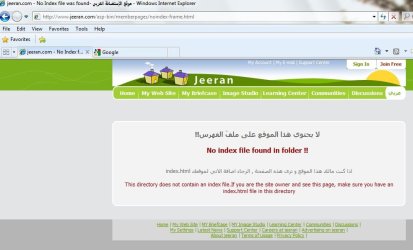
Hi this is probably not a windows 7 problem but has only arisen since I changed from Vista, when I switch on and log in , as soon as my desktop appears I get a message (attached) can't seem to get rid of it, maybe I'm missing something obvious here?:confused:
 

Attachments

  • Untitled.jpg
    Untitled.jpg
    14.6 KB · Views: 7

My Computer

OS
windows 7
This is what I see
 

Attachments

  • jeeran.jpg
    jeeran.jpg
    55.4 KB · Views: 21

My Computer

Computer type
PC/Desktop
Computer Manufacturer/Model Number
Bruce ... somewhere in his 40's
OS
Windows 7 Ultimate 32bit SP1
CPU
Intel(R) Core(TM)2 Quad CPU @ 2.40GHz, 2400 MHz
Motherboard
INTEL/D975XBX2
Memory
4 GB
Graphics Card(s)
ATI Radeon HD 2600 Pro
Monitor(s) Displays
Samsung SyncMaster 914v
Screen Resolution
1280 x 1024
Hard Drives
2/500GB each ... ST3500630AS ATA Device.
One is not connected
PSU
Rocketfish 700 W
Case
G.Skill Gigabyte Chassis
Keyboard
Standard PS/2 Keyboard
Mouse
Microsoft PS/2 Mouse
Internet Speed
DSL
Antivirus
Avira Internet Security
Browser
IE 11
Other Info
ATI HDMI Audio
yup but how do I get rid of it? tried lots of things but nothing succeds yet?
 

My Computer

OS
windows 7

My Computer

Computer type
PC/Desktop
Computer Manufacturer/Model Number
Bruce ... somewhere in his 40's
OS
Windows 7 Ultimate 32bit SP1
CPU
Intel(R) Core(TM)2 Quad CPU @ 2.40GHz, 2400 MHz
Motherboard
INTEL/D975XBX2
Memory
4 GB
Graphics Card(s)
ATI Radeon HD 2600 Pro
Monitor(s) Displays
Samsung SyncMaster 914v
Screen Resolution
1280 x 1024
Hard Drives
2/500GB each ... ST3500630AS ATA Device.
One is not connected
PSU
Rocketfish 700 W
Case
G.Skill Gigabyte Chassis
Keyboard
Standard PS/2 Keyboard
Mouse
Microsoft PS/2 Mouse
Internet Speed
DSL
Antivirus
Avira Internet Security
Browser
IE 11
Other Info
ATI HDMI Audio
It would appear that you have a browser or something set to initialize on boot, that is attempting to connect to that url. If that be the case, it must be opening to a saved session, or been closed with an open tab with that website open, or it is set as your home page. The problem is in your browser settings.
 

My Computer

Computer Manufacturer/Model Number
DIY
OS
W7x64 Pro, SuSe 12.1/** W7 x64 Pro, XP MCE
CPU
Phenom II 1090T w/Noctua NH-D14 /**4400+ X2 w/CM Hyper TX 3
Motherboard
ASRock 890FX Deluxe 4/**A8N-SLI
Memory
2 x 2GB Patriot PGS34g1600LLKA/**4x1GB Corsair VS
Graphics Card(s)
EVGA GTX460 SC/**EVGA 8800GTS
Sound Card
Asus Xonar D2X/**Xonar D1
Monitor(s) Displays
Acer X233H, Dell E152FPc /**LG M237-WD
Screen Resolution
1920x1080 & 1024x768/**1980x1080
Hard Drives
WDC 2TB, 1.5TB, 1TB, 500GB,Seagate 500GB , Maxtor 80GB /**500GB Seagate & WDC 1TB Black
PSU
CM RS600 w/ APC BX1000G/**Antec 500 TP w/ APC BX1000
Case
HAF922/**Antec 1040IIB
Cooling
3x200mm, 1x140 and 1x120mm/**5x80mm fans
Keyboard
Logitech Media USB/**Saitek Eclipse
Mouse
Cordless Trackman Wheel/**Ditto
Internet Speed
3.3Mbps
Other Info
SB 560 5.1 w/ Sennheiser RS140/**Creative T20 speakers, Dvico FusionHDTV7 Gold RT, Cisco E3000, HP 5510V AIO, Linksys E3000, Belkin F5U237 hub and **F5D8055 adapter
(** = 2nd rig)
right thanks for that at least its pointing me in the right direction
 

My Computer

OS
windows 7
Like the above poster seeker said about the browser starting on boot.

You may want to look in MSCONFIG and check the startup tab to see what starts up when you log on, also check SERVICES.MSC and see if there's any services running that shouldn't be there
 

My Computer

Computer Manufacturer/Model Number
Custom Built
OS
Windows 7 Pro 64-bit
CPU
AMD Phenom II X2 550 BE
Motherboard
ASUS M4A79XTD EVO
Memory
A-Data DDR3 1600 4gb
Graphics Card(s)
HIS Radeon HD 4670
Sound Card
VIA VT1708S (8 channel onboard)
Monitor(s) Displays
Dell 23" S2309W
Screen Resolution
1920 x 1080
Hard Drives
WD 320,750gb, Seagate 500gb External Backup
PSU
Rosewill Green Series 430W
Case
Coolermaster
Cooling
Scythe SCKTN-3000
been in all suggested locations and nothing out of the ordinary is obvious to me
 

My Computer

OS
windows 7
If the browser is not set to start on boot, then something else is starting it. I don't know what, but that is what to look for.
 

My Computer

Computer Manufacturer/Model Number
DIY
OS
W7x64 Pro, SuSe 12.1/** W7 x64 Pro, XP MCE
CPU
Phenom II 1090T w/Noctua NH-D14 /**4400+ X2 w/CM Hyper TX 3
Motherboard
ASRock 890FX Deluxe 4/**A8N-SLI
Memory
2 x 2GB Patriot PGS34g1600LLKA/**4x1GB Corsair VS
Graphics Card(s)
EVGA GTX460 SC/**EVGA 8800GTS
Sound Card
Asus Xonar D2X/**Xonar D1
Monitor(s) Displays
Acer X233H, Dell E152FPc /**LG M237-WD
Screen Resolution
1920x1080 & 1024x768/**1980x1080
Hard Drives
WDC 2TB, 1.5TB, 1TB, 500GB,Seagate 500GB , Maxtor 80GB /**500GB Seagate & WDC 1TB Black
PSU
CM RS600 w/ APC BX1000G/**Antec 500 TP w/ APC BX1000
Case
HAF922/**Antec 1040IIB
Cooling
3x200mm, 1x140 and 1x120mm/**5x80mm fans
Keyboard
Logitech Media USB/**Saitek Eclipse
Mouse
Cordless Trackman Wheel/**Ditto
Internet Speed
3.3Mbps
Other Info
SB 560 5.1 w/ Sennheiser RS140/**Creative T20 speakers, Dvico FusionHDTV7 Gold RT, Cisco E3000, HP 5510V AIO, Linksys E3000, Belkin F5U237 hub and **F5D8055 adapter
(** = 2nd rig)

My Computer

Computer type
PC/Desktop
Computer Manufacturer/Model Number
Bruce ... somewhere in his 40's
OS
Windows 7 Ultimate 32bit SP1
CPU
Intel(R) Core(TM)2 Quad CPU @ 2.40GHz, 2400 MHz
Motherboard
INTEL/D975XBX2
Memory
4 GB
Graphics Card(s)
ATI Radeon HD 2600 Pro
Monitor(s) Displays
Samsung SyncMaster 914v
Screen Resolution
1280 x 1024
Hard Drives
2/500GB each ... ST3500630AS ATA Device.
One is not connected
PSU
Rocketfish 700 W
Case
G.Skill Gigabyte Chassis
Keyboard
Standard PS/2 Keyboard
Mouse
Microsoft PS/2 Mouse
Internet Speed
DSL
Antivirus
Avira Internet Security
Browser
IE 11
Other Info
ATI HDMI Audio
Have you tried running Malwarebytes or another AV, antispyware program?

You could have some kind of adware that's trying to show a pop up when Windows starts
 

My Computer

Computer Manufacturer/Model Number
Custom Built
OS
Windows 7 Pro 64-bit
CPU
AMD Phenom II X2 550 BE
Motherboard
ASUS M4A79XTD EVO
Memory
A-Data DDR3 1600 4gb
Graphics Card(s)
HIS Radeon HD 4670
Sound Card
VIA VT1708S (8 channel onboard)
Monitor(s) Displays
Dell 23" S2309W
Screen Resolution
1920 x 1080
Hard Drives
WD 320,750gb, Seagate 500gb External Backup
PSU
Rosewill Green Series 430W
Case
Coolermaster
Cooling
Scythe SCKTN-3000
There are programs that act as a browser, which are not what are typically used, for instance Hulu Downloader. There are more, but that is the only one that comes to mind at the moment. Whatever the case be, something is attempting to go to that page on the internet automatically on boot, and obviously, nothing should be able to do so.
 

My Computer

Computer Manufacturer/Model Number
DIY
OS
W7x64 Pro, SuSe 12.1/** W7 x64 Pro, XP MCE
CPU
Phenom II 1090T w/Noctua NH-D14 /**4400+ X2 w/CM Hyper TX 3
Motherboard
ASRock 890FX Deluxe 4/**A8N-SLI
Memory
2 x 2GB Patriot PGS34g1600LLKA/**4x1GB Corsair VS
Graphics Card(s)
EVGA GTX460 SC/**EVGA 8800GTS
Sound Card
Asus Xonar D2X/**Xonar D1
Monitor(s) Displays
Acer X233H, Dell E152FPc /**LG M237-WD
Screen Resolution
1920x1080 & 1024x768/**1980x1080
Hard Drives
WDC 2TB, 1.5TB, 1TB, 500GB,Seagate 500GB , Maxtor 80GB /**500GB Seagate & WDC 1TB Black
PSU
CM RS600 w/ APC BX1000G/**Antec 500 TP w/ APC BX1000
Case
HAF922/**Antec 1040IIB
Cooling
3x200mm, 1x140 and 1x120mm/**5x80mm fans
Keyboard
Logitech Media USB/**Saitek Eclipse
Mouse
Cordless Trackman Wheel/**Ditto
Internet Speed
3.3Mbps
Other Info
SB 560 5.1 w/ Sennheiser RS140/**Creative T20 speakers, Dvico FusionHDTV7 Gold RT, Cisco E3000, HP 5510V AIO, Linksys E3000, Belkin F5U237 hub and **F5D8055 adapter
(** = 2nd rig)
Have you tried running Malwarebytes or another AV, antispyware program?

You could have some kind of adware that's trying to show a pop up when Windows starts
ad a ware and cc cleaner come up clean every time as does avg
 

My Computer

OS
windows 7
I'm not very hopeful that you will find the culprit via spyware detection programs, but there are much, much better programs than the ones that you tried. At the very least, try Malwarebytes, SpyBot S & D and also Hyjack This.
 

My Computer

Computer Manufacturer/Model Number
DIY
OS
W7x64 Pro, SuSe 12.1/** W7 x64 Pro, XP MCE
CPU
Phenom II 1090T w/Noctua NH-D14 /**4400+ X2 w/CM Hyper TX 3
Motherboard
ASRock 890FX Deluxe 4/**A8N-SLI
Memory
2 x 2GB Patriot PGS34g1600LLKA/**4x1GB Corsair VS
Graphics Card(s)
EVGA GTX460 SC/**EVGA 8800GTS
Sound Card
Asus Xonar D2X/**Xonar D1
Monitor(s) Displays
Acer X233H, Dell E152FPc /**LG M237-WD
Screen Resolution
1920x1080 & 1024x768/**1980x1080
Hard Drives
WDC 2TB, 1.5TB, 1TB, 500GB,Seagate 500GB , Maxtor 80GB /**500GB Seagate & WDC 1TB Black
PSU
CM RS600 w/ APC BX1000G/**Antec 500 TP w/ APC BX1000
Case
HAF922/**Antec 1040IIB
Cooling
3x200mm, 1x140 and 1x120mm/**5x80mm fans
Keyboard
Logitech Media USB/**Saitek Eclipse
Mouse
Cordless Trackman Wheel/**Ditto
Internet Speed
3.3Mbps
Other Info
SB 560 5.1 w/ Sennheiser RS140/**Creative T20 speakers, Dvico FusionHDTV7 Gold RT, Cisco E3000, HP 5510V AIO, Linksys E3000, Belkin F5U237 hub and **F5D8055 adapter
(** = 2nd rig)
I'm not very hopeful that you will find the culprit via spyware detection programs, but there are much, much better programs than the ones that you tried. At the very least, try Malwarebytes, SpyBot S & D and also Hyjack This.
ah forgot about spybot, I'll run it now

*edit* yep spybot comes up clean as well
 
Last edited:

My Computer

OS
windows 7
For some reason, I was thinking that URL is your 'Home Page" and you were getting the scripts error on that page.

Let's flush your DNS Cache:
Sometimes a bad DNS entry will be cached and you will need to either flush the DNS cache to get rid of it, or wait up to 24 hours for it to be dropped from the cache automatically.

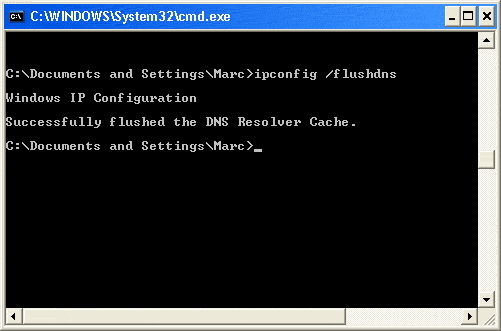
Open a command prompt....from the Start menu, select Run > In the box/"open field", enter cmd.exe
enter ipconfig /flushdns press 'enter'
flushdns.gif

Successful DNS Flush

Next,
download ATF Cleaner ATF-Cleaner.exe - www.atribune.org
Click "Main" > check 'select all' (except prefetch) this first time using it, then click "Empty Selected". Do the same for FireFox or Opera if you use either of those browsers.
Finally go to Control Panel > Internet Options.
On the General tab under "Temporary Internet Files" Click "Delete Files".
Put a check by "Delete Offline Content" and click OK.

Now,
Download the HostsXpert 4.3 - Hosts File Manager.
  • Unzip HostsXpert 4.3 - Hosts File Manager to a convenient folder such as C:\HostsXpert
  • Click HostsXpert.exe to Run HostsXpert 4.3 - Hosts File Manager from its new home
  • Click "Make Hosts Writable?" in the upper right corner (If available).
  • Click Restore Microsoft's Hosts file and then click OK.
  • Click the X to exit the program.
  • Note: If you were using a custom Hosts file you will need to replace any of those entries yourself.
 

My Computer

Computer type
PC/Desktop
Computer Manufacturer/Model Number
Bruce ... somewhere in his 40's
OS
Windows 7 Ultimate 32bit SP1
CPU
Intel(R) Core(TM)2 Quad CPU @ 2.40GHz, 2400 MHz
Motherboard
INTEL/D975XBX2
Memory
4 GB
Graphics Card(s)
ATI Radeon HD 2600 Pro
Monitor(s) Displays
Samsung SyncMaster 914v
Screen Resolution
1280 x 1024
Hard Drives
2/500GB each ... ST3500630AS ATA Device.
One is not connected
PSU
Rocketfish 700 W
Case
G.Skill Gigabyte Chassis
Keyboard
Standard PS/2 Keyboard
Mouse
Microsoft PS/2 Mouse
Internet Speed
DSL
Antivirus
Avira Internet Security
Browser
IE 11
Other Info
ATI HDMI Audio
For some reason, I was thinking that URL is your 'Home Page" and you were getting the scripts error on that page.

Let's flush your DNS Cache:
Sometimes a bad DNS entry will be cached and you will need to either flush the DNS cache to get rid of it, or wait up to 24 hours for it to be dropped from the cache automatically.

Open a command prompt....from the Start menu, select Run > In the box/"open field", enter cmd.exe
enter ipconfig /flushdns press 'enter'
flushdns.gif

Successful DNS Flush

Next,
download ATF Cleaner ATF-Cleaner.exe - www.atribune.org
Click "Main" > check 'select all' (except prefetch) this first time using it, then click "Empty Selected". Do the same for FireFox or Opera if you use either of those browsers.
Finally go to Control Panel > Internet Options.
On the General tab under "Temporary Internet Files" Click "Delete Files".
Put a check by "Delete Offline Content" and click OK.

Now,
Download the HostsXpert 4.3 - Hosts File Manager.
  • Unzip HostsXpert 4.3 - Hosts File Manager to a convenient folder such as C:\HostsXpert
  • Click HostsXpert.exe to Run HostsXpert 4.3 - Hosts File Manager from its new home
  • Click "Make Hosts Writable?" in the upper right corner (If available).
  • Click Restore Microsoft's Hosts file and then click OK.
  • Click the X to exit the program.
  • Note: If you were using a custom Hosts file you will need to replace any of those entries yourself.

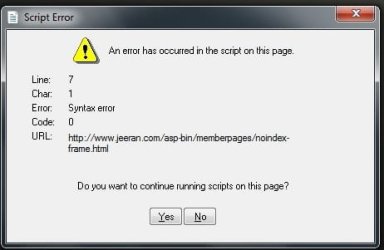
Did all of the above until last step when message " Error: cannot create file C:\\windows\system32\drivers\etc\hosts"


*edit* and now neither Gmail nor Flickr will open properly
 

My Computer

OS
windows 7
Hi guys and thanks for all the help, I think I am on to something, I have located the file which generates the script which appears at startup, its in system 32 and is called sounds, it shows as being created on 07/11/09 which would tie in with the problem, I'm assuming its a virus of some kind although none of the recomended programmes picked it up, can I simply delete it?
 

My Computer

OS
windows 7
I don't have that file...at least not at that location, so I doubt that it is system critical. Instead of just deleting it, cut/paste it to a non-system location, so you could restore it if necessary and see what happens.
 

My Computer

Computer Manufacturer/Model Number
DIY
OS
W7x64 Pro, SuSe 12.1/** W7 x64 Pro, XP MCE
CPU
Phenom II 1090T w/Noctua NH-D14 /**4400+ X2 w/CM Hyper TX 3
Motherboard
ASRock 890FX Deluxe 4/**A8N-SLI
Memory
2 x 2GB Patriot PGS34g1600LLKA/**4x1GB Corsair VS
Graphics Card(s)
EVGA GTX460 SC/**EVGA 8800GTS
Sound Card
Asus Xonar D2X/**Xonar D1
Monitor(s) Displays
Acer X233H, Dell E152FPc /**LG M237-WD
Screen Resolution
1920x1080 & 1024x768/**1980x1080
Hard Drives
WDC 2TB, 1.5TB, 1TB, 500GB,Seagate 500GB , Maxtor 80GB /**500GB Seagate & WDC 1TB Black
PSU
CM RS600 w/ APC BX1000G/**Antec 500 TP w/ APC BX1000
Case
HAF922/**Antec 1040IIB
Cooling
3x200mm, 1x140 and 1x120mm/**5x80mm fans
Keyboard
Logitech Media USB/**Saitek Eclipse
Mouse
Cordless Trackman Wheel/**Ditto
Internet Speed
3.3Mbps
Other Info
SB 560 5.1 w/ Sennheiser RS140/**Creative T20 speakers, Dvico FusionHDTV7 Gold RT, Cisco E3000, HP 5510V AIO, Linksys E3000, Belkin F5U237 hub and **F5D8055 adapter
(** = 2nd rig)
Back
Top