Messed up my HD so help please.

derekmiles

New member
Local time
8:43 PM
Messages
3
Location
UK
I'll start by telling you that I'm 85 but been messing with and building PC's since the 70's. Forgotten most things. Just bought a Lenova M90p SFF from RefurbThat and messed up the HD. I've also built a new Tower PC that I'm now using.

I also have a third PC that's loaded with XP3 Pro that I use for an old accounting programme.

My thoughts were to use my Acronis Disk Director to alter the HD in the Lenova by shrinking the main partition to give a new partition, naming it as "E". After that I was invited to format the new "E" which I did by selecting "Commit". That's as far as I wanted to get yesterday since I intended to get advice on installing my XP3 OS to use my old accounting system.

This morning I started up my Lenova and it 'squeaked'. An error message came up

MBR Error 3.
Non system disk Press any key
Boot from floppy.

Hasten to add that I have backups of five previous days on a USB drive and a Western Cloud unit attached to my router/switch. Never investigated the Western My Cloud, just connected it as instructed and left it flashing away as a 'belt and braces' security thingy.

So there we have it and what can I do now ? If anyone can come up with some advice, please let it be a detailed procedure that befits an ageing idiot that's not like a lady who can always do more things than one at a time ! Kindest regards to all. Derek Miles in the UK.
 

My Computer My Computer

Computer type
PC/Desktop
Computer Manufacturer/Model Number
Custom
OS
Win 7 Pro 64 bit
Motherboard
Asus
Memory
8MB
Hard Drives
500 SATA
Antivirus
Norton
Hello and welcome Derek mate now is what you are after a dual boot? because that is what the impression I am getting is.

Now can you boot into safe mode if so I would try a system restore and if that gets you back to square one then try this to do what you want, as far as setting up partitions Acronis is good but I find this better and a little more explicit and easy to use.
Best Free Partition Manager for Windows | MiniTool Partition Free
 

My Computer My Computer

Computer type
PC/Desktop
Computer Manufacturer/Model Number
Own build (new) Desk1 / Asus ROG Win 7 / Desk2 1st build
OS
Desk1 7 Home Prem / Desk2 10 Pro / Main lap Asus ROG 10 Pro 2 laptop Toshiba 7 Pro Asus P2520 7 & 10
CPU
Desk1 i5 3750K / Laptop i7 GTX 860M / Desk2 i5 2500
Motherboard
Desk1 Asus P877-V / Desk2 Gigabyte H67 UD3H / Laptop ?
Memory
Desk1 8GB (1866) / Desk2 16GB (1333) / Laptop 8Gb DDR3
Graphics Card(s)
Desk 1& 2NVidia GTX 650 & Laptops on board Intel
Sound Card
Desk 1 & 2 -XONAR DG Realtek High Def audio Laptop
Monitor(s) Displays
Desk 1 Benq HD 2450 / Desk2 Philips 24" / Laptop 17.5"
Screen Resolution
1920x1080 D1 & D2 & Laptop 1
Hard Drives
Desk1 Samsung 120GB 830 SSD
Asus ROG 256GB 850 Pro SSD
Desk2 Samsung 840 256 SSD
Toshiba 120GB EVO
PSU
Desk 1 Corsair HX 1050/ Laptop ? / Desk 2 Corsair HX 650
Case
Desk 1 Cooler HAF XM ? Toshiba laptop / Desk2 Coolermaster
Cooling
Fans on all Desk1 -2 Desk2 - all Coolermasters 5 Laptop ?
Keyboard
Desk 1 MS Sidewinder X6 Desk 2 MS Sidewinder X 4
Mouse
Desk 1&2 - Gigabyte MS 900 gamer - laptop - Logitec wireless
Internet Speed
ADSL2+
Other Info
One other Desktop (tester) and spare Toshba laptop both with SSD's
Running Kaspersky 2016 ISS on all machines config'd identically
Logitec audio stereo systems on each machine (x3)
Canon MG5250MFC
Router/modem TP-Link running WPA2SK
My many thanks to you for your intended assistance, your help gives me some hope !

Getting into safe-mode could be a bit difficult unless you know of a special way because when I switch on, pretty well immediately I get the "MBR ERROR 3. Followed by "Non system disk" then "Press any key to boot from floppy" and I haven't got a floppy installed.

Thanks for being there and meanwhile I will download the software you suggested but I can only put it onto this Win10 outfit.
 

My Computer My Computer

Computer type
PC/Desktop
Computer Manufacturer/Model Number
Custom
OS
Win 7 Pro 64 bit
Motherboard
Asus
Memory
8MB
Hard Drives
500 SATA
Antivirus
Norton
Derek what works sometimes is to start tapping F8 before pushing the power on button.
 

My Computer My Computer

Computer type
PC/Desktop
Computer Manufacturer/Model Number
Own build (new) Desk1 / Asus ROG Win 7 / Desk2 1st build
OS
Desk1 7 Home Prem / Desk2 10 Pro / Main lap Asus ROG 10 Pro 2 laptop Toshiba 7 Pro Asus P2520 7 & 10
CPU
Desk1 i5 3750K / Laptop i7 GTX 860M / Desk2 i5 2500
Motherboard
Desk1 Asus P877-V / Desk2 Gigabyte H67 UD3H / Laptop ?
Memory
Desk1 8GB (1866) / Desk2 16GB (1333) / Laptop 8Gb DDR3
Graphics Card(s)
Desk 1& 2NVidia GTX 650 & Laptops on board Intel
Sound Card
Desk 1 & 2 -XONAR DG Realtek High Def audio Laptop
Monitor(s) Displays
Desk 1 Benq HD 2450 / Desk2 Philips 24" / Laptop 17.5"
Screen Resolution
1920x1080 D1 & D2 & Laptop 1
Hard Drives
Desk1 Samsung 120GB 830 SSD
Asus ROG 256GB 850 Pro SSD
Desk2 Samsung 840 256 SSD
Toshiba 120GB EVO
PSU
Desk 1 Corsair HX 1050/ Laptop ? / Desk 2 Corsair HX 650
Case
Desk 1 Cooler HAF XM ? Toshiba laptop / Desk2 Coolermaster
Cooling
Fans on all Desk1 -2 Desk2 - all Coolermasters 5 Laptop ?
Keyboard
Desk 1 MS Sidewinder X6 Desk 2 MS Sidewinder X 4
Mouse
Desk 1&2 - Gigabyte MS 900 gamer - laptop - Logitec wireless
Internet Speed
ADSL2+
Other Info
One other Desktop (tester) and spare Toshba laptop both with SSD's
Running Kaspersky 2016 ISS on all machines config'd identically
Logitec audio stereo systems on each machine (x3)
Canon MG5250MFC
Router/modem TP-Link running WPA2SK
Perhaps the master boot record was damaged. You can use Britec's XP Recovery Console to fix it. On a working computer with a disk drive, download the Britec Recovery Console here: Bootable Recovery Console ISO Image -

It's an ISO disk image file. You don't copy the ISO file itself to a CD, you burn its contents. Which you do this way: How to burn an .iso image onto a CD/DVD-ROM

With your newly created bootable CD, put it in the disk drive of the faulty computer. Turn on your computer and it will boot to the CD automatically. If it doesn't, you'll have to open the BIOS of the computer (you usually strike a key as soon as your computer starts to enter it) and change the boot order so the CD drive is first.

Then follow these instructions to fix the master boot record: How To Repair the Master Boot Record In Windows XP

If you need step by step instructions, I or someone else on this forum could provide them. Although it's a fairly straight-forward process.
 

My Computer My Computer

Computer type
PC/Desktop
Computer Manufacturer/Model Number
custom build
OS
Windows 7 Enterprise x64
Yep well it is a possibility I suppose but formatting usually deletes all data on a drive.

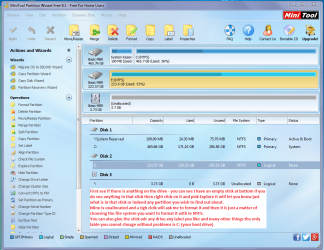
Try this Best Free Partition Manager for Windows | MiniTool Partition Free run it and and then click on the stick (or any drive you like really) and see if it has anything in it if you have formatted it it will say what file system you formatted it with. You can also do many other things with this program for example altering partitions to suit you adding partitions etc etc
 

Attachments

  • PW GENERAL.PNG
    PW GENERAL.PNG
    189.4 KB · Views: 0

My Computer My Computer

Computer type
PC/Desktop
Computer Manufacturer/Model Number
Own build (new) Desk1 / Asus ROG Win 7 / Desk2 1st build
OS
Desk1 7 Home Prem / Desk2 10 Pro / Main lap Asus ROG 10 Pro 2 laptop Toshiba 7 Pro Asus P2520 7 & 10
CPU
Desk1 i5 3750K / Laptop i7 GTX 860M / Desk2 i5 2500
Motherboard
Desk1 Asus P877-V / Desk2 Gigabyte H67 UD3H / Laptop ?
Memory
Desk1 8GB (1866) / Desk2 16GB (1333) / Laptop 8Gb DDR3
Graphics Card(s)
Desk 1& 2NVidia GTX 650 & Laptops on board Intel
Sound Card
Desk 1 & 2 -XONAR DG Realtek High Def audio Laptop
Monitor(s) Displays
Desk 1 Benq HD 2450 / Desk2 Philips 24" / Laptop 17.5"
Screen Resolution
1920x1080 D1 & D2 & Laptop 1
Hard Drives
Desk1 Samsung 120GB 830 SSD
Asus ROG 256GB 850 Pro SSD
Desk2 Samsung 840 256 SSD
Toshiba 120GB EVO
PSU
Desk 1 Corsair HX 1050/ Laptop ? / Desk 2 Corsair HX 650
Case
Desk 1 Cooler HAF XM ? Toshiba laptop / Desk2 Coolermaster
Cooling
Fans on all Desk1 -2 Desk2 - all Coolermasters 5 Laptop ?
Keyboard
Desk 1 MS Sidewinder X6 Desk 2 MS Sidewinder X 4
Mouse
Desk 1&2 - Gigabyte MS 900 gamer - laptop - Logitec wireless
Internet Speed
ADSL2+
Other Info
One other Desktop (tester) and spare Toshba laptop both with SSD's
Running Kaspersky 2016 ISS on all machines config'd identically
Logitec audio stereo systems on each machine (x3)
Canon MG5250MFC
Router/modem TP-Link running WPA2SK
You bought a Lenovo M90p Small Form Factor Refurbished Desktop.

1. Do you have the Recovery Disks that can take you to the factory condition?

2. In the absence of Recovery Disks, have you taken a full backup of your system that can take you back to the condition when you bought it?

Some OEM machines have their own proprietary MBR and either installing incompatible version of Acronis or altering the partition structure has altered and affected the MBR sector. ( Acronis has a bad reputation altering the MBR for its own purposes and OEM machines with proprietary MBRs do not take it kindly and may throw the MBR3 error.)

If your machine indeed had a proprietary MBR, conventional methods of fixing MBR fix MBR, bootrec etc., is not going to help. The only solution, IMO, is as indicated in 1 and 2.

Having said that, there is absolutely no bar in trying what others suggest. No game up or game down here. At best I could only guess what could have happened.

( If some one asks me to create partitions on an OEM machine, I generally refuse but if I have to as an obligation, I always take a full backup of the system before making any changes. If disaster strikes, no worries, I can getback where I was.)
 
Last edited:

My Computer My Computer

OS
Windows 7 Home Premium 32 bit
Back
Top