Method For Slipstreaming SP1 and IE11 into Windows 7 DVD

Leo625

Member
Member
Local time
10:18 AM
Messages
70
One of my Windows 7 Ultimate DVD's is old enough that it doesn't have SP1. I have searched the interwebs for a solid method with clear instructions to slipstream SP1 into the Win 7 DVD ISO but the articles I have read leave me less than confident of success with conflicting terminologies, instructions, and some errors pointed out in comments below the articles.


I don't want to use any 3rd party tools. I have Windows 8.1 ADK installed and have limited knowledge of its processes and so would need a step-by-step aimed at plinkers such as myself.


Does anyone have a proven method or know where I might find reliable instructions? Also have read instances where the finished ISO when installed does not indicate SP1 status.


Anyway, help is welcome. Thanks Much.


Leo625
 

My Computer My Computer

At a glance

Win 7 Ultimate X64AMD RYZEN 5 2600MEM 2Gx8|G.SKILL AEGISNVIDIA 750 Ti
Computer type
PC/Desktop
Computer Manufacturer/Model Number
Leo625`s Amazing Time Killers
OS
Win 7 Ultimate X64
CPU
AMD RYZEN 5 2600
Motherboard
GIGABYTE X470 AORUS Gaming 7 WIFI
Memory
MEM 2Gx8|G.SKILL AEGIS
Graphics Card(s)
NVIDIA 750 Ti
Sound Card
MB
Monitor(s) Displays
LG
Screen Resolution
1920 X 1080
Hard Drives
WD 1TB Black
PSU
Corsair 750
Case
Old and Sturdy
Cooling
3 - 120MM Fans and CoolerMaster Hyper 612 on CPU
Keyboard
Logitech wired and lighted
Mouse
Logitech wireless
Browser
Firefox
Save your time & get this:

Download Windows ISO Downloader 8.01 for Windows - Filehippo.com

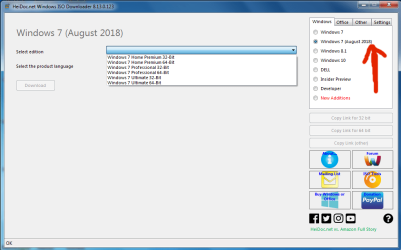
Select Windows 7 (August 2018)
Win_Iso_Downloader.png

Not only it has SP1 & IE11 but also the latest updates OUT-OF-THE-BOX... it will save you hours or days of downloading with windows update...
Select Edition > Select language

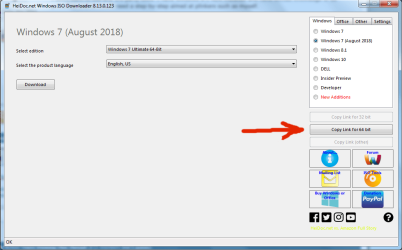
Click Copy Link for 64 bit, (or Copy link for 32 bit if you selected a 32 bit version)
Win_Iso_Downloader2.png
paste the link in your download manager & after it's done

use Ultraiso, Rufus or any similar tool to create a bootable USB stick

ENJOY
 

My Computer My Computer

At a glance

Windows XP 64-bit SP2FX-8370 (Died) Now: FX-61002 x 8GB Kingston KVR16N11/8manli gtx 960
Computer type
PC/Desktop
Computer Manufacturer/Model Number
Custom
OS
Windows XP 64-bit SP2
CPU
FX-8370 (Died) Now: FX-6100
Motherboard
MSI 970a Sli krait (Died & killed my CPU) Now: Asus M5a87
Memory
2 x 8GB Kingston KVR16N11/8
Graphics Card(s)
manli gtx 960
Sound Card
The Venerable Emu10k Sound Blaster Live! CT4780
Monitor(s) Displays
Dell P2014H IPS Monitor
Screen Resolution
1600 x 900
PSU
S12II 430W 80 PLUS Bronze Certified
Cooling
Covers removed... Leave the Case Opened ;)
Browser
360 Extreme Browser, Brave, Vivaldi, Waterfox, Serpent
Hi Leo625,

Does anyone have a proven method or know where I might find reliable instructions? Also have read instances where the finished ISO when installed does not indicate SP1 status.

Download the latest ISO and run DISM++.

To run the DISM++ [Deployment Image Servicing & Management] Windows Updates after a clean install on the LIVE OS, please follow my instructions below!

NOTE: The light blue text below are links to the relevant websites and programs, just click them!

DISM++ - Basic Overview

DISM++ is a FREE implementation tool that has the ability to perform Windows Updates [WU]. Some of the advantages [but not all] are:

[1] The GUI is very easy to understand and use.
[2] It is much faster than M$’s WU because it uses a different engine.
[3] It downloads the latest WU DB from the M$ servers, scans your OS, and then lists the updates available.
[4] It doesn’t install superseded updates like M$ does.
[5] It gives you the option of what you want to install.
[6] The pre-ticked updates are what is recommended and are similar to the WU critical and recommended updates. The un-ticked updates are similar to the WU optional updates.

[7] It warns you if an update:
  • Includes telemetry.
  • Has known issues with certain hardware.
  • Needs exclusive access.
  • Is suspect.
  • Your OS doesn't need it.
  • Has any other known issues.
[8] It doesn’t require re-booting between updates.[9] It can be used to either update an install.wim image OFFLINE, or to update the LIVE OS.

If you decide to use DISM++, then it is best to run the DISM++ Windows updates a couple of times to make sure you get ALL the updates that are needed. DON’T install ANY of the ORANGE updates though [see numbers [6] and [7] above]. It can also install the required .NET Framework updates. Then just run WU to see what other updates are available, if any.

DISM++ - Run Windows Updates On The LIVE OS

DISM++ Direct download [zip] => DISM++.

Here is the quick procedure guide:

[1] Download the latest version of DISM++ [see the DISM++ Direct download [zip] link above].
[2] Extract the files using something like 7-Zip here => 7-Zip.
[3] Turn Sleep mode OFF in Power Options [you can turn it back on after you have finished].
[4] Double-click Dism++x86 or Dism++x64 and then click Run.
[5] Click Updates in the left-hand pane and then click Scan [bottom right].
[6] Once the scan has completed, click Install Updates [blue button to the right of Scan].

[7] If any warning pop-ups appear [see item [7] in the Basic Overview above], click Cancel and it will skip that one. There could be several of these appear so click Cancel to all of them.

[8] It is advisable to run the DISM++ WU a couple of times. To do this, just re-boot and Scan again [from number [4] above].

[9] Run M$ WU [Windows Update] to see if there are any other updates available.

That's it!

Further information and aspects of the above are discussed and explained here => Update your Win 7 installation media. It is quite a long thread, but you will see the parts that are applicable!

I hope this helps!
 

My Computer My Computer

At a glance

Win 7 HP SP1 64-bit Vista HB SP2 32-bit Linux...Intel(R) Pentium(R) CPU P6200 @ 2.13GHz4.00 GBIntel(R) Graphics Media Accelerator HD
Computer type
Laptop
Computer Manufacturer/Model Number
Fujitsu LIFEBOOK
OS
Win 7 HP SP1 64-bit Vista HB SP2 32-bit Linux Mint 18.3
CPU
Intel(R) Pentium(R) CPU P6200 @ 2.13GHz
Motherboard
FUJITSU FJNBB06
Memory
4.00 GB
Graphics Card(s)
Intel(R) Graphics Media Accelerator HD
Sound Card
[1] Realtek High Definition Audio [2] Intel(R) Display Audio
Screen Resolution
1366 x 768 x 32 bits (4294967296 colors) @ 59 Hz
Hard Drives
TOSHIBA MK5076GSX
Antivirus
AVG FREE

My Computers My Computers

  • At a glance

    Windows 7 HP 64i5 6600K - 800MHz to 4200MHz4+4G GSkill DDR4 3000IG - Intel 530
    Computer type
    PC/Desktop
    Computer Manufacturer/Model Number
    custom build
    OS
    Windows 7 HP 64
    CPU
    i5 6600K - 800MHz to 4200MHz
    Motherboard
    GA-Z170-HD3P
    Memory
    4+4G GSkill DDR4 3000
    Graphics Card(s)
    IG - Intel 530
    Monitor(s) Displays
    Samsung 226BW
    Screen Resolution
    1680x1050
    Hard Drives
    (1) -1 SM951 – 128GB M.2 AHCI PCIe SSD drive for Windows 7 and Lubuntu
    (2) -1 WD SATA 3 - 1T for Data
    (3) -1 WD SATA 3 - 1T for backup
    PSU
    Thermaltake 450W TR2 gold
    Keyboard
    Old and good Chicony mechanical keyboard
    Mouse
    Logitech mX performance - 9 buttons (had to disable some)
    Internet Speed
    500Mb/s
    Browser
    Firefox 64
    Other Info
    TinyWall firewall
  • At a glance

    Windows 7 Proi7-4500U 800MHz to 3.0GHz(4+4)G DDR3 1600IG intel 4400 + NVIDIA GeForce GT 745M
    Computer type
    Laptop
    System Manufacturer/Model Number
    Asus Q550LF
    OS
    Windows 7 Pro
    CPU
    i7-4500U 800MHz to 3.0GHz
    Motherboard
    Asus Q550LF
    Memory
    (4+4)G DDR3 1600
    Graphics Card(s)
    IG intel 4400 + NVIDIA GeForce GT 745M
    Sound Card
    Realtek
    Monitor(s) Displays
    LG Display LP156WF4-SPH1
    Screen Resolution
    1920 x 1080
    Hard Drives
    BX500 120G SSD for Windows and programs +
    1T HDD for data
    Internet Speed
    500 Mb/s
    Browser
    Firefox
    Other Info
    TinyWall firewall
I don't recommend the 2018 thing. There are lots of updates that have been superseded, it contains the telemetry stuff, and it only has one rearm remaining, and of course there are updates since.

Better to get the official SP1 iso and do the updating from scratch - using dism++ and/or Simplix.
 

My Computers My Computers

  • At a glance

    7 X64i5 84002x8gb 3200mhz
    Computer type
    PC/Desktop
    OS
    7 X64
    CPU
    i5 8400
    Motherboard
    gigabyte b365m ds3h
    Memory
    2x8gb 3200mhz
    Hard Drives
    various
    PSU
    pure power 11 400w cm
    Case
    Coolermaster
    Cooling
    cryorig m9i
  • At a glance

    7x64g54008gb ddr4 2400
    Computer type
    PC/Desktop
    OS
    7x64
    CPU
    g5400
    Motherboard
    ga b365m ds3h
    Memory
    8gb ddr4 2400
    PSU
    xfx pro 450w
I don't recommend the 2018 thing. There are lots of updates that have been superseded, it contains the telemetry stuff, and it only has one rearm remaining, and of course there are updates since.

Better to get the official SP1 iso and do the updating from scratch - using dism++ and/or Simplix.

I agree but it is the only available on Heidoc
 

My Computers My Computers

  • At a glance

    Windows 7 HP 64i5 6600K - 800MHz to 4200MHz4+4G GSkill DDR4 3000IG - Intel 530
    Computer type
    PC/Desktop
    Computer Manufacturer/Model Number
    custom build
    OS
    Windows 7 HP 64
    CPU
    i5 6600K - 800MHz to 4200MHz
    Motherboard
    GA-Z170-HD3P
    Memory
    4+4G GSkill DDR4 3000
    Graphics Card(s)
    IG - Intel 530
    Monitor(s) Displays
    Samsung 226BW
    Screen Resolution
    1680x1050
    Hard Drives
    (1) -1 SM951 – 128GB M.2 AHCI PCIe SSD drive for Windows 7 and Lubuntu
    (2) -1 WD SATA 3 - 1T for Data
    (3) -1 WD SATA 3 - 1T for backup
    PSU
    Thermaltake 450W TR2 gold
    Keyboard
    Old and good Chicony mechanical keyboard
    Mouse
    Logitech mX performance - 9 buttons (had to disable some)
    Internet Speed
    500Mb/s
    Browser
    Firefox 64
    Other Info
    TinyWall firewall
  • At a glance

    Windows 7 Proi7-4500U 800MHz to 3.0GHz(4+4)G DDR3 1600IG intel 4400 + NVIDIA GeForce GT 745M
    Computer type
    Laptop
    System Manufacturer/Model Number
    Asus Q550LF
    OS
    Windows 7 Pro
    CPU
    i7-4500U 800MHz to 3.0GHz
    Motherboard
    Asus Q550LF
    Memory
    (4+4)G DDR3 1600
    Graphics Card(s)
    IG intel 4400 + NVIDIA GeForce GT 745M
    Sound Card
    Realtek
    Monitor(s) Displays
    LG Display LP156WF4-SPH1
    Screen Resolution
    1920 x 1080
    Hard Drives
    BX500 120G SSD for Windows and programs +
    1T HDD for data
    Internet Speed
    500 Mb/s
    Browser
    Firefox
    Other Info
    TinyWall firewall
I don't recommend the 2018 thing. There are lots of updates that have been superseded, it contains the telemetry stuff, and it only has one rearm remaining, and of course there are updates since.

Better to get the official SP1 iso and do the updating from scratch - using dism++ and/or Simplix.

What do you mean by "one rearm remaining"?! would you explain a little bit

"it contains the telemetry stuff" can't you uninstall those?
 

My Computer My Computer

At a glance

Windows XP 64-bit SP2FX-8370 (Died) Now: FX-61002 x 8GB Kingston KVR16N11/8manli gtx 960
Computer type
PC/Desktop
Computer Manufacturer/Model Number
Custom
OS
Windows XP 64-bit SP2
CPU
FX-8370 (Died) Now: FX-6100
Motherboard
MSI 970a Sli krait (Died & killed my CPU) Now: Asus M5a87
Memory
2 x 8GB Kingston KVR16N11/8
Graphics Card(s)
manli gtx 960
Sound Card
The Venerable Emu10k Sound Blaster Live! CT4780
Monitor(s) Displays
Dell P2014H IPS Monitor
Screen Resolution
1600 x 900
PSU
S12II 430W 80 PLUS Bronze Certified
Cooling
Covers removed... Leave the Case Opened ;)
Browser
360 Extreme Browser, Brave, Vivaldi, Waterfox, Serpent
Thanks All for your help.

I have downloaded Windows 7 ISO's and when I use them I have to "phone home" to get my install activated. With my original DVD I have not had any trouble activating the OS straight from the activation screen so I would like to use my original DVD.

I will try DISM++ again but I will read up on the DISM++ thread first how to interpret the instructions which as far as I can determine aren't fully printed in English. DISM++ does look promising from the aspect of quickly and accurately updating the install. I presently use Simplix to update but I can't find where a person might only slipstream SP1 into an ISO.

I have a 2012 copy of the SP1 files and I noticed after I merge this with my DVD, Windows still wants an update to SP1 so the old SP1 is different than the new SP1, it appears.

I realize Windows 7 is not supported after next year but I really don't want to downgrade to Windows 10 yet even though I have a Pro Edition USB waiting in the wings. Gonna try dual-booting first to see how it goes but in the meantime I am just sort of experimenting to see how to do different methods of making a new DVD.

Again I Thank You All for your input and advice.


Leo625
 

My Computer My Computer

At a glance

Win 7 Ultimate X64AMD RYZEN 5 2600MEM 2Gx8|G.SKILL AEGISNVIDIA 750 Ti
Computer type
PC/Desktop
Computer Manufacturer/Model Number
Leo625`s Amazing Time Killers
OS
Win 7 Ultimate X64
CPU
AMD RYZEN 5 2600
Motherboard
GIGABYTE X470 AORUS Gaming 7 WIFI
Memory
MEM 2Gx8|G.SKILL AEGIS
Graphics Card(s)
NVIDIA 750 Ti
Sound Card
MB
Monitor(s) Displays
LG
Screen Resolution
1920 X 1080
Hard Drives
WD 1TB Black
PSU
Corsair 750
Case
Old and Sturdy
Cooling
3 - 120MM Fans and CoolerMaster Hyper 612 on CPU
Keyboard
Logitech wired and lighted
Mouse
Logitech wireless
Browser
Firefox
Hi Leo625,

With my original DVD I have not had any trouble activating the OS straight from the activation screen so I would like to use my original DVD.

I will try DISM++ again but I will read up on the DISM++ thread first how to interpret the instructions which as far as I can determine aren't fully printed in English. DISM++ does look promising from the aspect of quickly and accurately updating the install. I presently use Simplix to update but I can't find where a person might only slipstream SP1 into an ISO.

I have a 2012 copy of the SP1 files and I noticed after I merge this with my DVD, Windows still wants an update to SP1 so the old SP1 is different than the new SP1, it appears.

Download the latest and last Windows 7 SP1 [Final] ISO [build 6.1.7601 - July 2009] for your version and bit-type [Win 7 SP1 Ultimate x64].

[1] Download Windows ISO Downloader.exe [direct download] to the Desktop and run it.
[2] On the right-hand side of the screen under the Windows tab select Windows 7.
[3] In the Select edition drop down box select the Win 7 edition you want an ISO for and click Confirm.
[4] In the Select the product language drop down box select the language you want and click Confirm.
[5] Under the Downloads section click the ISO bit-type you want to download and save it to the Desktop.
[6a] Burn it to a DVD, using the Windows 7 built in ISO burner, OR ...
[6b] Burn it to a USB, you can either use Rufus 3.4 or Rufus 3.4 Portable.
[7] Install Win 7 using either of the above and then update Windows using DISM++ [see my post #3].

Here is the sequence of using DISM++ provided by SIW2 => Using DISM++ for Windows Updates [post #59 onwards].

I hope this helps!
 

My Computer My Computer

At a glance

Win 7 HP SP1 64-bit Vista HB SP2 32-bit Linux...Intel(R) Pentium(R) CPU P6200 @ 2.13GHz4.00 GBIntel(R) Graphics Media Accelerator HD
Computer type
Laptop
Computer Manufacturer/Model Number
Fujitsu LIFEBOOK
OS
Win 7 HP SP1 64-bit Vista HB SP2 32-bit Linux Mint 18.3
CPU
Intel(R) Pentium(R) CPU P6200 @ 2.13GHz
Motherboard
FUJITSU FJNBB06
Memory
4.00 GB
Graphics Card(s)
Intel(R) Graphics Media Accelerator HD
Sound Card
[1] Realtek High Definition Audio [2] Intel(R) Display Audio
Screen Resolution
1366 x 768 x 32 bits (4294967296 colors) @ 59 Hz
Hard Drives
TOSHIBA MK5076GSX
Antivirus
AVG FREE

My Computers My Computers

  • At a glance

    7 X64i5 84002x8gb 3200mhz
    Computer type
    PC/Desktop
    OS
    7 X64
    CPU
    i5 8400
    Motherboard
    gigabyte b365m ds3h
    Memory
    2x8gb 3200mhz
    Hard Drives
    various
    PSU
    pure power 11 400w cm
    Case
    Coolermaster
    Cooling
    cryorig m9i
  • At a glance

    7x64g54008gb ddr4 2400
    Computer type
    PC/Desktop
    OS
    7x64
    CPU
    g5400
    Motherboard
    ga b365m ds3h
    Memory
    8gb ddr4 2400
    PSU
    xfx pro 450w
Sorry I was gone a few days. Okay I will try this out. Mark this one solved and if I have more questions I will post anew.


Thank You, Leo625
 

My Computer My Computer

At a glance

Win 7 Ultimate X64AMD RYZEN 5 2600MEM 2Gx8|G.SKILL AEGISNVIDIA 750 Ti
Computer type
PC/Desktop
Computer Manufacturer/Model Number
Leo625`s Amazing Time Killers
OS
Win 7 Ultimate X64
CPU
AMD RYZEN 5 2600
Motherboard
GIGABYTE X470 AORUS Gaming 7 WIFI
Memory
MEM 2Gx8|G.SKILL AEGIS
Graphics Card(s)
NVIDIA 750 Ti
Sound Card
MB
Monitor(s) Displays
LG
Screen Resolution
1920 X 1080
Hard Drives
WD 1TB Black
PSU
Corsair 750
Case
Old and Sturdy
Cooling
3 - 120MM Fans and CoolerMaster Hyper 612 on CPU
Keyboard
Logitech wired and lighted
Mouse
Logitech wireless
Browser
Firefox
Back
Top