Mic Boost Slider Not Working

eastdawg2k

New member
Local time
11:04 PM
Messages
8
Hello Guys,

This is Driving me insane.
My Mic Boost slider is not working since i Installed Windows 7 in my desktop
Downloaded the latest realtek drivers, and still it doesn't move
It's set to 0.0, its not grayed out or anything, just not sliding.
The microphone works, but extremely low even though mic volume is set to max.
i have to pretty much need to have the thing inside my mouth so people can hear me.
I tried the slider both in Windows Sound config setup and the realtek sound manager they both do not move.
I set the device as default as well.
turned on, and off the enhancements with no luck

I would deeply appreciate if any of you guys have a solution for this.

Thank you for your time
 

My Computer

OS
Windows 7
CPU
Intel Pentium 3.4 HT
Motherboard
d915pbl
Memory
2 gb pc24200
Graphics Card(s)
nvidia 8800 GTX
Sound Card
onboard
Monitor(s) Displays
Samsung syncmaster 226bw
Which version of Win 7 are you running? (RC 7100, etc)?

Onboard Audio and driver - Realtek?
 

My Computer

OS
XP Pro & Vista Home Premium (x86); Windows Ultimate 7600 x64 Retail
Yes I'm using on-board sound which is Realtek.
I was not able to find which RC I have. Is there a way we can find this information in the system? searched through all my emails, and wasn't able to find anything.
Thanks for your attention
 

My Computer

OS
Windows 7
CPU
Intel Pentium 3.4 HT
Motherboard
d915pbl
Memory
2 gb pc24200
Graphics Card(s)
nvidia 8800 GTX
Sound Card
onboard
Monitor(s) Displays
Samsung syncmaster 226bw
Is your card realtek ac97 or realtek hd?
 

My Computer

OS
OS
Realtek hd im assuming because i tried to install ac97, and it wouldnt let me install
 

My Computer

OS
Windows 7
CPU
Intel Pentium 3.4 HT
Motherboard
d915pbl
Memory
2 gb pc24200
Graphics Card(s)
nvidia 8800 GTX
Sound Card
onboard
Monitor(s) Displays
Samsung syncmaster 226bw
The latest realtek driver is Vista_Win7_R230 ant it can be be downloaded here: Realtek (if you didn't downloaded that version)
 

My Computer

OS
OS
Yes I'm using on-board sound which is Realtek.
I was not able to find which RC I have. Is there a way we can find this information in the system? searched through all my emails, and wasn't able to find anything.
Thanks for your attention

Click START>RUN. Enter WINVER and press the Enter key. Should tell you your installed version.

The reason I ask is that I had trouble with both my mic and audio drivers until I upgraded my pre-release version(s) from 7100 & 7127 to 7232. May be it was just my setup, but I had tried EVERYTHING. Only the upgrade to 7232 "fixed" it.
 

My Computer

OS
XP Pro & Vista Home Premium (x86); Windows Ultimate 7600 x64 Retail
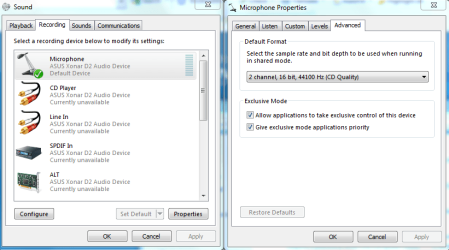
You may need to do this which should give other applications control of your mic.
 

Attachments

  • mic application control of this device.PNG
    mic application control of this device.PNG
    30.4 KB · Views: 1,864

My Computer

Computer type
PC/Desktop
Computer Manufacturer/Model Number
Home built
OS
Windows 7 Ult, Windows 8.1 Pro,
CPU
Q9650-4.275GHz, E8600 4.5GHz, E6750-3.8GHz
Motherboard
Evga 780i FTW
Memory
G.Skill PC2 9600 1200Mhz 5 5 5 15 2T
Graphics Card(s)
GTX480
Sound Card
Asus Xonar D2
Monitor(s) Displays
HannsG
Screen Resolution
1680X1050
Hard Drives
GSkill Phoenix Pro 120GB SSD
PSU
ThermalTake Toughpower 1000Watt modular
Case
ThermalTake XaserV
Cooling
Xigmatek S1283
Keyboard
Logitech G15
Mouse
Logitech G9
Internet Speed
T1
Click START>RUN. Enter WINVER and press the Enter key. Should tell you your installed version.

The reason I ask is that I had trouble with both my mic and audio drivers until I upgraded my pre-release version(s) from 7100 & 7127 to 7232. May be it was just my setup, but I had tried EVERYTHING. Only the upgrade to 7232 "fixed" it.

Muad Dib, im on 7100 Version.
Do i have to install a fresh version?
or can i update??

Thanks
 

My Computer

OS
Windows 7
CPU
Intel Pentium 3.4 HT
Motherboard
d915pbl
Memory
2 gb pc24200
Graphics Card(s)
nvidia 8800 GTX
Sound Card
onboard
Monitor(s) Displays
Samsung syncmaster 226bw
You may need to do this which should give other applications control of your mic.

Hey Chev.
I tried that before with no success.

Thanks
 

My Computer

OS
Windows 7
CPU
Intel Pentium 3.4 HT
Motherboard
d915pbl
Memory
2 gb pc24200
Graphics Card(s)
nvidia 8800 GTX
Sound Card
onboard
Monitor(s) Displays
Samsung syncmaster 226bw
The latest realtek driver is Vista_Win7_R230 ant it can be be downloaded here: Realtek (if you didn't downloaded that version)

Hello Sassa,

Yeah i have updated to that driver as well with no luck

Thanks
 

My Computer

OS
Windows 7
CPU
Intel Pentium 3.4 HT
Motherboard
d915pbl
Memory
2 gb pc24200
Graphics Card(s)
nvidia 8800 GTX
Sound Card
onboard
Monitor(s) Displays
Samsung syncmaster 226bw
This is really driving me nuts.
Ive been searching for someone with a similar problem, and i couldn't find a single person with this issue.
Im Seriously thinking about rolling back to XP :(
 

My Computer

OS
Windows 7
CPU
Intel Pentium 3.4 HT
Motherboard
d915pbl
Memory
2 gb pc24200
Graphics Card(s)
nvidia 8800 GTX
Sound Card
onboard
Monitor(s) Displays
Samsung syncmaster 226bw

My Computer

Computer type
PC/Desktop
Computer Manufacturer/Model Number
Home built
OS
Windows 7 Ult, Windows 8.1 Pro,
CPU
Q9650-4.275GHz, E8600 4.5GHz, E6750-3.8GHz
Motherboard
Evga 780i FTW
Memory
G.Skill PC2 9600 1200Mhz 5 5 5 15 2T
Graphics Card(s)
GTX480
Sound Card
Asus Xonar D2
Monitor(s) Displays
HannsG
Screen Resolution
1680X1050
Hard Drives
GSkill Phoenix Pro 120GB SSD
PSU
ThermalTake Toughpower 1000Watt modular
Case
ThermalTake XaserV
Cooling
Xigmatek S1283
Keyboard
Logitech G15
Mouse
Logitech G9
Internet Speed
T1
Muad Dib, im on 7100 Version.
Do i have to install a fresh version?
or can i update??

Thanks

An "in-place" upgrade worked for for me. v7232 or later (preferably 7600 :)).

I suggest you uninstall the Realtek driver, and any other Mic related software, before the upgrade and re-install.

For me it was the Realtek, Skype and Logitech Webcam.
 

My Computer

OS
XP Pro & Vista Home Premium (x86); Windows Ultimate 7600 x64 Retail
An "in-place" upgrade worked for for me. v7232 or later (preferably 7600 :)).

I suggest you uninstall the Realtek driver, and any other Mic related software, before the upgrade and re-install.

For me it was the Realtek, Skype and Logitech Webcam.

Ok so i went to the windows website, and they said the 7600 release is not official. is that true?
 

My Computer

OS
Windows 7
CPU
Intel Pentium 3.4 HT
Motherboard
d915pbl
Memory
2 gb pc24200
Graphics Card(s)
nvidia 8800 GTX
Sound Card
onboard
Monitor(s) Displays
Samsung syncmaster 226bw
Ok so i went to the windows website, and they said the 7600 release is not official. is that true?

Which Windows website did you go to? The official MS Windows 7 RTM v7600 is only available to Technet Subscribers, MSDN, OEM and some others. The general availability date is Oct 22.

The Windows RC 7100 was the only other "official" MS release.

There are some unofficial leaked versions available on the internet. That information can be found elsewhere.
 

My Computer

OS
XP Pro & Vista Home Premium (x86); Windows Ultimate 7600 x64 Retail
Back
Top