Mic constantly playing through speakers.

SteelShark

New member
Local time
2:56 PM
Messages
5
My mic is constantly playing through my speakers what it hears, even when I go into my sound options and disable the device. It's plugged in through my sound card's mic jack.
I use it for gaming, so I can't just unplug it. Can someone please explain to me how to make it stop playing what it hears. I'm using the Realtek HD Audio Manager.
 

My Computer

OS
Windows 7 64bit
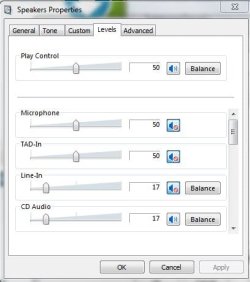
Looks at speakers in speaker properties, make sure mic is muted.
 

Attachments

  • Capture.JPG
    Capture.JPG
    29 KB · Views: 166

My Computer

Computer Manufacturer/Model Number
Dell and Custom
OS
Systems 1 and 2: Windows 7 Enterprise x64, Win 8 Developer
CPU
System 1: i7 [email protected], System 2: AMD FX-4100 Zambezi 3.6G
Motherboard
System 1:Dell 06NWYK System 2: ASUS M5A97 AM3+
Memory
System 1: 8GB System 2: 8GB
Graphics Card(s)
System 1: ATI FirePro V4800 System 2: Radeon HD 6850
Sound Card
System 1: onboard System 2: onboard
Monitor(s) Displays
System1: Viewsonic HDMI 24"
Screen Resolution
System 1: 1920x1080 System 2: 1920x1080
Hard Drives
System 1: Mirrored .5B drives System 2: Seagate Barracuda ST1000DM003 1TB 7200 RPM 64MB Cache SATA 6.0Gb/s
Case
System 1: Dell System 2: Cooler Master
Internet Speed
10 MBPS
My mic is constantly playing through my speakers what it hears, even when I go into my sound options and disable the device. It's plugged in through my sound card's mic jack.
I use it for gaming, so I can't just unplug it. Can someone please explain to me how to make it stop playing what it hears. I'm using the Realtek HD Audio Manager.

Hmmm... ok on the bottom right hand corner of your screen right click the speakers and choose recording devices find which mic is making the noise. Right click it and go to properties. And see if listen to device is on if it is uncheck the box and click apply then ok
 

My Computer

OS
Windows 7 Home Premium 64Bit
CPU
AMD Phenom II x4 920 Processor
Motherboard
Gigabyte Technology Co., Ltd. GA-MA785GM-US2H (Socket AM2)
Memory
Corsair 4.0GB Dual-Channel DDR2 @ 401MHz (5-5-5-18)
Graphics Card(s)
GeForce 8600 GT (EVGA)
Sound Card
Realtek High Definition Audio
Monitor(s) Displays
Acer X193W
Screen Resolution
1440 X 900
Hard Drives
244GB Seagate ST3250410AS ATA Device (SATA)
This problem has been driving me insane since I got my new Windows 7 system nearly a year ago.

The only solutions I could find all involved going through the Windows Sound/Recording Devices/Microphone/Properties/Listen and uncheck "Listen to this device". Unfortunately, this was already unchecked yet the microphone remained live through the speakers.

It was in the Realtek HD Audio Manager that I found a way to finally fix it (looks like an orange speaker in the system tray).

The attached image shows the option highlighted in red.
 

Attachments

  • realtek_mic_feedback.png
    realtek_mic_feedback.png
    70.7 KB · Views: 1,037

My Computer

OS
Windows 7 Professional x64
Just a heads up for anyone else who finds their way here from Google, my control panel doesn't look like the post above (it looks like this, ASUS branded with a different layout). Instead I had to disable all audio inputs from the speakers levels in the windows settings.

Like this:
realtek - Imgur
 

My Computer

OS
Windows 7 Ultimate x64
When i disable all of those, my microphone status switches to "currently unavailable" and stops working. by randomly turning things on and off i can get it back, but then it goes back to playing back what it records.
im using the headphone/mic ports from my x-fi sound card. help would be appreciated.
 

My Computer

OS
Windows 7 64 bit
In playback not recording

This problem torubled me for ages, seeing only few people with success who had tried suggestions from forums, untill i noticed that i was consantly looking under Recording Devices not "Playback Devices" as i shouldve.

-if you right click on your speaker icon in task tray,
-go to PLAYBACK DEVICES
-double click ur default device to bring up properites
-click levels
-mute mic

this doesnt mute ur mic, but mutes it from playback thru speakers. hope this helps
 

My Computer

Computer type
PC/Desktop
OS
windows 7 64bit
Thank you SD7 ... this worked for me.
I also have a Gygabite MB with build-in Realtek audio.

Also thanks to JohnnyUK, I'm sure your contribution to this will also help some people.

Cheers, ;)
 

My Computer

Computer type
PC/Desktop
Computer Manufacturer/Model Number
clone
OS
Win7 x64
CPU
AMD Athlontm II X3 450 Processor 3.21 GHz
Motherboard
Gygabite
Memory
10 GB
Graphics Card(s)
ATI Radeon HD 4250
Antivirus
AVG
Browser
firefox
Thank you

Thanks SD7 , I was about smashing my laptop !
 

My Computer

Computer type
PC/Desktop
OS
Windows 7 64bit
Thanks tons, bopchongs. I have been trying to solve this problem for years by looking at recording properties. I opened Playback devices as you suggested and dropped my mic level to 0.

Problem solved!
 

My Computer

Computer Manufacturer/Model Number
ASUS u56e laptop
OS
Windows 7 Home Premium x64
CPU
Intel Core i5-2410m
Memory
6 gb
Graphics Card(s)
Intel
Sound Card
Realtek
Back
Top