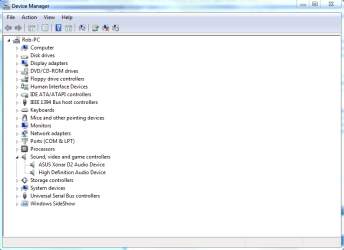
Hi guys, so yea, I love Windows 7, it's the first operating system that almost always truly "just works" for me. However, last week I bought a couple of couple of Condenser Microphones(MXL 990 and 991), along with a XLR cable to USB interface/preamp, or what I use to connect the microphones to my PC. Now he microphones are great, awesome quality with very little noise for a bargain price, however it seems that there is an issue with the amount of gain the mics have when running Windows 7. I was at the point of returning the microphones because I couldn't sing or play loudly without the sound getting distorted, and I thought they must be defective, because one would expect two studio quality microphones to be able to handle a bit of volume. I'd have to set the microphone audio levels in the Audio properties of windows 7 to 5% in order for me to record without so much distortion! Problem with this is that then when I wasn't singing too loudly then it would be too low, and it was just more frustrating than it should have been. But before I gave up on the microphones, I decided to boot into Vista(x86), and voila, all of a sudden my mics sounded much better, less noise, and I could be loud even at 100% volume without sound getting distorted.
Now, I don't actually think it has to do with the Microphone. To me it makes more sense that the issue would be with the USB Pre-amp. Nor do I think it's a Windows 7 problem, it's likely an issue with the fact that my 7 installation is 64bit while my vista is 32 bit, since I'd been through something similar before. My sister's laptop has the same issue.
Now my question is, has anyone had a problem like this before and/or know a solution? I could just boot into Vista everytime I wanted to record, but well, that's annoying. Booting into vista for the first time in months felt.... slow, lol. Oh, and my laptop has terrible ventillation, so my computer will often shut off due to overheaing while I'm recording in Vista, while in Windows 7 I've never had it overheat on me.
Any help much appreciated =]
Now, I don't actually think it has to do with the Microphone. To me it makes more sense that the issue would be with the USB Pre-amp. Nor do I think it's a Windows 7 problem, it's likely an issue with the fact that my 7 installation is 64bit while my vista is 32 bit, since I'd been through something similar before. My sister's laptop has the same issue.
Now my question is, has anyone had a problem like this before and/or know a solution? I could just boot into Vista everytime I wanted to record, but well, that's annoying. Booting into vista for the first time in months felt.... slow, lol. Oh, and my laptop has terrible ventillation, so my computer will often shut off due to overheaing while I'm recording in Vista, while in Windows 7 I've never had it overheat on me.
Any help much appreciated =]
My Computer
At a glance
Windows 7 Build 7077 x64AMD Athlon Dual Core QL-60 - 1.9Ghz2GBNVIDIA GeForce 8200 M G
- Computer Manufacturer/Model Number
- Compaq CQ50-107NR
- OS
- Windows 7 Build 7077 x64
- CPU
- AMD Athlon Dual Core QL-60 - 1.9Ghz
- Memory
- 2GB
- Graphics Card(s)
- NVIDIA GeForce 8200 M G
- Screen Resolution
- 1280 x 800
- Hard Drives
- 120GB, Not sure of RPM but prolly 5400 or lower.