Microsoft Essentials vs. Norton's 2010

Microsoft or Norton 2010

  • Microsoft Essentials

    Votes: 43 72.9%
  • Norton 2010

    Votes: 16 27.1%

  • Total voters
    59

wickedout

New member
Local time
5:16 PM
Messages
61
Location
California
Hello everyone. I was here sitting and wondering why NIS charges so much for in my opinion not a very good product and Microsoft provides for free. This has to be killing NIS in sales.

Please feel free to discuss other AV programs as well.

What's your take on this? Thanks in advance. :)
 

My Computer

Computer Manufacturer/Model Number
Custom Built
OS
Windows 7 Professional
CPU
Intel i7 2700K
Motherboard
ASRock Z68 EXTREME4 GEN3
Memory
G.SKILL Ripjaws X Series 16GB
Graphics Card(s)
EVGA 560 Ti
Sound Card
On Board
Monitor(s) Displays
Samsung
Screen Resolution
1680 X 1050
Hard Drives
Intel X25-M Mainstream SSD and Western Digital Caviar Black 1TB
PSU
NZXT HALE90 850W
Case
Corsair 600T SE
Cooling
Prolimatech Megahalems
Keyboard
RAZER Anansi
Mouse
RAZER DeathAdder
Internet Speed
Fast
In most professional security lab tests Norton does a better job then MSE and Norton is vastly improved starting in 2009.

Jim :geek:
 

My Computer

Computer type
PC/Desktop
Computer Manufacturer/Model Number
Home Built
OS
Windows 8.1 Pro w/Media Center 64bit, Windows 7 HP 64bit
CPU
Phenom II X6 1100T
Motherboard
ASUS M5A99X EVO
Memory
Crucial Balistic 8gb DDR3-1866 CL9
Graphics Card(s)
MSI R6850 Cyclone IGD5 PE
Sound Card
On Board
Monitor(s) Displays
ASUS VE258Q 25" LED with DVI-HDMI-DisplayPort
Screen Resolution
1920 x 1080
Hard Drives
Two WD Cavier Black 2TB Sata III, WD My Book Essential 2TB USB 3.0
PSU
Seasonic X650 80 Plus GOLD Modular
Case
Corsair 400R
Cooling
Antec Kuhler H2O 620, Two 120mm and four 140mm
Keyboard
Logitech K120
Mouse
Logitech Marble Mouse USB, Logitech Precision Game Pad
Internet Speed
15MB
Antivirus
Norton IS 2013, Malwarebytes Pro Beta 2
Browser
IE-11, FF-27
Other Info
APC UPS ES 750, Netgear WNR3500L Gigabit & Wireless N Router with SamKnows Test Program, Motorola SB6120 Gigabit Cable Modem. Brother HL-2170W Laser Printer, Epson V300 Scanner
Nice point. I had NIS 2010 for about 5 months but got error after error during updates. The software wouldn't complete my updates no matter what they tried. I was very disappointed and said see ya NIS 2010 for MSE. I had tech support from NIS try to resolve it and they had no luck fixing my issue.

So far MSE hasn't given me any issues.
 

My Computer

Computer Manufacturer/Model Number
Custom Built
OS
Windows 7 Professional
CPU
Intel i7 2700K
Motherboard
ASRock Z68 EXTREME4 GEN3
Memory
G.SKILL Ripjaws X Series 16GB
Graphics Card(s)
EVGA 560 Ti
Sound Card
On Board
Monitor(s) Displays
Samsung
Screen Resolution
1680 X 1050
Hard Drives
Intel X25-M Mainstream SSD and Western Digital Caviar Black 1TB
PSU
NZXT HALE90 850W
Case
Corsair 600T SE
Cooling
Prolimatech Megahalems
Keyboard
RAZER Anansi
Mouse
RAZER DeathAdder
Internet Speed
Fast
In most professional security lab tests Norton does a better job then MSE and Norton is vastly improved starting in 2009.

Jim :geek:


I agree if you can spend the money you then should by Norton Internet security 2010. I was reading a a computing mag (PC authority Australia) and they compared all the latest main anti virus software (both free and commercial) and Norton best MSE in all the malware and internet threats detection. The mag also said that NIS was the best anti virus software out of all its competitors. Nis has also has reduced its impact on computers system resource since the 2009 edition but MSE beats NIS in startup time and ram usage.

But nothing compares to Avast 5. I think it the best free av out there.:D
 

My Computer

Computer Manufacturer/Model Number
Self-built on 31/1/11
OS
Windows 7 Ultimate 64 bit
CPU
Intel i5 2400 @ 3.80 GHz
Motherboard
Ashrock P67 Extreme 4
Memory
Mushkin Silverline 996768 4GB
Graphics Card(s)
MSI GTX 460 760MB Cyclone Overclocked
Sound Card
Integrated
Monitor(s) Displays
Asus VH202T 20" Widescreen
Screen Resolution
1600x900
Hard Drives
SSD: OCZ Vertex 2 60GB
HDD: Hitachi Deskstar 7K1000.C 500GB
PSU
Silverstone Strider 500W
Case
Zalman Z9 Plus
Cooling
Cooler Master Hyper 212 Plus
Keyboard
Logitech Wireless Keyboard MK520
Mouse
Logitech M310
Internet Speed
3 Mbps
Other Info
UEFI: Ashrock P67/
Network Card :TP-Link WN350GD/
WEI: 7.4/
ODD: Lite-On IHAS324
Hi there

If we come out of the lab and into the REAL world there is really NO NEED for ANYBODY as a HOME user to ever pay for security packages again.

Install MSE and use your computer intelligently and you should NEVER EVER be bothered with Viruses etc etc again. MSE does a great job at minimal resource usage.

For CORPORATES and Large LAN's it's a totally different ballgame - it can be a complex job having to defend a large LAN from all sorts of attacks where you have a lot of users both internal and external very few of which you can control. In these cases a professional robust security suite is necessary - but to re-iterate for most HOME users intelligently using their computers MSE is MORE than sufficient.

Of course if you break the rules and take risks with your machine (illegal downloads from dubious sources etc etc) then it really doesn't matter WHAT security you use because "as sure as eggs is eggs..." you'll get infected -- these people are FAR FAR cleverer than typical people working to get out a commercial product which is usually OBSOLETE even by the time it gets out of the door -- just look at the almost DAILY updates that MSE provides.

Hackers etc don't have to go through Quality Control and layers of "Project Management" before they release their "products".

Cheers
jimbo
 

My Computer

Computer type
PC/Desktop
Computer Manufacturer/Model Number
Custom built, several laptops HP/ASUS
OS
Linux CENTOS 7 / various Windows OS'es and servers
CPU
Intel i7 Intel i5
Memory
8GB, 16GB
Graphics Card(s)
On Motherboard
Sound Card
Realtek HD audio
Monitor(s) Displays
Apple Cinema display, Samsung LCD
Screen Resolution
1920 X 1080
Hard Drives
4 X 1TB SATA
Mouse
Toshiba wireless laser
Internet Speed
> 20MB up
I have used NIS for several years. In the beginning of this year, with version 2010 I hit problems and literally hours on chat did not fix it. The problems related to SONAR. Moreover Norton insisted I uninstall Advanced System Care though it is not an anti-virus program. I now use Microsoft Security Essentials (free) and a few free program such as Roboform to replace components of NIS
 

My Computer

Computer Manufacturer/Model Number
HP Compaq 500B MT
OS
Windows 7
Install MSE and use your computer intelligently and you should NEVER EVER be bothered with Viruses etc etc again. MSE does a great job at minimal resource usage.
Never say never.

Also, while free solutions like MSE can be adequate enough, "real world" type tests shows that Norton comes out on top for prevention. It also uses less resources than MSE.
 

My Computer

OS
Arch Linux 64-bit
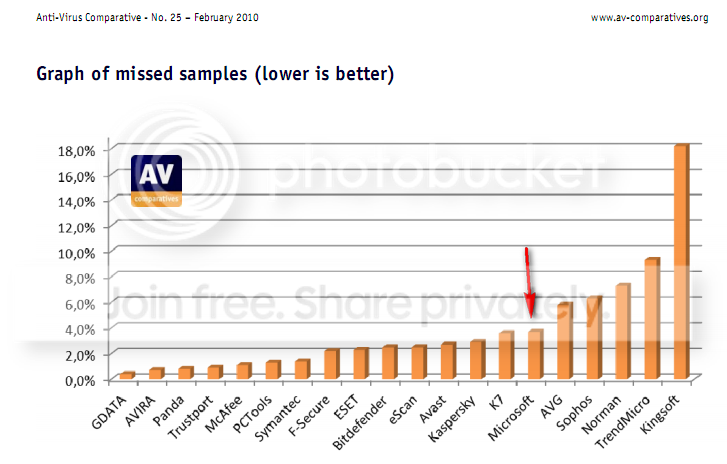
Regarding the real world tests members've been referring to. Take a look at the latest report (feb 2010) by AV-comparitives. They took up 20 well known AVs and compared them on multiple paramaters- detection rates, false positive/ alarm and scanning speed.

Norton bests MSE on detection rates (98.6% compared to 96.3%) and on scanning speed (18.6 mb/sec compared to 5.8 mb/sec). But Norton gives far more false positives than MSE (11 compared to 3).

All in all, MSE looks pretty good for a free AV. Incidentally, MSE bested AVG free on detection rates and false positives but fared poorer on scanning speed.
 

My Computer

Computer Manufacturer/Model Number
Too many to describe...
OS
Windows 7 x64 pro/ Windows 7 x86 Pro/ XP SP3 x86
MSE is very slow when it does a full scan. Sometimes it can take up to an hour or more to scan my entire system. NIS is very fast I know that.

Remember this. If you have a quad CPU most apps will run faster. More cores more speed. Now if you have a 6 core 12 thread CPU like the Intel i7 980x MSE can have a full scan done a lot faster then my quad and saying that so can NIS 2010.

What I just stated I'm not to sure if the CPU plays it's part or not in scanning times? What makes it the AV's scan faster then others? I just know my quad killed my single core CPU in everything from my experience.
 

My Computer

Computer Manufacturer/Model Number
Custom Built
OS
Windows 7 Professional
CPU
Intel i7 2700K
Motherboard
ASRock Z68 EXTREME4 GEN3
Memory
G.SKILL Ripjaws X Series 16GB
Graphics Card(s)
EVGA 560 Ti
Sound Card
On Board
Monitor(s) Displays
Samsung
Screen Resolution
1680 X 1050
Hard Drives
Intel X25-M Mainstream SSD and Western Digital Caviar Black 1TB
PSU
NZXT HALE90 850W
Case
Corsair 600T SE
Cooling
Prolimatech Megahalems
Keyboard
RAZER Anansi
Mouse
RAZER DeathAdder
Internet Speed
Fast
Have you considered avast?
 

My Computer

Computer Manufacturer/Model Number
self built
OS
Windows 7 Professional 64-bit
CPU
Intel E8400 3GHz
Motherboard
Intel DX48BT2
Memory
Kingston PC3-10700H 4Gb
Graphics Card(s)
XFX Radeon HD 5850 BlackEd.
Sound Card
Asus Xonar DG
Monitor(s) Displays
2x Samsung SM-T220HD 22"
Screen Resolution
1680x1050 on two monitors
Hard Drives
OCZ Vertex 2 120gb 3.5" (OS)
Seagate Momentus XT 500gb
Samsung F3 1Tb (games)
2x Samsung F1 1Tb
PSU
Thermaltake ToughPower 850w
Case
Thermaltake Armor
Cooling
Scythe Mugen II
Keyboard
Microsoft Comfort Curve USB
Mouse
Razer Diamondback 3G
Internet Speed
8128/443
Yes I have. How user friendly is Avast?
 

My Computer

Computer Manufacturer/Model Number
Custom Built
OS
Windows 7 Professional
CPU
Intel i7 2700K
Motherboard
ASRock Z68 EXTREME4 GEN3
Memory
G.SKILL Ripjaws X Series 16GB
Graphics Card(s)
EVGA 560 Ti
Sound Card
On Board
Monitor(s) Displays
Samsung
Screen Resolution
1680 X 1050
Hard Drives
Intel X25-M Mainstream SSD and Western Digital Caviar Black 1TB
PSU
NZXT HALE90 850W
Case
Corsair 600T SE
Cooling
Prolimatech Megahalems
Keyboard
RAZER Anansi
Mouse
RAZER DeathAdder
Internet Speed
Fast
In a lot of cases (and I really hate to say it...) a paid for product is better than a free product

It really shouldn't be this way but....money helps everyone at the end of the day make a better product than one doing it for free


That is the nature of our "modern" world....

That being said I am happy Norton reformed itself with 2009 and now with 2010. I have seen it in action personally and thought it was impressive

...though I won't argue jimbo45's sentiments....for the normal, email and internet browsing, average joe computer...Norton 2010 is pretty excessive

In conclusion....if you pay for the best....you get the best....though sometimes the best is more than you will need
 

My Computer

Computer Manufacturer/Model Number
Compal JFT02 (Custom Build Laptop)
OS
Windows 7 Home Premium x64 - Mac OS X 10.6.4 x64
CPU
Intel Core 2 Duo T9300 2.5 GHz
Motherboard
JFT02
Memory
4GB Kingston DDR2-800
Graphics Card(s)
NVIDIA Geforce 8600M GT (512MB Model)
Sound Card
Realtek HD Audio
Monitor(s) Displays
WUXGA Standard Laptop Display
Screen Resolution
1680*1050
Hard Drives
Toshiba 320GB 5400RPM Laptop HD
PSU
Standard Laptop Power Supply
Case
Standard Laptop Case
Cooling
Standard Laptop Cooling
Keyboard
Standard Laptop 105 Key-Keyboard
Mouse
Synaptics Touchpad
Internet Speed
Verizion Online DSL 3360/864 kbs (dl/up)
Yes I have. How user friendly is Avast?
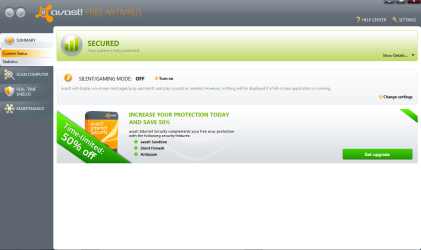
I didn't use it for long but I believe it is very user friendly.


It use to have the worst interface but when they released Avast 5.0. they totally overhauled he interface. Now it's incredibly user friendly and you have a lot more control over the AV then MSE (you can choose to install only certain updates).
 

Attachments

  • avast.PNG
    avast.PNG
    58.2 KB · Views: 46

My Computer

Computer Manufacturer/Model Number
Self-built on 31/1/11
OS
Windows 7 Ultimate 64 bit
CPU
Intel i5 2400 @ 3.80 GHz
Motherboard
Ashrock P67 Extreme 4
Memory
Mushkin Silverline 996768 4GB
Graphics Card(s)
MSI GTX 460 760MB Cyclone Overclocked
Sound Card
Integrated
Monitor(s) Displays
Asus VH202T 20" Widescreen
Screen Resolution
1600x900
Hard Drives
SSD: OCZ Vertex 2 60GB
HDD: Hitachi Deskstar 7K1000.C 500GB
PSU
Silverstone Strider 500W
Case
Zalman Z9 Plus
Cooling
Cooler Master Hyper 212 Plus
Keyboard
Logitech Wireless Keyboard MK520
Mouse
Logitech M310
Internet Speed
3 Mbps
Other Info
UEFI: Ashrock P67/
Network Card :TP-Link WN350GD/
WEI: 7.4/
ODD: Lite-On IHAS324

My Computer

Computer Manufacturer/Model Number
Samsung NP530U4B-S02IN
OS
Windows® 8 Pro (64-bit)
CPU
Intel® Core™ i5 Processor 2467M (1.60GHz, 3MB L3 Cache)
Motherboard
Samsung Electronics
Memory
6GB DDR3 System Memory at 1,333MHz (on BD 4GB + 2GB x 1)
Graphics Card(s)
AMD Radeon™ HD7550M 1GB DDR3 (Ext. Graphic)
Sound Card
Realtek High Definition Audio
Monitor(s) Displays
35.56cm (14.0) SuperBright 300nit HD LED Display
Screen Resolution
1366x768
Hard Drives
1TB S-ATA II Hard Drive (5400RPM) with ExpressCache 16GB SSD
Internet Speed
sucks
Antivirus
Microsoft Security Essentials
Browser
Google Chrome (Sync enabled)
In a lot of cases (and I really hate to say it...) a paid for product is better than a free product

It really shouldn't be this way but....money helps everyone at the end of the day make a better product than one doing it for free

I like that point !! :thumbsup:
 

My Computer

Computer Manufacturer/Model Number
Samsung NP550P5C-S02IN
OS
Windows 7 Ultimate - 64-bit | Windows 8 Pro - 64-bit
CPU
Intel® Core™ i7 Processor 3,610QM (2.30Hz, 6MB L3 Cach
Memory
8 GB
Graphics Card(s)
NVIDIA® GeForce® GT 650M 2GB Graphics, Optimus™ techno
Sound Card
SoundAlive™ JBL 3 Speakers (With sub-Woofer)
Monitor(s) Displays
39.62cm (15.6) SuperBright 300nit HD+ LED Display
Screen Resolution
1,600 x 900, Anti-Reflective
Hard Drives
1TB S-ATA II Hard Drive (5,400RPM)
I'm currently using ESET Smart Security 4. I had Norton Internet Security (OEM 90 day trial from Symantec) and used it for several days, it dramaticly slowed down my boot time and the full system scans lagged my computer (I'm using a quad core o.O), so I switched to MSE, which was pretty decent, but the Full system scam took over 6 hours to complete. Nod32 seems to be the perfect choice for me right now.
 

My Computer

Computer Manufacturer/Model Number
Custom Built/ Built by me, CR-48
OS
Windows 7 Ultimate x64
CPU
INTEL CORE I5 750 180x20 all powersaving 1.168v
Motherboard
MSI P55-GD55
Memory
OCZ 4GB DDR3 PC3-10666 (7-7-7-20-2t) @1.651v
Graphics Card(s)
ASUS 9800GT GLACIATOR FANSINK
Sound Card
ONBOARD REALTEK ALC889
Monitor(s) Displays
VIEWSONIC VX924, VIZIO VS420LF1A
Screen Resolution
VX924: 1280x1024 75hz, VS420LF1A: 1920x1080 60hz(1080p)
Hard Drives
HITACHI Deskstar HD31000 IDK/7K 1TB 7200RPM 32MB CACHE SATA II
PSU
OCZ MODXSTREAM PRO 700 WATT SEMI-MODULAR
Case
ANTEC 900
Cooling
CoolerMaster Hyper 212+
Keyboard
Logitech K520
Mouse
LOGITECH M310
Internet Speed
CHARTER PIPELINE 15MB DOWN/ 3MB UP
Other Info
ROUTER: DLINK DIR-655, Netgear WNR3500L (SamKnows)
MODEM: MOTOROLA SB6120
HTPC: AMD Athlon II x2 255 C3, Pegatron M2N78-LA (Violet 3.02) , Galaxy NVidia Geforce 210, HP OEM 300WATT PSU, Zalman Z7 Plus, SAMSUNG 3GB PC2-5300, SEAGATE 80GB SATA, Hauppauge WinTV-HVR-1800
If you consider a free Anti-virus such as MSE, there are other free applications to go with it, if you choose to look.

Neither Avast or AVG will be on my systems. I've just seen far too many infected computers with both of these products ... oh, and (also) Norton/Symantec! :eek:

You want a script defender for IE 8? ... How about System Downloads : Script Defender /// AnalogX

BTW ... full system scans will take longer because the more files you have, well it takes longer :p
 

My Computer

Computer type
PC/Desktop
Computer Manufacturer/Model Number
Bruce ... somewhere in his 40's
OS
Windows 7 Ultimate 32bit SP1
CPU
Intel(R) Core(TM)2 Quad CPU @ 2.40GHz, 2400 MHz
Motherboard
INTEL/D975XBX2
Memory
4 GB
Graphics Card(s)
ATI Radeon HD 2600 Pro
Monitor(s) Displays
Samsung SyncMaster 914v
Screen Resolution
1280 x 1024
Hard Drives
2/500GB each ... ST3500630AS ATA Device.
One is not connected
PSU
Rocketfish 700 W
Case
G.Skill Gigabyte Chassis
Keyboard
Standard PS/2 Keyboard
Mouse
Microsoft PS/2 Mouse
Internet Speed
DSL
Antivirus
Avira Internet Security
Browser
IE 11
Other Info
ATI HDMI Audio
If you consider a free Anti-virus such as MSE, there are other free applications to go with it, if you choose to look.

Neither Avast or AVG will be on my systems. I've just seen far too many infected computers with both of these products ... oh, and (also) Norton/Symantec! :eek:

You want a script defender for IE 8? ... How about System Downloads : Script Defender /// AnalogX

BTW ... full system scans will take longer because the more files you have, well it takes longer :p

True, but those anti-virus companies ought to do what Symantec does: mark which files need to be scanned and which don't. This saves time and resources.
 

My Computer

Computer Manufacturer/Model Number
Custom Built/ Built by me, CR-48
OS
Windows 7 Ultimate x64
CPU
INTEL CORE I5 750 180x20 all powersaving 1.168v
Motherboard
MSI P55-GD55
Memory
OCZ 4GB DDR3 PC3-10666 (7-7-7-20-2t) @1.651v
Graphics Card(s)
ASUS 9800GT GLACIATOR FANSINK
Sound Card
ONBOARD REALTEK ALC889
Monitor(s) Displays
VIEWSONIC VX924, VIZIO VS420LF1A
Screen Resolution
VX924: 1280x1024 75hz, VS420LF1A: 1920x1080 60hz(1080p)
Hard Drives
HITACHI Deskstar HD31000 IDK/7K 1TB 7200RPM 32MB CACHE SATA II
PSU
OCZ MODXSTREAM PRO 700 WATT SEMI-MODULAR
Case
ANTEC 900
Cooling
CoolerMaster Hyper 212+
Keyboard
Logitech K520
Mouse
LOGITECH M310
Internet Speed
CHARTER PIPELINE 15MB DOWN/ 3MB UP
Other Info
ROUTER: DLINK DIR-655, Netgear WNR3500L (SamKnows)
MODEM: MOTOROLA SB6120
HTPC: AMD Athlon II x2 255 C3, Pegatron M2N78-LA (Violet 3.02) , Galaxy NVidia Geforce 210, HP OEM 300WATT PSU, Zalman Z7 Plus, SAMSUNG 3GB PC2-5300, SEAGATE 80GB SATA, Hauppauge WinTV-HVR-1800
After my initial exitement about MSE, it has cooled off after I caught 1 trojan and 2 Browser highjacker. That has never happened to me in years of Norton usage. I am therefore switching all my systems back to Norton. And in the professional AV tests, MSE does not do that well either. From the latest AV report:

2010-03-22_193327.png
 

My Computer

Computer Manufacturer/Model Number
HP, Dell, Gateway, Toshiba - 4 laptops and 2 desktops
OS
Vista, Windows7, Mint Mate, Zorin, Windows 8
CPU
from 1.6GHz Duo to i7
Monitor(s) Displays
2x HP w2207
Hard Drives
5x HDD, 7x SSD, 12x Externals
Keyboard
with trackball - no mices
Mouse
Trackball mice
Internet Speed
DSL 6000
Back
Top