You are using an out of date browser. It may not display this or other websites correctly.
You should upgrade or use an
alternative browser.
Solved Microsoft Excel 2003 Border Colour
ɹǝqɯǝW ɹoıuǝS
Member
VIP
How do I change the colour of the borders?
- Computer Manufacturer/Model Number
- Acer Aspire M3802
- OS
- Windows 7 Home Premium 64-bit Service Pack 1 / Ubuntu 12.10 64-bit
- CPU
- Intel Quad Core Q8300 @2.5MHz
- Memory
- 4x2GB DDR3
- Graphics Card(s)
- Nvidia 9800 GTX+ HD
- Sound Card
- Realtek HD 3D Sound
- Monitor(s) Displays
- Samsung Syncmaster 2333 HD
- Screen Resolution
- 1920x1080
- Hard Drives
- 750GB SATA
- PSU
- Alpine 750w
- Keyboard
- Logitech G510
- Internet Speed
- 18M
on vacation
Guru
Gold Member
hi, what do you mean border? is it the cells? or the skin itself?
- Computer type
- PC/Desktop
- Computer Manufacturer/Model Number
- Gigabyte Technology Co. Ltd.
- OS
- Windows 10 Pro 64-Bit
- CPU
- Intel(R) Core(TM) i5-4460 CPU @ 3.20 GHz(4CPU's), ~3.2GHz
- Motherboard
- Gigabyte B85M-HD3-A
- Memory
- 8192 RAM
- Graphics Card(s)
- NVIDIA GeForce 710
- Sound Card
- Integrated High Definition audio with Realtek ALC888 codec
- Monitor(s) Displays
- Acer V183HV Ab 18.5" LCD Display
- Screen Resolution
- 1366 x 768
- Keyboard
- HP
- Mouse
- HP
- Internet Speed
- 100mbps
- Antivirus
- Microsoft Security Essentials
- Browser
- Chrome, Firefox
ɹǝqɯǝW ɹoıuǝS
Member
VIP
Thread Starter
hi, what do you mean border? is it the cells? or the skin itself?
The colour of the borders you can assign to cells. The icon is in the top right I think.
- Computer Manufacturer/Model Number
- Acer Aspire M3802
- OS
- Windows 7 Home Premium 64-bit Service Pack 1 / Ubuntu 12.10 64-bit
- CPU
- Intel Quad Core Q8300 @2.5MHz
- Memory
- 4x2GB DDR3
- Graphics Card(s)
- Nvidia 9800 GTX+ HD
- Sound Card
- Realtek HD 3D Sound
- Monitor(s) Displays
- Samsung Syncmaster 2333 HD
- Screen Resolution
- 1920x1080
- Hard Drives
- 750GB SATA
- PSU
- Alpine 750w
- Keyboard
- Logitech G510
- Internet Speed
- 18M
The colour of the borders you can assign to cells. The icon is in the top right I think.
- Select the cell range.
- Right click and select Format Cells...
- Click the Border tab.
- Select the Line Style.
- Select the Color from the drop list.
- Select the Preset border or select the Border combination you desire.
- Click the OK button.
Done!
Regards,
GEWB
- Computer type
- PC/Desktop
- Computer Manufacturer/Model Number
- (7 different computers booting up to 10 systems)
- OS
- Linux Mint / XP / Win7 Home, Pro, Ultimate / Win8.1 / Win10
- Other Info
- Four desktops, two laptops, one notebook and one tablet
Further to
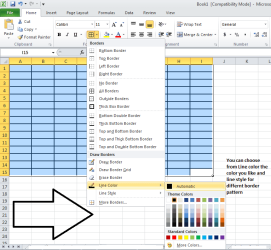
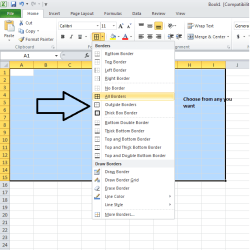
GEWB post, here are 2 pictures. Just in case you need them

-
Untitled1.png
26.9 KB
· Views: 4
-
Untitled2.png
19.6 KB
· Views: 2
- Computer type
- PC/Desktop
- Computer Manufacturer/Model Number
- Self assembled
- OS
- Windows 10 Home 64Bit
- CPU
- Intel Core i5 10400 @ 2.90GHz
- Motherboard
- Intel Corporation DG41WV (PROCESSOR)
- Memory
- 8.00GB Single-Channel Unknown @ 1329MHz (16-20-20-38)
- Sound Card
- Realtek High Definition Audio
- Monitor(s) Displays
- DELL E170S
- Screen Resolution
- 1280x1024 pixels
- Hard Drives
- 931GB TOSHIBA DT01ACA100 (SATA)
238GB TEAM TM8PS7256G (SATA SSD)
- Case
- Nothing Fancy
- Cooling
- Fans
- Keyboard
- A4 Tech Co LTD
- Mouse
- A4 Tech Co Ltd/Logitech
- Internet Speed
- 25 Mbps
ɹǝqɯǝW ɹoıuǝS
Member
VIP
Thread Starter
The colour of the borders you can assign to cells. The icon is in the top right I think.
- Select the cell range.
- Right click and select Format Cells...
- Click the Border tab.
- Select the Line Style.
- Select the Color from the drop list.
- Select the Preset border or select the Border combination you desire.
- Click the OK button.
Done!
Regards,
GEWB
Thanks, this worked!
- Computer Manufacturer/Model Number
- Acer Aspire M3802
- OS
- Windows 7 Home Premium 64-bit Service Pack 1 / Ubuntu 12.10 64-bit
- CPU
- Intel Quad Core Q8300 @2.5MHz
- Memory
- 4x2GB DDR3
- Graphics Card(s)
- Nvidia 9800 GTX+ HD
- Sound Card
- Realtek HD 3D Sound
- Monitor(s) Displays
- Samsung Syncmaster 2333 HD
- Screen Resolution
- 1920x1080
- Hard Drives
- 750GB SATA
- PSU
- Alpine 750w
- Keyboard
- Logitech G510
- Internet Speed
- 18M
Hello sjc1138 -
You're welcome.
Regards,
GEWB
- Computer type
- PC/Desktop
- Computer Manufacturer/Model Number
- (7 different computers booting up to 10 systems)
- OS
- Linux Mint / XP / Win7 Home, Pro, Ultimate / Win8.1 / Win10
- Other Info
- Four desktops, two laptops, one notebook and one tablet



