
Microsoft folder opening on startup-xp

momanium

New member
Member
Local time
5:10 PM
Messages
50
This issue has been here for a while now and I am sure someone helpful out there can find and easy fix. :) Now the folders directory is: (C:)/Program Files/Microsoft Inside the folder are two more folders called Office live and Search Enhancement Pack. Any ideas:)
 

My Computer

OS
Windows Xp Home 32 Bit, Windows 7 Home Premium 64 bit
LOL @ your sig.... i dont understand your problem

#1 this is win 7 forum ; )
#2 you dont want these to startup? or you do want them to and they are not?
#3 happy new year!
 

My Computer

OS
Windows 7 pro 64 bit
CPU
Intel Core i7-870 Lynnfield 2.93GHz
Motherboard
MSI P55-GD80 LGA 1156
Memory
Gskill 8 gig, 4x2gig
Graphics Card(s)
ASUS EAH5850
Sound Card
built in HD
Monitor(s) Displays
HP 23 inch
Hard Drives
1tbHDD,500HDD,500HDD,30SSD no RAID...
Case
Cooler master HAF 932
Cooling
4 case fans, v6 cpu cooler
Keyboard
Logitech G110
Mouse
Razer Death Adder
Internet Speed
never fast enough
LOL @ your sig.... i dont understand your problem

#1 this is win 7 forum ; )
#2 you dont want these to startup? or you do want them to and they are not?
#3 happy new year!

Hi, I know about the whole windows 7 but this is the only forum I like and have posted questions before on XP:o. Ermm basically i want the folder to stop opening as I dont know why it started and what purpose it holds. By the way, thanks for the comment about the my sig, was sent it in a text ;)
 

My Computer

OS
Windows Xp Home 32 Bit, Windows 7 Home Premium 64 bit
Check your startup items using MSCONFIG.
 

My Computer

Computer Manufacturer/Model Number
Custom
OS
Windows 7 Ultimate RTM (Technet)
CPU
3.00 gigahertz Intel Core2 Duo E8400
Motherboard
ASUSTeK Computer INC. P5K/EPU Rev 1.xx
Memory
4GB
Graphics Card(s)
ATI Radeon X1950 Pro
Sound Card
Built in HD Audio
Monitor(s) Displays
22" Gateway LCD
Screen Resolution
1920 x 1200
Hard Drives
ST3160023A [Hard drive] (160.04 GB) -- drive 0, rev 8.01, ST3500630AS [Hard drive] (500.11 GB) -- drive 2, rev 3.AAK
ST3500630AS [Hard drive] (500.11 GB) -- drive 1, rev 3.AAK
Keyboard
Logitech G11
Mouse
Microsoft Wireless Laser Mouse 5000
Internet Speed
13.44 Mbps
+1 MacGyvr
Just in case if you dont know here are the steps:

  • Click Start>Run
  • Type msconfig and click run
  • A dialog box will open
  • Click on startup tab (Displays all your startup items)
  • Now there will be some details for each particular item.
  • Expand the width of the location detail (It will help you trace the folder)
  • Now if the location of your folder matches with the one given then uncheck that startup item.
  • Apply. OK
  • And you are good to go
 

My Computer

Computer Manufacturer/Model Number
Gigabyte
OS
Windows 7 Ultimate 64-bit
CPU
Intel i5-760
Motherboard
GA-P55-USB3
Memory
2X2GB Kingstom Valueram
Graphics Card(s)
nVidia GTX 460
Sound Card
Onboard
Monitor(s) Displays
Samsung LED BX2050
Screen Resolution
1600X900
Hard Drives
1TB Western Digital. 64 MB cache, 7200rpm
PSU
Mercury 700W
Case
Gigabyte iSolo 210
Cooling
Stock
Keyboard
USB Multimedia
Mouse
Logitech USB Optical
Internet Speed
Broadband: 100MB/s
Other Info
New Home-built PC for personal and moderate gaming. Not Overclocked.
Oh sorry for the long wait had to go off... I have tried this before and did so again the microsoft folder is not there :mad:
 

My Computer

OS
Windows Xp Home 32 Bit, Windows 7 Home Premium 64 bit
A google search brought this up :

"
Everyone (including Microsoft) might like to know that another culprit exists for the same problem which is not solved by the automated fix above: Microsoft Works Suite 2002. It installs with two registry entries in particular that lack quotes at HKEY_LOCAL_MACHINE\SOFTWARE\Microsoft\Windows\CurrentVersion\Run:
Microsoft Works Portfolio:C:\Program Files\Microsoft Works\WksSb.exe /AllUsers
WorksFUD:C:\Program Files\Microsoft Works\wkfud.exe
I have been frustrated for months by this pop-up folder C:\Program Files\Microsoft, thinking that the problem was with the program(s) installed therein (since it only shows up when an application is installed that creates this folder, such as Choice Guard, Office Live Add-in, etc.). Although the problem can be "fixed" by uninstalling the program(s) in this folder (thus removing the folder),this folder and its contents are not the problem. The problem lies with the above registry-key entries (and any others that lack quotes and begin with C:\Program Files\Microsoft...). It lies dormant and unnoticed (like a virus) until the Microsoft folder is created in Program Files. Then the folder pops up at startup from then on (even if it is completely empty!). When I place quotes around the above entries as follows, the problem immediately ceases the next time I boot up:

Microsoft Works Portfolio: "C:\Program Files\Microsoft Works\WksSb.exe" /AllUsers
WorksFUD: "C:\Program Files\Microsoft Works\wkfud.exe"

However this did not work although it sounds like the exact problem :confused:
 

My Computer

OS
Windows Xp Home 32 Bit, Windows 7 Home Premium 64 bit
ah, well was going to post, but while composing my reply there were a few good answers, so i won't bother with my full blurb. an invalid link path or registry run item path can cause this, amongst other errors. sometimes these oddities are hard to trace.

if you still have the problem, look for the entry that has the same initial path, ie. if your unwanted opening folder is "C:\Program Files\Microsoft Office", look for the startup item in msconfig or regedit's "HKEY_LOCAL_MACHINE\SOFTWARE\Microsoft\Windows\CurrentVersion\Run" items, in my example, "C:\Program Files\Microsoft Office\" Office12\winword.exe would match, the quote in the wrong place would cause the folder to open rather than word.
 

My Computer

Computer type
PC/Desktop
Computer Manufacturer/Model Number
Custom build Nanu by 3SX
OS
Win 7 ultimate x64 sp1
CPU
Intel i7 4 core 3770k ivy bridge o/c to 4.2ghz
Motherboard
Asus p8z77-i Deluxe
Memory
16 GB
Graphics Card(s)
Nvidia geforce GTX650
Sound Card
Realtek on mb
Monitor(s) Displays
24in. lcd/led
Screen Resolution
1920x1080
Hard Drives
128GB Kingston SSD
500GB seagate maximus xt hybrid
500GB hitachi HD
500GB external WD Passport usb3
PSU
Silverstone 450 watt
Case
Silverstone FT03 Black Fortress
Cooling
Water cooler
Keyboard
Logitech wireless kbd/mouse mk300
Mouse
Logitech wireless kbd/mouse mk300
Internet Speed
8mb adsl (actuall speed is around 6mb)
Other Info
Asus DSL-N55U wireless router
SONY BC-5850H 6X BLURAY writer
OUTPOST Security Suite
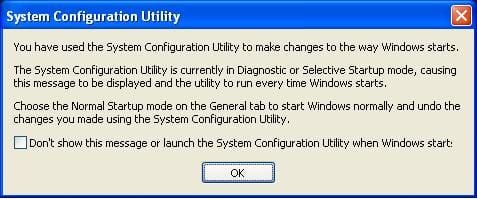
Hi guys, what I ended up doing was also doing a bit of spring cleaning while at "msconfig". I noticed a process which involved microsoft groove which was there for some odd reason as I have never and will never use groove.Now it has stopped coming up :D but in its place comes this "you have used selective startup (picture attatched). How do i get rid of it without undoing the change I made... Also thanks for all the help guys (you're awesome). Are there any forums like this for xp :huh:
 

Attachments

  • Selective startup.JPG
    Selective startup.JPG
    22.3 KB · Views: 769

My Computer

OS
Windows Xp Home 32 Bit, Windows 7 Home Premium 64 bit
run msconfig again, tick normal startup.
 

My Computer

Computer type
PC/Desktop
Computer Manufacturer/Model Number
Custom build Nanu by 3SX
OS
Win 7 ultimate x64 sp1
CPU
Intel i7 4 core 3770k ivy bridge o/c to 4.2ghz
Motherboard
Asus p8z77-i Deluxe
Memory
16 GB
Graphics Card(s)
Nvidia geforce GTX650
Sound Card
Realtek on mb
Monitor(s) Displays
24in. lcd/led
Screen Resolution
1920x1080
Hard Drives
128GB Kingston SSD
500GB seagate maximus xt hybrid
500GB hitachi HD
500GB external WD Passport usb3
PSU
Silverstone 450 watt
Case
Silverstone FT03 Black Fortress
Cooling
Water cooler
Keyboard
Logitech wireless kbd/mouse mk300
Mouse
Logitech wireless kbd/mouse mk300
Internet Speed
8mb adsl (actuall speed is around 6mb)
Other Info
Asus DSL-N55U wireless router
SONY BC-5850H 6X BLURAY writer
OUTPOST Security Suite
Hi guys, what I ended up doing was also doing a bit of spring cleaning while at "msconfig". I noticed a process which involved microsoft groove which was there for some odd reason as I have never and will never use groove.Now it has stopped coming up :D but in its place comes this "you have used selective startup (picture attatched). How do i get rid of it without undoing the change I made... Also thanks for all the help guys (you're awesome). Are there any forums like this for xp :huh:

See the little checkbox at the bottom of your picture that says don't show this again? Check it.
 

My Computer

Computer Manufacturer/Model Number
Custom
OS
Windows 7 Ultimate RTM (Technet)
CPU
3.00 gigahertz Intel Core2 Duo E8400
Motherboard
ASUSTeK Computer INC. P5K/EPU Rev 1.xx
Memory
4GB
Graphics Card(s)
ATI Radeon X1950 Pro
Sound Card
Built in HD Audio
Monitor(s) Displays
22" Gateway LCD
Screen Resolution
1920 x 1200
Hard Drives
ST3160023A [Hard drive] (160.04 GB) -- drive 0, rev 8.01, ST3500630AS [Hard drive] (500.11 GB) -- drive 2, rev 3.AAK
ST3500630AS [Hard drive] (500.11 GB) -- drive 1, rev 3.AAK
Keyboard
Logitech G11
Mouse
Microsoft Wireless Laser Mouse 5000
Internet Speed
13.44 Mbps
run msconfig again, tick normal startup.
Hi that made all the things I unticked back ticked and also groove so the folder starts opening again:o
 

My Computer

OS
Windows Xp Home 32 Bit, Windows 7 Home Premium 64 bit

My Computer

Computer type
PC/Desktop
Computer Manufacturer/Model Number
Custom build Nanu by 3SX
OS
Win 7 ultimate x64 sp1
CPU
Intel i7 4 core 3770k ivy bridge o/c to 4.2ghz
Motherboard
Asus p8z77-i Deluxe
Memory
16 GB
Graphics Card(s)
Nvidia geforce GTX650
Sound Card
Realtek on mb
Monitor(s) Displays
24in. lcd/led
Screen Resolution
1920x1080
Hard Drives
128GB Kingston SSD
500GB seagate maximus xt hybrid
500GB hitachi HD
500GB external WD Passport usb3
PSU
Silverstone 450 watt
Case
Silverstone FT03 Black Fortress
Cooling
Water cooler
Keyboard
Logitech wireless kbd/mouse mk300
Mouse
Logitech wireless kbd/mouse mk300
Internet Speed
8mb adsl (actuall speed is around 6mb)
Other Info
Asus DSL-N55U wireless router
SONY BC-5850H 6X BLURAY writer
OUTPOST Security Suite
Back
Top