Microsoft is patching Windows 8 but NOT Windows 7

PaulGo

New member
Power User
VIP
Local time
5:30 PM
Messages
172

Redmond is patching Windows 8 but NOT Windows 7, say security bods

Microsoft has left Windows 7 exposed by only applying patches to its newest operating systems.
Researchers found the gaps after they scanned 900 Windows libraries and uncovered a variety of security functions that were updated in Windows 8 but not in 7. They said the shortcoming could lead to the discovery of zero day vulnerabilities.


The missing safe functions were part of Microsoft's dedicated libraries intsafe.h and strsafe.h that help developers combat various attacks.
Redmond is patching Windows 8 but NOT Windows 7, say security bods ? The Register
 

My Computer My Computer

At a glance

Windows 10 (64 bit)AMD FX832016 GBAMD 7870
Computer type
PC/Desktop
Computer Manufacturer/Model Number
Custom Build
OS
Windows 10 (64 bit)
CPU
AMD FX8320
Motherboard
Asus M5A99X EVO
Memory
16 GB
Graphics Card(s)
AMD 7870
It's always a risk to have open apps with a constant feed win-8 is pretty much on steroids as far as constant feeds,
I can't say windows 7 type of apps/programs/toolbars are much different security wise,
Best is to do without them and use them as a site you access like a home page or favorite ?

Sync has always I've thought to be the new biggest security hole waiting to be exploited / Onedrive desktop/ Dropbox../.....
Cloud.../ websites Share this and that ;)
Nothing is 100% secure and the disclaimers usually point that out,
But Microsoft abandoning win-7 ?
Cheers.
 

My Computer My Computer

At a glance

Win-7-Pro64bit 7-H-Prem-64biti7-5930K 2nd i9-9940x both water blocked VRM'...Trident-z 3200C14 2nd Trident-z 3600C16EVGA 1080ti ftw3 2nd Titan Xp both water blocked
Computer type
PC/Desktop
Computer Manufacturer/Model Number
Custom assembled by me :}
OS
Win-7-Pro64bit 7-H-Prem-64bit
CPU
i7-5930K 2nd i9-9940x both water blocked VRM's too
Motherboard
ASUS SABERTOOTH X99 2nd ASUS x299 Apex
Memory
Trident-z 3200C14 2nd Trident-z 3600C16
Graphics Card(s)
EVGA 1080ti ftw3 2nd Titan Xp both water blocked
Sound Card
Built-in Realtek
Monitor(s) Displays
1-AOC G2460PG 24"G-Sync 144Hz/ 2nd 1-ASUS VG248QE 24" 144Hz
Screen Resolution
1920 x 1080 144Hz
Hard Drives
2-Samsung M.2 Evo & Evo Plus
2-Samsung 850 EVO 500GB SSD's/ 3-2.5 W.D. Black 1tb-&3-1tb/3-3.5 WD Black 1tb hdd's
PSU
EVGA SuperNOVA 1000-P2 2nd 1200-P2
Case
2-Corsair Obsidian Series 450D Black ATX Mid Tower
Cooling
Custom water loops
Keyboard
Logitech G710+/ 2nd Logitech G910
Mouse
2-RedDragon M901 Perdition 16400 dpi Gaming mouse = wired
Internet Speed
Comcast Ping 19ms 89.31mbps download speed 6.12mbps upload
Antivirus
Malwarebytes Pro/ Superantispyware Pro
Browser
FireFox & Pale moon
Other Info
2nd ASUS X299 Apex/Intel i9-9940x with Custom water loop/7H-Prem-x64/Corsair 450D case/Ram Trident-z 3600C16 4x8gb / Samsung970Evo plus 500gb SSD/Dual ssd EZ swap evo/PSU EVGA SuperNova 1200w-P2 80+Platinum/GPU Titan Xp /8-ML-140 on push-pull on 2-280GTX rads

My Computer My Computer

At a glance

Windows 10 Home x64INTEL Core i5-750 Quad-Core 3.37GHzHyperX Fury Black Series 8GB (2 x 4GB) 1866MhzEVGA GeForce GTX 750 Superclocked 1GB 128-Bit...
Computer type
PC/Desktop
OS
Windows 10 Home x64
CPU
INTEL Core i5-750 Quad-Core 3.37GHz
Motherboard
ASUS P7P55D
Memory
HyperX Fury Black Series 8GB (2 x 4GB) 1866Mhz
Graphics Card(s)
EVGA GeForce GTX 750 Superclocked 1GB 128-Bit GDDR5
Monitor(s) Displays
LG 32MA68HY 32" IPS
Screen Resolution
1920 x 1080
Hard Drives
Samsung 840 Evo 120GB, SEAGATE 500GB Barracuda® 7200.12, SATA 3 Gb/s, 7200 RPM, 16MB cache
PSU
ANTEC TruePower New TP-550, 80 PLUS, 550W
Case
ANTEC Three Hundred Illusion
Cooling
COOLER MASTER Hyper 212 Plus, 4 x 120mm 1 x 140mm Noctua's
Internet Speed
85 + Mbps
Antivirus
Avast
Browser
Vivaldi
They can abandon Windows 7 and loose their money and their trust from their customers or continue the updates for Windows 7 because W7's lifespan is still a bit long :\
 

My Computer My Computer

At a glance

Windows 7 Home Premium 64-BITAMD A8 7200P8GB 1600mhzRadeon R5 (APU) + Radeon R5 M230 2GB Dual Gra...
Computer type
PC/Desktop
Computer Manufacturer/Model Number
ASUS X550ZE
OS
Windows 7 Home Premium 64-BIT
CPU
AMD A8 7200P
Motherboard
N/A
Memory
8GB 1600mhz
Graphics Card(s)
Radeon R5 (APU) + Radeon R5 M230 2GB Dual Graphics
Sound Card
Realtek ALC269 with SonicMaster
Monitor(s) Displays
Laptop Display
Screen Resolution
1920 x 1080 @60hz
Hard Drives
WDC WD50 00LPVX-80V0TT0 (500GB)
PSU
Laptop Charger
Mouse
ARMAGGEDON TEXTRON SCORPION 7
Internet Speed
100 mbps DOWN / 50 mbps UP
Antivirus
Windows Defender
Browser
Mozzila FireFox, Valve Steam in-game internet browser
Hi there

You need to understand the basic difference in how security works between W7 and W8. In W8 itself it is built in to the kernel and several modules . Windows defender (confusing as this is NOT the same as Windows defender in W7) which is really a re-write of Ms Security essentials but built in to the kernel is patched daily.

Windows 7 relies more on EXTERNAL / 3rd party packages for security so it's up to the security vendor to supply patches to those. Ms will of course patch its own products such as MSE (Microsoft security essentials) and IE.

I doubt if W7 is essentially more insecure than W8.1 currently -- patches, time lines for these patches and modules to be patched cannot be equated on the whole with the same set used in W8.1

W7 being used by enterprises much more than W8.1 will certainly for the immediate future not be left vulnerable to the latest hacks - however Ms can't be responsible for any weaknesses / loopholes caused by badly written 3rd party programs.

W8 / W8.1 has types of "always active" apps (metro etc) so security for ensuring those types of things are safe operates totally differently from W7 which is in essence a "static" OS in that you rarely have loads of apps integrated into the OS which are running constantly - excluding system tasks etc.

Cheers
jimbo
 

My Computer My Computer

At a glance

Linux CENTOS 7 / various Windows OS'es and se...Intel i7 Intel i58GB, 16GBOn Motherboard
Computer type
PC/Desktop
Computer Manufacturer/Model Number
Custom built, several laptops HP/ASUS
OS
Linux CENTOS 7 / various Windows OS'es and servers
CPU
Intel i7 Intel i5
Memory
8GB, 16GB
Graphics Card(s)
On Motherboard
Sound Card
Realtek HD audio
Monitor(s) Displays
Apple Cinema display, Samsung LCD
Screen Resolution
1920 X 1080
Hard Drives
4 X 1TB SATA
Mouse
Toshiba wireless laser
Internet Speed
> 20MB up
MS is in fact, updating w7, I just installed 14 updates, 9 of which are security related to the OS, the rest for Office stuff.

Jimbo, can you explain "kernel" so my 3 brain cells can comprehend it? I see the word bandied about all the time. :confused:
 

My Computer My Computer

At a glance

Windows 7 Ultimate X64 SP1Intel i5-2550K, Differing ~4.4-4.8GHz No buil...16GB G.Skill Sniper 1866MHz @ 2133MHz 2x8GBASUS GTX650TIB-DC2OC-2GD5, (650TI Boost)
Computer type
PC/Desktop
Computer Manufacturer/Model Number
Home Built Desktop By DataTech
OS
Windows 7 Ultimate X64 SP1
CPU
Intel i5-2550K, Differing ~4.4-4.8GHz No built in GPU
Motherboard
ASUS P8Z68-V PRO/GEN3
Memory
16GB G.Skill Sniper 1866MHz @ 2133MHz 2x8GB
Graphics Card(s)
ASUS GTX650TIB-DC2OC-2GD5, (650TI Boost)
Sound Card
Onboard Realtek 5-1
Monitor(s) Displays
Samsung P2570HD
Screen Resolution
1920x1080
Hard Drives
Samsung 840 Pro 256GB SSD for OS, 500GB Seagate Constellation (Enterprise drive) for Data
PSU
Corsair HX650W
Case
Inwin Dragon Rider
Cooling
Hyper 212 EVO w/two Noctua fans, push-pull, @1300 RPM
Keyboard
E-Z Eyes, bright yellow keys with large characters
Mouse
steelseries SENSEI Laser Pro Gaming
Internet Speed
48-51Mbs Mbs down, 11 Mbs up Xfinity Cable
Antivirus
Norton Internet Security 2013
Browser
IE 10, Opera, Pale Moon if needed
Other Info
4 case fans, LG BluRay-RE, ASUS DVD-RW, Mr. Fusion power supply, 1.21 gigawatts.
I suspect some of the things that are being patched in Windows 8 / 8.1 and not in Windows 7 do not exist in Windows 7 or Vista. For example the metro ecosystem. The whole report is a load of tosh.
 

My Computer My Computer

At a glance

Windows 7 x64 Ultimate and numerous virtual m...AMD FX-8350 Vishera 32nm Technology @ 4.2 GHz...G Skill 32.0GB Dual-Channel DDR3 @ 1204MHz (1...EVGA GeForce GTX 960 4GB Super SC ACX 2.0+ wi...
Computer type
PC/Desktop
Computer Manufacturer/Model Number
Bluethunder II
OS
Windows 7 x64 Ultimate and numerous virtual machines
CPU
AMD FX-8350 Vishera 32nm Technology @ 4.2 GHz default
Motherboard
ASUSTeK COMPUTER INC. SABERTOOTH 990FX R2.0 (Socket 942)
Memory
G Skill 32.0GB Dual-Channel DDR3 @ 1204MHz (11-13-13-31)
Graphics Card(s)
EVGA GeForce GTX 960 4GB Super SC ACX 2.0+ with Back Plate
Sound Card
Creative X-Fi Titanium HD Audiophile PCIe
Monitor(s) Displays
LG L227WTG x 3
Screen Resolution
1680 x 1050 16:10
Hard Drives
238GB Samsung850 PRO SATA Disk Device (SSD)
1863GB Seagate ST2000DM 001-1CH164 (SATA)
1397GB Seagate ST1500DL 003-9VT16L(SATA)
466GB Western Digital WDC WD50 03AZEX-00K1GA0 (SATA) x 2
932GB Seagate ST310005 28AS SATA Disk Device (SATA)
PSU
Enermax Revolution87+ 1000 Watts Gold Certified Power Supply
Case
Rocketfish Full Tower
Cooling
Cooler Master Hyper 212 EVO Push Pull 120mm Fans
Keyboard
Logitech K740
Mouse
Logitech G100S Laser LED + Logitech Gamepad F310
Internet Speed
500 mbs down and 30mbs up
Antivirus
Malwarebytes Pro & Avast and MSE on certain Virtual Machines
Browser
Firefox (Main) Chrome, Internet Explorer (Back Up)
Other Info
Logitech X 230 2.1 Stereo System and 5.1 Yamaha RX V2090
B&W DM6 Monitor Speakers + Center and Surround Speakers
Using Mouse Without Borders (Google it)
MS is in fact, updating w7, I just installed 14 updates, 9 of which are security related to the OS, the rest for Office stuff.

Jimbo, can you explain "kernel" so my 3 brain cells can comprehend it? I see the word bandied about all the time. :confused:

Hi there.

Trying to explain Operating systems in a few words is a problem -- however an OS consists of basically a TASK manager which handles all its central functions like managing memory / paging / I/O calls etc and an interface which application programs ("apps") - things like say your DVD player software or E-mail call to execute.

The kernel is essentially the main core of the operating system which runs and controls all the processes happening in the computer.

Normally the System services and programs run in "protected mode" -- normal "User programs" (your Apps) can't run in this mode - and these programs are normally part of the kernel - or the central program which is always running in your system. For example when you type something on a keyboard the operating system has to have a program that knows exactly when the keyboard is used and what it has to do. (In technical terms this is called "an Interrupt" and the Interrupt manager in the OS will depending on the type of action required call the relevant application to handle the request - for example keyboard input / disk I/O / Screen display etc).

For example after booting Windows you can start an application -- so you must have some program running which is looking or waiting for a command to start your application. After booting you might not enter anything for 30 mins -- but there must be an underlying process running which is notified as soon as you make a mouse click / a keyboard stroke.

Your application isn't concerned with memory management / I/O etc etc. The Operating system ensures that applications run and use their own areas and data from one application isn't corrupted with data from another.

Operating systems are very COMPLEX and to describe them properly goes way beyond the scope of this post. A bit of googling should give you further info.

Cheers
jimbo
 

My Computer My Computer

At a glance

Linux CENTOS 7 / various Windows OS'es and se...Intel i7 Intel i58GB, 16GBOn Motherboard
Computer type
PC/Desktop
Computer Manufacturer/Model Number
Custom built, several laptops HP/ASUS
OS
Linux CENTOS 7 / various Windows OS'es and servers
CPU
Intel i7 Intel i5
Memory
8GB, 16GB
Graphics Card(s)
On Motherboard
Sound Card
Realtek HD audio
Monitor(s) Displays
Apple Cinema display, Samsung LCD
Screen Resolution
1920 X 1080
Hard Drives
4 X 1TB SATA
Mouse
Toshiba wireless laser
Internet Speed
> 20MB up
If you have problems installing certain updates for windows 7 operating systems, MS will try and tell you the problem is with you and your computer. Most of the time this is not true. If it's just one update or even two out of many, the problem is with MS. It's not you. It's still a good idea to to run chkdsk in cmd just to make sure and run a good full security scan with your security provider. You can fix most problems with cmd. Wait a while...a week or two and MS will eventually fix the error. Chances it's not just you but a lot of people going through the same thing. MS is now geared up for windows 8 and those of us with 7, vista or xp take a back seat.
 

My Computer My Computer

At a glance

windows 7 home premium 64bit
Computer type
Laptop
Computer Manufacturer/Model Number
asus
OS
windows 7 home premium 64bit
Antivirus
norton 360
Browser
monzilla firefox
While the kernel does manage memory addresses for applications, the actual memory size and what's written there is controlled by the application in question. The kernel basically allocates the memory buffer, or heap, as requested by the application and the application controls what's written in this buffer. If the size of data being written is greater than the buffer allocation size, then the buffer overflow will take place. And that's not a good thing. The intentionally triggered buffer overflow can crash the system in good case. In bad case, the buffer overflow is used to execute arbitrary code that compromises the system.

Most applications are developed in C/C++ language, that has no built-in routine/function to check/restrict memory buffer boundaries. The developers are suppose to write their own routine that performs this function, but that does not happen all the times.

The Windows SDK, that includes C/C++, has built-in routines for application developers to enforce the memory buffer boundaries, so they don't need to write their own. What the article is complaining about is the difference between intsafe.h (SDK 7 for W7) and strsafe.h (SDK 8 for W8) libraries. Comparing these libraries is pretty much irrelevant, as far as the status of the security patch is concerned for the indicated OS.

As more and more buffer overflow technology utilized by hackers become known, the more "safe functions" will be added to the SDK libraries. Some of them will be forward looking only, while others may make it to the previous version to SDK libraries. This could be a decision based on compatibility and not an intent of abandoning previous OS versions, that are still supported.

The programming error resulting in buffer overflows is the main reason why I use MS EMET 5.0. EMET protects the OS, applications, and browsers against 13 known buffer overflow technologies. Will it protect against all of them? Well, no... There's nothing that programmatically can protect your system against a programmer error...:p
 

My Computer My Computer

At a glance

Windows 7 64-bit, Windows 8.1 64-bit, OSX El ...Intel i5-3350P 3.1 GHz16 GBs GSkill SniperRadeon HD 7850
Computer type
PC/Desktop
Computer Manufacturer/Model Number
Custom built at Home
OS
Windows 7 64-bit, Windows 8.1 64-bit, OSX El Capitan, Windows 10 (VMware)
CPU
Intel i5-3350P 3.1 GHz
Motherboard
Gigabyte GA-Z77X-UP5 TH
Memory
16 GBs GSkill Sniper
Graphics Card(s)
Radeon HD 7850
Sound Card
VIA HD Audio
Monitor(s) Displays
Dell U2410 24"
Screen Resolution
1920x1200
Hard Drives
1 x Intel 520 240 GBs
1 x Seagate 1TBs SATA 2.0,
1 x Seagate 1TBs eSATA 2.0
PSU
Thermaltake 850W
Case
Antec P183
Cooling
Noctua NH-D14 Heatsink 2 x 120mm fans, 4 x 120mm case fans
Keyboard
Dell Multimedia keyboard
Mouse
Logitech Trackball
Internet Speed
28.5 Mb/s
Hi there

Shows IBM were great all those years ago when they developed the MVS/370 system for their mainframes. There was a protected mode command that could ONY be executed by the "Nucleus" or kernel that flipped a "PSW" bit to a 0 or 1 which told the system whether the application was running in "Protected mode" or in "application mode".

If the application was a non IBM authorized routine it could not issue a status change to the PSW (Program Status Word) so it couldn't allocate its own memory etc but had to stick totally within application areas.

S/370 Assembler Tutorial - Introduction to S/370 Principles of Operation - Part Three - Chapter 4 - Control

For anybody wanting to learn about OS design the IBM MVS/370 is an excellent start as it still embodies good OS design - even after all these years - including Virtual memory and I/O management. Modern OS'es often are based on the old IBM MVS/370 principles.

(@all younger readers -- nothing wrong in learning from solid older applications --IBM MVS/370 is a classic in OS design -- same way that modern Road / Highway construction takes many elements from Ancient Roman Engineering -- although obviously not basing manpower requirements on the slavery principle they had back then).


I think in all the years IBM MVS/370 was around NOBODY apart from possibly some insider "System Programmers" ever managed to Hack the OS. Of course Hacking has got a lot more sophisticated these days but IBM MVS/370 will go down in history as one of the greatest OS'es ever in computer design.

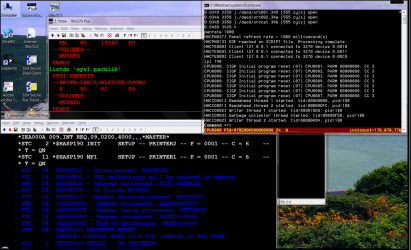
You can run this also on a PC these days via the Hercules emulator if you want to try running a mainframe OS on your PC. !!! Nostalgia days . Screenshots shown running MVS/370 on a PC with Hercules emulator !!.

The MVS Tur(n)key New User's Cookbook

Cheers
jimbo
 

Attachments

  • mvs1.png
    mvs1.png
    217.2 KB · Views: 5

My Computer My Computer

At a glance

Linux CENTOS 7 / various Windows OS'es and se...Intel i7 Intel i58GB, 16GBOn Motherboard
Computer type
PC/Desktop
Computer Manufacturer/Model Number
Custom built, several laptops HP/ASUS
OS
Linux CENTOS 7 / various Windows OS'es and servers
CPU
Intel i7 Intel i5
Memory
8GB, 16GB
Graphics Card(s)
On Motherboard
Sound Card
Realtek HD audio
Monitor(s) Displays
Apple Cinema display, Samsung LCD
Screen Resolution
1920 X 1080
Hard Drives
4 X 1TB SATA
Mouse
Toshiba wireless laser
Internet Speed
> 20MB up
The S/370, 390, and now z/OS are pretty much the same from the memory management's perspective. In another word, it is still kernel controlled that includes enforcing the memory boundaries. The assembler programing language in itself is the same as C/C++ from the memory management perspective, there are no built-in routines for buffer boundaries enforcement. The mainframe app programmers must write their own memory control and failure to do so could result in app crash, since MVS will not allow out of bound writing to the memory.

While others, such as *NIX, FreeBSD/OSX, NT kernels don't have MVS level of memory management; however, additional modules try to address buffer overflow vulnerabilities in application and to a certain extent within the OS via Pax, OpenWall, StackDefender, etc. And yes, EMET is one of the add on...

But I have to agree with you and MVS, memory management should strictly be controlled by the kernel and not by the applications...
 

My Computer My Computer

At a glance

Windows 7 64-bit, Windows 8.1 64-bit, OSX El ...Intel i5-3350P 3.1 GHz16 GBs GSkill SniperRadeon HD 7850
Computer type
PC/Desktop
Computer Manufacturer/Model Number
Custom built at Home
OS
Windows 7 64-bit, Windows 8.1 64-bit, OSX El Capitan, Windows 10 (VMware)
CPU
Intel i5-3350P 3.1 GHz
Motherboard
Gigabyte GA-Z77X-UP5 TH
Memory
16 GBs GSkill Sniper
Graphics Card(s)
Radeon HD 7850
Sound Card
VIA HD Audio
Monitor(s) Displays
Dell U2410 24"
Screen Resolution
1920x1200
Hard Drives
1 x Intel 520 240 GBs
1 x Seagate 1TBs SATA 2.0,
1 x Seagate 1TBs eSATA 2.0
PSU
Thermaltake 850W
Case
Antec P183
Cooling
Noctua NH-D14 Heatsink 2 x 120mm fans, 4 x 120mm case fans
Keyboard
Dell Multimedia keyboard
Mouse
Logitech Trackball
Internet Speed
28.5 Mb/s
Thanks Jimbo, that's what I wanted to know. It seems you and Cr00zng use the same "native language." ;)
 

My Computer My Computer

At a glance

Windows 7 Ultimate X64 SP1Intel i5-2550K, Differing ~4.4-4.8GHz No buil...16GB G.Skill Sniper 1866MHz @ 2133MHz 2x8GBASUS GTX650TIB-DC2OC-2GD5, (650TI Boost)
Computer type
PC/Desktop
Computer Manufacturer/Model Number
Home Built Desktop By DataTech
OS
Windows 7 Ultimate X64 SP1
CPU
Intel i5-2550K, Differing ~4.4-4.8GHz No built in GPU
Motherboard
ASUS P8Z68-V PRO/GEN3
Memory
16GB G.Skill Sniper 1866MHz @ 2133MHz 2x8GB
Graphics Card(s)
ASUS GTX650TIB-DC2OC-2GD5, (650TI Boost)
Sound Card
Onboard Realtek 5-1
Monitor(s) Displays
Samsung P2570HD
Screen Resolution
1920x1080
Hard Drives
Samsung 840 Pro 256GB SSD for OS, 500GB Seagate Constellation (Enterprise drive) for Data
PSU
Corsair HX650W
Case
Inwin Dragon Rider
Cooling
Hyper 212 EVO w/two Noctua fans, push-pull, @1300 RPM
Keyboard
E-Z Eyes, bright yellow keys with large characters
Mouse
steelseries SENSEI Laser Pro Gaming
Internet Speed
48-51Mbs Mbs down, 11 Mbs up Xfinity Cable
Antivirus
Norton Internet Security 2013
Browser
IE 10, Opera, Pale Moon if needed
Other Info
4 case fans, LG BluRay-RE, ASUS DVD-RW, Mr. Fusion power supply, 1.21 gigawatts.
Back
Top