Microsoft is playing dirty pool

GRoston

New member
Power User
VIP
Local time
6:48 PM
Messages
374
All,

Just a warning regarding the GWX ConfigManager. IMO, this is malware that serves no useful purpose. I removed it from my machines after mistakenly installing it without first having understood it purpose. After uninstalling, I specifically told Windows Update to hide the update (KB3035583).

Guess what - that doesn't work. On all of my machines, this update has reappeared, as an important download.

This is dirty pool. If I don't want something on my machine, MS has no right to force it down my throat, especially when the program in question is nothing more than malware.
 

My Computer

Computer type
PC/Desktop
OS
Windows 7 x64 Pro
CPU
Core i7 860 @ 3.8 GHz
Motherboard
MSI P55-GD80
Memory
16 GB F3-12800CL7D (DDR3 1600 7-7-7-24)
Graphics Card(s)
Sapphire Vapor-X 100283VXL Radeon HD 5770
Monitor(s) Displays
NEC LCD3090WQXi-BK
So hide it again, and it should never come back.
 

My Computer

Computer type
PC/Desktop
Computer Manufacturer/Model Number
Skylake Special #666
OS
Windows 10 Pro x64
CPU
Intel Core i7 6700K
Motherboard
Asus Sabertooth Z170 Mark 1
Memory
GSkill TridentZ RGB 16GB 3600 16-16-16-36
Graphics Card(s)
EVGA GTX 980 Ti SC x2
Sound Card
Realtek High Definition
Monitor(s) Displays
AOC G2460PG
Screen Resolution
1920 x 1080 144Hz
Hard Drives
Samsung 860 Pro 256GB, Seagate Barracuda 4TB x2
PSU
EVGA 1000 P2, EVGA White Custom Braided Cables
Case
Corsair Vengeance C70 Gunmetal Black
Cooling
Corsair H100i v2, Corsair ML120 x2, Thermal Grizzly Kryonaut
Keyboard
Logitech G910 Orion Spectrum
Mouse
Logitech G700s
Internet Speed
Verizon Fios Quantum Gateway 75/75
Antivirus
Windows Defender, Malwarebytes Free 3.8.3
Browser
Chrome
Other Info
Corsair SP120 x4, LG Blu-ray Drive, Durabrand HT-395 100 Watt Dolby Digital Amp, Corsair H2100 Wireless 7.1 Headset
Been there, done that...
 

My Computer

Computer type
PC/Desktop
OS
Windows 7 x64 Pro
CPU
Core i7 860 @ 3.8 GHz
Motherboard
MSI P55-GD80
Memory
16 GB F3-12800CL7D (DDR3 1600 7-7-7-24)
Graphics Card(s)
Sapphire Vapor-X 100283VXL Radeon HD 5770
Monitor(s) Displays
NEC LCD3090WQXi-BK
Did it come back as a different numbered update, because I just checked and that number you gave is still hidden.

My list of hidden.

KB2876229 SKYPE

KB2923545
KB2970228
KB2977728
KB2978092
KB2994023
KB3022345
KB3035583
KB2990214
KB3021917
KB2952664

Just ran windows update, no updates to install right now.

Just ran SFC came up 100% perfect
 
Last edited:

My Computer

Computer type
PC/Desktop
Computer Manufacturer/Model Number
Skylake Special #666
OS
Windows 10 Pro x64
CPU
Intel Core i7 6700K
Motherboard
Asus Sabertooth Z170 Mark 1
Memory
GSkill TridentZ RGB 16GB 3600 16-16-16-36
Graphics Card(s)
EVGA GTX 980 Ti SC x2
Sound Card
Realtek High Definition
Monitor(s) Displays
AOC G2460PG
Screen Resolution
1920 x 1080 144Hz
Hard Drives
Samsung 860 Pro 256GB, Seagate Barracuda 4TB x2
PSU
EVGA 1000 P2, EVGA White Custom Braided Cables
Case
Corsair Vengeance C70 Gunmetal Black
Cooling
Corsair H100i v2, Corsair ML120 x2, Thermal Grizzly Kryonaut
Keyboard
Logitech G910 Orion Spectrum
Mouse
Logitech G700s
Internet Speed
Verizon Fios Quantum Gateway 75/75
Antivirus
Windows Defender, Malwarebytes Free 3.8.3
Browser
Chrome
Other Info
Corsair SP120 x4, LG Blu-ray Drive, Durabrand HT-395 100 Watt Dolby Digital Amp, Corsair H2100 Wireless 7.1 Headset
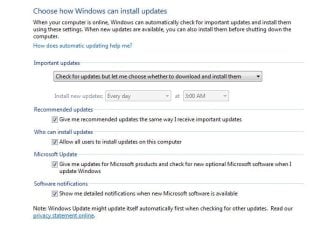
Make sure Windows update is configured to never download anything automatically, much less to install anything on its own. That's the only safe option. Notify but don't download at the extreme if you're paranoid about the unneeded updates. Anything more automatic exposes you to this and other kinds of problems with the typical broken updates.

To be extra sure, disable the Windows Update service in control panel. For complete peace of mind, firewall it off the network (surprisingly, Windows Firewall can protect you against the built-in MS spyware).
 

My Computer

Computer type
Laptop
Computer Manufacturer/Model Number
Toshiba Sattelite A665-S6092
OS
Windows 7 Ultimate x64
CPU
Intel Core i7-740QM
Memory
8 GB DDR3
Graphics Card(s)
NVIDIA GeForce 330GT
Screen Resolution
1366x768
Hard Drives
Samsung 840 SSD 500GB
1TB USB3 external HD
Cooling
Coolermaster Notepal U3 notebook cooling pad
Internet Speed
3mbps ASDL
Antivirus
ClamWin 0.98.7
Browser
Opera 12.17 x86 (main), Firefox 38 (sec), IE11 (last resort)
Yep it should be like this. I`m the only user on my PC, that`s why that one is checked.
 

Attachments

  • Capture.JPG
    Capture.JPG
    49.7 KB · Views: 3

My Computer

Computer type
PC/Desktop
Computer Manufacturer/Model Number
Skylake Special #666
OS
Windows 10 Pro x64
CPU
Intel Core i7 6700K
Motherboard
Asus Sabertooth Z170 Mark 1
Memory
GSkill TridentZ RGB 16GB 3600 16-16-16-36
Graphics Card(s)
EVGA GTX 980 Ti SC x2
Sound Card
Realtek High Definition
Monitor(s) Displays
AOC G2460PG
Screen Resolution
1920 x 1080 144Hz
Hard Drives
Samsung 860 Pro 256GB, Seagate Barracuda 4TB x2
PSU
EVGA 1000 P2, EVGA White Custom Braided Cables
Case
Corsair Vengeance C70 Gunmetal Black
Cooling
Corsair H100i v2, Corsair ML120 x2, Thermal Grizzly Kryonaut
Keyboard
Logitech G910 Orion Spectrum
Mouse
Logitech G700s
Internet Speed
Verizon Fios Quantum Gateway 75/75
Antivirus
Windows Defender, Malwarebytes Free 3.8.3
Browser
Chrome
Other Info
Corsair SP120 x4, LG Blu-ray Drive, Durabrand HT-395 100 Watt Dolby Digital Amp, Corsair H2100 Wireless 7.1 Headset
Make sure Windows update is configured to never download anything automatically, much less to install anything on its own. That's the only safe option. Notify but don't download at the extreme if you're paranoid about the unneeded updates. Anything more automatic exposes you to this and other kinds of problems with the typical broken updates.
There is some talk that MS will remove that ability in W10.
There will be a blocking/delay system for the Enterprise version (and possibly the Pro version).

People are even justifying it by saying, the only reason there are update problems is because users with issues, haven't installed every update that MS has released.
 

My Computer

Computer type
PC/Desktop
Computer Manufacturer/Model Number
n/a
OS
W7 Ultimate SP1, LM19.2 MATE, W10 Home 1703, W10 Pro 1703 VM, #All 64 bit
CPU
AMD Phenom II x6 1100T, 3.3 GHz
Motherboard
ASUS M4A88T-M/USB3 (AM3)
Memory
12GB DDR3 1333 G-Skill (4GB x 2), G-Skill (2GB x 2)
Graphics Card(s)
NVIDIA GeForce GTX 660
Sound Card
Realtek?
Monitor(s) Displays
Samsung S23B350
Screen Resolution
1920x1080
Hard Drives
WD Green 2TB (SATA), WD Green 3TB (SATA), WD Blue 4TB (SATA), WD Blue 6TB (SATA)
PSU
Cooler Master
Case
Antec GX300 Tower
Cooling
3x Antec TRICOOL 120mm Fans
Mouse
Wired Optical
Internet Speed
DSL
Antivirus
Avast
Browser
Pale Moon (64 bit)
Other Info
2018-12-27 Upgraded HDDs
2015-12-10 Upgraded case, graphics card, storage
2015-08-15 Upgraded motherboard & RAM
2015-07-15 Upgraded LM17.1 to LM17.2
I could care less if MS made updates automatic, as long as it didn`t mess up your machine.

I know there may be some out there that could care less about a perfect SFC, but I am not one of them.

Windows update was just fine until the day they came out with the update to upgrade your machine to the TP
 
Last edited:

My Computer

Computer type
PC/Desktop
Computer Manufacturer/Model Number
Skylake Special #666
OS
Windows 10 Pro x64
CPU
Intel Core i7 6700K
Motherboard
Asus Sabertooth Z170 Mark 1
Memory
GSkill TridentZ RGB 16GB 3600 16-16-16-36
Graphics Card(s)
EVGA GTX 980 Ti SC x2
Sound Card
Realtek High Definition
Monitor(s) Displays
AOC G2460PG
Screen Resolution
1920 x 1080 144Hz
Hard Drives
Samsung 860 Pro 256GB, Seagate Barracuda 4TB x2
PSU
EVGA 1000 P2, EVGA White Custom Braided Cables
Case
Corsair Vengeance C70 Gunmetal Black
Cooling
Corsair H100i v2, Corsair ML120 x2, Thermal Grizzly Kryonaut
Keyboard
Logitech G910 Orion Spectrum
Mouse
Logitech G700s
Internet Speed
Verizon Fios Quantum Gateway 75/75
Antivirus
Windows Defender, Malwarebytes Free 3.8.3
Browser
Chrome
Other Info
Corsair SP120 x4, LG Blu-ray Drive, Durabrand HT-395 100 Watt Dolby Digital Amp, Corsair H2100 Wireless 7.1 Headset
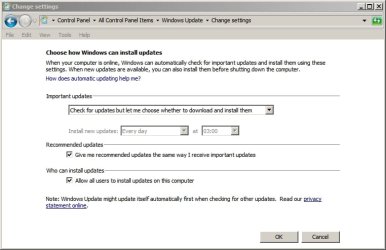
Re: Screenshot in Post #6 - this is what I see:

Change Windows Update settings.jpg

On another note:

Removed those Windows 10 upgrade updates using Powershell and hid them. KB2990214 did indeed re-appear. Have reset Windows Updates, WU History and WU Temp Files. A check for updates only shows KB3035583,KB3021917,KB2990214,KB2952664 are missing and I've hidden them and they have not been offered again so far. Last check around an hour ago.

Edit:

Re: SFC. I don't use it or trust it. If I've got a system file that needs replacing I'll replace it myself. If SFC is allowed to run it messes up too many customizations!
 
Last edited:

My Computer

Computer type
Laptop
Computer Manufacturer/Model Number
ASUS
OS
Microsoft Windows 7 Home Premium 64-bit 7601 Multiprocessor Free Service Pack 1
CPU
AMD C-60 APU with Radeon(tm) HD Graphics
Motherboard
ASUSTeK COMPUTER INC. X501U
Memory
4.00 GB
Graphics Card(s)
AMD Radeon HD 6290 Graphics
Sound Card
(1) AMD High Definition Audio Device (2) Realtek High Defi
Screen Resolution
1366 x 768 x 32 bits (4294967296 colors) @ 60 Hz
Hard Drives
Hitachi HTS545050A7E380 SATA Disk Device
Antivirus
Comodo CIS & FW, SecureAplus App Whitelisting, Threatfire
Browser
Cyberfox 64bit, Opera 64bit, Airfox
Other Info
Spy-The-Spy, HitmanPro.Alert, Norton Connect Safe, MJRegWatcher, BitDefender TrafficLight, Voodoo Shield, Zemana AntiMalware
But how would you know if you have a bad system file unless you run sfc ?

I have KB2990214 and KB KB3021917 installed, they seem to cause no issues, unless they are one of the Windows 10 nag me updates.

Found the 1st.

KB2990214 - Microsoft Support
support.microsoft.com/en-us/kb/2990214
Microsoft Corporation
Describes an update that enables you to upgrade your computer from Windows 7 to a later version of Windows.

And the 2nd.

KB3021917
This update performs diagnostics in Windows 7 Service Pack 1 (SP1) in order to determine whether performance issues may be encountered when the latest Windows operating system is installed. Telemetry is sent back to Microsoft for those computers that participate in the Windows Customer Experience Improvement Program (CEIP). This update will help Microsoft and its partners deliver better system performance for customers who are seeking to install the latest Windows operating system.
 

My Computer

Computer type
PC/Desktop
Computer Manufacturer/Model Number
Skylake Special #666
OS
Windows 10 Pro x64
CPU
Intel Core i7 6700K
Motherboard
Asus Sabertooth Z170 Mark 1
Memory
GSkill TridentZ RGB 16GB 3600 16-16-16-36
Graphics Card(s)
EVGA GTX 980 Ti SC x2
Sound Card
Realtek High Definition
Monitor(s) Displays
AOC G2460PG
Screen Resolution
1920 x 1080 144Hz
Hard Drives
Samsung 860 Pro 256GB, Seagate Barracuda 4TB x2
PSU
EVGA 1000 P2, EVGA White Custom Braided Cables
Case
Corsair Vengeance C70 Gunmetal Black
Cooling
Corsair H100i v2, Corsair ML120 x2, Thermal Grizzly Kryonaut
Keyboard
Logitech G910 Orion Spectrum
Mouse
Logitech G700s
Internet Speed
Verizon Fios Quantum Gateway 75/75
Antivirus
Windows Defender, Malwarebytes Free 3.8.3
Browser
Chrome
Other Info
Corsair SP120 x4, LG Blu-ray Drive, Durabrand HT-395 100 Watt Dolby Digital Amp, Corsair H2100 Wireless 7.1 Headset
I could care less if MS made updates automatic, as long as it didn`t mess up your machine.
What are the chances of that?

I've noticed that a lot of PC enthusiasts avoid automatic OS updates (I've always used the "Notify" option). :)

We're lucky, because as users of a pre-W10 version of Windows, we can control what happens on our PC
At least it seems that way ... mostly ... some of the time. :D

Some versions of W10 might not have the ability to control updates.
Those users will be completely at the mercy of the MS "Patch Division".
 

My Computer

Computer type
PC/Desktop
Computer Manufacturer/Model Number
n/a
OS
W7 Ultimate SP1, LM19.2 MATE, W10 Home 1703, W10 Pro 1703 VM, #All 64 bit
CPU
AMD Phenom II x6 1100T, 3.3 GHz
Motherboard
ASUS M4A88T-M/USB3 (AM3)
Memory
12GB DDR3 1333 G-Skill (4GB x 2), G-Skill (2GB x 2)
Graphics Card(s)
NVIDIA GeForce GTX 660
Sound Card
Realtek?
Monitor(s) Displays
Samsung S23B350
Screen Resolution
1920x1080
Hard Drives
WD Green 2TB (SATA), WD Green 3TB (SATA), WD Blue 4TB (SATA), WD Blue 6TB (SATA)
PSU
Cooler Master
Case
Antec GX300 Tower
Cooling
3x Antec TRICOOL 120mm Fans
Mouse
Wired Optical
Internet Speed
DSL
Antivirus
Avast
Browser
Pale Moon (64 bit)
Other Info
2018-12-27 Upgraded HDDs
2015-12-10 Upgraded case, graphics card, storage
2015-08-15 Upgraded motherboard & RAM
2015-07-15 Upgraded LM17.1 to LM17.2
Avoiding SFC

But how would you know if you have a bad system file unless you run sfc ?

Well I don't avoid SFC entirely so perhaps I'd better explain. If I want to check I'll use the verify only option. The other thing is that if I ever get an error message about missing or corrupt files I'll replace them myself. I certainly don't allow SFC to carry out repairs.

I have KB2990214 and KB KB3021917 installed, they seem to cause no issues, unless they are one of the Windows 10 nag me updates.

Found the 1st.

KB2990214 - Microsoft Support
support.microsoft.com/en-us/kb/2990214
Microsoft Corporation
Describes an update that enables you to upgrade your computer from Windows 7 to a later version of Windows.

I prefer to install the update(s) as and when I wish to upgrade.

And the 2nd.

KB3021917
This update performs diagnostics in Windows 7 Service Pack 1 (SP1) in order to determine whether performance issues may be encountered when the latest Windows operating system is installed. Telemetry is sent back to Microsoft for those computers that participate in the Windows Customer Experience Improvement Program (CEIP). This update will help Microsoft and its partners deliver better system performance for customers who are seeking to install the latest Windows operating system.

Personally I leave Windows Customer Experience Improvement Program (CEIP) off. I don't like that my security software is telling me that GWX ConfigManager wants to connect to the internet so I'll keep it off my machine until I actually need it!

That's just my own preference.
 

My Computer

Computer type
Laptop
Computer Manufacturer/Model Number
ASUS
OS
Microsoft Windows 7 Home Premium 64-bit 7601 Multiprocessor Free Service Pack 1
CPU
AMD C-60 APU with Radeon(tm) HD Graphics
Motherboard
ASUSTeK COMPUTER INC. X501U
Memory
4.00 GB
Graphics Card(s)
AMD Radeon HD 6290 Graphics
Sound Card
(1) AMD High Definition Audio Device (2) Realtek High Defi
Screen Resolution
1366 x 768 x 32 bits (4294967296 colors) @ 60 Hz
Hard Drives
Hitachi HTS545050A7E380 SATA Disk Device
Antivirus
Comodo CIS & FW, SecureAplus App Whitelisting, Threatfire
Browser
Cyberfox 64bit, Opera 64bit, Airfox
Other Info
Spy-The-Spy, HitmanPro.Alert, Norton Connect Safe, MJRegWatcher, BitDefender TrafficLight, Voodoo Shield, Zemana AntiMalware
I uninstalled those last 2, added em to the list, I have no intention of changing (not gonna use the word upgrade) this box to 10.
 

My Computer

Computer type
PC/Desktop
Computer Manufacturer/Model Number
Skylake Special #666
OS
Windows 10 Pro x64
CPU
Intel Core i7 6700K
Motherboard
Asus Sabertooth Z170 Mark 1
Memory
GSkill TridentZ RGB 16GB 3600 16-16-16-36
Graphics Card(s)
EVGA GTX 980 Ti SC x2
Sound Card
Realtek High Definition
Monitor(s) Displays
AOC G2460PG
Screen Resolution
1920 x 1080 144Hz
Hard Drives
Samsung 860 Pro 256GB, Seagate Barracuda 4TB x2
PSU
EVGA 1000 P2, EVGA White Custom Braided Cables
Case
Corsair Vengeance C70 Gunmetal Black
Cooling
Corsair H100i v2, Corsair ML120 x2, Thermal Grizzly Kryonaut
Keyboard
Logitech G910 Orion Spectrum
Mouse
Logitech G700s
Internet Speed
Verizon Fios Quantum Gateway 75/75
Antivirus
Windows Defender, Malwarebytes Free 3.8.3
Browser
Chrome
Other Info
Corsair SP120 x4, LG Blu-ray Drive, Durabrand HT-395 100 Watt Dolby Digital Amp, Corsair H2100 Wireless 7.1 Headset
^^^
have no intention of changing (not gonna use the word upgrade) this box to 10.
Ditto. Ditched all these kb's, will maybe look into it at end of w7 support 14. january 2020, if this laptop (or me) is still alive :O)
 

My Computer

Computer type
Laptop
Computer Manufacturer/Model Number
Dell \ Lenovo\ HP \ Toshiba
OS
W7, W8.1
Antivirus
MSE, Malwarebytes
Browser
FF
Did it come back as a different numbered update, because I just checked and that number you gave is still hidden.

My list of hidden.

KB2876229 SKYPE

KB2647753
KB2732487
KB2923545
KB2970228
KB2977728
KB2978092
KB2994023
KB3022345
KB3035583
KB2990214
KB3021917

Just ran windows update, no updates to install right now.

Just ran SFC came up 100% perfect

Thanks for sharing your list and i might check some for myself of those article IDs you listed, my actual is

KB3022345
KB3035583
KB2990214
KB3021917
KB2952664

There wasn't the last one in your list....
 

My Computer

Computer type
PC/Desktop
Computer Manufacturer/Model Number
Custom Build
OS
Windows 7 Professional SP1 - x64 [Non-UEFI Boot]
CPU
Ivy Bridge Core i5 3570K (Delidded)
Motherboard
Asus P8Z77-V LE PLUS
Memory
G.Skill "Ares" DDR3 PC3-12800 - 1600MHz (16Gb)
Graphics Card(s)
Asus Dual-RX480-O4G
Sound Card
Creative Sound Blaster Z w/5.1 sound system
Monitor(s) Displays
Asus IPS 23"
Screen Resolution
16/9
Hard Drives
Internal:
500Go Sata 6Gb/s (x2)
500Go Sata 3Gb/s (x2)
SSD 60Go Sata 6Gb/s
PSU
In Win C 900W Series 80+ Platinum
Case
Thermaltake Chaser A71
Cooling
Custom Water Cooling Loop
Keyboard
Cooler Master QuickFire XTi
Mouse
Razer Imperator 2012 (4G)
Antivirus
MSE
Browser
IE 11.0.xxx Rtm
Other Info
"Raid0" with Intel Smart Response Technology (HDD/SSD)
Re: KB2990214

Did it come back as a different numbered update, because I just checked and that number you gave is still hidden.

My list of hidden.

KB2876229 SKYPE

KB2647753
KB2732487
KB2923545
KB2970228
KB2977728
KB2978092
KB2994023
KB3022345
KB3035583
KB2990214
KB3021917

Just ran windows update, no updates to install right now.

Just ran SFC came up 100% perfect

Thanks for sharing your list and i might check some for myself of those article IDs you listed, my actual is

KB3022345
KB3035583
KB2990214
KB3021917
KB2952664

There wasn't the last one in your list....

Re: KB2990214.

Information suggests that it should be installed and that you can't skip it.

See the post here:

Installing KB2990214 also installs the latest Windows Update Agent.

For now - I'm keeping it off my machine. If you want to check which version of Windows Update Agent is installed you can right click on this file and check the version.

C:\Windows\System32\wuaueng.dll

Mine reads 7.6.7600.230 (not the latest version)

Should have read 7.6.7600.320
 
Last edited:

My Computer

Computer type
Laptop
Computer Manufacturer/Model Number
ASUS
OS
Microsoft Windows 7 Home Premium 64-bit 7601 Multiprocessor Free Service Pack 1
CPU
AMD C-60 APU with Radeon(tm) HD Graphics
Motherboard
ASUSTeK COMPUTER INC. X501U
Memory
4.00 GB
Graphics Card(s)
AMD Radeon HD 6290 Graphics
Sound Card
(1) AMD High Definition Audio Device (2) Realtek High Defi
Screen Resolution
1366 x 768 x 32 bits (4294967296 colors) @ 60 Hz
Hard Drives
Hitachi HTS545050A7E380 SATA Disk Device
Antivirus
Comodo CIS & FW, SecureAplus App Whitelisting, Threatfire
Browser
Cyberfox 64bit, Opera 64bit, Airfox
Other Info
Spy-The-Spy, HitmanPro.Alert, Norton Connect Safe, MJRegWatcher, BitDefender TrafficLight, Voodoo Shield, Zemana AntiMalware
Did it come back as a different numbered update, because I just checked and that number you gave is still hidden.

My list of hidden.

KB2876229 SKYPE

KB2647753
KB2732487
KB2923545
KB2970228
KB2977728
KB2978092
KB2994023
KB3022345
KB3035583
KB2990214
KB3021917

Just ran windows update, no updates to install right now.

Just ran SFC came up 100% perfect

Thanks for sharing your list and i might check some for myself of those article IDs you listed, my actual is

KB3022345
KB3035583
KB2990214
KB3021917
KB2952664

There wasn't the last one in your list....

Re: KB2990214.

Information suggests that it should be installed and that you can't skip it.

See the post here:

Installing KB2990214 also installs the latest Windows Update Agent.

For now - I'm keeping it off my machine. If you want to check which version of Windows Update Agent is installed you can right click on this file and check the version.

C:\Windows\System32\wuaueng.dll

Mine reads 7.6.7600.230 (not the latest version)

Thanks Callender,

I was first talking about KB2952664 but having read your post too about KB2990214.

I do not have any issue with Windows Update Agent (svchost.exe netsvcs) because i have skipped/hidden the update before it got installed, so its like my machine just have the regular WU Agent.

If stand alone does exit at some point i'll use it. If not, i'll be considering install that KB2990214.
 

My Computer

Computer type
PC/Desktop
Computer Manufacturer/Model Number
Custom Build
OS
Windows 7 Professional SP1 - x64 [Non-UEFI Boot]
CPU
Ivy Bridge Core i5 3570K (Delidded)
Motherboard
Asus P8Z77-V LE PLUS
Memory
G.Skill "Ares" DDR3 PC3-12800 - 1600MHz (16Gb)
Graphics Card(s)
Asus Dual-RX480-O4G
Sound Card
Creative Sound Blaster Z w/5.1 sound system
Monitor(s) Displays
Asus IPS 23"
Screen Resolution
16/9
Hard Drives
Internal:
500Go Sata 6Gb/s (x2)
500Go Sata 3Gb/s (x2)
SSD 60Go Sata 6Gb/s
PSU
In Win C 900W Series 80+ Platinum
Case
Thermaltake Chaser A71
Cooling
Custom Water Cooling Loop
Keyboard
Cooler Master QuickFire XTi
Mouse
Razer Imperator 2012 (4G)
Antivirus
MSE
Browser
IE 11.0.xxx Rtm
Other Info
"Raid0" with Intel Smart Response Technology (HDD/SSD)
For now - I'm keeping it off my machine. If you want to check which version of Windows Update Agent is installed you can right click on this file and check the version.

C:\Windows\System32\wuaueng.dll

Mine reads 7.6.7600.230 (not the latest version)

I can guarantee that it doesn't read that! ;)
the actual version number is 7.6.7600.320
... unless you have some strange version of Windows installed.
 

My Computer

Computer type
Laptop
Computer Manufacturer/Model Number
Asus K52F or Lenovo B51-80
OS
Win 7 x64 Home Premium (and x86 VirtualBox VM)/Win10
CPU
i3 370M/i7 6500U
Motherboard
Asus/Lenovo
Memory
8GB - finally :)/8GB
Graphics Card(s)
it's an i3, dude!/dual Intel&nVidia
Sound Card
onboard
Monitor(s) Displays
15.6" built-in
Screen Resolution
1366x768/1920x1080
Hard Drives
750GB Seagate internal
Sundry external drives attached to other computers on the local network
1TB SSD on the Lenovo
PSU
n/a
Internet Speed
as much as I can get - usually on a dongle/phone, so <1MB/s
Antivirus
MSE/Defender
Browser
IE11/12/Edge/Chrome/FF(if I must)
Windows Update Agent - version

For now - I'm keeping it off my machine. If you want to check which version of Windows Update Agent is installed you can right click on this file and check the version.

C:\Windows\System32\wuaueng.dll

Mine reads 7.6.7600.230 (not the latest version)

I can guarantee that it doesn't read that! ;)
the actual version number is 7.6.7600.320
... unless you have some strange version of Windows installed.

Just checked and of course you are %100 correct Noel! Maybe I need an eye test....
 

My Computer

Computer type
Laptop
Computer Manufacturer/Model Number
ASUS
OS
Microsoft Windows 7 Home Premium 64-bit 7601 Multiprocessor Free Service Pack 1
CPU
AMD C-60 APU with Radeon(tm) HD Graphics
Motherboard
ASUSTeK COMPUTER INC. X501U
Memory
4.00 GB
Graphics Card(s)
AMD Radeon HD 6290 Graphics
Sound Card
(1) AMD High Definition Audio Device (2) Realtek High Defi
Screen Resolution
1366 x 768 x 32 bits (4294967296 colors) @ 60 Hz
Hard Drives
Hitachi HTS545050A7E380 SATA Disk Device
Antivirus
Comodo CIS & FW, SecureAplus App Whitelisting, Threatfire
Browser
Cyberfox 64bit, Opera 64bit, Airfox
Other Info
Spy-The-Spy, HitmanPro.Alert, Norton Connect Safe, MJRegWatcher, BitDefender TrafficLight, Voodoo Shield, Zemana AntiMalware
This is what it says for Update KB2952664

So, it`s not getting installed, I`ll add it to the list.

This update helps Microsoft make improvements to the current operating system in order to ease the upgrade experience to the latest version of Windows.
 

My Computer

Computer type
PC/Desktop
Computer Manufacturer/Model Number
Skylake Special #666
OS
Windows 10 Pro x64
CPU
Intel Core i7 6700K
Motherboard
Asus Sabertooth Z170 Mark 1
Memory
GSkill TridentZ RGB 16GB 3600 16-16-16-36
Graphics Card(s)
EVGA GTX 980 Ti SC x2
Sound Card
Realtek High Definition
Monitor(s) Displays
AOC G2460PG
Screen Resolution
1920 x 1080 144Hz
Hard Drives
Samsung 860 Pro 256GB, Seagate Barracuda 4TB x2
PSU
EVGA 1000 P2, EVGA White Custom Braided Cables
Case
Corsair Vengeance C70 Gunmetal Black
Cooling
Corsair H100i v2, Corsair ML120 x2, Thermal Grizzly Kryonaut
Keyboard
Logitech G910 Orion Spectrum
Mouse
Logitech G700s
Internet Speed
Verizon Fios Quantum Gateway 75/75
Antivirus
Windows Defender, Malwarebytes Free 3.8.3
Browser
Chrome
Other Info
Corsair SP120 x4, LG Blu-ray Drive, Durabrand HT-395 100 Watt Dolby Digital Amp, Corsair H2100 Wireless 7.1 Headset
Back
Top