Microsoft Isatap problem (code 10), no network connection, help please

dragontiger

New member
Local time
9:01 PM
Messages
44
Location
Bogor, West Java, Indonesia
Hello guys,

I dont have any idea anymore how to fix this problem, i've been looking to the microsoft answer site, and tried the microsoft fixit device, but still it couldn't be solved.:(
I'm afraid that there's something gone wrong with my hardware, see if you guys could help me with this.
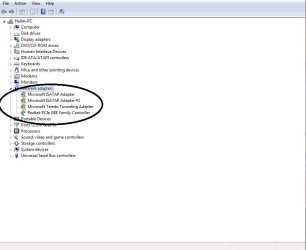
isatap.jpg

upload4.jpg

thanx a lot!:)
 

My Computer My Computer

OS
win 7 home premium 64bit
CPU
Amd Phenom X4 955 BE
Motherboard
msi870A-G54
Memory
Team Xtreme Dark 2x2GB
Graphics Card(s)
Digital Alliance GTX460
Monitor(s) Displays
LG 227WAP
Hard Drives
Western Digital 1TB sata 3
PSU
corsair cx600
I've actually seen this randomly added to machines that don't even need it to function.
Generally the solution is just to uninstall them all and reboot the machine.
If they are needed the system will automatically re-detect and load them.
If not, they are out of the way.
 

My Computer My Computer

Computer Manufacturer/Model Number
Insane hobo technologies. ;-)
OS
Windows 7 x64
CPU
Intel i7 2600k
Motherboard
Asrock z68 extreme 4 gen 3
Memory
G.skill Ripjaw 16gigs @ 1866
Graphics Card(s)
Nvidia gtx580 (evga)
Sound Card
Integrated HD audio + hdmi
Monitor(s) Displays
24" ASUS widescreen + 42" insignia
Screen Resolution
1080p (1920x1080)
Hard Drives
128 Samsung 830
256 Samsung 840
3 x 1tb storage drive (various)
1 western digital 1tb (eSATA)
1 Seagate 1tb (eSATA)
PSU
1 kilowatt SLI/Crossfire rated Silverstone modular
Case
NZXT Phantom + additional 220 fan
Cooling
Zalmann
Keyboard
Microsoft wireless 3000 (v2)
Mouse
MS - wireless 5000 (bluetrack)
Internet Speed
depends on if you ask me or my provider.
Other Info
The above information is provided as is, and the author assumes no responsibility for issues it may cause with your sanity or fanboyism.
I'v uninstall them and then reboot it, the isatap didnt show up again as u expected, but the network still can't pass through.
is there any possibility that my system is the problem?
i'm using win7 home premium 64
 

My Computer My Computer

OS
win 7 home premium 64bit
CPU
Amd Phenom X4 955 BE
Motherboard
msi870A-G54
Memory
Team Xtreme Dark 2x2GB
Graphics Card(s)
Digital Alliance GTX460
Monitor(s) Displays
LG 227WAP
Hard Drives
Western Digital 1TB sata 3
PSU
corsair cx600

My Computer My Computer

Computer Manufacturer/Model Number
Insane hobo technologies. ;-)
OS
Windows 7 x64
CPU
Intel i7 2600k
Motherboard
Asrock z68 extreme 4 gen 3
Memory
G.skill Ripjaw 16gigs @ 1866
Graphics Card(s)
Nvidia gtx580 (evga)
Sound Card
Integrated HD audio + hdmi
Monitor(s) Displays
24" ASUS widescreen + 42" insignia
Screen Resolution
1080p (1920x1080)
Hard Drives
128 Samsung 830
256 Samsung 840
3 x 1tb storage drive (various)
1 western digital 1tb (eSATA)
1 Seagate 1tb (eSATA)
PSU
1 kilowatt SLI/Crossfire rated Silverstone modular
Case
NZXT Phantom + additional 220 fan
Cooling
Zalmann
Keyboard
Microsoft wireless 3000 (v2)
Mouse
MS - wireless 5000 (bluetrack)
Internet Speed
depends on if you ask me or my provider.
Other Info
The above information is provided as is, and the author assumes no responsibility for issues it may cause with your sanity or fanboyism.
Download Driver Pack Solutions 11.8. It contains some of the most needed drivers for our PC's. Luckily your unit hardware's needed drivers are in there, which I also presume. It's a driver issue on your part of which the mentioned software could fix. See how things change from there. If the problem still is not fixed, I suggest you uninstall that driver on your system just like what it was suggested. I encountered the same problem way back, and uninstalling the said driver didn't really hinder anything in the system.
 

My Computer My Computer

OS
Windows 7 Ultimate x64 (desktop) / x64 (laptop)
CPU
AMD Phenom 2 X3 720 2.8 GHz (desktop) / AMD Dual-Core E-350
Motherboard
ASRock N68-VS3 UCC / Acer Aspire 5253
Memory
4 Gb DDR3 / 4Gb DD3
Graphics Card(s)
Nvidia GeForce GTS 450 2048 Mb / AMD Radeon HD 6310
Sound Card
High Definition Audio Device
Monitor(s) Displays
ViewSonic
Screen Resolution
1024 x 768 / 1366 x 768
Hard Drives
313GB Seagate ST332041 8AS SCSI Disk Device (ATA) / 500 Gb HDD
PSU
Electron ATX-600W
Case
Some Case
Cooling
AMD built-in cooling fan
Keyboard
Logitech Keyboard
Mouse
A4tech Infrared Mouse / Philips Infrared Mouse
Internet Speed
1 Mbps
Other Info
Information of the PC's specs courtesy of Speccy freeware. Lol.
can you do me a favor and follow the instructions here.
http://www.sevenforums.com/crashes-debugging/96879-blue-screen-death-bsod-posting-instructions.html

I know you haven't had a bsod but I would like to look at your hardware specs and error logs.

Meanwhile you can also run this as it's easy to do and can't hurt anything.
http://www.sevenforums.com/tutorials/1538-sfc-scannow-command-system-file-checker.html

i used to get a lot of bsod, due to bad memory slot ( i guess). since i change my RAM to another slot evertying seems okay, no more bsod.
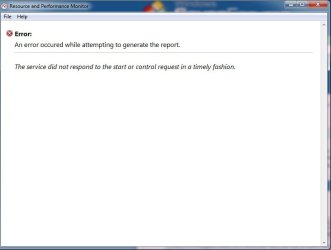
i tried to get you the perfmon report but an error occured.
View attachment Windows_NT6_BSOD_jcgriff2.rar

perfmon eror.jpg

Download Driver Pack Solutions 11.8. It contains some of the most needed drivers for our PC's. Luckily your unit hardware's needed drivers are in there, which I also presume. It's a driver issue on your part of which the mentioned software could fix. See how things change from there. If the problem still is not fixed, I suggest you uninstall that driver on your system just like what it was suggested. I encountered the same problem way back, and uninstalling the said driver didn't really hinder anything in the system.

where can i find the Driver Pack Solutions 11.8?
 

My Computer My Computer

OS
win 7 home premium 64bit
CPU
Amd Phenom X4 955 BE
Motherboard
msi870A-G54
Memory
Team Xtreme Dark 2x2GB
Graphics Card(s)
Digital Alliance GTX460
Monitor(s) Displays
LG 227WAP
Hard Drives
Western Digital 1TB sata 3
PSU
corsair cx600
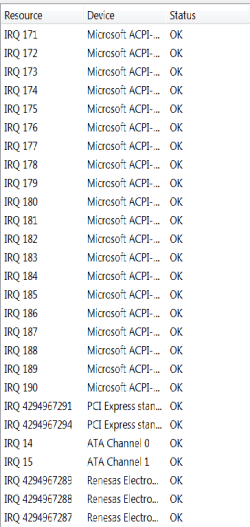
You system has more irq's than I've ever seen in my entire life.
It looks like there may actually be a problem with the acpi system.

I'm curious if anyone has ever seen irq's this numerous or with numbers that make no sense like this?
It's completely foreign to me.
It goes on for about 9 pages.
 

Attachments

  • Untitled.png
    Untitled.png
    7.3 KB · Views: 15

My Computer My Computer

Computer Manufacturer/Model Number
Insane hobo technologies. ;-)
OS
Windows 7 x64
CPU
Intel i7 2600k
Motherboard
Asrock z68 extreme 4 gen 3
Memory
G.skill Ripjaw 16gigs @ 1866
Graphics Card(s)
Nvidia gtx580 (evga)
Sound Card
Integrated HD audio + hdmi
Monitor(s) Displays
24" ASUS widescreen + 42" insignia
Screen Resolution
1080p (1920x1080)
Hard Drives
128 Samsung 830
256 Samsung 840
3 x 1tb storage drive (various)
1 western digital 1tb (eSATA)
1 Seagate 1tb (eSATA)
PSU
1 kilowatt SLI/Crossfire rated Silverstone modular
Case
NZXT Phantom + additional 220 fan
Cooling
Zalmann
Keyboard
Microsoft wireless 3000 (v2)
Mouse
MS - wireless 5000 (bluetrack)
Internet Speed
depends on if you ask me or my provider.
Other Info
The above information is provided as is, and the author assumes no responsibility for issues it may cause with your sanity or fanboyism.
seriously guru, i have no idea bout this.,:shock:
how it could relate to the network system?
 

My Computer My Computer

OS
win 7 home premium 64bit
CPU
Amd Phenom X4 955 BE
Motherboard
msi870A-G54
Memory
Team Xtreme Dark 2x2GB
Graphics Card(s)
Digital Alliance GTX460
Monitor(s) Displays
LG 227WAP
Hard Drives
Western Digital 1TB sata 3
PSU
corsair cx600
I'm waiting on another guru to drop in on this to be honest.
I'm almost considering possible motherboard issue at this point.
It could all be 'virtual' stuff as the result of a application or management program of some sort that I am simply not familiar with.
...there are thousands of them after all.
I'll drop a line to one of my buddies here and have him look at it, it may be nothing to be concerned about, I just don't know right now as it's not something I've run into first hand.
 

My Computer My Computer

Computer Manufacturer/Model Number
Insane hobo technologies. ;-)
OS
Windows 7 x64
CPU
Intel i7 2600k
Motherboard
Asrock z68 extreme 4 gen 3
Memory
G.skill Ripjaw 16gigs @ 1866
Graphics Card(s)
Nvidia gtx580 (evga)
Sound Card
Integrated HD audio + hdmi
Monitor(s) Displays
24" ASUS widescreen + 42" insignia
Screen Resolution
1080p (1920x1080)
Hard Drives
128 Samsung 830
256 Samsung 840
3 x 1tb storage drive (various)
1 western digital 1tb (eSATA)
1 Seagate 1tb (eSATA)
PSU
1 kilowatt SLI/Crossfire rated Silverstone modular
Case
NZXT Phantom + additional 220 fan
Cooling
Zalmann
Keyboard
Microsoft wireless 3000 (v2)
Mouse
MS - wireless 5000 (bluetrack)
Internet Speed
depends on if you ask me or my provider.
Other Info
The above information is provided as is, and the author assumes no responsibility for issues it may cause with your sanity or fanboyism.
hm, thats absolutely im considering about., i know my DDR slot had some problem, but i dunno if the network have a same issue.
really appreciate your help guru, hope your friend could fix this.,:D
 

My Computer My Computer

OS
win 7 home premium 64bit
CPU
Amd Phenom X4 955 BE
Motherboard
msi870A-G54
Memory
Team Xtreme Dark 2x2GB
Graphics Card(s)
Digital Alliance GTX460
Monitor(s) Displays
LG 227WAP
Hard Drives
Western Digital 1TB sata 3
PSU
corsair cx600
If you are familiar with your bios, and how to reset it etc...
you may consider doing so now, as generally irq's are handled by hardware (i.e. the bios)
In the meantime. I have no idea when zigzag will be able to get to this it will likely be morning though.
 

My Computer My Computer

Computer Manufacturer/Model Number
Insane hobo technologies. ;-)
OS
Windows 7 x64
CPU
Intel i7 2600k
Motherboard
Asrock z68 extreme 4 gen 3
Memory
G.skill Ripjaw 16gigs @ 1866
Graphics Card(s)
Nvidia gtx580 (evga)
Sound Card
Integrated HD audio + hdmi
Monitor(s) Displays
24" ASUS widescreen + 42" insignia
Screen Resolution
1080p (1920x1080)
Hard Drives
128 Samsung 830
256 Samsung 840
3 x 1tb storage drive (various)
1 western digital 1tb (eSATA)
1 Seagate 1tb (eSATA)
PSU
1 kilowatt SLI/Crossfire rated Silverstone modular
Case
NZXT Phantom + additional 220 fan
Cooling
Zalmann
Keyboard
Microsoft wireless 3000 (v2)
Mouse
MS - wireless 5000 (bluetrack)
Internet Speed
depends on if you ask me or my provider.
Other Info
The above information is provided as is, and the author assumes no responsibility for issues it may cause with your sanity or fanboyism.
Just passing by...

* Have you a System Restore point created PRIOR to the problem{s} occurring?

* Have you a Win 7 DVD ?

* Given that your original problem is one of connectivity please run an IPCONFIG /all and make a screenshot of the output and upload it to us here.

start>cmd>right click and run as admin>ipconfg /all


My Computer My Computer

Computer Manufacturer/Model Number
LAPTOP. HP Pavilion dv7-4010TX .
OS
Win 7 Ultimate 64-bit. SP1.
CPU
Intel i7 -720QM.[1.6GHz Turbo Boost 2.8GHz. 6MB Cache.]
Memory
8 DDR 3 RAM. 1066MHZ
Graphics Card(s)
ATI 1024 MB. DDR3. Radeon HD5650
Monitor(s) Displays
17.3" High Definition Brightview LCD. LED Backlit.
Screen Resolution
1600 x 900.
Hard Drives
640GB
Case
Laptop / notebook.
Mouse
Logitech Anywhere mouse. MX.
Internet Speed
ADSL [ but too slow ]
Hello guys,

I dont have any idea anymore how to fix this problem, i've been looking to the microsoft answer site, and tried the microsoft fixit device, but still it couldn't be solved.:(
I'm afraid that there's something gone wrong with my hardware, see if you guys could help me with this.
View attachment 179345

View attachment 179346

thanx a lot!:)

The enclosed snip shows that your original problem may be as simple as a LAN card configuration issue.

Please run an IPCONFIG /ALL and upload its output to us here.

Also can you tell us more about both your system specs and network setup.


Dam Jan you are quick <g>
 
Last edited:

My Computer My Computer

Computer Manufacturer/Model Number
HP Pavillion dv-7 1005 Tx
OS
Win 8 Release candidate 8400
CPU
[email protected]
Memory
4 gigs
Graphics Card(s)
Nvidia 9600M
Sound Card
HD built-in
Monitor(s) Displays
17" Wxga
Screen Resolution
1440x900
Cooling
none
Internet Speed
45Mb down 5Mb up
Just passing by...

* Have you a System Restore point created PRIOR to the problem{s} occurring?

* Have you a Win 7 DVD ?

* Given that your original problem is one of connectivity please run an IPCONFIG /all and make a screenshot of the output and upload it to us here.

start>cmd>right click and run as admin>ipconfg /all


Actually this isatap error had been there since the 1st time i installed the system, but i didn't mind it since im a USB modem to connect to the internet.,

I do have a win 7 64bit home premium disk, i was planning to reinstal my windows but i dont think it gonna solved the problem because i have installed another network card, and plug the lan into it, "still" no connection available.

The enclosed snip shows that your original problem may be as simple as a LAN card configuration issue.

Please run an IPCONFIG /ALL and upload its output to us here.

Also can you tell mors about both your system specs and network setup.
Dam Jan you are quick <g>

here's my spec guru:

mobo: MSI 870A-G54
proc : Amd phenom II x4 955 3.2Ghz
Ram: TEAM Xtreme Dark 2Gbx2 TXD34096M1600HC9DC-D

For the network setup im using a standard ADSL modem, SmartAX MT882a, huawei Tech.
I'd run the connection through my laptop and everything goes pretty well. Its automatically connected to the internet.
It seems to me that something stuck in my Pc, i just dunno what it is.

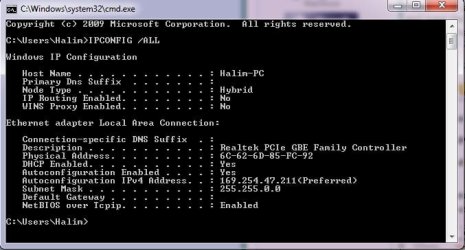
here it is my ipconfig screenshot:
IPCONFIG.jpg
 

My Computer My Computer

OS
win 7 home premium 64bit
CPU
Amd Phenom X4 955 BE
Motherboard
msi870A-G54
Memory
Team Xtreme Dark 2x2GB
Graphics Card(s)
Digital Alliance GTX460
Monitor(s) Displays
LG 227WAP
Hard Drives
Western Digital 1TB sata 3
PSU
corsair cx600
hello there guys?
 

My Computer My Computer

OS
win 7 home premium 64bit
CPU
Amd Phenom X4 955 BE
Motherboard
msi870A-G54
Memory
Team Xtreme Dark 2x2GB
Graphics Card(s)
Digital Alliance GTX460
Monitor(s) Displays
LG 227WAP
Hard Drives
Western Digital 1TB sata 3
PSU
corsair cx600
Just passing by...

* Have you a System Restore point created PRIOR to the problem{s} occurring?

* Have you a Win 7 DVD ?

* Given that your original problem is one of connectivity please run an IPCONFIG /all and make a screenshot of the output and upload it to us here.

start>cmd>right click and run as admin>ipconfg /all


Actually this isatap error had been there since the 1st time i installed the system, but i didn't mind it since im a USB modem to connect to the internet.,

I do have a win 7 64bit home premium disk, i was planning to reinstal my windows but i dont think it gonna solved the problem because i have installed another network card, and plug the lan into it, "still" no connection available.

The enclosed snip shows that your original problem may be as simple as a LAN card configuration issue.

Please run an IPCONFIG /ALL and upload its output to us here.

Also can you tell mors about both your system specs and network setup.
Dam Jan you are quick <g>

here's my spec guru:

mobo: MSI 870A-G54
proc : Amd phenom II x4 955 3.2Ghz
Ram: TEAM Xtreme Dark 2Gbx2 TXD34096M1600HC9DC-D

For the network setup im using a standard ADSL modem, SmartAX MT882a, huawei Tech.
I'd run the connection through my laptop and everything goes pretty well. Its automatically connected to the internet.
It seems to me that something stuck in my Pc, i just dunno what it is.

here it is my ipconfig screenshot:
View attachment 179769

The ipconfig /all is still showing an IP that indicates it is not configured properly. It is showing an IP (169.254.x.x) that says it is not talking to the router. The bad IP address changed so I am wondering if it might be a bad cable

Have you tried re-installing the driver?
 

My Computer My Computer

Computer Manufacturer/Model Number
HP Pavillion dv-7 1005 Tx
OS
Win 8 Release candidate 8400
CPU
[email protected]
Memory
4 gigs
Graphics Card(s)
Nvidia 9600M
Sound Card
HD built-in
Monitor(s) Displays
17" Wxga
Screen Resolution
1440x900
Cooling
none
Internet Speed
45Mb down 5Mb up
im using the same cable when im plug it into laptop. and its working.
im already uninstal the network devices and all its driver, reinstall them again, and still not working.

What if i reinstall the windows?
 

My Computer My Computer

OS
win 7 home premium 64bit
CPU
Amd Phenom X4 955 BE
Motherboard
msi870A-G54
Memory
Team Xtreme Dark 2x2GB
Graphics Card(s)
Digital Alliance GTX460
Monitor(s) Displays
LG 227WAP
Hard Drives
Western Digital 1TB sata 3
PSU
corsair cx600
im using the same cable when im plug it into laptop. and its working.
im already uninstal the network devices and all its driver, reinstall them again, and still not working.

What if i reinstall the windows?

It would eliminate one possible source of the problem
 

My Computer My Computer

Computer Manufacturer/Model Number
HP Pavillion dv-7 1005 Tx
OS
Win 8 Release candidate 8400
CPU
[email protected]
Memory
4 gigs
Graphics Card(s)
Nvidia 9600M
Sound Card
HD built-in
Monitor(s) Displays
17" Wxga
Screen Resolution
1440x900
Cooling
none
Internet Speed
45Mb down 5Mb up
ok i'll let u guys know later. thx!:)
 

My Computer My Computer

OS
win 7 home premium 64bit
CPU
Amd Phenom X4 955 BE
Motherboard
msi870A-G54
Memory
Team Xtreme Dark 2x2GB
Graphics Card(s)
Digital Alliance GTX460
Monitor(s) Displays
LG 227WAP
Hard Drives
Western Digital 1TB sata 3
PSU
corsair cx600
Back
Top