Solved Microsoft Management Console is down

jlumbtx

New member
Member
Local time
5:49 PM
Messages
51
I get an error message saying the MMC is not working. I found Step-by-Step Guide to the Microsoft Management Console but could only get to step 6. I says Click Finish. This returns you to the Add/Remove Snap-ins dialog box. Click Close. but there is no CLOSE button on the screen.
Then in step 7 I see Click the Extensions tab as shown in Figure 2 below. but I can find the Add/Re
 

My Computer

Computer Manufacturer/Model Number
custom
OS
Win7 Ultimate x64
CPU
AMD 4 core
Motherboard
Gigabyte GA- 890GPA-UD3H
Memory
16 gigabytes
Graphics Card(s)
EVGA/NVIDIA GT 640
Sound Card
integral
Monitor(s) Displays
ViewSonic 24"
Hard Drives
2 WD
PSU
500 watts
Case
Gigabyte
Cooling
Zalman
Keyboard
Logitech
Mouse
Logitech
Did you mean to add more info to your above post because it looks like part of the post got cut off?
 

My Computer

Computer type
PC/Desktop
Computer Manufacturer/Model Number
custom built
OS
Windows 7 ultimate 64-bit
CPU
Intel I7 2600K 3.4ghz
Motherboard
Asus Evo P8P67
Memory
Corsair 16gb ddr3 1600mhz
Graphics Card(s)
Nvidia Geforce gt 430
Sound Card
Sound Blaster Titanium x-fi pci express
Monitor(s) Displays
Dell E198WFP
Hard Drives
1 western digital 2TB drive.
PSU
Antec 1200 watt
Case
Inwin Dragon Rider
Cooling
6 case supplied cooling fans
Keyboard
logitech mk700
Mouse
logitech m705
Internet Speed
25-50mbps download; 10mbps upload(i think)
Antivirus
avg free 2014
Browser
mozilla firefox
Other Info
Also have a pretty bad speaker setup which is a klipsch promedia 5.1 surround speaker setup with huge subwoofer and lg blu ray player/writer. Also a hp officejet pro 8600 plus wireless all in one and a logitech s7500 webcam.
Yeah, I think he wanted to put more info.
 

My Computer

Computer type
Laptop
Computer Manufacturer/Model Number
Sony Corporation VAIO VPCEL22FX
OS
Microsoft Windows 7 Ultimate x64
CPU
AMD E-450 with Radeon HD Graphics
Motherboard
Sony Corporation VAIO
Memory
Nanya Technology DDR3 4.00 GB (3.60 GB usable)
Graphics Card(s)
ATI AMD Radeon HD 6320 Graphics
Sound Card
AMD High Definition Audio Device
Monitor(s) Displays
Name Generic PnP Monitor on AMD Radeon HD 6320 Graphics
Screen Resolution
1366x768 pixels
Hard Drives
-- Controller Map ----------------------------------------------------------
+ AMD SATA Controller [ATA]
- TOSHIBA MK3259GSXP SATA Disk Device
- Optiarc DVD RW AD-7740H SATA CdRom Device

--------------------------------------------------
Antivirus
Eset Smart Security 8
Browser
Google Chrome
Other Info
Old School Rock Hard Laptop...Works like a charm and reminds you of future and past.
For the love of god re-write your question -.-
NOTHING is hard using mmc it is so easy and that is why it was made :rolleyes:
 

My Computer

Computer type
Laptop
Computer Manufacturer/Model Number
Sony Corporation VAIO VPCEL22FX
OS
Microsoft Windows 7 Ultimate x64
CPU
AMD E-450 with Radeon HD Graphics
Motherboard
Sony Corporation VAIO
Memory
Nanya Technology DDR3 4.00 GB (3.60 GB usable)
Graphics Card(s)
ATI AMD Radeon HD 6320 Graphics
Sound Card
AMD High Definition Audio Device
Monitor(s) Displays
Name Generic PnP Monitor on AMD Radeon HD 6320 Graphics
Screen Resolution
1366x768 pixels
Hard Drives
-- Controller Map ----------------------------------------------------------
+ AMD SATA Controller [ATA]
- TOSHIBA MK3259GSXP SATA Disk Device
- Optiarc DVD RW AD-7740H SATA CdRom Device

--------------------------------------------------
Antivirus
Eset Smart Security 8
Browser
Google Chrome
Other Info
Old School Rock Hard Laptop...Works like a charm and reminds you of future and past.
I didn't get the full question
If this is not your question it is NOT fully my problem because I got 1/3 of the whole question.
If there is really a problem with MMC re-install by using Repair Install

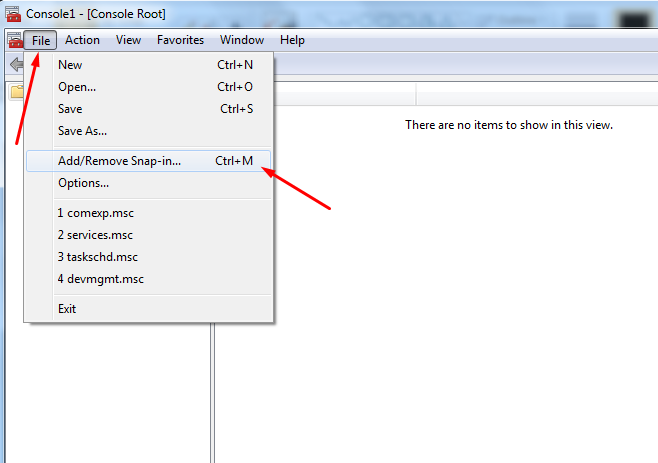
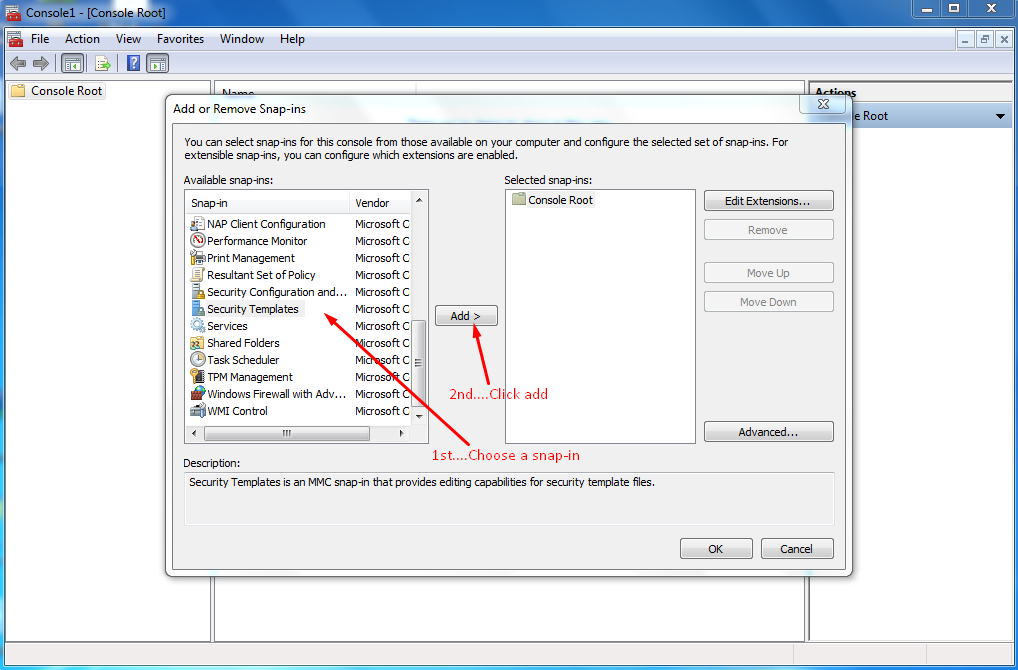
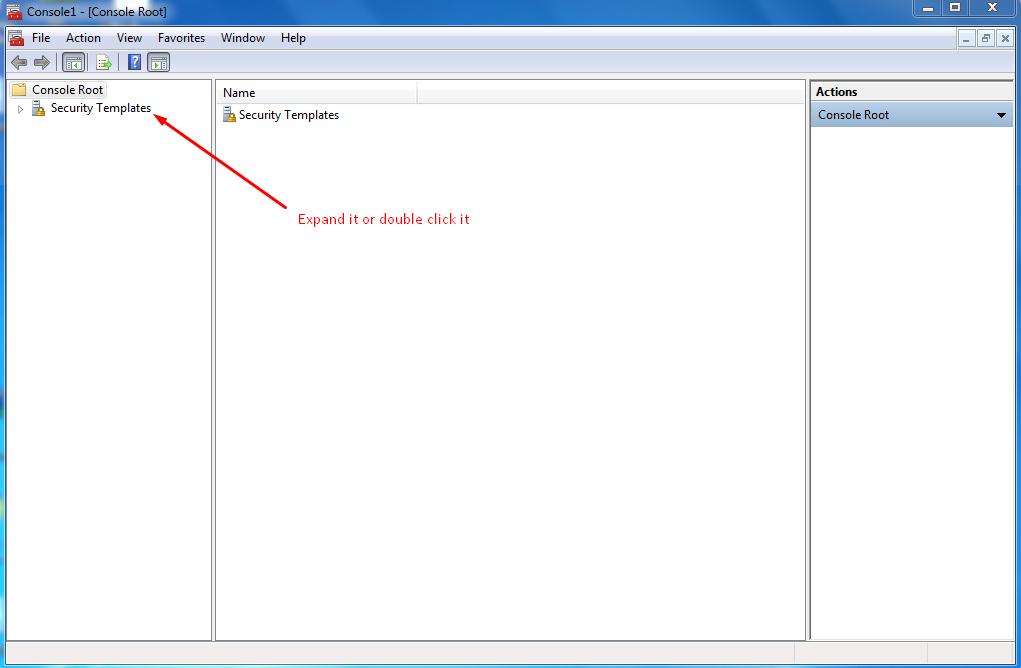
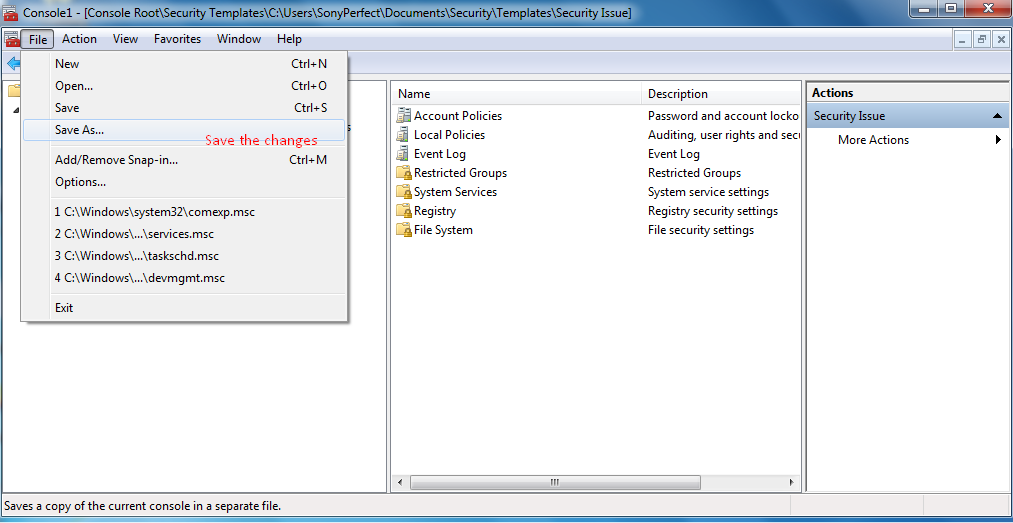
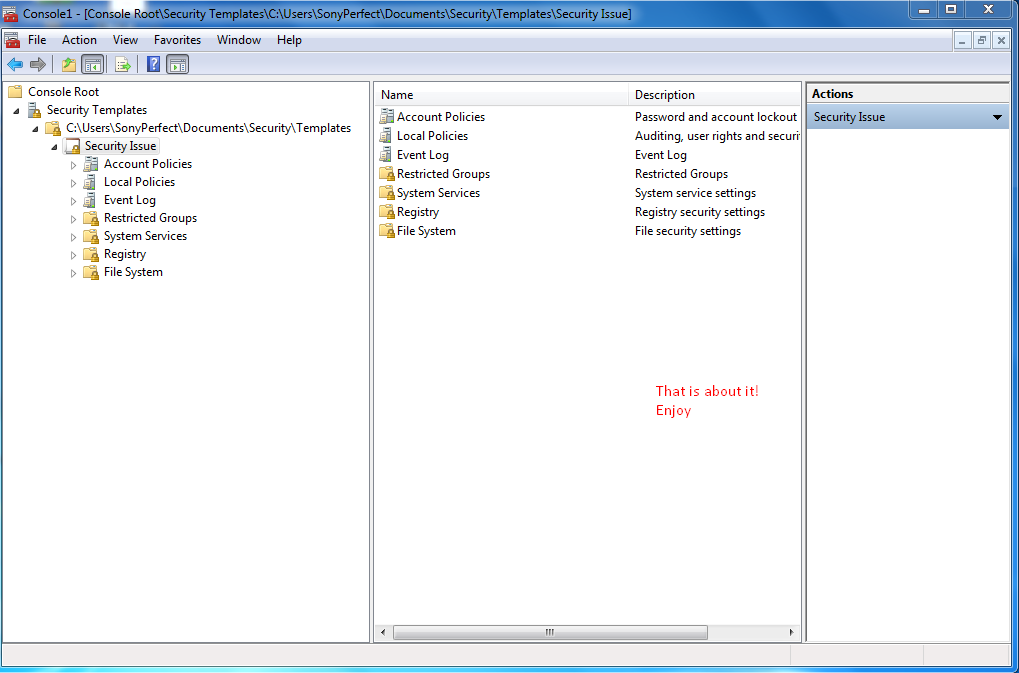
the post under is a step-by-step to create a snap-in
Start MMC
PmY1iE6.png

Go to file -->Add/Remove Snap-in...
GIwY4X4.png

Choose a snap-in and click add
bu61B6t.png

Check to see if it was added and click OK
kUFWM5B.png

Expand the snap-in
2YmS2dh.png

Save the changes
wA5ohsC.png

That is it! you added a new snap-in happy? :)
mpsf2fc.png
 
Last edited:

My Computer

Computer type
Laptop
Computer Manufacturer/Model Number
Sony Corporation VAIO VPCEL22FX
OS
Microsoft Windows 7 Ultimate x64
CPU
AMD E-450 with Radeon HD Graphics
Motherboard
Sony Corporation VAIO
Memory
Nanya Technology DDR3 4.00 GB (3.60 GB usable)
Graphics Card(s)
ATI AMD Radeon HD 6320 Graphics
Sound Card
AMD High Definition Audio Device
Monitor(s) Displays
Name Generic PnP Monitor on AMD Radeon HD 6320 Graphics
Screen Resolution
1366x768 pixels
Hard Drives
-- Controller Map ----------------------------------------------------------
+ AMD SATA Controller [ATA]
- TOSHIBA MK3259GSXP SATA Disk Device
- Optiarc DVD RW AD-7740H SATA CdRom Device

--------------------------------------------------
Antivirus
Eset Smart Security 8
Browser
Google Chrome
Other Info
Old School Rock Hard Laptop...Works like a charm and reminds you of future and past.
Sorry- I had a major interruption. I have been trying to fix the MMC but have been unable to add the Event Viewer snap-in.
When I try, I get 2 error messages:

MMC has detected an error in a snap-in and will unload it.

MMC cannot initialize the snap-in.
Name: Event Viewer
CLSID: FX:{b05566ad-fe9c-4363-be05-7a4cbb7cb510}

As a result I am unable to use the Event Viewer.

John
 

My Computer

Computer Manufacturer/Model Number
custom
OS
Win7 Ultimate x64
CPU
AMD 4 core
Motherboard
Gigabyte GA- 890GPA-UD3H
Memory
16 gigabytes
Graphics Card(s)
EVGA/NVIDIA GT 640
Sound Card
integral
Monitor(s) Displays
ViewSonic 24"
Hard Drives
2 WD
PSU
500 watts
Case
Gigabyte
Cooling
Zalman
Keyboard
Logitech
Mouse
Logitech

My Computer

Computer type
PC/Desktop
Computer Manufacturer/Model Number
Home made Desktop
OS
Windows 10 Pro. 64/ version 1709 Windows 7 Pro/64
CPU
Intel i7-6800K @ 4.3
Motherboard
ASUS X-99 Deluxe II
Memory
Corsair Platinum 16 gig @2400
Graphics Card(s)
EVGA GTX 1070 OC
Monitor(s) Displays
Asus 27" LED LCD/VE278Q
Screen Resolution
1920-1080 or 1280-720 HDMI
Hard Drives
INTEL SSD 730-240 Gb Sata 3.0/
PSU
EVGA Platium 1200W
Case
Phanteks Luxe Tempered Glass 8 fans/ one radiator
Cooling
XSPC/ Water Cooled CPU
Keyboard
Das 4 Professional
Mouse
Logitech M705/MX Anywhere 2-S
Internet Speed
100 mbits
Antivirus
Microsoft Security Essentials/ Malwarebytes Premium 3.0/ SAS
Browser
I.E. 11 default/Firefox/ ISP Time Warner Cable/Spectrum
Other Info
LG BluRay Burner/
Sound system-KLipsch-THX/
Icy Dock ssd Hot Swap bays.
Will Repair Install do something different than the repair function on my Win7 installation CD?
 

My Computer

Computer Manufacturer/Model Number
custom
OS
Win7 Ultimate x64
CPU
AMD 4 core
Motherboard
Gigabyte GA- 890GPA-UD3H
Memory
16 gigabytes
Graphics Card(s)
EVGA/NVIDIA GT 640
Sound Card
integral
Monitor(s) Displays
ViewSonic 24"
Hard Drives
2 WD
PSU
500 watts
Case
Gigabyte
Cooling
Zalman
Keyboard
Logitech
Mouse
Logitech
Back
Top