
Microsoft Mouse & Keyboard Center Install Error 1603

raya2

New member
Member
Local time
9:25 AM
Messages
58
I have a Microsoft "IntelliMouse Explorer 3.0" mouse. I searched for this device at microsoft's websites & downloaded it's software driver called "Microsoft Mouse & Keyboard Center 1.0" about 1 year ago & then installed it.

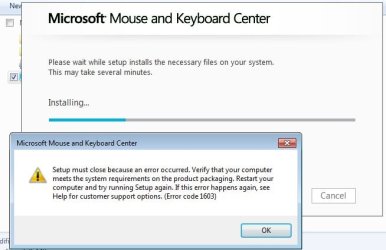
Recently I found out that there is a new version (2.1) available for download. I download it & tried to install. But each time I tried, it gave me the following error & asked me to restart & try again. I restarted & tried again & again (even in safe mode), but the same error occured again & again. I even can't uninstall the old driver. So any help here is very appreciate :geek:

OS: Windows 7 SP1 x86


The error:

Setup must close because an error occurred. Verify that your computer meets the system requirements on the product packaging. Restart your computer and try running Setup again. If this error happens again, see Help for customer support options. (Error code 1603)
 

Attachments
  • 94368123.jpg
    94368123.jpg
    30.4 KB · Views: 12
Last edited:

My Computer My Computer

At a glance

Windows 7
OS
Windows 7

My Computer My Computer

At a glance

Windows 10 Pro. 64/ version 1709 Windows 7 Pr...Intel i7-6800K @ 4.3Corsair Platinum 16 gig @2400EVGA GTX 1070 OC
Computer type
PC/Desktop
Computer Manufacturer/Model Number
Home made Desktop
OS
Windows 10 Pro. 64/ version 1709 Windows 7 Pro/64
CPU
Intel i7-6800K @ 4.3
Motherboard
ASUS X-99 Deluxe II
Memory
Corsair Platinum 16 gig @2400
Graphics Card(s)
EVGA GTX 1070 OC
Monitor(s) Displays
Asus 27" LED LCD/VE278Q
Screen Resolution
1920-1080 or 1280-720 HDMI
Hard Drives
INTEL SSD 730-240 Gb Sata 3.0/
PSU
EVGA Platium 1200W
Case
Phanteks Luxe Tempered Glass 8 fans/ one radiator
Cooling
XSPC/ Water Cooled CPU
Keyboard
Das 4 Professional
Mouse
Logitech M705/MX Anywhere 2-S
Internet Speed
100 mbits
Antivirus
Microsoft Security Essentials/ Malwarebytes Premium 3.0/ SAS
Browser
I.E. 11 default/Firefox/ ISP Time Warner Cable/Spectrum
Other Info
LG BluRay Burner/
Sound system-KLipsch-THX/
Icy Dock ssd Hot Swap bays.

My Computer My Computer

At a glance

8 Pro x64i7 3770K 4.6GHz16GB G.Skill Trident X 2666mhzx2 EVGA 780 Ti Superclocked SLI
Computer type
PC/Desktop
Computer Manufacturer/Model Number
Systems by SmartEyeball
OS
8 Pro x64
CPU
i7 3770K 4.6GHz
Motherboard
ASUS P8Z77 WS
Memory
16GB G.Skill Trident X 2666mhz
Graphics Card(s)
x2 EVGA 780 Ti Superclocked SLI
Sound Card
SB X-FI Surround 5.1 PRO USB / ATH-AD900 Headphones
Monitor(s) Displays
x3 Dell U2410 / 58" Samsung
Screen Resolution
5760*1200/ 1920*1200
Hard Drives
2x Intel 520 240GB (RAID 0) * 2x WD Caviar Blacks 2TB (RAID 0) * 2TB WD Caviar Black * Sony Optirac DVD
PSU
Silverstone Strider Evolution 1200W
Case
Thermaltake Level 10 GT Snow Edition
Cooling
Noctua NH-D14
Keyboard
Topre Realforce // Ducky Shine MX Black // Filco Ninja TKL
Mouse
Thermaltake Theron (Highly Recommended) + Razer Imperator
Antivirus
MSE
Browser
IE, FF, WaterFox
Other Info
GT Extreme V2 Sim Racing Cockpit + 40" LCD and K/B Mouse stand ▼
Fanatec CSR Elite Wheel + Clubsport V1 Pedals + CSR shifter/7G-H ▼Saitek X52 Pro ▼ TrackIR 5 Pro
Buttkicker v2 Seat Rumbler with Dedicated 5.1 and Sub Woofer attached to frame ▼
=
Bloody Big Grin
If you could use this to post screen shots. I and many others don't like to go off this site to see things. Security and all.
http://www.sevenforums.com/tutorials/9733-screenshots-files-upload-post-seven-forums.html

If a update is needed for your Microsoft mouse/keyboard your Windows Updates should of offered it to you.

Are you having a problem with your mouse and or keyboard?

Ok. I attached the screenshot.

The windows updates also offered me the same update but It gave me the same error during the install.

There are two reasons that I want to update this driver:

1- Updating the drivers always is good & give you more options & advantages for your hardware.

2- Recently & sometimes my "IntelliMouse Explorer 3.0" mouse's left click mouse is acting too fast. for example even with a little pressure of finger, It reacts & opens or close things unwantedly...

This refers to an older version of the app, but the error code is the same:

Troubleshoot installing Intellipoint, IntelliType, or LifeCam software

I'd personally start with just running it as Admin (r-click on the setup.exe and select Run As Administrator)

None of those instructions helped me out. And I laso tried the admin trick before.
 

My Computer My Computer

At a glance

Windows 7
OS
Windows 7
I would suggest you try another mouse.
The very sensitive to the touch left click is probably the mouse button not the drivers or program.
Have you been in your mouse setting and made adjustment that you like?
 

My Computer My Computer

At a glance

Windows 10 Pro. 64/ version 1709 Windows 7 Pr...Intel i7-6800K @ 4.3Corsair Platinum 16 gig @2400EVGA GTX 1070 OC
Computer type
PC/Desktop
Computer Manufacturer/Model Number
Home made Desktop
OS
Windows 10 Pro. 64/ version 1709 Windows 7 Pro/64
CPU
Intel i7-6800K @ 4.3
Motherboard
ASUS X-99 Deluxe II
Memory
Corsair Platinum 16 gig @2400
Graphics Card(s)
EVGA GTX 1070 OC
Monitor(s) Displays
Asus 27" LED LCD/VE278Q
Screen Resolution
1920-1080 or 1280-720 HDMI
Hard Drives
INTEL SSD 730-240 Gb Sata 3.0/
PSU
EVGA Platium 1200W
Case
Phanteks Luxe Tempered Glass 8 fans/ one radiator
Cooling
XSPC/ Water Cooled CPU
Keyboard
Das 4 Professional
Mouse
Logitech M705/MX Anywhere 2-S
Internet Speed
100 mbits
Antivirus
Microsoft Security Essentials/ Malwarebytes Premium 3.0/ SAS
Browser
I.E. 11 default/Firefox/ ISP Time Warner Cable/Spectrum
Other Info
LG BluRay Burner/
Sound system-KLipsch-THX/
Icy Dock ssd Hot Swap bays.
I would suggest you try another mouse.
The very sensitive to the touch left click is probably the mouse button not the drivers or program.
Have you been in your mouse setting and made adjustment that you like?

Changing the mouse is not a solution but is an escape from the problem (Now I am using a different mouse)

I don't think that this problem is related to sensitivity of left click, because this problem doesn't occur everytime. I think it is driver related.
And the mouse setting of "Microsoft Mouse & Keyboard Center 1.0" don't have any section for changing any adjustment in speed (It only can change the buttons of the mouse)
 

My Computer My Computer

At a glance

Windows 7
OS
Windows 7
Let me make sure I understand you.
You changed the mouse and the problem went away but its not the old mouse causing the problem.
Is that correct?
 

My Computer My Computer

At a glance

Windows 10 Pro. 64/ version 1709 Windows 7 Pr...Intel i7-6800K @ 4.3Corsair Platinum 16 gig @2400EVGA GTX 1070 OC
Computer type
PC/Desktop
Computer Manufacturer/Model Number
Home made Desktop
OS
Windows 10 Pro. 64/ version 1709 Windows 7 Pro/64
CPU
Intel i7-6800K @ 4.3
Motherboard
ASUS X-99 Deluxe II
Memory
Corsair Platinum 16 gig @2400
Graphics Card(s)
EVGA GTX 1070 OC
Monitor(s) Displays
Asus 27" LED LCD/VE278Q
Screen Resolution
1920-1080 or 1280-720 HDMI
Hard Drives
INTEL SSD 730-240 Gb Sata 3.0/
PSU
EVGA Platium 1200W
Case
Phanteks Luxe Tempered Glass 8 fans/ one radiator
Cooling
XSPC/ Water Cooled CPU
Keyboard
Das 4 Professional
Mouse
Logitech M705/MX Anywhere 2-S
Internet Speed
100 mbits
Antivirus
Microsoft Security Essentials/ Malwarebytes Premium 3.0/ SAS
Browser
I.E. 11 default/Firefox/ ISP Time Warner Cable/Spectrum
Other Info
LG BluRay Burner/
Sound system-KLipsch-THX/
Icy Dock ssd Hot Swap bays.
And the mouse setting of "Microsoft Mouse & Keyboard Center 1.0" don't have any section for changing any adjustment in speed (It only can change the buttons of the mouse)

You can adjust the pointer speed etc with the windows mouse control panel.
 

My Computer My Computer

At a glance

8 Pro x64i7 3770K 4.6GHz16GB G.Skill Trident X 2666mhzx2 EVGA 780 Ti Superclocked SLI
Computer type
PC/Desktop
Computer Manufacturer/Model Number
Systems by SmartEyeball
OS
8 Pro x64
CPU
i7 3770K 4.6GHz
Motherboard
ASUS P8Z77 WS
Memory
16GB G.Skill Trident X 2666mhz
Graphics Card(s)
x2 EVGA 780 Ti Superclocked SLI
Sound Card
SB X-FI Surround 5.1 PRO USB / ATH-AD900 Headphones
Monitor(s) Displays
x3 Dell U2410 / 58" Samsung
Screen Resolution
5760*1200/ 1920*1200
Hard Drives
2x Intel 520 240GB (RAID 0) * 2x WD Caviar Blacks 2TB (RAID 0) * 2TB WD Caviar Black * Sony Optirac DVD
PSU
Silverstone Strider Evolution 1200W
Case
Thermaltake Level 10 GT Snow Edition
Cooling
Noctua NH-D14
Keyboard
Topre Realforce // Ducky Shine MX Black // Filco Ninja TKL
Mouse
Thermaltake Theron (Highly Recommended) + Razer Imperator
Antivirus
MSE
Browser
IE, FF, WaterFox
Other Info
GT Extreme V2 Sim Racing Cockpit + 40" LCD and K/B Mouse stand ▼
Fanatec CSR Elite Wheel + Clubsport V1 Pedals + CSR shifter/7G-H ▼Saitek X52 Pro ▼ TrackIR 5 Pro
Buttkicker v2 Seat Rumbler with Dedicated 5.1 and Sub Woofer attached to frame ▼
=
Bloody Big Grin
Latest Software Ver

MS Mouse and Keyboard Center Ver 2.1.177.0. This was issued to replace Intellipoint and Intellitype software. It runs in Win 7 and 8. To get it to install you will have to uninstall the present software you are using.

Oh yes, I am using MS wireless key and mouse model 3000. This software get more models.
I hope I understood your problem and this helps. Here is a link.

Microsoft Mouse and Keyboard Center | Microsoft Hardware
 

My Computer My Computer

At a glance

win 7 X64 Ultimate SP1I3770KG Skill F3-14900CL9-4GBXL x 4NVIDIA GeForce GTX670 + Intel 4000
Computer Manufacturer/Model Number
BGC (Bob's Garage Crew)
OS
win 7 X64 Ultimate SP1
CPU
I3770K
Motherboard
Asus P8Z77-V Deluxe
Memory
G Skill F3-14900CL9-4GBXL x 4
Graphics Card(s)
NVIDIA GeForce GTX670 + Intel 4000
Sound Card
Realtek HD 5.1 (MOB)
Monitor(s) Displays
Asus VW224T (1)
Screen Resolution
1920 x 1080
Hard Drives
SATA Corsair Force GT 2.5" 180GB (System) Sata 3
OCZ Vertex3 120GB
OCZ Vertex 2 120GB 2.5" SATA II
ST31000524AS 1000.2GB
WD15EARS (External)
PSU
CoolerMaster 1000 Watt
Case
CoolerMaster HAF X
Cooling
CPU -- CoolerMaster 520N
Keyboard
MS Wireless 3000 V2
Mouse
MS Wireless 3000 V2
Internet Speed
Cable
Antivirus
Norton Internet Security
Browser
IE9
Other Info
AMI Bios 1805
OC'd 3%

My Computer My Computer

At a glance

Windows 10 Pro. 64/ version 1709 Windows 7 Pr...Intel i7-6800K @ 4.3Corsair Platinum 16 gig @2400EVGA GTX 1070 OC
Computer type
PC/Desktop
Computer Manufacturer/Model Number
Home made Desktop
OS
Windows 10 Pro. 64/ version 1709 Windows 7 Pro/64
CPU
Intel i7-6800K @ 4.3
Motherboard
ASUS X-99 Deluxe II
Memory
Corsair Platinum 16 gig @2400
Graphics Card(s)
EVGA GTX 1070 OC
Monitor(s) Displays
Asus 27" LED LCD/VE278Q
Screen Resolution
1920-1080 or 1280-720 HDMI
Hard Drives
INTEL SSD 730-240 Gb Sata 3.0/
PSU
EVGA Platium 1200W
Case
Phanteks Luxe Tempered Glass 8 fans/ one radiator
Cooling
XSPC/ Water Cooled CPU
Keyboard
Das 4 Professional
Mouse
Logitech M705/MX Anywhere 2-S
Internet Speed
100 mbits
Antivirus
Microsoft Security Essentials/ Malwarebytes Premium 3.0/ SAS
Browser
I.E. 11 default/Firefox/ ISP Time Warner Cable/Spectrum
Other Info
LG BluRay Burner/
Sound system-KLipsch-THX/
Icy Dock ssd Hot Swap bays.
Let me make sure I understand you.
You changed the mouse and the problem went away but its not the old mouse causing the problem.
Is that correct?

This problem is only about Microsoft "IntelliMouse Explorer 3.0" mouse. I am using A4tech mouse right now & don't have this problem.

And the mouse setting of "Microsoft Mouse & Keyboard Center 1.0" don't have any section for changing any adjustment in speed (It only can change the buttons of the mouse)

You can adjust the pointer speed etc with the windows mouse control panel.

I did this before & it couldn't help me.

MS Mouse and Keyboard Center Ver 2.1.177.0. This was issued to replace Intellipoint and Intellitype software. It runs in Win 7 and 8. To get it to install you will have to uninstall the present software you are using.

I don't have any Intellipoint and Intellitype software installed. I only have MS Mouse and Keyboard Center Ver 1.0 installed that can't be updated or uninstalled... (This is a bad situation: No Update & No Uninstall :cry: )


I bookmarked this page 1 year ago & I know about it. It doesn't have anything helpfull about my problem.
 

My Computer My Computer

At a glance

Windows 7
OS
Windows 7
Backups

Backup your registry, now.
Create an image of your OS disk, now.

Quote: I don't have any Intellipoint and Intellitype software installed. I only have MS Mouse and Keyboard Center Ver 1.0 installed that can't be updated or uninstalled... (This is a bad situation: No Update & No Uninstall :cry: )

Uninstall MS Mouse and Keyboard Center Ver 1.0. Have a copy of the file, from the link I supplied,
and reinstall the newer version.

The uninstall should be in your control panel under programs & features,
 
Last edited:

My Computer My Computer

At a glance

win 7 X64 Ultimate SP1I3770KG Skill F3-14900CL9-4GBXL x 4NVIDIA GeForce GTX670 + Intel 4000
Computer Manufacturer/Model Number
BGC (Bob's Garage Crew)
OS
win 7 X64 Ultimate SP1
CPU
I3770K
Motherboard
Asus P8Z77-V Deluxe
Memory
G Skill F3-14900CL9-4GBXL x 4
Graphics Card(s)
NVIDIA GeForce GTX670 + Intel 4000
Sound Card
Realtek HD 5.1 (MOB)
Monitor(s) Displays
Asus VW224T (1)
Screen Resolution
1920 x 1080
Hard Drives
SATA Corsair Force GT 2.5" 180GB (System) Sata 3
OCZ Vertex3 120GB
OCZ Vertex 2 120GB 2.5" SATA II
ST31000524AS 1000.2GB
WD15EARS (External)
PSU
CoolerMaster 1000 Watt
Case
CoolerMaster HAF X
Cooling
CPU -- CoolerMaster 520N
Keyboard
MS Wireless 3000 V2
Mouse
MS Wireless 3000 V2
Internet Speed
Cable
Antivirus
Norton Internet Security
Browser
IE9
Other Info
AMI Bios 1805
OC'd 3%
Uninstall MS Mouse and Keyboard Center Ver 1.0. Have a copy of the file, from the link I supplied,
and reinstall the newer version.

The uninstall should be in your control panel under programs & features,

Did you really read my answers in the last post or even the first post of the topic?!

I can't uninstall or reinstall MS Mouse and Keyboard Center Ver 1.0 because when trying to uninstall, It gives me the same error that I post in the first post...
 

My Computer My Computer

At a glance

Windows 7
OS
Windows 7
Read Post

Yeah I read your post. I guess you are stuck with that piece of crap from now on. Nothing is impossible to uninstall if one really wants to uninstall it. Figure it out.
 

My Computer My Computer

At a glance

win 7 X64 Ultimate SP1I3770KG Skill F3-14900CL9-4GBXL x 4NVIDIA GeForce GTX670 + Intel 4000
Computer Manufacturer/Model Number
BGC (Bob's Garage Crew)
OS
win 7 X64 Ultimate SP1
CPU
I3770K
Motherboard
Asus P8Z77-V Deluxe
Memory
G Skill F3-14900CL9-4GBXL x 4
Graphics Card(s)
NVIDIA GeForce GTX670 + Intel 4000
Sound Card
Realtek HD 5.1 (MOB)
Monitor(s) Displays
Asus VW224T (1)
Screen Resolution
1920 x 1080
Hard Drives
SATA Corsair Force GT 2.5" 180GB (System) Sata 3
OCZ Vertex3 120GB
OCZ Vertex 2 120GB 2.5" SATA II
ST31000524AS 1000.2GB
WD15EARS (External)
PSU
CoolerMaster 1000 Watt
Case
CoolerMaster HAF X
Cooling
CPU -- CoolerMaster 520N
Keyboard
MS Wireless 3000 V2
Mouse
MS Wireless 3000 V2
Internet Speed
Cable
Antivirus
Norton Internet Security
Browser
IE9
Other Info
AMI Bios 1805
OC'd 3%
Nothing is impossible to uninstall if one really wants to uninstall it. Figure it out.

Yes, Nothing is impossible to uninstall But I came here So others could help me to figure it out how! :D
(Like I said, even "safe mode" didn't help)
 

My Computer My Computer

At a glance

Windows 7
OS
Windows 7
Last edited:

My Computer My Computer

At a glance

win 7 X64 Ultimate SP1I3770KG Skill F3-14900CL9-4GBXL x 4NVIDIA GeForce GTX670 + Intel 4000
Computer Manufacturer/Model Number
BGC (Bob's Garage Crew)
OS
win 7 X64 Ultimate SP1
CPU
I3770K
Motherboard
Asus P8Z77-V Deluxe
Memory
G Skill F3-14900CL9-4GBXL x 4
Graphics Card(s)
NVIDIA GeForce GTX670 + Intel 4000
Sound Card
Realtek HD 5.1 (MOB)
Monitor(s) Displays
Asus VW224T (1)
Screen Resolution
1920 x 1080
Hard Drives
SATA Corsair Force GT 2.5" 180GB (System) Sata 3
OCZ Vertex3 120GB
OCZ Vertex 2 120GB 2.5" SATA II
ST31000524AS 1000.2GB
WD15EARS (External)
PSU
CoolerMaster 1000 Watt
Case
CoolerMaster HAF X
Cooling
CPU -- CoolerMaster 520N
Keyboard
MS Wireless 3000 V2
Mouse
MS Wireless 3000 V2
Internet Speed
Cable
Antivirus
Norton Internet Security
Browser
IE9
Other Info
AMI Bios 1805
OC'd 3%
There are programs that will uninstall "stubs" or bad installations. Some are free and some are not. Here is a link to a free cleaner for failed installs (your present mouse ware fits this). You might try this if you like but heed the caution about backups.

Download Windows Installer CleanUp Utility 2.5.0.1 Free - Remove Windows Installer configuration information on failed installs - Softpedia

A restore point would also be a good idea.

Thanks for this little software; But unfortunately this either didn't help me. I removed the "MS Mouse and Keyboard Center Ver 1.0" from it's list But "MS Mouse and Keyboard Center Ver 1.0" still exists in the "programs and features" at "control panel".
 

My Computer My Computer

At a glance

Windows 7
OS
Windows 7

My Computer My Computer

At a glance

Win 10 Pro 64Intel Core i7 960 @3.20 GHz24.0 GB DDR3EVGA GTX 750Ti
Computer type
PC/Desktop
Computer Manufacturer/Model Number
Custom Build
OS
Win 10 Pro 64
CPU
Intel Core i7 960 @3.20 GHz
Motherboard
MSI MS7522
Memory
24.0 GB DDR3
Graphics Card(s)
EVGA GTX 750Ti
Monitor(s) Displays
LG E2341 23 Inch
Screen Resolution
1920x1080
Hard Drives
1TB Western Dgital 1002FAEX-00Y9A0
1TB Hitachi HDS721010CLA322
PSU
700 Watt
Case
Haf 912
Cooling
Fans
Keyboard
Logitech MK710
Mouse
Logitech M705
Internet Speed
Cable
Antivirus
AIS 2015 .10.0.2225
Browser
Firefox 49
Other Info
MalwareBytes Anti-Rootkit utility

My Computer My Computer

At a glance

win 7 X64 Ultimate SP1I3770KG Skill F3-14900CL9-4GBXL x 4NVIDIA GeForce GTX670 + Intel 4000
Computer Manufacturer/Model Number
BGC (Bob's Garage Crew)
OS
win 7 X64 Ultimate SP1
CPU
I3770K
Motherboard
Asus P8Z77-V Deluxe
Memory
G Skill F3-14900CL9-4GBXL x 4
Graphics Card(s)
NVIDIA GeForce GTX670 + Intel 4000
Sound Card
Realtek HD 5.1 (MOB)
Monitor(s) Displays
Asus VW224T (1)
Screen Resolution
1920 x 1080
Hard Drives
SATA Corsair Force GT 2.5" 180GB (System) Sata 3
OCZ Vertex3 120GB
OCZ Vertex 2 120GB 2.5" SATA II
ST31000524AS 1000.2GB
WD15EARS (External)
PSU
CoolerMaster 1000 Watt
Case
CoolerMaster HAF X
Cooling
CPU -- CoolerMaster 520N
Keyboard
MS Wireless 3000 V2
Mouse
MS Wireless 3000 V2
Internet Speed
Cable
Antivirus
Norton Internet Security
Browser
IE9
Other Info
AMI Bios 1805
OC'd 3%
There is a program called Final Uninstaller that will remove any and all left over apps. It scans for them. It takes awhile but it does work.
Final Uninstaller - Professional Uninstall Tool for Your PC


Thank you both But none of softwares that you have suggested, have "MS Mouse and Keyboard Center" in their list.

I used another software named "your uninstaller" & It could uninstall "MS Mouse and Keyboard Center". I prefer to uninstall it with a proper way not with pressure :huh:

Anyway I don't know If it is possible to install the newer version or not! --> "MS Mouse and Keyboard Center 2.1"?

But not going to check that soon because nonce I am happy with A4tech mouse...
 

My Computer My Computer

At a glance

Windows 7
OS
Windows 7
Back
Top