Microsoft .NET Framework error with Athentech Perfectly Clear software

Wingnut225

New member
Local time
9:15 PM
Messages
13
I'm running Photoshop CC2014 and recently downloaded a plug in called Athentech Perfectly Clear V2. I've had version 1 running with no problems. It appears that it installed properly because I can see it under my "filters" menu in Photoshop. When I try to use the plug for the first time, I get a pop up window to activate it. When I hit the "activate" button to enter my license code, I received a pop up window from "Microsoft .NET Framework" that states, "Unhandled exception has occured in your application. If you click Continue, the application will ignore this error and attempt to continue. If you click Quit, the application will close immediately." When I click Continue, I receive another pop up window from Athentech License Manager but that window is blank and I have no way to enter my license.

I performed a clean startup and the same problem occurred.

I also went to the Control Panel and did a repair on the Microsoft .NET software.

I ran ESET security virus scan and it did pick up a string related to the Athentech software as a problem. I unistalled the plugin, disabled the ESET Securiy software and installed the plugin again. Still, the same problem occurred. I ran ESET again and it picked up a string related to the plugin.

However, when I logged in as the administrator and tried to use the plug in it worked fine.

Any thoughts?
 

My Computer My Computer

Computer type
PC/Desktop
Computer Manufacturer/Model Number
Home built w/ Asus P8z68-v pro MB
OS
Windows 7 home premium 64bit
CPU
Intel i5-2500 3.3GHz
Motherboard
Asus P8z68-v pro
Memory
4-8GB corsair vengeance 1600mHz 9-9-9-24
Graphics Card(s)
Asus gtx650 ti
Hard Drives
Samsung SSD 840 EVO 250gb
Other storage drives
Antivirus
ESET smart security 6
Photoshop Plugin

Their manual states:

Minimum System Requirements
• Windows XP, Vista, Windows 7 or 8, Windows Server 2003 or later
• 64 bit operating system is required
• .NET framework 4.0 or higher
• 4 GB of RAM (8 GB or more is recommended)

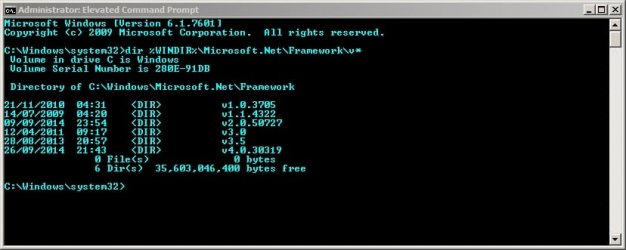
Please open an Elevated Command Prompt

Then type the following:

dir %WINDIR%\Microsoft.Net\Framework\v*

Press Enter.

Post a screenshot of the results.

Net Framework.jpg
 

My Computer My Computer

Computer type
Laptop
Computer Manufacturer/Model Number
ASUS
OS
Microsoft Windows 7 Home Premium 64-bit 7601 Multiprocessor Free Service Pack 1
CPU
AMD C-60 APU with Radeon(tm) HD Graphics
Motherboard
ASUSTeK COMPUTER INC. X501U
Memory
4.00 GB
Graphics Card(s)
AMD Radeon HD 6290 Graphics
Sound Card
(1) AMD High Definition Audio Device (2) Realtek High Defi
Screen Resolution
1366 x 768 x 32 bits (4294967296 colors) @ 60 Hz
Hard Drives
Hitachi HTS545050A7E380 SATA Disk Device
Antivirus
Comodo CIS & FW, SecureAplus App Whitelisting, Threatfire
Browser
Cyberfox 64bit, Opera 64bit, Airfox
Other Info
Spy-The-Spy, HitmanPro.Alert, Norton Connect Safe, MJRegWatcher, BitDefender TrafficLight, Voodoo Shield, Zemana AntiMalware
Thanks for your help. I've attached a screen shot of the elevated command prompt. I also meet the minimum requirements.
 

Attachments

  • command prompt.jpg
    command prompt.jpg
    64 KB · Views: 0

My Computer My Computer

Computer type
PC/Desktop
Computer Manufacturer/Model Number
Home built w/ Asus P8z68-v pro MB
OS
Windows 7 home premium 64bit
CPU
Intel i5-2500 3.3GHz
Motherboard
Asus P8z68-v pro
Memory
4-8GB corsair vengeance 1600mHz 9-9-9-24
Graphics Card(s)
Asus gtx650 ti
Hard Drives
Samsung SSD 840 EVO 250gb
Other storage drives
Antivirus
ESET smart security 6
Photoshop Plugin

Just checking that you've got the required .NET Framework version installed and it looks okay!

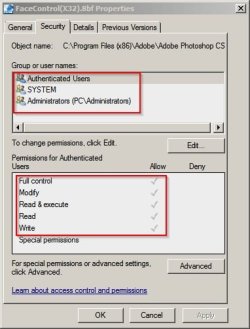
I know little about your plugin but you could try checking permissions to see if they're set like this:

Plugin.jpg

If not - change permissions to match the screenshot.
 

My Computer My Computer

Computer type
Laptop
Computer Manufacturer/Model Number
ASUS
OS
Microsoft Windows 7 Home Premium 64-bit 7601 Multiprocessor Free Service Pack 1
CPU
AMD C-60 APU with Radeon(tm) HD Graphics
Motherboard
ASUSTeK COMPUTER INC. X501U
Memory
4.00 GB
Graphics Card(s)
AMD Radeon HD 6290 Graphics
Sound Card
(1) AMD High Definition Audio Device (2) Realtek High Defi
Screen Resolution
1366 x 768 x 32 bits (4294967296 colors) @ 60 Hz
Hard Drives
Hitachi HTS545050A7E380 SATA Disk Device
Antivirus
Comodo CIS & FW, SecureAplus App Whitelisting, Threatfire
Browser
Cyberfox 64bit, Opera 64bit, Airfox
Other Info
Spy-The-Spy, HitmanPro.Alert, Norton Connect Safe, MJRegWatcher, BitDefender TrafficLight, Voodoo Shield, Zemana AntiMalware
The settings are the same. It looks like it's an issue with the plug in and not windows. I wasn't sure. I've been in contact with their support but they have been of little help. I'm not a computer guru by any means but it seams strange to me that the plug in works fine when I log in as administrator but not when I log in under my regular account. Thanks for your help mate!
 

My Computer My Computer

Computer type
PC/Desktop
Computer Manufacturer/Model Number
Home built w/ Asus P8z68-v pro MB
OS
Windows 7 home premium 64bit
CPU
Intel i5-2500 3.3GHz
Motherboard
Asus P8z68-v pro
Memory
4-8GB corsair vengeance 1600mHz 9-9-9-24
Graphics Card(s)
Asus gtx650 ti
Hard Drives
Samsung SSD 840 EVO 250gb
Other storage drives
Antivirus
ESET smart security 6
Back
Top