Microsoft Office 2010 forum?

Sprog

New member
Local time
5:45 AM
Messages
20
Hi,

Can anyone recommend where I can get good advice (might be a printer issue) for Word 2010?

I'm tearing my hair out with this problem:
I create a template that's 25.4cm by 12.7cm (5"x5" blank greeting card) with 2 columns, stick my photo in one column then print... only my printer insists on printing as if the photo is at the centre of an A4 paper.

Thanks for any advice, I'm in desperate need.
 

My Computer

Computer type
PC/Desktop
Computer Manufacturer/Model Number
Custom build
OS
Windows 7 Pro 64-Bit
CPU
Intel Pentium G3258 CPU Dual Core 3.20GHz, Socket H3 LGA-11
Motherboard
Mod 1150 ASRock Z97 Pro3 ATX
Memory
HyperX Savage 8 GB (2 x 4 GB) 2400 MHz DDR3 CL11 DIMM XMP
Graphics Card(s)
ASUS HD6870 1GB
Monitor(s) Displays
AOC 24"
Screen Resolution
1920 x 1080
Hard Drives
Crucial 240GB SSD
3TB WD HDD
PSU
Fanless
Case
None!
Cooling
Water
Keyboard
MS wireless
Mouse
MS wireless
Internet Speed
160Mbs
Antivirus
AVAST Free
Browser
Firefox & Chrome
Hi,

Lets see if we can fix this. What type of printer are you using? Have you updated the drivers to the latest version?
 

My Computer

Computer type
PC/Desktop
Computer Manufacturer/Model Number
Golden Mk. I.4
OS
Windows 10 Pro x64 ; Xubuntu x64
CPU
Intel i7 860 @ 2.80 GHz O/C'ed to 4.0GHz
Motherboard
Gigabyte P55A-UD3R Rev.1. Award BIOS F13
Memory
16GB Corsair Vengance DDR3 @ 661 MHz Dual Channel (9-9-9-24)
Graphics Card(s)
EVGA NVidia GTX 560 1024MB
Sound Card
Realtek Integrated
Monitor(s) Displays
Dual Samsung SyncMaster 2494HS
Screen Resolution
1920*1080 and 1920*1080
Hard Drives
1*Samsung 840 EVO 120GB SSD;
1*OCZ Vertex 2 60GB SSD;
2*Samsung F3 SpinPoint 1TB in RAID0;
1*Samsung F1 SpinPoint 1TB;
2*Western Digital 1TB External USB 3.0
1*Western Digital 500GB External USB 3.0
1*Seagate 500GB External USB 2.0
PSU
Thermaltake ToughPower QFan 750W
Case
Thermaltake Element S VK60001W2Z
Cooling
Corsair H60 Water Cooling, 2*230mm and 2*80mm case fans
Keyboard
Logitech G110
Mouse
Logitech MX518
Please help, now very urgent!

Thank you and sorry for the late reply, I started this thread before I went to bed!

My printer is an all-in-one HP PSC 750xi (a bit old but very reliable). I don't seem to have any problem printing anything else, just this file.

I don't know if it will help but I've attached the file to see if you can see if I've done anything wrong which is causing my printer to print in the middle of the paper/card so it only prints half the picture. The margins are right up to the edges but that shouldn't be causing the problem.

I've also attached a photo of the printer and what it's doing. The pink arrow points to where the image should have started from.

Thank you.
 

Attachments

Last edited:

My Computer

Computer type
PC/Desktop
Computer Manufacturer/Model Number
Custom build
OS
Windows 7 Pro 64-Bit
CPU
Intel Pentium G3258 CPU Dual Core 3.20GHz, Socket H3 LGA-11
Motherboard
Mod 1150 ASRock Z97 Pro3 ATX
Memory
HyperX Savage 8 GB (2 x 4 GB) 2400 MHz DDR3 CL11 DIMM XMP
Graphics Card(s)
ASUS HD6870 1GB
Monitor(s) Displays
AOC 24"
Screen Resolution
1920 x 1080
Hard Drives
Crucial 240GB SSD
3TB WD HDD
PSU
Fanless
Case
None!
Cooling
Water
Keyboard
MS wireless
Mouse
MS wireless
Internet Speed
160Mbs
Antivirus
AVAST Free
Browser
Firefox & Chrome
Ok. Its almost my bedtime here in Australia, so I'll have a look at this tommorrow. I have an Epson Workforce 325 and use Office2010 so I'll try print that out, and see how we go.
 

My Computer

Computer type
PC/Desktop
Computer Manufacturer/Model Number
Golden Mk. I.4
OS
Windows 10 Pro x64 ; Xubuntu x64
CPU
Intel i7 860 @ 2.80 GHz O/C'ed to 4.0GHz
Motherboard
Gigabyte P55A-UD3R Rev.1. Award BIOS F13
Memory
16GB Corsair Vengance DDR3 @ 661 MHz Dual Channel (9-9-9-24)
Graphics Card(s)
EVGA NVidia GTX 560 1024MB
Sound Card
Realtek Integrated
Monitor(s) Displays
Dual Samsung SyncMaster 2494HS
Screen Resolution
1920*1080 and 1920*1080
Hard Drives
1*Samsung 840 EVO 120GB SSD;
1*OCZ Vertex 2 60GB SSD;
2*Samsung F3 SpinPoint 1TB in RAID0;
1*Samsung F1 SpinPoint 1TB;
2*Western Digital 1TB External USB 3.0
1*Western Digital 500GB External USB 3.0
1*Seagate 500GB External USB 2.0
PSU
Thermaltake ToughPower QFan 750W
Case
Thermaltake Element S VK60001W2Z
Cooling
Corsair H60 Water Cooling, 2*230mm and 2*80mm case fans
Keyboard
Logitech G110
Mouse
Logitech MX518
I see you have it set to 10"x5" on the print setting try to change that.
 

My Computer

Computer Manufacturer/Model Number
SMN-Productions
OS
Windows 7 x86/x64, Server 2008r2, Web Server 2008
CPU
i7 v2 3930K Steping stone 2
Motherboard
ASUS Rampage IV Extreme
Memory
G.SKILL Ripjaws Z Series 32GB
Graphics Card(s)
AMD HD 5770
Monitor(s) Displays
Acer 21" and Samsung 20"
Hard Drives
Patriot Pyro 80GB
PSU
1000 Watt
Case
HAF-X
Cooling
4 Fans
Keyboard
Black Widow Ultimate
I see you have it set to 10"x5" on the print setting try to change that.

That is the actual size of the card. It becomes 5"x5" when I fold it. I used 2 columns and put the photo in one column only which is the face of the greeting card when folded. Don't know if that's the best way of making one!

BTW, It's doing the same thing when I try to print an envelope now, so I'm assumng it'll do that with anything that's not A4 size ...bugger.

Thank you.
 

My Computer

Computer type
PC/Desktop
Computer Manufacturer/Model Number
Custom build
OS
Windows 7 Pro 64-Bit
CPU
Intel Pentium G3258 CPU Dual Core 3.20GHz, Socket H3 LGA-11
Motherboard
Mod 1150 ASRock Z97 Pro3 ATX
Memory
HyperX Savage 8 GB (2 x 4 GB) 2400 MHz DDR3 CL11 DIMM XMP
Graphics Card(s)
ASUS HD6870 1GB
Monitor(s) Displays
AOC 24"
Screen Resolution
1920 x 1080
Hard Drives
Crucial 240GB SSD
3TB WD HDD
PSU
Fanless
Case
None!
Cooling
Water
Keyboard
MS wireless
Mouse
MS wireless
Internet Speed
160Mbs
Antivirus
AVAST Free
Browser
Firefox & Chrome
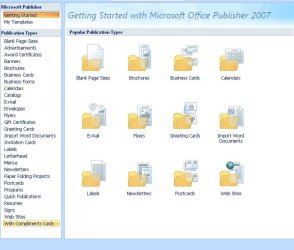
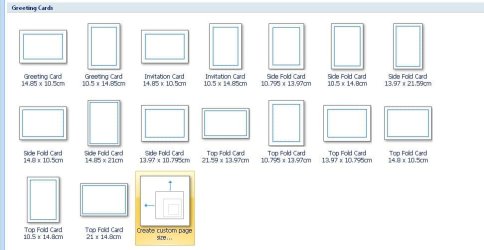
Do you, by chance, have MicroSoft Publisher in your Office Suite? I so, it would be much easier to create a greetings card in there - lots of templates available, e.g....
.
.
 

Attachments

  • Publisher.JPG
    Publisher.JPG
    59.7 KB · Views: 4
  • Publisher Greetings card.JPG
    Publisher Greetings card.JPG
    59.1 KB · Views: 2

My Computer

Computer type
PC/Desktop
Computer Manufacturer/Model Number
Packard Bell
OS
Windows 7 Home Premium 64bit
CPU
Intel(R) Core(TM) i3-2120 CPU @ 3.30GHz
Motherboard
Packard Bell IPISB-AG
Memory
3.00 GB
Graphics Card(s)
(1) Intel(R) HD Graphics (2) VNC Mirror Driver
Sound Card
Realtek High Definition Audio
Monitor(s) Displays
AIO LCD
Screen Resolution
1920 x 1080
Hard Drives
WDC WD10EADX-22TDHB0 ATA Device
Fixed hard disk media
4 partitions
931.51 GB
Keyboard
Wireless
Mouse
Wireless
Antivirus
Microsoft Security Essentials
Browser
IE; Firefox
Other Info
Also:
Samsung N220 Plus Netbook - Windows 7 Home
HP laptop
iPad 5
It looks similar to the problem when the "Fit to picture" option is selected when printing images from Explorer.
 

My Computer

Computer Manufacturer/Model Number
Self-built rig
OS
Win7 Pro x64
CPU
Koa i5-2550K
Memory
8 GB
Graphics Card(s)
Sapphire ATI 6870 1GB GDDR5
Sound Card
RealTek HD Audio / ATI HDMI Audio
Monitor(s) Displays
Samsung HDTV Monitor T23A350
Screen Resolution
1920 x 1080
Hard Drives
- SSD (C:)
- HDD (D:)
- BD-ROM (E:)
Keyboard
Logitech G110
Internet Speed
Unifi home (5mbps)
Back
Top