Microsoft Office 2010

evo74

New member
Local time
3:06 AM
Messages
9
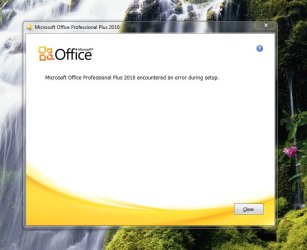
I can't install microsoft office 2010, it just keeps me error at the end... I have try to use windows install clean up, registry cleanup, etc. but it's not working for me... what do I have do to????:confused:
 

My Computer

Computer Manufacturer/Model Number
Asus
OS
Windows 7 Ultimate x64
CPU
Core i7 990X 3.46GHz
Motherboard
Asus RAMPAGE IV EXTREME
Memory
32Gb DDR 3 1600MHz
Graphics Card(s)
nvidia GeForce gtx690 4gb 512bits
Monitor(s) Displays
Samsung wide 23" full hd
Screen Resolution
1920-1080
Hard Drives
2x500Gb ssd
Keyboard
Alienware
Mouse
Alienware
Internet Speed
120Mb/s
What error are you getting?
 

My Computer

Computer Manufacturer/Model Number
MSI
OS
Windows 7 Professional 64bit
CPU
Intel Celeron 2.4 GH
Memory
4 GB
Graphics Card(s)
NVidia GeForce 9800GT
Sound Card
ATI HDMI Audio
Monitor(s) Displays
Acer S231HL Dual Monitors
Hard Drives
Hitachi 300GB ATA
Maxtor 300GB USB
Cooling
Standard
Keyboard
Logitech wireless
Mouse
Logitech wireless
Internet Speed
Cable
Please specify the error, then me and roban can help you with your problem.

Thanks,

Harry
 

My Computer

Computer type
Laptop
i get this error:
 

Attachments

  • microsoft office.jpg
    microsoft office.jpg
    67.8 KB · Views: 26

My Computer

Computer Manufacturer/Model Number
Asus
OS
Windows 7 Ultimate x64
CPU
Core i7 990X 3.46GHz
Motherboard
Asus RAMPAGE IV EXTREME
Memory
32Gb DDR 3 1600MHz
Graphics Card(s)
nvidia GeForce gtx690 4gb 512bits
Monitor(s) Displays
Samsung wide 23" full hd
Screen Resolution
1920-1080
Hard Drives
2x500Gb ssd
Keyboard
Alienware
Mouse
Alienware
Internet Speed
120Mb/s
Hi,

I would suggest running windows updates on your system before installing Microsoft office, as there could be possibility that some updates might be pending. You may need to set Windows Update to “Automatically Download” and install recommended updates. Installing any important, recommended, and optional updates can update system features and other software that might help to fix this issue.

If the issue still persists, then try renaming the ‘Microsoft Help’ folder and then install Office.
Follow the steps given below to rename the Microsoft Help Folder:
1. Click on Start > All Programs > Accessories > Run > Type %Programdata% and Click OK
2. Rename the 'Microsoft Help' folder as 'Microsoft Help. OLD'
3. Now try installing Office and check if it works.

Also would suggest you to restart the computer in clean bootand then try to install Office. Some non-Microsoft services might be interfering with the installation process. Ensure to restart the computer in normal mode after troubleshooting.
 

My Computer

OS
Windows 7 Enterprise x64
Hi,

I would suggest running windows updates on your system before installing Microsoft office, as there could be possibility that some updates might be pending. You may need to set Windows Update to “Automatically Download” and install recommended updates. Installing any important, recommended, and optional updates can update system features and other software that might help to fix this issue.

If the issue still persists, then try renaming the ‘Microsoft Help’ folder and then install Office.
Follow the steps given below to rename the Microsoft Help Folder:
1. Click on Start > All Programs > Accessories > Run > Type %Programdata% and Click OK
2. Rename the 'Microsoft Help' folder as 'Microsoft Help. OLD'
3. Now try installing Office and check if it works.

Also would suggest you to restart the computer in clean bootand then try to install Office. Some non-Microsoft services might be interfering with the installation process. Ensure to restart the computer in normal mode after troubleshooting.

Dosen't Work!!! :cry:
 

My Computer

Computer Manufacturer/Model Number
Asus
OS
Windows 7 Ultimate x64
CPU
Core i7 990X 3.46GHz
Motherboard
Asus RAMPAGE IV EXTREME
Memory
32Gb DDR 3 1600MHz
Graphics Card(s)
nvidia GeForce gtx690 4gb 512bits
Monitor(s) Displays
Samsung wide 23" full hd
Screen Resolution
1920-1080
Hard Drives
2x500Gb ssd
Keyboard
Alienware
Mouse
Alienware
Internet Speed
120Mb/s

My Computer

Computer Manufacturer/Model Number
Asus
OS
Windows 7 Ultimate x64
CPU
Core i7 990X 3.46GHz
Motherboard
Asus RAMPAGE IV EXTREME
Memory
32Gb DDR 3 1600MHz
Graphics Card(s)
nvidia GeForce gtx690 4gb 512bits
Monitor(s) Displays
Samsung wide 23" full hd
Screen Resolution
1920-1080
Hard Drives
2x500Gb ssd
Keyboard
Alienware
Mouse
Alienware
Internet Speed
120Mb/s
Where did you get Office 2010 Pro?

i buy it from microsoft... i did get the same error a while ago but i could install it with simply just using windows install cleanup utility, registry deleting and folder renaming...:mad::mad::mad:
 

My Computer

Computer Manufacturer/Model Number
Asus
OS
Windows 7 Ultimate x64
CPU
Core i7 990X 3.46GHz
Motherboard
Asus RAMPAGE IV EXTREME
Memory
32Gb DDR 3 1600MHz
Graphics Card(s)
nvidia GeForce gtx690 4gb 512bits
Monitor(s) Displays
Samsung wide 23" full hd
Screen Resolution
1920-1080
Hard Drives
2x500Gb ssd
Keyboard
Alienware
Mouse
Alienware
Internet Speed
120Mb/s
Is your version of windows 7 or vista a legitimate copy?
 

My Computer

OS
Windows XP and Windows 7 32 bit
Why don't you try installing the Office 2010 in a different pc to check whether the installation media is corrupted.
You said you had an earlier problem with this copy of Office. Why didn't you contact Microsoft personnel that moment? It would have been easier I think. check this link for microsoft terms to warranty claim MICROSOFT SOFTWARE LICENSE TERMS
 

My Computer

Computer type
PC/Desktop
Computer Manufacturer/Model Number
Intel
OS
Windows 7 Ultimate 32bit
its weird, i had the same problem few weeks ago. i clean installed windows 7 on my laptop and tried installing office 2010 but i got the same error. (it worked before i did clean install). SO, i clean installed one of my desktop using the SAME windows CD and MS office 2010. guess what, it worked! i dont know what the problem is on my laptop. its so random.. so i just installed office 2007 on my laptop.. :(
 

My Computer

OS
windows 7
Back
Top