
 When I sent a message and when I was using Microsoft Office Outlook 2003, I had an option that enabled me to add a photo following or preceding my text. This option enabled me to put a photo in the text area and place text under or above the photo explaining the photo. I am now running Microsoft Office Outlook 2007 using Windows Home Premium 64 bit and I cannot find this option. If this is no longer an option, how can I place a photo in the text area and then follow with text explaining the photo? If this is not possible, I guess this new version is a downgrade!
 Thanks in advance and I will appreciate an answer.
Last edited:
My Computer
At a glance
Windows 7 Home Premium 64 bit3.1 gigahertz AMD Phenom II X4 9454 gigabytesATI Radeon HD 4200
- Computer Manufacturer/Model Number
- FMGW
- OS
- Windows 7 Home Premium 64 bit
- CPU
- 3.1 gigahertz AMD Phenom II X4 945
- Motherboard
- ASUSTeK Computer INC. M4A785-M Rev X.ox
- Memory
- 4 gigabytes
- Graphics Card(s)
- ATI Radeon HD 4200
- Monitor(s) Displays
- ASUS VH236H 23.4 inch
- Hard Drives
- Segate 500 Gig.


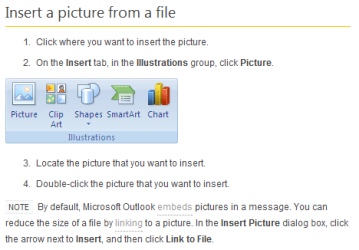

 Irene, I clicked on the URL "

