Microsoft Office Problem

awenthol

Pretending to be a Poser
Power User
Local time
5:19 PM
Messages
147
Not sure if this is the right forum for this, but it seemed like a best fit....

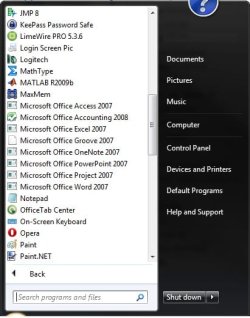
For the second time, I have lost my icons for my Office shortcuts/apps. That is, both the start menu and the "C:\Programs" folder show nothing. I noticed this the second time after the use of Restorator and it's possible it happened before, after it, but I didn't pay any attention. Anyone know what the deal is??? I had to reinstall to get them to show up again. (Knock on wood) This time they still show icons in the task bar, though last time they would not.

Is it possible Restorator keeps doing this or maybe something else???
 

Attachments
  • Start_Menu.jpg
    Start_Menu.jpg
    33.6 KB · Views: 44

My Computer My Computer

At a glance

7 Pro x64Intel Core i7-640M8GBGT330M
Computer Manufacturer/Model Number
Sony VPCZ1390X CTO
OS
7 Pro x64
CPU
Intel Core i7-640M
Motherboard
Sony/Intel
Memory
8GB
Graphics Card(s)
GT330M
Monitor(s) Displays
Built-in 13" + 24" LG Flatron
Screen Resolution
1920x1080, 1920x1080
Hard Drives
Internal-2x128GB SSD (Raid 0), 500GB WD Caviar Green
External- 3TB WD
Keyboard
Logitech Illuminated
Mouse
Logitech Performance MX
Internet Speed
7 MB -- Sprint Overdrive on 4G
Other Info
Sprint EVO 3D (Synergy 2.3.4)
you might have a virus/malware on board that keeps modifying your files

check for spyware and all sorts and uninstall your office from control panel, reboot and install a fresh new copy

assuming that you have sanitized your hard drive ;-)
 

My Computer My Computer

At a glance

windows 7 64bitp86002x2gb samsung hynix ddr2 800intel g4500 chipset
Computer Manufacturer/Model Number
dell latitude e6400
OS
windows 7 64bit
CPU
p8600
Motherboard
dell
Memory
2x2gb samsung hynix ddr2 800
Graphics Card(s)
intel g4500 chipset
Hard Drives
seagate 7200 rpm 500gb
I just recently did a clean install on a new hard drive (6 days ago?). I'm running a spyware/virus/etc scan right now but don't really think that's what it is....
 

My Computer My Computer

At a glance

7 Pro x64Intel Core i7-640M8GBGT330M
Computer Manufacturer/Model Number
Sony VPCZ1390X CTO
OS
7 Pro x64
CPU
Intel Core i7-640M
Motherboard
Sony/Intel
Memory
8GB
Graphics Card(s)
GT330M
Monitor(s) Displays
Built-in 13" + 24" LG Flatron
Screen Resolution
1920x1080, 1920x1080
Hard Drives
Internal-2x128GB SSD (Raid 0), 500GB WD Caviar Green
External- 3TB WD
Keyboard
Logitech Illuminated
Mouse
Logitech Performance MX
Internet Speed
7 MB -- Sprint Overdrive on 4G
Other Info
Sprint EVO 3D (Synergy 2.3.4)
I get that problem too with certain icons. It takes about 25 to 30 seconds before the icons will render. It happens with 3 programs (not Office).

One possible cause is if you removed the installer files for Office from C:\Windows\Installer\...

Have you tried right clicking each icon and changing it? Right click, properties, change icon: browse to the executable location and select it.
 

My Computer My Computer

At a glance

Windows 7 Ultimate (x86)Intel 2.20 Dual Core4 GBnVidia 9400 GT (512 MB)
Computer Manufacturer/Model Number
Dell Dimension E520
OS
Windows 7 Ultimate (x86)
CPU
Intel 2.20 Dual Core
Memory
4 GB
Graphics Card(s)
nVidia 9400 GT (512 MB)
Sound Card
Sigmatel C Major HD
Monitor(s) Displays
22" Samsung 2232 bw
Screen Resolution
1680x1050
Mouse
Microsoft Arc
Other Info
Wacom Graphire 4 (6x8) Tablet
then, maybe, it's your installation files or the source of your installation files. is your office modified or custom installed not from microsoft? it might have a worm or spyware....
 

My Computer My Computer

At a glance

windows 7 64bitp86002x2gb samsung hynix ddr2 800intel g4500 chipset
Computer Manufacturer/Model Number
dell latitude e6400
OS
windows 7 64bit
CPU
p8600
Motherboard
dell
Memory
2x2gb samsung hynix ddr2 800
Graphics Card(s)
intel g4500 chipset
Hard Drives
seagate 7200 rpm 500gb
I had the same problem and the conclusion was that i used System Restore. Did you used System Restore ? If yes try Tune Up Utilities it has an utility to restore the default icons see that will help you. I installed a new fresh copy on windows 7 and my problems were gone.
 

My Computer My Computer

At a glance

Windows 7
OS
Windows 7
I did System Restore to initially get everything back to normal but it's happening again. I've been creating new shortcuts to remedy the situation but doesn't get at the heart of the problem...

It's not a rendering issue and I really don't think I have any viruses/worms/etc, as a scan came back negative.
 

My Computer My Computer

At a glance

7 Pro x64Intel Core i7-640M8GBGT330M
Computer Manufacturer/Model Number
Sony VPCZ1390X CTO
OS
7 Pro x64
CPU
Intel Core i7-640M
Motherboard
Sony/Intel
Memory
8GB
Graphics Card(s)
GT330M
Monitor(s) Displays
Built-in 13" + 24" LG Flatron
Screen Resolution
1920x1080, 1920x1080
Hard Drives
Internal-2x128GB SSD (Raid 0), 500GB WD Caviar Green
External- 3TB WD
Keyboard
Logitech Illuminated
Mouse
Logitech Performance MX
Internet Speed
7 MB -- Sprint Overdrive on 4G
Other Info
Sprint EVO 3D (Synergy 2.3.4)
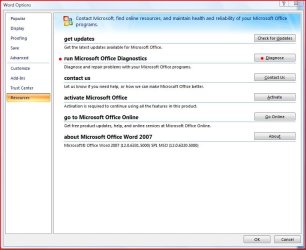
Open any office program, click the orb in the upper left corner, click whatever Options (ex: "Excel Options"), click "Resources", look for "run Micorsoft Office Diagnostics" and click Diagnose, when the "Is Micorsoft Office having problems" box appears click continue and it will run the repair and should fix your shortcuts as well.

Office diagnostics.JPG

Let us know what happens. Good luck.
 

My Computer My Computer

At a glance

Windows 10 ProIntel Core i7-4770K (3.5Ghz)32 gig Corsair Dominator Platinum (4x8Gig)Sapphire Tri-X R9 Fury
Computer type
PC/Desktop
Computer Manufacturer/Model Number
Custom built by me.
OS
Windows 10 Pro
CPU
Intel Core i7-4770K (3.5Ghz)
Motherboard
Gigabyte G1 Sniper 5 (F10 Bios)
Memory
32 gig Corsair Dominator Platinum (4x8Gig)
Graphics Card(s)
Sapphire Tri-X R9 Fury
Sound Card
Soundblaster ZXR
Monitor(s) Displays
NEC PA242W 24" LCD Monitor
Screen Resolution
1920 x 1200
Hard Drives
Primary - Samsung 850 Pro (512gig), Samsung 840 Pro (256gig), 2TB WD Caviar Black.
PSU
EVGA Supernova 1000 G2
Case
Cooler Master HAF X
Cooling
Corsair H100i with Corsair Air Series SP120 Quiet Fans
Keyboard
Logitech Wireless Wave
Mouse
Logitech Performance MX
Internet Speed
High Speed Cable
Antivirus
Norton Security
Browser
IE11
Other Info
Memory Timings - 1866MHz @ 9-9-9-27-1T @ 1.5 volts
Open any office program, click the orb in the upper left corner, click whatever Options (ex: "Excel Options"), click "Resources", look for "run Micorsoft Office Diagnostics" and click Diagnose, when the "Is Micorsoft Office having problems" box appears click continue and it will run the repair and should fix your shortcuts as well.

View attachment 36055

Let us know what happens. Good luck.

I tried diagnostics before the restore...just made everything worse.

I've found quite a few threads on this. Apparently there's a bug in the OS that is causing many people problems with this...
 

My Computer My Computer

At a glance

7 Pro x64Intel Core i7-640M8GBGT330M
Computer Manufacturer/Model Number
Sony VPCZ1390X CTO
OS
7 Pro x64
CPU
Intel Core i7-640M
Motherboard
Sony/Intel
Memory
8GB
Graphics Card(s)
GT330M
Monitor(s) Displays
Built-in 13" + 24" LG Flatron
Screen Resolution
1920x1080, 1920x1080
Hard Drives
Internal-2x128GB SSD (Raid 0), 500GB WD Caviar Green
External- 3TB WD
Keyboard
Logitech Illuminated
Mouse
Logitech Performance MX
Internet Speed
7 MB -- Sprint Overdrive on 4G
Other Info
Sprint EVO 3D (Synergy 2.3.4)
Hmmm...I'm using Office 2007 Enterprise Edition without issue. In fact i'm in word, excel and outlook at this very moment.

Have you downloaded the patches and service packs (SP2) yet?

Also what version of Windows 7 are you using? Are you using the retail version or the pre-release? That could be an issue. I'm using the retail version of Windows 7 Ultimate (x64).
 

My Computer My Computer

At a glance

Windows 10 ProIntel Core i7-4770K (3.5Ghz)32 gig Corsair Dominator Platinum (4x8Gig)Sapphire Tri-X R9 Fury
Computer type
PC/Desktop
Computer Manufacturer/Model Number
Custom built by me.
OS
Windows 10 Pro
CPU
Intel Core i7-4770K (3.5Ghz)
Motherboard
Gigabyte G1 Sniper 5 (F10 Bios)
Memory
32 gig Corsair Dominator Platinum (4x8Gig)
Graphics Card(s)
Sapphire Tri-X R9 Fury
Sound Card
Soundblaster ZXR
Monitor(s) Displays
NEC PA242W 24" LCD Monitor
Screen Resolution
1920 x 1200
Hard Drives
Primary - Samsung 850 Pro (512gig), Samsung 840 Pro (256gig), 2TB WD Caviar Black.
PSU
EVGA Supernova 1000 G2
Case
Cooler Master HAF X
Cooling
Corsair H100i with Corsair Air Series SP120 Quiet Fans
Keyboard
Logitech Wireless Wave
Mouse
Logitech Performance MX
Internet Speed
High Speed Cable
Antivirus
Norton Security
Browser
IE11
Other Info
Memory Timings - 1866MHz @ 9-9-9-27-1T @ 1.5 volts

My Computer My Computer

At a glance

Windows 7 Enterprise (x64); Windows Server 20...16GB
Computer type
PC/Desktop
Computer Manufacturer/Model Number
Dell OP7010
OS
Windows 7 Enterprise (x64); Windows Server 2008 R2 (x64)
Memory
16GB
Monitor(s) Displays
4 Dell 24" LCD
Screen Resolution
1280x1024
Keyboard
Dell
Mouse
Dell Optical
Internet Speed
40meg
Back
Top