Solved Microsoft Office Professional Plus 2013 (Outlook)

squirtmph

New member
Member
VIP
Local time
9:35 PM
Messages
235
Location
PDX
I'm have a problem sending or receiving emails from Outlook 2013

I will be posting image from the problem I'm experience


Thank you!


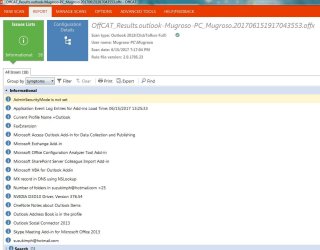
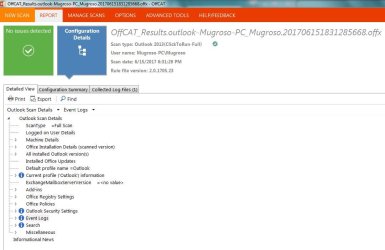
(Last Scan)
 

Attachments
  • Microsoft Office REPORT 2A OffCAT.JPG
    Microsoft Office REPORT 2A OffCAT.JPG
    69.1 KB · Views: 1
  • Microsoft Office REPORT 3A OffCAT.JPG
    Microsoft Office REPORT 3A OffCAT.JPG
    27.6 KB · Views: 25
  • Microsoft Office REPORT 4A OffCAT.JPG
    Microsoft Office REPORT 4A OffCAT.JPG
    82.4 KB · Views: 1

My Computer My Computer

Computer type
Laptop
Computer Manufacturer/Model Number
Azure Blade 15.6
OS
Windows 10 Pro Version 22H2 64-bit Edition
CPU
Intel(R) Core(TM) i7-10875H CPU @ 2.30GHz 2.30 GHz
Memory
2.0 GB (31.8 GB usable)
Monitor(s) Displays
4K UHD OLED TOUCH
Screen Resolution
3840 x 2160
Hard Drives
1 TB
Mouse
Logitech MX Master 3S
Antivirus
Windows Security
Browser
Google Chrome
Other Info
______________________________________________


______________________________________________
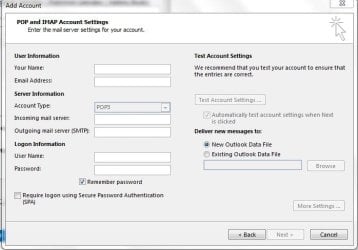
It seems that the problem might be to do with your email account settings. Could you provide more details on those, such as are you in an work office situation & are you connected to an office network. If this is the case have you contacted the office IT section for help.
 

My Computer My Computer

Computer type
PC/Desktop
Computer Manufacturer/Model Number
Self built using existing case
OS
Windows 7 Home Premium 64 bit sp1
CPU
Intel i5 3570 3.4Ghz Ivy Bridge SKT 1155 quad core
Motherboard
Gigabyte Z77-HD3 SKT 1155 2xSata 3, 4x USB 3.0
Memory
G-Skill Rip Jaws 16Gb (8x2) DDR3 -1600 PC3 12800 CL 10 red
Graphics Card(s)
Gigabyte NVIDIA GT610 1Gb DDR3 810/1200 PCI-E 2.0 Silent
Sound Card
NVIDIA High Definition & Realtech High Definition Audio
Monitor(s) Displays
2 x Philips 226V4L 16:9 aspect ratio
Screen Resolution
1920 x 1080 HD
Hard Drives
Samsung 840 Pro 256gb SSD, SATA 3.
Hitachi Touro Portable 1tb, USB 3.0 HDD used for image b/ups.
PSU
Corsair VS450
Case
Codeng
Cooling
PSU fan & CPU fan
Keyboard
Logitech
Mouse
Logitech Wireless trackball M570
Internet Speed
Wireless 3G. 3mg down & 550kb up.
Antivirus
Bitdefender Internet Security 2020
Browser
Opera (Current Version) & Firefox
Other Info
MS Office 2013 Pro. Davis weather station software. MGE Nova 600 avr UPS.
Hi, thanks for you help

I'm not in work Network.
I'm away from PC, can't respond back to you what setting I use.
Thanks from you help
 

My Computer My Computer

Computer type
Laptop
Computer Manufacturer/Model Number
Azure Blade 15.6
OS
Windows 10 Pro Version 22H2 64-bit Edition
CPU
Intel(R) Core(TM) i7-10875H CPU @ 2.30GHz 2.30 GHz
Memory
2.0 GB (31.8 GB usable)
Monitor(s) Displays
4K UHD OLED TOUCH
Screen Resolution
3840 x 2160
Hard Drives
1 TB
Mouse
Logitech MX Master 3S
Antivirus
Windows Security
Browser
Google Chrome
Other Info
______________________________________________


______________________________________________
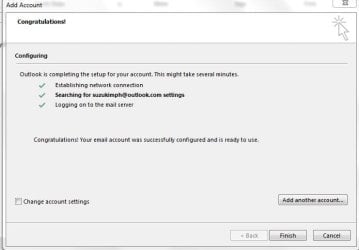
Here is the tutorial where I got it from

Here is the video link where I got it from Ranger4

Please view from video-clip count 2:32Min
I use those settings

and in the end i did get green check mark


Thank you for you help to my question

https://www.youtube.com/watch?v=i4g5gAVKRM4&t=12s
 

My Computer My Computer

Computer type
Laptop
Computer Manufacturer/Model Number
Azure Blade 15.6
OS
Windows 10 Pro Version 22H2 64-bit Edition
CPU
Intel(R) Core(TM) i7-10875H CPU @ 2.30GHz 2.30 GHz
Memory
2.0 GB (31.8 GB usable)
Monitor(s) Displays
4K UHD OLED TOUCH
Screen Resolution
3840 x 2160
Hard Drives
1 TB
Mouse
Logitech MX Master 3S
Antivirus
Windows Security
Browser
Google Chrome
Other Info
______________________________________________

______________________________________________
Will wait until you have returned to the computer in question. I also notice that you are using a Hotmail account. MS have made changes to a lot of those accounts so you may have to switch over to using Outlook.com as your provider. I had problems with Live.com which was also a MS email account provider & I had to change my Outlook 2013 over to Outlook.com. Outlook.com is not part of Outlook 2013, which makes it confusing.

Outlook.com is the email account provider & Outlook 2013 is an email software program & Outlook.com can be used with other email software programs.

OffCat is not reporting any issues, so email account settings are the most likely problem areas.

This MS website might help you with changing your email account settings for switching to Outlook.com.\

Upgrade from Hotmail to Outlook.com - Office Blogs
 

My Computer My Computer

Computer type
PC/Desktop
Computer Manufacturer/Model Number
Self built using existing case
OS
Windows 7 Home Premium 64 bit sp1
CPU
Intel i5 3570 3.4Ghz Ivy Bridge SKT 1155 quad core
Motherboard
Gigabyte Z77-HD3 SKT 1155 2xSata 3, 4x USB 3.0
Memory
G-Skill Rip Jaws 16Gb (8x2) DDR3 -1600 PC3 12800 CL 10 red
Graphics Card(s)
Gigabyte NVIDIA GT610 1Gb DDR3 810/1200 PCI-E 2.0 Silent
Sound Card
NVIDIA High Definition & Realtech High Definition Audio
Monitor(s) Displays
2 x Philips 226V4L 16:9 aspect ratio
Screen Resolution
1920 x 1080 HD
Hard Drives
Samsung 840 Pro 256gb SSD, SATA 3.
Hitachi Touro Portable 1tb, USB 3.0 HDD used for image b/ups.
PSU
Corsair VS450
Case
Codeng
Cooling
PSU fan & CPU fan
Keyboard
Logitech
Mouse
Logitech Wireless trackball M570
Internet Speed
Wireless 3G. 3mg down & 550kb up.
Antivirus
Bitdefender Internet Security 2020
Browser
Opera (Current Version) & Firefox
Other Info
MS Office 2013 Pro. Davis weather station software. MGE Nova 600 avr UPS.
Thanks for getting back & the reference to the YouTube video. The problem is that video was made in March 2014 & all the changes MS has made to Hotmail & other MS email services were change in 2016 & 2017, so it's really out of date.

The reference I provided in Post#5 should point you in the right direction.

It seems that our chatter has crossed paths & we are on this Forum together.
 

My Computer My Computer

Computer type
PC/Desktop
Computer Manufacturer/Model Number
Self built using existing case
OS
Windows 7 Home Premium 64 bit sp1
CPU
Intel i5 3570 3.4Ghz Ivy Bridge SKT 1155 quad core
Motherboard
Gigabyte Z77-HD3 SKT 1155 2xSata 3, 4x USB 3.0
Memory
G-Skill Rip Jaws 16Gb (8x2) DDR3 -1600 PC3 12800 CL 10 red
Graphics Card(s)
Gigabyte NVIDIA GT610 1Gb DDR3 810/1200 PCI-E 2.0 Silent
Sound Card
NVIDIA High Definition & Realtech High Definition Audio
Monitor(s) Displays
2 x Philips 226V4L 16:9 aspect ratio
Screen Resolution
1920 x 1080 HD
Hard Drives
Samsung 840 Pro 256gb SSD, SATA 3.
Hitachi Touro Portable 1tb, USB 3.0 HDD used for image b/ups.
PSU
Corsair VS450
Case
Codeng
Cooling
PSU fan & CPU fan
Keyboard
Logitech
Mouse
Logitech Wireless trackball M570
Internet Speed
Wireless 3G. 3mg down & 550kb up.
Antivirus
Bitdefender Internet Security 2020
Browser
Opera (Current Version) & Firefox
Other Info
MS Office 2013 Pro. Davis weather station software. MGE Nova 600 avr UPS.
I also have a hotmail account. As Ranger4 poited out, Microsft updated the connector in in Late 2016. You should have recevied an email with instructions on what yiumust do.

FYI: hotmail is ubder the the outlook.com umbrella of services.

Email subject line:

Reconnect Outlook 2016/2013 to Outlook.com for uninterrupted email access

Message:

[FONT=&quot]Dear Outlook.com customer,

[/FONT]
[FONT=&quot]Earlier this year, Microsoft introduced the new Outlook.com, which provides a business-class email experience to help you stay connected and get more done. Now that you have been upgraded to the new Outlook.com, it’s necessary that you reconnect Outlook 2016 or Outlook 2013 to your Outlook.com account. As someone who has an Outlook.com email account connected to a desktop version of Outlook 2016 or Outlook 2013, you’re receiving this final reminder because you have not yet reconnected your account. [/FONT][FONT=&quot]What to do[/FONT][FONT=&quot]: Reconnect your desktop version of Outlook to your Outlook.com account to ensure uninterrupted email access. If you do not reconnect your account, your Outlook.com emails will soon stop syncing to Outlook 2016 and Outlook 2013. Once you reconnect, your Outlook.com emails will resume syncing to your desktop version of Outlook. [/FONT][FONT=&quot]For detailed instructions and help on how to reconnect your account, please visit the official Microsoft support website at https://go.microsoft.com/fwlink/?linkid=837697. [/FONT][FONT=&quot]Note that this change only affects any Outlook.com accounts you are accessing via Outlook 2016 or Outlook 2013; you do not need to reconnect to your other email accounts, such as Office 365, Exchange, or other third party email accounts. You can also continue to send, receive, and access email from your Outlook.com account on the web via any popular web browser[/FONT][FONT=&quot]We recognize that reconnecting your account is inconvenient, but this step will ensure that you are able to take full advantage of the new Outlook.com over a more secure and reliable infrastructure. If you have any questions not answered by the support article above, please contact customer support at: https://support.office.com/home/chat.
[/FONT]
[FONT=&quot]
Thank you for being an Outlook.com customer, [/FONT]
[FONT=&quot]
The Outlook.com team [/FONT]

[FONT=&quot]


[/FONT]
[FONT=&quot]FAQ: [/FONT]
[FONT=&quot]Q. What happens if I don’t reconnect Outlook 2016 or Outlook 2013 to Outlook.com? [/FONT]
[FONT=&quot]A. Your Outlook.com emails will soon stop syncing to Outlook 2016 or Outlook 2013 until you reconnect your account. You will still be able to access your Outlook.com emails via a web browser at any time. [/FONT]
[FONT=&quot]Q. Do I need to reconnect Outlook 2016 or Outlook 2013 to any non-Outlook.com accounts (Exchange, Office 365, Gmail, etc.)? [/FONT]
[FONT=&quot]A. No, you only need to reconnect Outlook 2016 or Outlook 2013 to your Outlook.com accounts. [/FONT]
[FONT=&quot]Q. Where can I get help if I have trouble reconnecting Outlook 2016 or Outlook 2013 to my Outlook.com account? [/FONT]
[FONT=&quot]A. For detailed step-by-step instructions, please refer to the help article at https://go.microsoft.com/fwlink/?linkid=837697. If you have any questions not answered by the support article above, please contact customer support at https://support.office.com/home/chat. [/FONT]
 

My Computer My Computer

OS
Windows 7 Ultimate x64
Guys I still don't have any success, how to setup outlook.
from the main port

I was available to create finally alias outloock


Q1. I needed to remove old email setup from outlook (@hotmal)
Q2. and replace it with outlook.com
Q3. Should I follow this settings?
https://www.outlook-apps.com/outlook-com-pop-settings/


Thank you very much for all information posted to my question
 

Attachments

  • Outloock Settings.JPG
    Outloock Settings.JPG
    42.3 KB · Views: 14
  • Outloock Settings delete account.JPG
    Outloock Settings delete account.JPG
    38.5 KB · Views: 13

My Computer My Computer

Computer type
Laptop
Computer Manufacturer/Model Number
Azure Blade 15.6
OS
Windows 10 Pro Version 22H2 64-bit Edition
CPU
Intel(R) Core(TM) i7-10875H CPU @ 2.30GHz 2.30 GHz
Memory
2.0 GB (31.8 GB usable)
Monitor(s) Displays
4K UHD OLED TOUCH
Screen Resolution
3840 x 2160
Hard Drives
1 TB
Mouse
Logitech MX Master 3S
Antivirus
Windows Security
Browser
Google Chrome
Other Info
______________________________________________


______________________________________________
Don't try & set it up using POP3 or other information, follow this MS website to help you set it up.

Add your Outlook.com account in Outlook for Windows - Outlook

The main reason for setting up your email account using the above method is that you don't have to change your email address, as you can continue to use your existing one. Thus saving you having to notify all your contacts.
 

My Computer My Computer

Computer type
PC/Desktop
Computer Manufacturer/Model Number
Self built using existing case
OS
Windows 7 Home Premium 64 bit sp1
CPU
Intel i5 3570 3.4Ghz Ivy Bridge SKT 1155 quad core
Motherboard
Gigabyte Z77-HD3 SKT 1155 2xSata 3, 4x USB 3.0
Memory
G-Skill Rip Jaws 16Gb (8x2) DDR3 -1600 PC3 12800 CL 10 red
Graphics Card(s)
Gigabyte NVIDIA GT610 1Gb DDR3 810/1200 PCI-E 2.0 Silent
Sound Card
NVIDIA High Definition & Realtech High Definition Audio
Monitor(s) Displays
2 x Philips 226V4L 16:9 aspect ratio
Screen Resolution
1920 x 1080 HD
Hard Drives
Samsung 840 Pro 256gb SSD, SATA 3.
Hitachi Touro Portable 1tb, USB 3.0 HDD used for image b/ups.
PSU
Corsair VS450
Case
Codeng
Cooling
PSU fan & CPU fan
Keyboard
Logitech
Mouse
Logitech Wireless trackball M570
Internet Speed
Wireless 3G. 3mg down & 550kb up.
Antivirus
Bitdefender Internet Security 2020
Browser
Opera (Current Version) & Firefox
Other Info
MS Office 2013 Pro. Davis weather station software. MGE Nova 600 avr UPS.
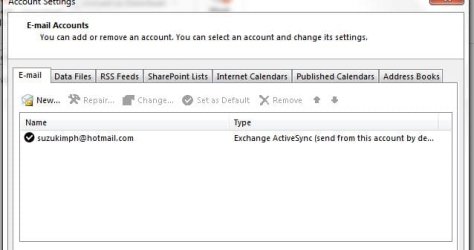
suzukimph@outlook Double

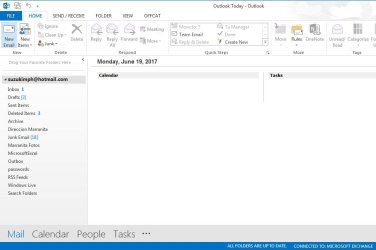
I like to say everything has being worked so far as you can see from photo images posted, allow me to thank you first, please.


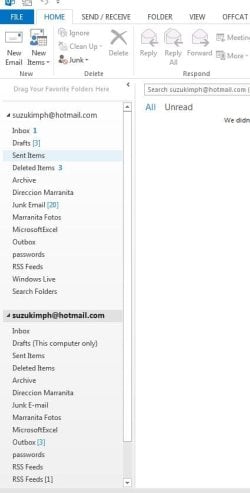
Q1. I still have two nor multiple account!
would that be safe to delete below account (empty) INBOX mail?
Q2. If I delete it, there is not way to know, from settings (user)!
Q3. still on testing status!

working 100%

Thank you for continue coming back to support to all my questions!

Happy father day, to you!
 

Attachments

Last edited:

My Computer My Computer

Computer type
Laptop
Computer Manufacturer/Model Number
Azure Blade 15.6
OS
Windows 10 Pro Version 22H2 64-bit Edition
CPU
Intel(R) Core(TM) i7-10875H CPU @ 2.30GHz 2.30 GHz
Memory
2.0 GB (31.8 GB usable)
Monitor(s) Displays
4K UHD OLED TOUCH
Screen Resolution
3840 x 2160
Hard Drives
1 TB
Mouse
Logitech MX Master 3S
Antivirus
Windows Security
Browser
Google Chrome
Other Info
______________________________________________


______________________________________________
Glad to hear you are up & running. I see you still have 3 items in your Outbox on the lower one of your hotmail addresses. You may wish to clear those before removing it. I think if you right click the mouse on the not needed one you can select Remove. However, check your contact list to see which account they are stored under & if you use the Address Book which I do you will need to check that as well.

You can also check your contact list by selecting the People tab at the LH bottom when in the normal Outlook view. You should have the one that you have just set up as the default one & being the default it will be the top listing in the normal Outlook view.

Also check in File, Account Settings to make sure you have the correct hotmail account selected as the Default one.

If you still have any queries get back for more help.
 

My Computer My Computer

Computer type
PC/Desktop
Computer Manufacturer/Model Number
Self built using existing case
OS
Windows 7 Home Premium 64 bit sp1
CPU
Intel i5 3570 3.4Ghz Ivy Bridge SKT 1155 quad core
Motherboard
Gigabyte Z77-HD3 SKT 1155 2xSata 3, 4x USB 3.0
Memory
G-Skill Rip Jaws 16Gb (8x2) DDR3 -1600 PC3 12800 CL 10 red
Graphics Card(s)
Gigabyte NVIDIA GT610 1Gb DDR3 810/1200 PCI-E 2.0 Silent
Sound Card
NVIDIA High Definition & Realtech High Definition Audio
Monitor(s) Displays
2 x Philips 226V4L 16:9 aspect ratio
Screen Resolution
1920 x 1080 HD
Hard Drives
Samsung 840 Pro 256gb SSD, SATA 3.
Hitachi Touro Portable 1tb, USB 3.0 HDD used for image b/ups.
PSU
Corsair VS450
Case
Codeng
Cooling
PSU fan & CPU fan
Keyboard
Logitech
Mouse
Logitech Wireless trackball M570
Internet Speed
Wireless 3G. 3mg down & 550kb up.
Antivirus
Bitdefender Internet Security 2020
Browser
Opera (Current Version) & Firefox
Other Info
MS Office 2013 Pro. Davis weather station software. MGE Nova 600 avr UPS.
Thank you RANGER4

for helping out from the begging

Hope everything was on you expectation on father day


Thank's again!!
 

Attachments

  • Outlook Update.JPG
    Outlook Update.JPG
    50.2 KB · Views: 1

My Computer My Computer

Computer type
Laptop
Computer Manufacturer/Model Number
Azure Blade 15.6
OS
Windows 10 Pro Version 22H2 64-bit Edition
CPU
Intel(R) Core(TM) i7-10875H CPU @ 2.30GHz 2.30 GHz
Memory
2.0 GB (31.8 GB usable)
Monitor(s) Displays
4K UHD OLED TOUCH
Screen Resolution
3840 x 2160
Hard Drives
1 TB
Mouse
Logitech MX Master 3S
Antivirus
Windows Security
Browser
Google Chrome
Other Info
______________________________________________


______________________________________________
You are welcome & glad to hear all is working for you.

Thanks for your Father's Day best wishes, which is appreciated, but we celebrate Father's Day in September.
 

My Computer My Computer

Computer type
PC/Desktop
Computer Manufacturer/Model Number
Self built using existing case
OS
Windows 7 Home Premium 64 bit sp1
CPU
Intel i5 3570 3.4Ghz Ivy Bridge SKT 1155 quad core
Motherboard
Gigabyte Z77-HD3 SKT 1155 2xSata 3, 4x USB 3.0
Memory
G-Skill Rip Jaws 16Gb (8x2) DDR3 -1600 PC3 12800 CL 10 red
Graphics Card(s)
Gigabyte NVIDIA GT610 1Gb DDR3 810/1200 PCI-E 2.0 Silent
Sound Card
NVIDIA High Definition & Realtech High Definition Audio
Monitor(s) Displays
2 x Philips 226V4L 16:9 aspect ratio
Screen Resolution
1920 x 1080 HD
Hard Drives
Samsung 840 Pro 256gb SSD, SATA 3.
Hitachi Touro Portable 1tb, USB 3.0 HDD used for image b/ups.
PSU
Corsair VS450
Case
Codeng
Cooling
PSU fan & CPU fan
Keyboard
Logitech
Mouse
Logitech Wireless trackball M570
Internet Speed
Wireless 3G. 3mg down & 550kb up.
Antivirus
Bitdefender Internet Security 2020
Browser
Opera (Current Version) & Firefox
Other Info
MS Office 2013 Pro. Davis weather station software. MGE Nova 600 avr UPS.
Back
Top