Microsoft OneDrive App Sign-In Problem

hgw53t

New member
Local time
12:17 AM
Messages
26
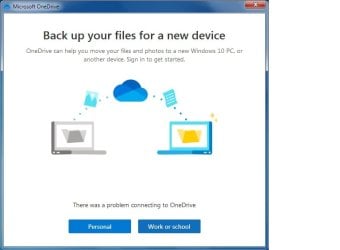
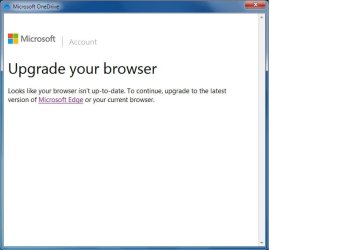
Hello, and I have a problem signing into an existing OneDrive Personal Account that had been working fine up until about a week ago. I do have latest updates for Microsoft Edge & Mozilla Firefox Browsers installed on this laptop. I can provide a little more info, but please look at screenshots (in order from top to bottom) of what is happening.
 

Attachments

  • OneDrive.jpg
    OneDrive.jpg
    61.3 KB · Views: 0
  • OneDrive (2).jpg
    OneDrive (2).jpg
    60.8 KB · Views: 0
  • OneDrive (3).jpg
    OneDrive (3).jpg
    51.3 KB · Views: 0

My Computer

Computer type
Laptop
Computer Manufacturer/Model Number
Toshiba
OS
Windows 7 Home Premium 32-bit
Memory
4-GB physical memory
Hard Drives
SSD 110-GB
Antivirus
Avast
Browser
I.E. 11 and Mozilla Firefox
Even if you get logged in the version of OneDrive for W7 is now only on backup mode and doesn't function like it used to as MS has ended support.
As a work-around I have installed an older version of OneDrive (21.220.1024.0005 is the one im using) and before running the program after installing (you may want to disable the internet as soon as it's installed to stop it auto updating) turn off OneDrive updates in the task scheduler program so that it can remain on the version you installed and then will function as normal and give you full access to your OneDrive.
 

My Computers

System One System Two

  • Computer type
    PC/Desktop
    Computer Manufacturer/Model Number
    Custom
    OS
    Windows 7 Ultimate X64
    CPU
    Intel i3 10100F
    Motherboard
    Asrock H570M
    Memory
    16GB
    Graphics Card(s)
    Nvidia 1060
    Monitor(s) Displays
    LG 65" OLED
    Screen Resolution
    3840x2160
    Case
    Antec Fusion Remote
    Internet Speed
    5G ~700Mbps
    Browser
    Edge Chromium
  • Computer type
    PC/Desktop
The version I am running is the exact same as what you wrote. The problem seemed to have happened AFTER I uninstalled my Internet Explorer 11 and then I.E. 8. I do have Edge Browser installed. Do you have any more suggestions?
 

My Computer

Computer type
Laptop
Computer Manufacturer/Model Number
Toshiba
OS
Windows 7 Home Premium 32-bit
Memory
4-GB physical memory
Hard Drives
SSD 110-GB
Antivirus
Avast
Browser
I.E. 11 and Mozilla Firefox
It looks like it updated itself then, as (from memory) the setup screen you posted doesnt show the 'backup your files' stuff on that version's setup pages. I believe that only activated in newer versions from March1st. I woud uninstall it, and install again but at the end of setup turn off the internet and disable the onedrive update task from task scheduler.

I think your other problem is because you removed IE. A lot of MS programs for Windows 7 require IE to function properly as they use some of it's background functionality to access the internet for logins etc. Enable IE again then let it update to the latest version. Set your usual browser to default in control panel and then forget IE is there. I have it on my machine and it very rarely shows it's ugly face :roflmao:
 

My Computers

System One System Two

  • Computer type
    PC/Desktop
    Computer Manufacturer/Model Number
    Custom
    OS
    Windows 7 Ultimate X64
    CPU
    Intel i3 10100F
    Motherboard
    Asrock H570M
    Memory
    16GB
    Graphics Card(s)
    Nvidia 1060
    Monitor(s) Displays
    LG 65" OLED
    Screen Resolution
    3840x2160
    Case
    Antec Fusion Remote
    Internet Speed
    5G ~700Mbps
    Browser
    Edge Chromium
  • Computer type
    PC/Desktop
Back
Top